





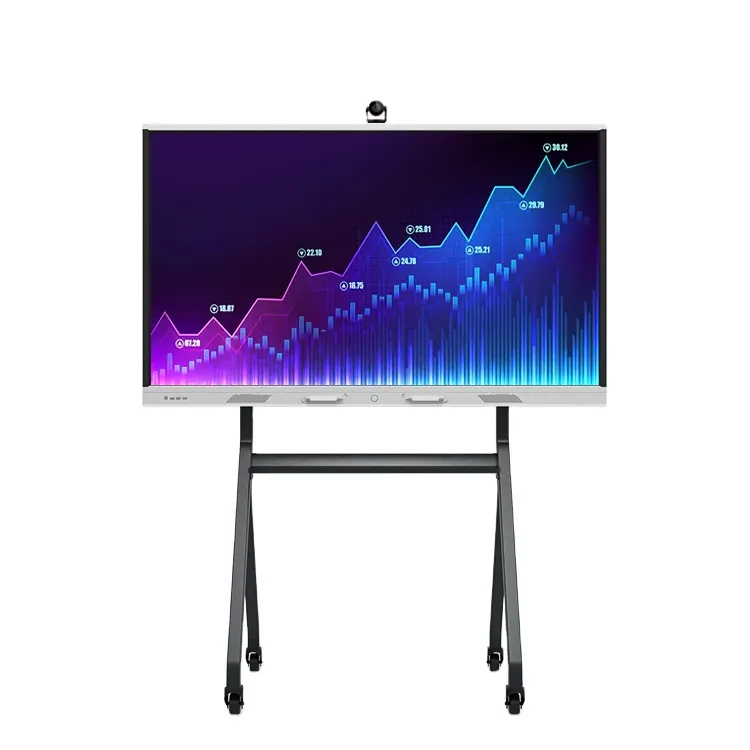
TD-75ID20U-Di3
Trend TD-75ID20U-Di3 75-inch Interactive Display with Dual OS
- Screen size
- 75 Inch
- Resolution
- 3840×2160 (UHD) @60hz
- System
- Windows7 / Windows8 / Windows10
- Memory
- 1.5 GB DDR3 (4GB/8GB Optional)
The Trend TD-75ID20U-Di3 is a 75-inch interactive display with 20 touch points, a 3840x2160 UHD panel and two operating systems: Windows on an Intel i3 platform and Android 6.0. Built-in speakers, included WiFi and stylus input suit classrooms, boardrooms and training suites from Education City to West Bay.
Two operating systems on one 75-inch touch panel
The TD-75ID20U-Di3 combines a 75-inch display with a built-in computer, so a presenter can run Windows or Android applications without a separate PC at the front of the room. The Windows side uses an Intel i3 platform with 4GB of memory and a 120GB SSD, and larger memory and storage options can be included when you request a quote. The Android side runs Android 6.0 with 1.5GB of DDR3 memory and 32GB of storage.
Two systems on one panel suit mixed environments. A school might keep Windows for its lesson software and use Android for simpler apps, while a government office might rely on Windows for its administrative systems.
Display, touch and connections for group work
The screen is a 3840x2160 UHD panel running at 60Hz, with 450 cd/m² brightness, a 2000:1 contrast ratio and 178-degree viewing angles. Its 8ms response time and 4mm tempered glass front, with glass transmittance above 88%, complete the picture quality.
An infrared touch frame supports 20 touch points, and the manufacturer states that more than 90% of the touch area is accurate to 2mm. Zero-pressure touch means light contact is registered, which helps when several learners write at the board during a lesson.
- Inputs: three HDMI inputs and a VGA input on the Android side, plus AV inputs
- Network: two RJ45 Ethernet sockets, with WiFi listed among the accessories
- USB: a USB touch connection, USB 3.0 and USB 2.0 ports, and an SD card slot
- Audio: two built-in 5W speakers and a headphone output
Where it fits in Qatar
In a lecture room or training centre in Education City, the 75-inch format and 20 touch points let an instructor annotate slides directly on the screen. A 1080p conference camera and conference microphone, both available as optional items, can be added for lectures that connect with colleagues overseas.
In a boardroom in West Bay or a meeting room in Msheireb, the panel can present documents and host video calls from either operating system. The wide viewing angle keeps figures readable for people seated at the far end of the table. In a private school classroom in Al Wakrah or Al Khor, matching panels across classrooms help standardise teaching, and a single purchase order can cover the whole order.
Planning mounting, power and the environment
The unit measures 1960.6 x 1161.8 x 96.8mm and weighs 67kg, with a 72kg gross weight for shipping. It can be wall mounted, or set on a movable or fixed floor stand, and a wall bracket and floor stand are available as options. Because of its weight, we recommend a free site survey before installation to check the wall, fixing points and cable route.
The power input is listed as 100 to 240V at 50/60Hz, which covers the 240V, 50Hz mains supply used in Qatar, and a power cord is included. The working temperature range is 0 to 50°C, so install the panel in an air-conditioned room away from direct sunlight through windows, especially given summer temperatures that often exceed 45°C. Confirm the environment with the SmartRooms Qatar team before installing it in any unconditioned space.
Request a quote from SmartRooms Qatar for the TD-75ID20U-Di3, including the wall bracket, floor stand or conference accessories you need. Quotations are usually issued within one working day, and we accept purchase orders (LPOs) and government tenders.
Highlights
- 75-inch 3840x2160 UHD display running at 60Hz
- 20 touch points with an infrared touch frame
- Dual operating system: Windows and Android 6.0
- Intel i3 platform with 4GB memory and 120GB SSD on Windows
- 450 cd/m² brightness, 2000:1 contrast, 178-degree viewing angle
- Remote control, base, bracket and WiFi listed as accessories
Classroom fit
At 75″ the farthest student should sit within about 5.6 m (6× the screen height).
Estimated timeline
Quotation within 1 working day · delivery timing depends on stock availability, and we confirm it with your quotation.
Specifications
Quick Details13
- Brand Name
- Trend Displays
- Model Number
- TD-75ID20U-Di3
- Resolution
- 3840×2160 (UHD) @60hz
- Brightness
- 450cd/m²
- Contrast
- 2000:1
- Warranty
- 1 Year
- Input mode
- Stylus writes keyboard
- GPU
- T720MP2(Android)
- Touch Function
- Infrared touch frame
- Backlight
- WLED
- Speaker
- 2×6Ω/5W(built in )
- Color
- Black
- Installation type
- On Wall, Movable or Fixed Floor Standing
Technical55
- Accessories
- Remote control, base/bracket, WiFi
- Accuracy
- More than 90% of the touch area is 2mm
- ATV
- NTSC,PAL,SECAM
- Audio
- Windows: The integrated sound card
- Audio and video Input
- MPEG1/2 layer I/II,AAC-Lc,WMA…
- Cable
- The power cord
- Cooling system
- Temperature-controlled fan dissipates heat
- Dimension
- 1960.6×1161.8×96.8mm
- Display mode
- S-ips, often black display, transmission
- Display output function
- Windows: HDMI*1 VGA*1 USB2.0*1 RJ45*1 USBTOUCH*1 AV*1 PC*1 LVDS*1 RF input headphones audio output
- DTV
- DTMB
- Ethernet
- X2 RJ45 Standard socket
- Glass
- 4mm tempered glass
- Glass transmittance
- > 88% (higher transmittance depends on glass surface treatment technology such as AR/AG)
- Gross Weight
- 72kg
- I/O Ports
- DZ-58-PTV : UNRT X1 DB9 Standard socket VGA IN x1 DB15 ,x1 external Standard socket AV IN x1 Small socket AV OUT x1 Small socket HDMI IN X3 HDMI in Standard socket, X1 pin USB(multimedia ) x1 USB 2.0 Standard socket USB(touch screen) x1 standard Type B building ,x1 external Earphone *1 Standard headphone socket. Android: Ethernet X2 RJ45 Standard socket VGA IN x1 DB15 ,x1 external Standard socket VGA
- Induction life
- 6 million times
- Interface
- USB 2.0(Full speed)
- Maximum service time (hours/day)
- 24 hours
- Network
- Windows: Network support Support boot horizontal screen and portrait two display mode
- Network Card
- Windows: Support for the cable/WiFi/3G and 4G access (optional)
- Number of infrared induction lines (W D)
- 32767×32767
- Object induction number (IR)
- Touch at 20
- Package size
- 2060×1264×190mm
- Power interface
- 1W
- Power supply
- Full duplex usb-powered DC +5V up to 500mA
- Shell material (face frame/back shell)
- Plastic/Sheet metal
- Store humidity
- 10%~90%(No condensation)
- Switching power supply
- Switching power supply European standard 220V two - phase three - wire system
- System platform
- Windows: QS77
- The light resistance
- It has light resistance
- To protect the glass
- 4mm toughened glass/level 7 earthquake resistant
- Touch the strength
- Zero pressure touch
- User manual
- Manual, warranty card, certificate of conformity
- VGA
- x1 DB15 ,x1 external Standard socket
- Video
- MPEG-2/4,AVS,H.264,H.265,TS,Realmedia…
- Operating system
- Windows: Windows7 / Windows8 / Windows10 Android: Android6.0
- Type
- TFT-LCD S-PVA
- Viewing Angle
- 178°/178°
- CPU
- Cortex A53*4 1.5GHz(Android) A77-I3/31100M/3130M
- Response Time
- 8ms
- Video Card
- Windows: IntelCore graphicsIntel HD 3000
- Power Consumption
- AC100-240V~(+/-10%),50/60Hz
- Decoding resolution
- 1920*1080/60Hz ;3840*2160/60Hz(DZ-58-PTV ) 1920*1080/60Hz ;3840*2160/60Hz(Android)
- Hard disk
- Android: 32GB (Optional: 64/128/256 GB) Windows: 120G SSD (Optional: 240/512G SSD or 500G/1TB/2TB HDD)
- Memory
- Android: 1.5 GB DDR3 (4GB/8GB Optional) Windows 4GB (8GB/16GB Optional)
- Size
- 75 Inch
- Standby Power Consumption
- 385W
- Display area
- 16:9
- MTBF
- >60000H
- Weight
- 67kg
- Working Temperature
- 0℃~50℃
- Chipset
- MSD6190HB(DZ-58-PTV ) MSD648(Android) Intel(Windows)
- Storage Temperature
- -20℃~60℃
- Humidity
- 20%~80%(No condensation)




