





Thursday, 22 October 2026 · 11 Jumada I 1448 AH Sun – Thu · 9:00 – 18:00
+971 56 914 9477 العربية
WhatsApp

6562

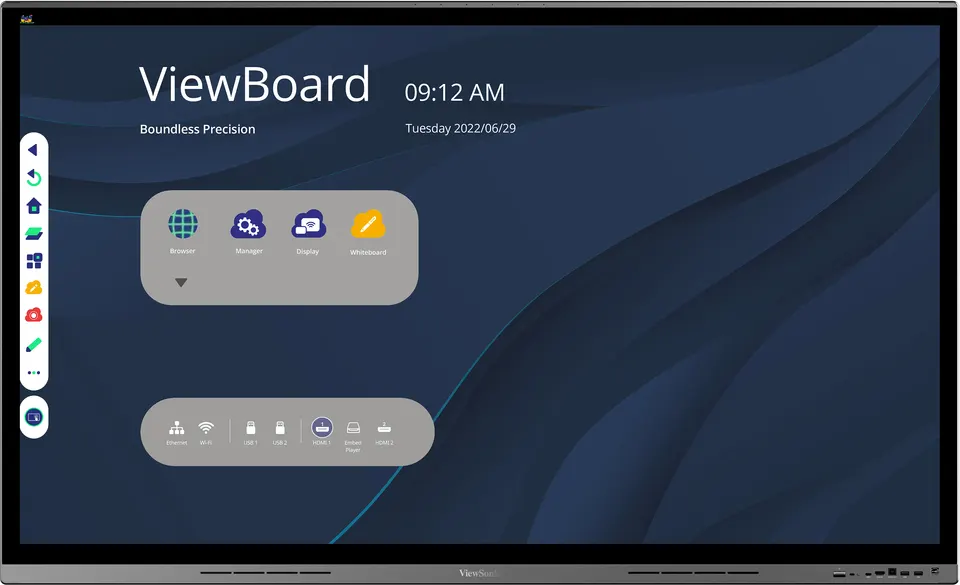
ViewSonic ViewBoard 6562 65-inch 4K Interactive Display

Screen size
65"
Resolution
UHD 3840x2160
Memory
3GB DDR4
Storage
32GB eMMC
WhatsApp
Priceon request
QuotationWithin 1 working day
DeliveryConfirmed with your quote, based on stock
PDFDownload datasheet (6562_Datasheet.pdf)
Overview

The ViewSonic ViewBoard 6562 is a 65-inch 4K UHD interactive display with bezel-less design, 20-point touch and built-in Android. It offers four HDMI inputs, an OPS slot for a Windows slot-in PC, and a USB Type-C port with 65W fast charge that works while the screen is in use. Qatari schools, government meeting rooms and corporate offices can pair it with ViewSonic's speakerphone and camera for a complete conference setup.

What the ViewBoard 6562 is built to do

The ViewBoard 6562 is a 65-inch interactive flat panel for rooms where people write, annotate and share content on the same screen. Its 4K UHD panel has an active display area of 1428.48 mm by 803.52 mm and sits behind a bezel-less front. Touch uses projected capacitive technology that recognises up to 20 touch points at once, and pen input supports multiple grades of pressure, so handwritten annotations look natural.

The specifications that matter for buyers

Image quality rests on 400 nits typical brightness, a 1200:1 typical contrast ratio (5000:1 maximum with dynamic contrast enabled), a 6.5 ms response time and 178-degree horizontal and vertical viewing angles. The front surface is rated 9H pencil hardness. Speakers are two 12W units plus a 15W subwoofer, and a six-element MEMS microphone array picks up voices across the room.

Connectivity is generous: four HDMI inputs, one VGA input, one OPS slot, one RS232 port, built-in Wi-Fi, two RJ45 LAN ports, six USB Type-A ports, two USB Type-B ports and one USB Type-C port. The Android platform runs a dual-core A73 plus dual-core A53 processor with 3GB DDR4 RAM and 32GB eMMC storage.

Where it fits in Qatar

  • Boardrooms in West Bay or Lusail: a 65-inch panel suits a mid-sized meeting room where the ViewSonic speakerphone and camera can connect remote partners in Doha or overseas offices.
  • Classrooms in Al Wakrah or Al Rayyan: a school fitting out new teaching spaces can write directly on the screen and show lessons from a laptop or tablet over HDMI.
  • Government and administrative offices: teams working in Arabic and English side by side can share content from their own devices through wireless presentation software, while the IT department manages the panels centrally with myViewBoard Manager.

What to plan for before installation

The panel weighs 37.4 kg net and 48.9 kg in its packaging, and its physical size is 1492 x 907 x 78 mm, so lifting and mounting need at least two people and a wall that can carry the load. The box includes a wall plate, five clamps and eight screws, but SmartRooms Qatar recommends a free site survey before wall mounting to confirm fixing points, cable routes and the power outlet. Operating temperature is 0°C to 40°C with 20% to 80% humidity, non-condensing, so plan for an air-conditioned room away from direct sunlight and windows, since summer temperatures in Qatar can exceed 45°C. The power input accepts 100 to 240 VAC, with typical consumption of 115W and a maximum of 390W.

Request a quote

Send SmartRooms Qatar the number of panels, your room dimensions, the mounting arrangement you prefer, and whether you need a compatible slot-in PC or conference accessories. Quotations are usually issued within one working day. We supply and deliver to all eight municipalities of Qatar, provide professional installation, and accept purchase orders and government tenders. Request a quote today to plan the right setup for your room.

Highlights

  • 65-inch 4K UHD panel with 3840 x 2160 resolution
  • 20-point multi-touch with multi-grade pen pressure
  • Four HDMI inputs and one OPS slot
  • USB Type-C port with 65W fast charge
  • Built-in Android with myViewBoard Manager for IT control
  • Compatible with VB-AUD-201 speakerphone and VB-CAM-201 camera

Classroom fit

At 65″ the farthest student should sit within about 4.9 m (6× the screen height).

Estimated timeline

Quotation within 1 working day · delivery timing depends on stock availability, and we confirm it with your quotation.

Specifications

49 specifications · Source: manufacturer · checked Oct 2026
Display12
Panel Size
65"
Panel Type
TFT LCD Module with DLED Backlight
Display Area (mm)
1428.48 (H) x 803.52 (V)
Aspect Ratio
16:9
Resolution
UHD 3840x2160(Pixels)
Colors
1.07G (8bits + FRC )
Brightness
400 nits (typ.)
Contrast Ratio
1200:1 Typ. / 5000:1 Max.(DCR enable)
Response Time
6.5ms
Viewing Angles
H = 178, V = 178 typ.
Surface Treatment
Hardness: 9H pencil
Bezel
Top: 38 mm Bottom: 63.9 mm Left: 30.5 mm Right:30.5 mm
Platform3
Processor
Dual core A73+Dual core A53
RAM
3GB DDR4
Storage
32GB eMMC
Touch3
Type/ Tech
Ultra Fine Touch Plus Technology ( Projected Capacitive )
Touch Resolution
32767 x 32767
Touch Point
20
INPUT7
HDMI
x4
RGB / VGA
x1
Audio
1x PC-Audio IN
MIC(Microphone)
Full band 6-element MEMS microphone array
RS232
x1
OPS
x1
WiFi
x1
OUTPUT3
HDMI
x1
Audio
x1
SPDIF
x1
LAN1
RJ45
x2
USB3
Type A
x6
Type B
x2
Type C
x1
SPEAKERS1
Value
12W x 2 + 15W x 1 Subwoofer
Embedded OS1
Value
Android
Bundle Software3
Basic Annotation Software
myViewBoard WhiteBoard for Android
Pro Annotation Software
myViewBoard WhiteBoard for Windows (Embedded in Windows Slot-in PC)
Wireless Presentation
ViewBoard Cast & myViewBoard Display & AirServer
Special Features1
Simple LAN sharing between IFP and slot-in device
Yes
Power2
Voltage
100-240VAC +/- 10% Wide Range
Consumption
115W(Energy Star) / 390W(Max.) Off:
OPERATING CONDITIONS2
Temperature (º C)
0°C to 40°C
Humidity
20% ~ 80% RH non-condensing
DIMENSIONS (W x H x D)2
Physical (inch / mm)
58.7 x 35.7 x 3.1 in / 1492 x 907 x 78 mm
Packaging (inch / mm)
63.3 x 39.8 x 8.5 in / 1607 x 1010 x 215 mm
WEIGHT2
Net (lb / kg)
82.45 lb / 37.4 kg
Gross (lb / kg)
107.8 lb / 48.9 kg
REGULATIONS1
Value
cTUVus, FCC/ICES003, Energy star 8.0, EPEAT, Mexico NOM, Mexico Energy, EMC/CE, CB/LVD, GOST-R / EAC, UkrSEPRO, UKCA, LBL, Green BOM, RoHS, ErP, REACH, SCIP, WEEE, TPCH, CA65, PAIA
PACKAGE CONTENTS1
Value
1. Power cable 2. Remote control 3. AAA battery X2 4. USB cable Type C 5. Passive stylus x 2 6. Quick Start Guide 7. Compliance statement 8. RS232 adapter 9. Plate 10. Clamp x 5 11. Screw x 8 12. HDMI cable 13. Touch USB cable
Compatible Slot-in PC1
Value
VPC12-WPO, VPC2C-O, VPC25-O, VPC27-O series

Downloads

15 files from the manufacturer
PDF Datasheets 6562_Datasheet.pdf 297 KB ViewSonic 6562 datasheets (PDF, 297 KB) PDF Manuals & guides IFP62_QSG.pdf 1.0 MB ViewSonic 6562 manuals & guides (PDF, 1.0 MB) PDF Manuals & guides IFP62_UG_ENG.pdf 18.8 MB ViewSonic 6562 manuals & guides (PDF, 18.8 MB) URL Manuals & guides · Opens on manufacturer site IFP6562 User Guide (Online View) ViewSonic 6562 manuals & guides (URL) PDF Drawings & CAD IFP6562_2D_drawing.pdf 778 KB ViewSonic 6562 drawings & cad (PDF, 778 KB) URL Drawings & CAD · Opens on manufacturer site IFP6562 3D drawing(stp) ViewSonic 6562 drawings & cad (URL) RFA Drawings & CAD · Opens on manufacturer site ViewSonic_IFP_IFP6562.rfa ViewSonic 6562 drawings & cad (RFA) PDF Software & firmware ViewBoard_Network_Requirements_ENG.pdf 2.9 MB ViewSonic 6562 software & firmware (PDF, 2.9 MB) URL Software & firmware · Opens on manufacturer site EAirplay ViewSonic 6562 software & firmware (URL) URL Software & firmware · Opens on manufacturer site IFP6562 Firmware_Pack_20240702 ViewSonic 6562 software & firmware (URL) URL Software & firmware · Opens on manufacturer site vCast ViewSonic 6562 software & firmware (URL) URL Software & firmware · Opens on manufacturer site vCastSender for Linux ViewSonic 6562 software & firmware (URL) URL Software & firmware · Opens on manufacturer site vCastSender for Mac ViewSonic 6562 software & firmware (URL) URL Software & firmware · Opens on manufacturer site vCastSender for Windows ViewSonic 6562 software & firmware (URL) PDF Other documents IFP6562_CFR.pdf 959 KB ViewSonic 6562 other documents (PDF, 959 KB)

Questions about 6562

Who is the ViewBoard 6562 designed for?
The ViewBoard 6562 suits a meeting room, classroom or training room where a 65-inch screen fits the group size. In Doha, that could be a corporate boardroom in West Bay, a training room in a Lusail office, or a classroom at a school in Al Rayyan. Its 4K UHD panel, 20-point touch and built-in Android platform let one display handle presenting, annotating and video calls. A site survey will confirm that the room suits this screen size.
How does the touch and pen performance work?
The panel uses projected capacitive touch with 20 touch points, so several people can write or tap at the same time. Pen input supports multiple grades of pressure, which helps handwriting look natural in annotation software. Touch resolution is 32767 x 32767. Two passive styluses are included in the box, so presenters do not need to share a single pen during a session.
Does it work with ViewSonic's speakerphone and video camera?
Yes. The ViewBoard 6562 is listed as compatible with the VB-AUD-201 conference speakerphone and the VB-CAM-201 all-in-one video conference camera. Together they form a complete meeting station for hybrid meetings between Doha and overseas teams. The panel's six-element MEMS microphone array and its speakers handle room audio, while the camera covers the video side of the call.
Which slot-in PCs can be fitted for Windows use?
The compatible slot-in PC series listed are VPC12-WPO, VPC2C-O, VPC25-O and VPC27-O. The Windows version of myViewBoard WhiteBoard runs embedded in the slot-in PC, so a Windows workflow can sit alongside the Android system. The panel also offers simple LAN sharing between the display and the slot-in device. Confirm the exact series with the SmartRooms Qatar team against your existing software before ordering.
Can I install it near a window or in a room that gets very hot?
Operating temperature is 0°C to 40°C with 20% to 80% humidity, non-condensing. Summer temperatures in Qatar can exceed 45°C, so the panel should be placed in an air-conditioned room away from direct sunlight and from areas exposed to dust and heat, such as open lobbies. If the room has large windows, discuss blinds and air-conditioning capacity with the installer during the site survey.
Will it run on Qatar's power supply?
The power input is rated 100 to 240 VAC with a wide-range tolerance of plus or minus 10 percent, which covers the 240 V supply used in Qatar. Typical consumption is 115W, rising to a maximum of 390W, and it drops below 0.5W when switched off. Have your electrician plan the circuit and sockets, and confirm the plug type with SmartRooms Qatar, since Qatar sockets are BS 1363 (Type G).
How large is the panel and how heavy is it?
The physical dimensions are 1492 x 907 x 78 mm, or 58.7 x 35.7 x 3.1 inches. The net weight is 37.4 kg, rising to 48.9 kg with packaging, so it needs at least two people to lift. Check the wall construction and cable routing before mounting. A free site survey from SmartRooms Qatar will confirm the fixing points for the wall plate and the best position for the room.
What connections do teams need for laptops and wireless sharing?
The panel has four HDMI inputs, one VGA input, two RJ45 LAN ports and built-in Wi-Fi. It also has six USB Type-A, two USB Type-B and one USB Type-C port, and the Type-C port offers 65W fast charge while the display is in use. For wireless sharing, the bundle includes ViewBoard Cast, myViewBoard Display and AirServer, so attendees can present from their own devices.
How can IT teams manage several panels in a school or government office?
The built-in myViewBoard Manager is designed for IT and management information systems teams to control panels centrally and manage content display. A school in Al Wakrah fitting out several classrooms, or a government office with panels on multiple floors, can keep settings consistent without visiting each room. Ask the SmartRooms Qatar team to confirm how it fits your network and security policy before you buy.
We are a school ordering several units. How does buying work?
Schools, ministries and companies can order with a purchase order (LPO) or through government tenders, including Monaqasat, and pay by bank transfer, cheque or purchase order. Send the number of panels, the room list and any slot-in PC or conference accessory requirements, and the quotation is usually issued within one working day. SmartRooms Qatar delivers to all eight municipalities and offers professional installation.
What is included in the box?
The box includes a power cable, a remote control with two AAA batteries, a USB Type-C cable, two passive styluses, an HDMI cable, a touch USB cable, an RS232 adapter, a wall plate, five clamps and eight screws, plus a quick start guide and compliance statement. Slot-in PCs, the speakerphone and the camera are not in the listed package contents, so add them to your quotation if you need them.

Similar models

BenQ CM7505 BenQ Board CM7505 75-inch Interactive Display
75″ UHD 3840 × 2160 pixels Ultra Precision IR
SMART SBID-6286S-V3 SMART Board 6086S-V3 86-inch Interactive Display with iQ
86″ 4K UHD (3840 × 2160) HyPr Touch with InGlass
SMART SBID-6286S-V3-P SMART Board 6086S-V3 Pro 86-inch Interactive Display with iQ
86″ 4K UHD (3840 × 2160) HyPr Touch with InGlass
Clevertouch Clevertouch Edge 65" Clevertouch Edge 65" 4K Interactive Display with Camera and Speakers
65″ 4K UHD (3840x2160 @60Hz) Android 15
Clevertouch Clevertouch Edge 86" Clevertouch Edge 86" 4K Interactive Flat Panel
86″ 4K UHD (3840x2160 @60Hz) Android 15
Email Call



