





Thursday, 22 October 2026 · 11 Jumada I 1448 AH Sun – Thu · 9:00 – 18:00
+971 56 914 9477 العربية
WhatsApp

IFP6550-3

ViewSonic IFP6550-3 65-inch 4K UHD Interactive Display

Screen size
65"
Resolution
UHD 3840x2160
Touch
20 points touch
Memory
3GB DDR4
WhatsApp
Priceon request
QuotationWithin 1 working day
DeliveryConfirmed with your quote, based on stock
PDFDownload datasheet (IFP6550-3_Datasheet.pdf)
Overview

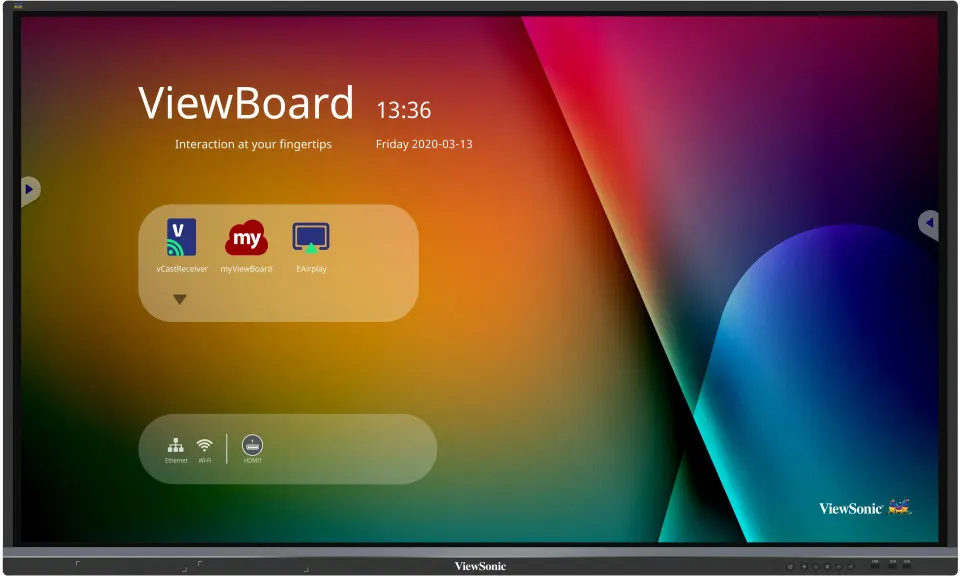
The ViewSonic IFP6550-3 is a 65-inch 4K UHD interactive display from the ViewBoard IFP50 series, with 20-point touch, 10 writing points and two pens that write in different colors and thicknesses at once. It runs Android 8 with built-in whiteboarding and wireless screen sharing, and includes a 4-way split screen. Suited to Doha classrooms, training rooms and meeting rooms that need a large, collaborative display.

What the ViewSonic IFP6550-3 does in a room

The ViewSonic IFP6550-3 is a 65-inch interactive display from the ViewBoard IFP50 series. It pairs a 3840 x 2160 UHD panel with an infrared touch layer that tracks up to 20 touch points and 10 writing points at once. The screen works as a touchscreen, a whiteboard, a video display and a shared workspace, so a teacher or presenter can write, annotate and show content from the same surface.

Writing, pens and built-in whiteboarding

Two touch pens are supplied. The display detects pen diameter automatically and recognises both an 8 mm pen and a 3 mm tipped pen, so two users can write at the same time in different colors and line thicknesses. The built-in myViewBoard tool handles annotation without a separate install. Where a Windows slot-in PC is fitted, myViewBoard for Windows is embedded, and Windows Ink and Office 365 annotation are listed as compatible.

Display quality, sound and eye comfort

The panel offers 1.07 billion colors through 10-bit processing, 350 nits typical brightness, a 5000:1 dynamic contrast ratio and an 8 ms response time. Its anti-glare coating and 9H surface hardness help in rooms where daylight reaches the screen. The display is eye-care certified, with low blue light and flicker-free operation at all brightness levels, which matters for staff who present for hours. Two 10 W speakers and a 15 W subwoofer give the room audio from the panel itself.

Ports, PC slot and sharing

The connection options cover most classroom and meeting room setups:

  • Three HDMI 2.0 inputs, supporting 3840 x 2160 at 60 Hz
  • VGA input, PC audio input, RS232 control port and an RJ45 LAN port
  • SmartPort USB ports shared between the built-in system and external PCs
  • Two USB Type-B touch connections and an optical SPDIF output
  • A proprietary OPS slot for compatible VPC10-WP, VPC14-WP, VPC15-WP, VPC16-WP and VPC17-WP slot-in PCs

Wireless sharing is handled by the built-in ViewBoard Cast app, and the 4-way split screen shows four sources side by side. A top camera plate is fitted, and an optional 1080p web camera can be added.

Where it fits in Qatar

A private school in Al Sadd could use it as a Grade 5 classroom display, switching between a maths lesson and a science video on separate sources through the split screen. A training centre in Lusail might place one in a meeting room to run hybrid sessions, with a remote team's content on one side and a presentation on the other. A government office in West Bay could use it in a briefing room where staff share documents from laptops.

Planning the installation

Plan the mounting before the panel arrives. The unit weighs 40.5 kg net and measures 1488 x 897 x 90 mm, and the packaging is 1669 x 1010 x 223 mm, so check the delivery route and lift access. It uses a 600 x 400 mm VESA pattern. Power input is 100-240 VAC, with typical draw of 108 W when on and under 0.5 W when off. The operating range is 0 to 40°C at 10 to 90% relative humidity, non-condensing. Summer temperatures in Doha can exceed 45°C, so install it in an air-conditioned indoor room away from direct sun through windows.

SmartRooms Qatar offers free site surveys before wall mounting, professional installation, delivery to all eight municipalities of Qatar, and quotations usually within one working day. We work with purchase orders (LPOs) and government tenders, including Monaqasat. Request a quote for the ViewSonic IFP6550-3 with your room size, wall type and quantity, and we will confirm stock and lead time with the quotation.

Highlights

  • 65-inch 4K UHD panel at 3840 x 2160 resolution
  • Infrared touch with 20 touch points and 10 writing points
  • Two pens detected automatically at 8 mm and 3 mm
  • Built-in myViewBoard whiteboarding and ViewBoard Cast sharing
  • Three HDMI 2.0 inputs plus a proprietary OPS slot
  • Eye-care certified with low blue light and flicker-free operation

Classroom fit

At 65″ the farthest student should sit within about 4.9 m (6× the screen height).

Estimated timeline

Quotation within 1 working day · delivery timing depends on stock availability, and we confirm it with your quotation.

Specifications

50 specifications · Source: manufacturer · checked Oct 2026
Display14
Panel Size
65"
Panel Type
TFT LCD Module with DLED Backlight.
Display Area (mm)
1431 (H) x 807 (V) (64.5” diagonal)
Aspect Ratio
16:9
Resolution
UHD 3840x2160 (Pixels)
Colors
1.07B colors (10bit)
Brightness
350 nits (typ.)
Contrast Ratio
5000:1 (DCR)
Response Time
8ms
Viewing Angles
H = 178, V = 178 typ.
Backlight Life
30,000 Hours (Min)
Surface Treatment
Hardness: 9H Anti-glare coating
Bezel
Slim
Orientation
Landscape
Platform3
Processor
ARM Cortex-A73*2 + Cortex-A53*2 1.5GHz
RAM
3GB DDR4
Storage
32GB
Touch3
Type/ Tech
IR Recognition
Touch Resolution
32767 x 32767
Touch Point
20 points touch, 10 points writing
INPUT5
HDMI
2.0 x3 (3840x2160 @60Hz)
RGB / VGA
x1
Audio
x1 (PC audio in)
RS232
x1
OPS
x1 PC Slot (proprietary)
OUTPUT2
Audio
x1 (Earphone out)
SPDIF
1 (optical)
LAN1
RJ45
x1
USB2
Type A
USB2.0: Front x2, Rear x1 (SmartPort™ for all) USB3.0: Front x1, Rear x3 (SmartPort™ for Rear x3)
Type B
x2, for touch
SPEAKERS1
Value
10W x 2 + 15W x 1 subwoofers
Top Camera Plate1
Value
Yes
COMPATIBILITY1
HDMI
3840x2160
Embedded OS1
Value
Android 8
Bundle Software2
Basic Annotation Software
myViewBoard
Pro Annotation Software
myViewBoard for Windows (Embedded in Windows Slot-in PC)
Special Features2
All-in-one USB port
Front “SmartPort™ USB” to all channels.
Simple LAN sharing between IFP and slot-in device
10M/100M/ for Android 10M/100M/1000M for slot-in PC
Power2
Voltage
100-240VAC +/- 10% Wide Range
Consumption
On: 108W(typ.) / Off:
ERGONOMICS1
Wall Mount (VESA® )
600 x 400
OPERATING CONDITIONS2
Temperature (º C)
0°C to 40°C
Humidity
10% ~ 90% RH non-condensing
DIMENSIONS (W x H x D)2
Physical (inch / mm)
58.6 x 35.3 x 3.5 in / 1488 x 897 x 90 mm
Packaging (inch / mm)
65.7 x 39.8 x 8.8 in / 1669 x 1010 x 223 mm
WEIGHT2
Net (lb / kg)
89.3 lb / 40.5 kg
Gross (lb / kg)
109.6 lb / 49.7 kg
REGULATIONS1
Value
cTUVus, FCC, ES8, EPEAT, EMC/CE, CB, RoHS & DOC, REACH, WEEE, ErP, EAC, UKrSEPRO, RCM, BSMI
PACKAGE CONTENTS1
Value
1. Power cable (3 meters). VSAx1, VSEx2, VSIx4 2. Remote control 3. USB cable (3 meters) 4. Touching pen x 2 5. Quick Start Guide 6. RS232 adapter 7. Clamp x 5 8. Plate 9. Screw x 8 10. HDMI cable 3M
Compatible Slot-in PC1
Value
VPC14-WP series VPC10-WP series VPC15-WP series VPC16-WP series VPC17-WP series

Downloads

19 files from the manufacturer
PDF Datasheets IFP6550-3_Datasheet.pdf 379 KB ViewSonic IFP6550-3 datasheets (PDF, 379 KB) PDF Manuals & guides IFP50-3_QSG_A3_all.pdf 10.8 MB ViewSonic IFP6550-3 manuals & guides (PDF, 10.8 MB) PDF Manuals & guides IFP50-3_UG_ARB.pdf 7.2 MB ViewSonic IFP6550-3 manuals & guides (PDF, 7.2 MB) PDF Manuals & guides IFP50-3_UG_ENG.pdf 20.9 MB ViewSonic IFP6550-3 manuals & guides (PDF, 20.9 MB) URL Manuals & guides · Opens on manufacturer site IFP6550-3 User Guide (Online View) ViewSonic IFP6550-3 manuals & guides (URL) URL Drawings & CAD · Opens on manufacturer site IFP6550-3 3D Drawing (RFA) ViewSonic IFP6550-3 drawings & cad (URL) URL Drawings & CAD · Opens on manufacturer site IFP6550-3 3D Drawing(stp) ViewSonic IFP6550-3 drawings & cad (URL) PDF Certificates & compliance IFP6550-3_LBL_certificate.pdf 123 KB ViewSonic IFP6550-3 certificates & compliance (PDF, 123 KB) PDF Software & firmware ViewBoard_Network_Requirements_ENG.pdf 2.9 MB ViewSonic IFP6550-3 software & firmware (PDF, 2.9 MB) URL Software & firmware · Opens on manufacturer site EAirplay ViewSonic IFP6550-3 software & firmware (URL) URL Software & firmware · Opens on manufacturer site IFP6550-3 CT2 Firmware Pack_20230407 ViewSonic IFP6550-3 software & firmware (URL) URL Software & firmware · Opens on manufacturer site IFP6550-3 Firmware Pack_20230407 ViewSonic IFP6550-3 software & firmware (URL) URL Software & firmware · Opens on manufacturer site MacOS Touch Driver(For Gestures) ViewSonic IFP6550-3 software & firmware (URL) URL Software & firmware · Opens on manufacturer site vCast ViewSonic IFP6550-3 software & firmware (URL) URL Software & firmware · Opens on manufacturer site vCastSender for Linux ViewSonic IFP6550-3 software & firmware (URL) URL Software & firmware · Opens on manufacturer site vCastSender for Mac ViewSonic IFP6550-3 software & firmware (URL) URL Software & firmware · Opens on manufacturer site vCastSender for Windows ViewSonic IFP6550-3 software & firmware (URL) PDF Other documents IFP6550-3_20191102.pdf 650 KB ViewSonic IFP6550-3 other documents (PDF, 650 KB) PDF Other documents IFP6550-3_CFR.pdf 1.3 MB ViewSonic IFP6550-3 other documents (PDF, 1.3 MB)

Questions about IFP6550-3

Who is the ViewSonic IFP6550-3 designed for?
It suits teachers, trainers and meeting hosts who need one large surface to write, annotate and show content. A 65-inch 4K panel works well in a classroom, training room or medium boardroom in Doha, West Bay or Lusail, where the audience sits within a few metres of the screen. For a lecture hall or a room that seats many people, a larger screen is the better choice, so measure the room before ordering.
How many people can write on the screen at once?
The touch layer tracks up to 20 touch points and 10 writing points at the same time. The display detects pen diameter automatically, so the two included touch pens, one at 8 mm and one with a 3 mm tip, can write simultaneously in different colors and thicknesses. In a group activity at a school in Al Rayyan, two students can work at the board together, each with their own color.
Can the screen show four sources side by side?
Yes. The 4-way split screen displays four content sources at once, which suits a trainer comparing a presentation, a spreadsheet, a video and a web page without switching inputs. Content can also be shared wirelessly through the built-in ViewBoard Cast app. In a training room in Msheireb, this lets the trainer keep reference material visible while participants work through an exercise.
How does wireless screen sharing work?
The built-in ViewBoard Cast app lets students share their screens to the display, and lets the teacher send content back to them. Because wireless performance depends on the building's network conditions, ask the SmartRooms Qatar team to check your layout during the free site survey before you rely on wireless-only sharing in a large room.
Which operating system and storage does it have?
The display runs Android 8 as its embedded operating system, with a quad-core processor (two Cortex-A73 and two Cortex-A53 cores at 1.5 GHz), 3GB DDR4 RAM and 32GB of storage. myViewBoard is built in for whiteboarding. For Windows applications, you need a compatible slot-in PC fitted in the OPS slot.
Which slot-in PCs can I fit to the OPS slot?
The OPS slot is proprietary, and the manufacturer lists the VPC10-WP, VPC14-WP, VPC15-WP, VPC16-WP and VPC17-WP series as compatible slot-in PCs. Slot-in PCs with an Intel 8th-generation CPU are offered as an option. Do not assume a PC outside these series will fit, so confirm the exact model with the SmartRooms Qatar team before placing your order.
Can it be installed in a hot room or near a window in Qatar?
Check the environment first. The operating range is 0 to 40°C with 10 to 90% relative humidity, non-condensing. Summer temperatures in Qatar can pass 45°C, so the display should sit in an air-conditioned indoor room, away from direct afternoon sun through windows and away from open entrances or outdoor areas. Confirm the room's cooling capacity during the site survey.
What wall mounting do I need to plan for?
The panel uses a 600 x 400 mm VESA pattern and measures 1488 x 897 x 90 mm, weighing 40.5 kg net. The box includes a plate, five clamps and eight screws. The packaging is larger at 1669 x 1010 x 223 mm, so plan the access route and check the wall structure first. SmartRooms Qatar offers free site surveys to check wall type, load and sightlines before installation.
Does it work with Qatar's electrical supply?
The power input is rated at 100-240 VAC with a plus or minus 10% tolerance, which covers the 240 V mains used in Qatar. Typical consumption is 108 W when on and under 0.5 W in standby. A 3-metre power cable is included. The data does not list the plug format, so ask the team to confirm the plug type for your site before ordering.
Which certifications does the display hold?
The listed regulatory approvals include cTUVus, FCC, EPEAT, CE (EMC), CB, RoHS, REACH, WEEE, ErP, EAC, RCM and BSMI. The manufacturer also describes the display as eye-care certified, with low blue light and flicker-free operation at all brightness levels. Procurement teams in government and education can use this list when checking compliance during a tender.
Can a school order several units under an LPO or tender?
Yes. SmartRooms Qatar works with purchase orders (LPOs) and government tenders, including Monaqasat, and payment can be made by bank transfer, cheque or purchase order. A school fitting out several classrooms can send one quantity request, and quotations are usually issued within one working day. Lead times are estimates based on stock and are confirmed with the quotation.
What comes in the box, and is it under warranty?
The box includes a remote control, two touch pens, a 3-metre power cable, a 3-metre USB cable, a 3-metre HDMI cable, an RS232 adapter, a quick start guide, five clamps, a plate and eight screws. The display is covered by the manufacturer's warranty, and the warranty terms are stated on your quotation.

Similar models

BenQ CM7505 BenQ Board CM7505 75-inch Interactive Display
75″ UHD 3840 × 2160 pixels Ultra Precision IR
SMART SBID-6286S-V3 SMART Board 6086S-V3 86-inch Interactive Display with iQ
86″ 4K UHD (3840 × 2160) HyPr Touch with InGlass
SMART SBID-6286S-V3-P SMART Board 6086S-V3 Pro 86-inch Interactive Display with iQ
86″ 4K UHD (3840 × 2160) HyPr Touch with InGlass
Clevertouch Clevertouch Edge 65" Clevertouch Edge 65" 4K Interactive Display with Camera and Speakers
65″ 4K UHD (3840x2160 @60Hz) Android 15
Clevertouch Clevertouch Edge 86" Clevertouch Edge 86" 4K Interactive Flat Panel
86″ 4K UHD (3840x2160 @60Hz) Android 15
Email Call



