





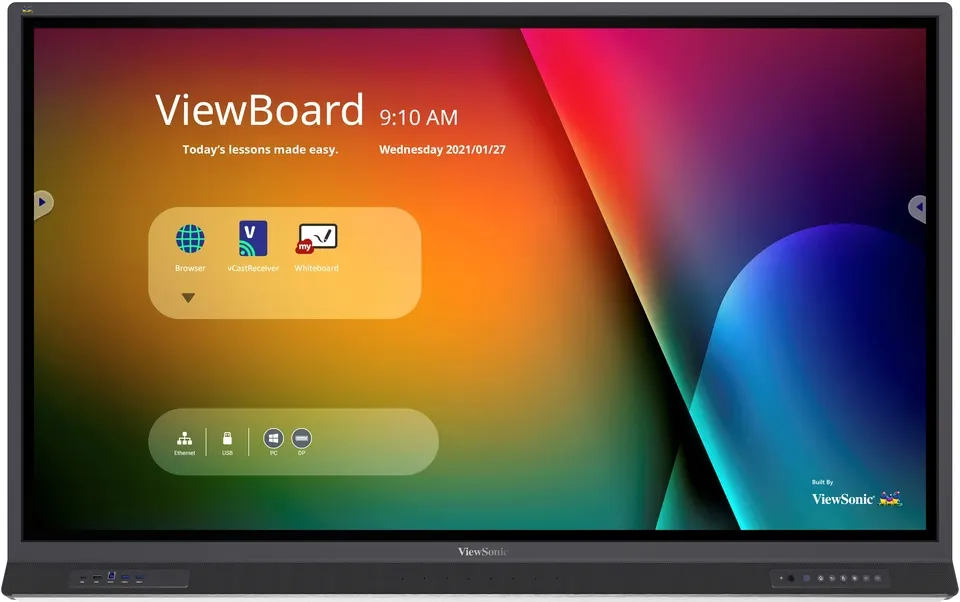
IFP6552
ViewSonic IFP6552 65-inch 4K Interactive Display
- Screen size
- 65"
- Resolution
- UHD 3840x2160
- Touch
- 33 points touch
- Memory
- 4GB / 8GB
The ViewSonic IFP6552 is a 65-inch 4K UHD interactive display for classrooms, training rooms and boardrooms across Qatar. It offers 3840x2160 resolution, 33-point touch on Windows and 20-point touch on Android, and a USB-C input that carries video, data and up to 60W of power over one cable. Two 15W front speakers, a 15W subwoofer and an 8-microphone array suit lessons and hybrid meetings. Request a quote.
A 65-inch 4K panel for shared lessons and meetings
The IFP6552 pairs a 65-inch TFT LCD with a 3840x2160 UHD resolution, 400 nits typical brightness and a 1200:1 typical contrast ratio, rising to 5000:1 with dynamic contrast enabled. An 8ms response time and 178-degree horizontal and vertical viewing angles keep content readable from across a room. The surface has a 9H hardness rating with anti-glare and anti-fingerprint coatings, and the panel includes True Flicker-Free technology and a blue light filter for long sessions.
Touch uses UFT (Ultra Fine Touch) technology with palm awareness. On Windows the panel registers up to 33 touch points and on Android up to 20, and it accepts two pens so two people can write at the same time. The 10-bit panel is rated at 1.07 billion colours, which keeps diagrams and video gradients smooth.
One cable for video, data and power
The USB-C input carries video, data and up to 60W of power over a single cable, with DisplayPort 1.2 alternate mode and Ethernet support. A presenter can connect a laptop without a separate power adapter or a second cable. The panel also has three HDMI inputs, including front and side ports for quick access, a DisplayPort input, a VGA input and a PC audio input.
- Ports: four USB 3.0 ports, two USB touch inputs, an RS232 port and an RJ45 LAN port
- Expansion: an OPS slot and a Wi-Fi module slot for optional modules
- Outputs: an optical SPDIF output and an earphone output
Sound, microphones and hybrid teaching
Two 15W front-facing speakers and a 15W subwoofer built into a soundbar fill a classroom or boardroom with clear audio without external speakers. An 8-microphone array with noise detection and cancellation picks up voices across the room. A remote teacher working from a personal device can choose which connected visualizer camera and microphone source to use, which suits lessons where some students join from home or from another campus.
Where the IFP6552 fits in Qatar
- Classrooms: a private school in Al Sadd replacing an ageing whiteboard and projector setup in a mid-sized classroom, with the panel's annotation tools used during lessons.
- Meeting rooms: a government office in Msheireb running bilingual presentations in Arabic and English, with a compatible VPC slot-in PC handling Windows applications.
- Training centres: a training room in Education City where instructors deliver hybrid sessions to participants in Doha and abroad.
Planning the installation
The panel weighs 43.9 kg net and 55.4 kg gross and measures 1509.1 x 955.4 x 119.1 mm, so the wall must carry its weight. It uses a VESA 600 x 400 mount, and the package includes wall-mount screws, clamps and a camera plate. SmartRooms Qatar offers a free site survey before wall-mounting, covering wall structure, power and data positions and distance from windows.
The operating range is 0°C to 40°C at 20% to 80% humidity, non-condensing. Qatari summers can push outdoor temperatures above 45°C, so install the panel in an air-conditioned room away from direct sunlight through glass. The power input is rated 100-240VAC, which covers Qatar's 240V mains, and typical draw is 135.7W.
Ready to specify the IFP6552 for your room? Request a quote from SmartRooms Qatar and we will confirm the configuration, mounting kit and installation details with your quotation, usually within one working day.
Highlights
- 65-inch 4K UHD panel with 3840x2160 resolution
- 33-point touch on Windows, 20-point touch on Android
- USB-C input delivering video, data and 60W power
- Two 15W speakers, 15W subwoofer and 8-mic array
- Android 11 with OPS slot and Wi-Fi module slot
Classroom fit
At 65″ the farthest student should sit within about 4.9 m (6× the screen height).
Estimated timeline
Quotation within 1 working day · delivery timing depends on stock availability, and we confirm it with your quotation.
Specifications
Display12
- Panel Size
- 65"
- Panel Type
- TFT LCD Module with DLED Backlight.
- Display Area (mm)
- 1428.48(H) x 803.52(V)
- Aspect Ratio
- 16:9
- Resolution
- UHD 3840x2160(Pixels)
- Colors
- 1.07B colors (10bit)
- Brightness
- 400 nits (typ.)
- Contrast Ratio
- 1200:1 Typ. , 5000:1 Max.(DCR enable)
- Response Time
- 8ms
- Viewing Angles
- H = 178, V = 178 typ.
- Backlight Life
- 50,000 Hours (Typ.)
- Surface Treatment
- Hardness: 9H with Anti-Fingerprint coating & Anti-Glare coating
Platform3
- Processor
- ARM Cortex A73*4
- RAM
- 4GB (IFP6552-1A), 8GB (IFP6552-1B)
- Storage
- 32GB (IFP6552-1A), 64GB (IFP6552-1B)
Touch3
- Type/ Tech
- UFT (Ultra Fine Touch) Technology
- Touch Resolution
- 32767 x 32767
- Touch Point
- Windows: 33 points touch, Android: 20 points touch
INPUT7
- HDMI
- x2 (3840x2160@60Hz, HDCP2.2, CEC, Front x1, Side x1), x1 (3840x2160@60Hz, HDCP2.2, CEC, ARC, Side x 1)
- RGB / VGA
- x1 (1920x1080 @60Hz)
- DisplayPort
- x1 (3840x2160 @60Hz)
- Audio
- x1 (PC audio in)
- RS232
- x1
- OPS
- module slot x 1
- WiFi
- module slot x 1
OUTPUT3
- HDMI
- x1 (on demand)
- Audio
- x1 (Earphone out)
- SPDIF
- x1 (optical)
LAN1
- RJ45
- x1
USB3
- Type A
- USB 2.0 x 1(Side x1), USB 3.0 x 4 (Front x2, Side x2, SmartPort™ USB)
- Type B
- x2, for touch
- Type C
- x1 (USB3.0, DP1.2 Alt Mode, Ethernet, PD 60W)
SPEAKERS1
- Value
- 15W x 2 + 15W x 1 subwoofer
MICROPHONE1
- Value
- built-in 8-array microphone
Top Camera Plate1
- Value
- Yes
Embedded OS1
- Value
- Android 11
Bundle Software3
- Basic Annotation Software
- myViewBoard WhiteBoard for Android
- Pro Annotation Software
- myViewBoard WhiteBoard for Windows (embedded in VPC)
- Wireless Presentation
- ViewBoard Cast & myViewBoard Display
Special Features3
- All-in-one USB port
- USB 3.0 x 4
- Simple LAN sharing between IFP and slot-in device
- 10/100/1000M for Android and PC
- Light Sensor
- Yes
Power2
- Voltage
- 100-240VAC +/- 10% Wide Range
- Consumption
- 135.7W (Typ.) < 0.5 W (""Off"")
ERGONOMICS1
- Wall Mount (VESA® )
- 600 x 400
OPERATING CONDITIONS2
- Temperature (º C)
- 0°C to 40°C
- Humidity
- 20% ~ 80% RH Non-Condensing
DIMENSIONS (W x H x D)2
- Physical (inch / mm)
- 1509.1 (W) x 955.4 (H) x 119.1 (D) mm, 59.41 (W) x 37.61 (H) x 4.69 (D) inch
- Packaging (inch / mm)
- 1660 (W) x 1045 (H) x 245 (D) mm, 65.35 (W) x 41.14 (H) x 9.65 (D) inch
WEIGHT2
- Net (lb / kg)
- 96.78 lb / 43.9 kg
- Gross (lb / kg)
- 122.14 lb / 55.4 kg
REGULATIONS1
- Value
- cTUVus, FCC, EPEAT, Mexico coc, Mexico Energy, RoHS, Energy Star 8, CEC, EMC/CE, CB, RoHS & DOC, REACH, WEEE, ErP. EEI, RCM, BIS, PSE, VCCI, CCC, CECP
PACKAGE CONTENTS1
- Value
- 1. Power cable(3 meters) 2. Remote control 3. USB Type-C cable (1.5 meters) 4. USB Touch cable (3 meters, USB2.0) 5. Touch pen x 2 6. Quick Start Guide + Compliance statement 7. RS232 adapter 8. Clamp x 5 9. Camera Plate 10. Screw x 8 (camera 2+2, wall mount 4) 11. HDMI cable (3 meters) 12. Eraser 13. AAA Battery x 2
Compatible Slot-in PC1
- Value
- VPC12 & VPC25/27-O & VPC25/27-O-B series




