





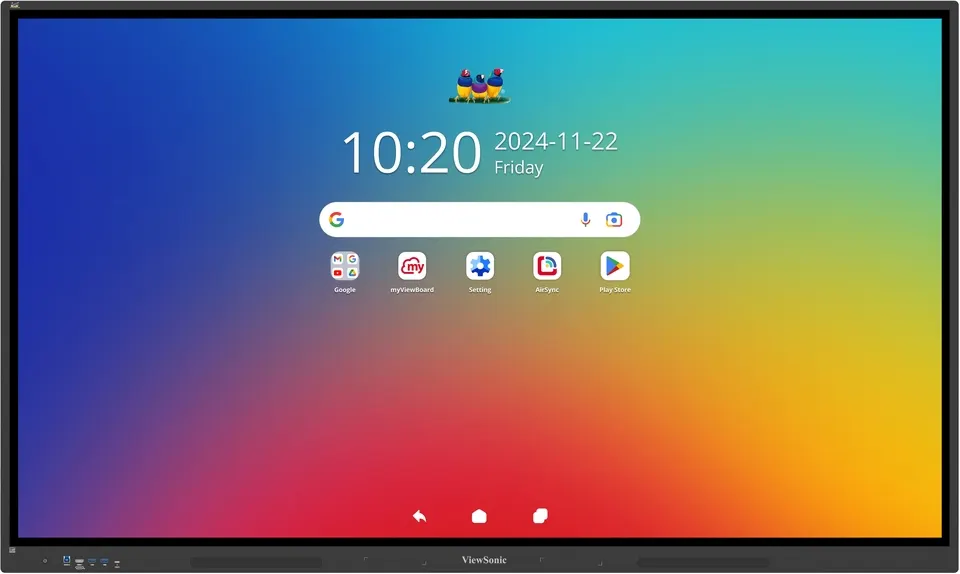
IFP7534
ViewSonic ViewBoard IFP7534 75-inch 4K Interactive Display
- Screen size
- 75"
- Resolution
- UHD 3840x2160
- Touch
- 40 points touch
- Memory
- 8GB DDR4
A 75-inch 4K UHD touch panel built for classrooms, lecture halls and meeting rooms. It pairs 40-point touch and an Android 14 EDLA platform with 8GB RAM and 128GB storage, plus an optional OPS slot for compatible slot-in PCs. Schools, universities and government offices in Doha, Al Rayyan and Lusail can request a quote for one unit or a multi-unit order.
What the ViewBoard IFP7534 is built for
The ViewSonic ViewBoard IFP7534 is a 75-inch interactive flat panel with a 3840 x 2160 UHD TFT LCD panel, DLED backlighting and a 16:9 landscape layout. The active display area measures 1650.24 mm by 942.01 mm, a large writing surface that lets a full class or a boardroom group see the same content. A 5000:1 contrast ratio with DCR enabled, 1.07 billion colours and 178-degree horizontal and vertical viewing angles keep text and diagrams readable from the back of a room.
Touch, writing and the Android 14 platform
The touch layer recognises up to 40 touch points and includes palm rejection, so a presenter can rest a hand on the glass while writing. Two touch pens are supplied. The panel runs Android 14 with EDLA certification and gives access to the Google Play Store for education and productivity apps. Inside are a quad-core processor, 8GB DDR4 memory and 128GB of storage, with an SD/SDHC card slot for media.
Connectivity for lessons and meetings
The panel has three HDMI inputs (one at the front and two at the rear, HDMI 2.0 with HDCP 2.2), a VGA input, a DisplayPort input, an audio input and an RS232 control port, plus an HDMI 2.0 output. Two RJ45 LAN ports are fitted. The front USB-C port supplies up to 65W of power delivery when no OPS module is installed, dropping to 15W with one fitted. An optional Intel standard OPS slot accepts compatible slot-in PCs, and a Wi-Fi module is available as an option.
- Classroom: a secondary school in Al Wakrah fitting out a science lab where students share one board for demonstrations and group work.
- Training: a training centre in Lusail running workshops where trainers switch between a laptop and a tablet through the front ports.
- Government meeting room: a ministry meeting room in Msheireb where Doha staff join sessions with colleagues abroad, using the included top camera plate and the front USB-C data connection.
Planning the installation in Qatar
The panel weighs 49 kg net and 60.5 kg gross, and measures 1716.5 x 1025.8 x 86.9 mm. The wall mount pattern is 800 x 400 mm, and the box includes four wall mount screws and five clamps. Confirm that the wall or stand can carry the weight before mounting, and book a free site survey with SmartRooms Qatar to check the wall, cable routing and power position.
The operating range is 0 to 40°C with 20 to 80% humidity, non-condensing. Qatar summer temperatures can exceed 45°C, so install the panel in an air-conditioned room that stays inside that range, and confirm the room conditions with the SmartRooms Qatar team. The power input is 100 to 240V AC, with rated consumption of 89.24W when on and 0.5W or less when off.
Send your room layout, the number of units and the wall or stand details, and SmartRooms Qatar will prepare a quotation, usually within one working day. Request a quote for the ViewBoard IFP7534 today.
Highlights
- 75-inch 4K UHD display at 3840 x 2160 resolution
- 40-point touch with palm rejection
- EDLA-certified Android 14 with Google Play Store access
- 8GB DDR4 RAM and 128GB storage
- Front USB-C with up to 65W power delivery without OPS
- Optional Intel standard OPS slot for compatible slot-in PCs
Classroom fit
At 75″ the farthest student should sit within about 5.6 m (6× the screen height).
Estimated timeline
Quotation within 1 working day · delivery timing depends on stock availability, and we confirm it with your quotation.
Specifications
Display13
- Panel Size
- 75"
- Panel Type
- TFT LCD Module with DLED Backlight.
- Display Area (mm)
- 1650.24(H) x 942.01(V)
- Aspect Ratio
- 16:9
- Resolution
- UHD 3840x2160(Pixels)
- Colors
- 1.07B colors
- Brightness
- 450 nits
- Contrast Ratio
- 5000:1 (max. with DCR enabled)
- Response Time
- 8ms
- Viewing Angles
- H=178, V=178
- Backlight Life
- 50,000 Hours (8 hours of use per day)
- Surface Treatment
- Hardness: 9H Anti-glare coating
- Orientation
- Landscape
Platform3
- Processor
- Quad-core
- RAM
- 8GB DDR4
- Storage
- 128 GB
Touch4
- Type/ Tech
- Ultra Fine Touch Technology
- Touch Resolution
- 32767 x 32767
- Touch Point
- 40 points touch
- Palm Rejection
- Yes
INPUT8
- HDMI
- x3 (Front x1: HDMI2.0/HDCP 2.2/CEC; Rear x 2:HDMI2.0/HDCP 2.2/CEC/ARC for HDMI 2)
- RGB / VGA
- x1
- DisplayPort
- x1
- Audio
- x1
- RS232
- x1
- SD/SDHC
- x1
- OPS
- x1 (Optional Intel Standard OPS)
- WiFi
- x1 (Optional VB-WIFI-002/VB-WIFI-004/VSB-050)
OUTPUT3
- HDMI
- HDMI 2.0 x1
- Audio
- x1
- SPDIF
- x1
LAN1
- RJ45
- x2
USB3
- Type A
- USB3.2 Gen 1 x 4 (Front x 2; Rear x 2 ) USB 2.0x1 (Rear)
- Type B
- USB 3.0 x2 (Rear x1 + Front x1)
- Type C
- Front*1 [PD65W (15W with OPS, 65W without OPS)+ DP1.2 + Data + 10M/100M sharing)] Rear *1 (PD15W +Data)
SPEAKERS1
- Value
- 20W x 2
Top Camera Plate1
- Value
- Yes
Embedded OS1
- Value
- Android 14 EDLA
Bundled Software5
- Basic Annotation Software
- myViewBoard
- Pro Annotation Software
- myViewBoard for Windows (Embedded in optional Windows Slot-in PC)
- Wireless Presentation
- AirSync
- Device Management
- Manager
- ViewSonic Launcher
- Yes
Special Features3
- All-in-one USB port
- (combine slot-in PC/Android/HDMI USB port) Front “SmartPort™ USB” to all channels.
- Simple LAN sharing between IFP and slot-in device
- 10/100M for Android & Slot-in PC
- Light Sensor
- Yes
Power2
- Voltage
- 100-240V AC
- Consumption
- On:89.24W ; Off: ≤ 0.5W
ERGONOMICS1
- Wall Mount (VESA® )
- 800*400
OPERATING CONDITIONS2
- Temperature (º C)
- 0°C to 40°C
- Humidity
- 20% ~ 80% RH non-condensing
DIMENSIONS (W x H x D)2
- Physical (inch / mm)
- 67.5 x 40.4 x 3.42 (in.) / 1716.5 x 1025.8 x 86.9 (mm)
- Packaging (inch / mm)
- 73.22 x 44.29 x 7.28 (in.) / 1860 x 1125 x 185 (mm)
WEIGHT2
- Net (lb / kg)
- 108.03 lb / 49 kg
- Gross (lb / kg)
- 133.38 lb /60.5 kg
REGULATIONS1
- Value
- FCC/ICES003, EPEAT, CE EMC, LVD or CB, RoHS Green BOM, & RoHS DoC, ErP, REACH SVHC List, & DoC, EEL, WEEE, BSMI,BIS
PACKAGE CONTENTS1
- Value
- 1. 3m power cord by ship area 2. Remote control with AAA battery 3. 3m touch USB cable 4. Touch pen x 2 (VB-PEN-009) 5. Quick Start Guide + Compliance statement 6. RS232 adapter 7. Clamp x 5 8. Camera Plate 9. Screw x 8 (camera 2+2, wall mount 4) 10. HDMI cable 3m
Compatible Slot-in PC1
- Value
- VPC3X, VPCF5-2A, VPCF5, VPC2X, VPC-A31-O1




