





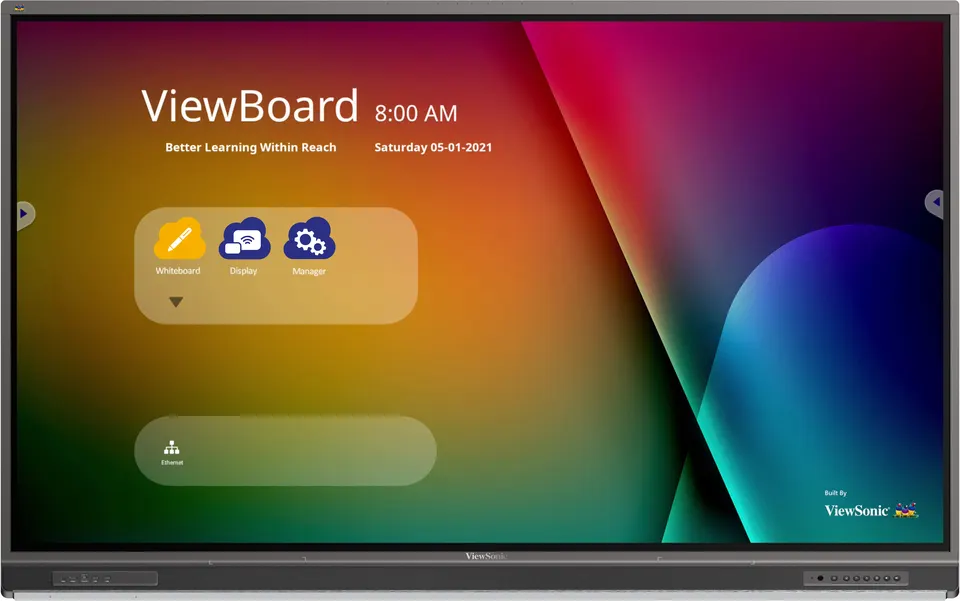
IFP7552-1CF
ViewSonic ViewBoard IFP7552-1CF 75-inch 4K Interactive Display
- Screen size
- 75"
- Resolution
- UHD 3840x2160
- Touch
- 33 points touch
- Memory
- 8GB DDR4
The ViewSonic ViewBoard IFP7552-1CF is a 75-inch 4K Ultra HD interactive display with 33-point touch on Windows and 20-point touch on Android. One USB-C cable carries data, video and up to 65W power, and the unit includes 2x15W speakers, a 15W subwoofer and an 8-mic array. It suits classrooms and lecture rooms in Qatar running in-person and hybrid lessons.
What the IFP7552-1CF is built to do
The IFP7552-1CF is a 75-inch interactive display from the ViewBoard 52 Series, designed for lessons where a large touch surface, a built-in operating system, a camera plate and a microphone array sit in one unit. It runs Android 11 and accepts a compatible Windows slot-in PC through its OPS slot, so a room can annotate, present and stream without a separate workstation at the front of the room.
Panel and picture figures to check
- Resolution: 3840 x 2160 UHD on a 75-inch IPS panel with a 16:9 aspect ratio
- Brightness: 400 nits typical, with a 1,200:1 typical contrast ratio
- Colour: 10-bit panel showing 1.07 billion colours
- Surface: 9H hardness with an anti-glare coating
- Touch: 33 points on Windows and 20 points on Android
The 400 nits typical brightness is a figure to test in the room itself. A classroom with large windows or a lobby facing a street will need the panel placed away from direct sunlight. The anti-glare coating reduces reflections, but it does not replace careful placement.
Connecting teachers, presenters and visitors
A single USB-C port carries data, video and up to 65W of power to a connected laptop, and the box includes a 1.8 m USB-C cable for this. The panel also offers four HDMI 2.0 inputs at 4K 60 Hz, one VGA input, a USB-C port with DisplayPort 1.2 and 100M Ethernet, plus an OPS module slot and a Wi-Fi module slot. For wireless use, vCastSender connects presenters with a one-time password, and myViewBoard Display lets guests cast from a browser without a cable.
Sound, microphones and hybrid teaching
Audio comes from two 15W front speakers and a 15W subwoofer, and an 8-microphone array with noise detection and cancellation is built in. For hybrid lessons, the display can select the camera and microphone source from a connected visualizer when a remote presenter teaches from a personal device. A light sensor and a top camera plate are also included.
Where it fits in Qatar
A private school in Al Wakrah fitting out new classrooms may choose the 75-inch size for rooms where students sit several metres from the board. A university seminar room in Education City running hybrid sessions can use the microphone array and camera source switching for students joining from elsewhere. A training centre in Msheireb running staff workshops in a mid-sized room can use the Android 11 system, with 8GB RAM and 64GB storage, for everyday annotation and casting.
Planning the installation
The panel measures 1709 x 1071 x 120 mm and weighs 55.25 kg net, so wall mounting needs a load-bearing wall and a bracket that matches the VESA 800 x 400 pattern. The box includes five clamps and eight screws, four of them for the wall mount. The unit draws 233.5W typical when on and under 0.5W when off, and its power input is rated 100-240 VAC. Its operating range is 0 to 40 degrees Celsius at 10 to 90 per cent non-condensing humidity, so it belongs in an air-conditioned room, not a hot store or outdoor area. SmartRooms Qatar offers free site surveys, which we recommend before mounting a panel of this weight.
Request a quote from SmartRooms Qatar for the IFP7552-1CF. We will confirm the configuration, mounting requirements and delivery to your municipality with your quotation, which is usually provided within one working day.
Highlights
- 75-inch 4K UHD IPS panel at 3840 x 2160 resolution
- 33-point touch on Windows, 20-point touch on Android
- Single USB-C cable for data, video and up to 65W power
- 2x15W speakers, 15W subwoofer and 8-mic array
- OPS and Wi-Fi module slots with Android 11 embedded
- VESA 800 x 400 wall mount, 0 to 40 degrees Celsius operation
Classroom fit
At 75″ the farthest student should sit within about 5.6 m (6× the screen height).
Estimated timeline
Quotation within 1 working day · delivery timing depends on stock availability, and we confirm it with your quotation.
Specifications
Display13
- Panel Size
- 75"
- Panel Type
- TFT LCD Module with DLED Backlight, IPS
- Display Area (mm)
- 1650.24 (H) x 928.26 (V) (74.5” diagonal)
- Aspect Ratio
- 16:9
- Resolution
- UHD 3840x2160(Pixels)
- Colors
- 1.07B colors (10bit)
- Brightness
- 400 nits (Typ.)
- Contrast Ratio
- 1200:1 Typ. , 4000:1 Max.(DCR enable)
- Response Time
- 8ms
- Viewing Angles
- H = 178, V = 178 (Typ.)
- Backlight Life
- 50,000 Hours (Typ.)
- Surface Treatment
- Hardness: 9H. Anti-glare coating
- Orientation
- Landscape
Platform3
- Processor
- ARM Cortex A73*4 (1.8GHz)
- RAM
- 8GB DDR4
- Storage
- 64 GB
Touch3
- Type/ Tech
- UFT (Ultra Fine Touch) Technology
- Touch Resolution
- 32767 x 32767
- Touch Point
- Windows: 33 points touch, Android: 20 points touch
INPUT6
- HDMI
- 2.0 x4 ( 3840x2160 @60Hz ,HDCP2.2, HDMI 2 with CEC/ARC)
- RGB / VGA
- x1(1920x1080@60Hz)
- Audio
- x1(PC audio in)
- RS232
- x1
- OPS
- module slot x 1
- WiFi
- WiFi module slot x 1
OUTPUT3
- HDMI
- x1 (720p@60Hz, 1080p@60Hz, 4K@60Hz RGB)
- Audio
- 1 (Earphone out)
- SPDIF
- 1(optical)
LAN1
- RJ45
- 1 in 1 out (10/100/1000M) (USB Type-C 10/100, Android & PC 10/100/1000)
USB3
- Type A
- USB2.0 x 3 (Front x2, Side x1) USB3.0 x 2(Side x 2)
- Type B
- x3(Front x1, Rear x 2)), for touch
- Type C
- x1 (USB2.0, DP1.2, Ethernet 100M, PD65W)
SPEAKERS1
- Value
- 15W x 2 front soundbar + 15W x 1 subwoofer
MICROPHONE1
- Value
- 8-array microphone
Top Camera Plate1
- Value
- Yes
Embedded OS1
- Value
- Android 11
Bundle Software4
- Basic Annotation Software
- myViewBoard WhiteBoard for Android
- Pro Annotation Software
- myViewBoard WhiteBoard for Windows (embedded in VPC)
- Wireless Presentation
- vCast & myViewBoard Display
- Device Management
- myViewBoard Manager
Special Features3
- All-in-one USB port
- USB 3.0 “SmartPort USB” to all channels.
- Simple LAN sharing between IFP and slot-in device
- (10/100/1000M) (USB Type-C 10/100, Android & PC 10/100/1000)
- Light Sensor
- Yes
Power2
- Voltage
- 100-240VAC +/- 10% Wide Range
- Consumption
- On: 233.5W(typ.) / Off:
ERGONOMICS1
- Wall Mount (VESA® )
- 800 x 400
OPERATING CONDITIONS2
- Temperature (º C)
- 0°C to 40°C
- Humidity
- 10% ~ 90% RH Non-Condensing
DIMENSIONS (W x H x D)2
- Physical (inch / mm)
- 1709 x 1071 x 120 mm / 67.28 x 42.17 x 4.72 in
- Packaging (inch / mm)
- 1860 x 1175 x 225 mm / 73.23 x 46.26 x 8.86 in
WEIGHT2
- Net (lb / kg)
- 121.81lb/55.25kg
- Gross (lb / kg)
- 170.37lb/77.28kg
REGULATIONS1
- Value
- US NRTL w/ CA , FCC-B w/ ICES003, DOE Energy Star, DOE EPEAT(Bronze), NOM or UL-MX-CoC, Mexico Energy, CE EMC, LVD or CB, RoHS Green BOM & RoHS DoC, Energy Efficiency Label (EEL), WEEE, UkrSEPRO + DoC, GOST-R / EAC, BSMI, TGM, FF, LBL, SCIP, Annex I, Annex II, Packing waste,
PACKAGE CONTENTS1
- Value
- 1. 3m power cord by ship area 2. Remote control with AAA battery (new VS remote control) 3. 3m touch USB cable 4. Touch pen x 2 (a set) 5. Quick Start Guide + Compliance statement 6. RS232 adapter 7. Clamp x 5 8. Camera Plate 9. Screw x 8 (camera 2+2, wall mount 4) 10. HDMI cable 3m 11. Typc-C cable 1.8 (Data & power charged)
Compatible Slot-in PC1
- Value
- VPC2-O series / VPC2-O-1B series / VPC12-WPO-15/16/ VPCF5 series / VPC33 series / VPC35 series / VPC37 series
Note1
- Value
- Disclaimer: 1.Although we endeavor to present the most accurate and comprehensive information at the time of publication, we reserve the right to make any change regarding any info herein without prior notice. 2.Unless otherwise stated, all performance claims are based on theoretical performance. Actual figures may vary in real-world situations and may depend on many factors including the processing speed of the host device, file attributes and other factors related to system configuration and your operating environment. 3.Product Specification and appearance may differ from country to country




