





Thursday, 22 October 2026 · 11 Jumada I 1448 AH Sun – Thu · 9:00 – 18:00
+971 56 914 9477 العربية
WhatsApp

IFP8650

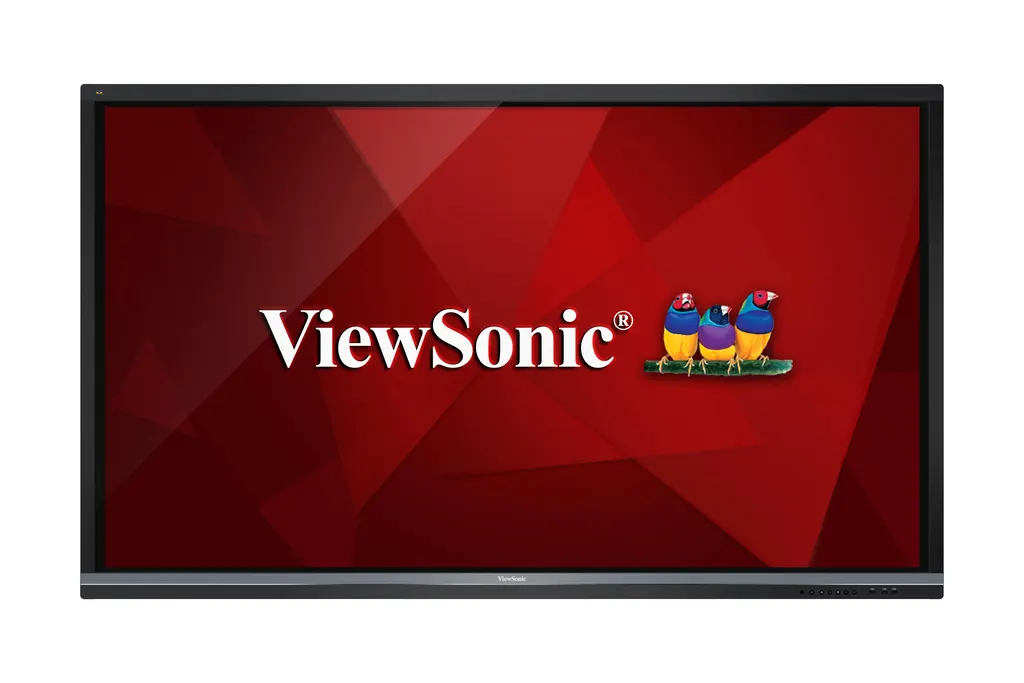
ViewSonic IFP8650 86-inch 4K Interactive Flat Panel

Screen size
86"
Resolution
3840 x 2160
Touch
20 points touch
Memory
2GB DDR3
WhatsApp
Priceon request
QuotationWithin 1 working day
DeliveryConfirmed with your quote, based on stock
PDFDownload datasheet (IFP8650_Datasheet.pdf)
Overview

The ViewSonic IFP8650 is an 86-inch 4K Ultra HD interactive flat panel with 3840 x 2160 resolution, 20-point touch and 10 writing points for simultaneous annotation. It runs its own quad-core processor with 16GB storage, so annotation and playback work without a PC, and two PC slots accept an optional slot-in computer. Its 100-240VAC input and VESA 800 x 600mm mount suit boardrooms and classrooms across Qatar.

What the ViewSonic IFP8650 does in a meeting room or classroom

The IFP8650 is an 86-inch interactive flat panel built on a TFT LCD with DLED backlight, a 16:9 aspect ratio and 3840 x 2160 resolution. Its 1.07 billion colours at 10-bit depth and 1,200:1 typical contrast ratio show fine detail in spreadsheets, engineering drawings and video. Brightness is rated at 350 nits typical and 300 nits minimum, and the 7H anti-glare glass protects the surface.

Touch, writing and annotation

The infrared touch system recognises 20 touch points and 10 writing points at the same time, with a stated response time under 15 ms. Two-finger touch brings up the Floating Pen, so a presenter can mark up PowerPoint slides, text documents, USB files or images from a connected source. The pre-installed myViewBoard whiteboarding software assigns drawing to one finger, moving and zooming to two, and erasing to three.

Built-in computing, ports and wireless options

An ARM Cortex A53 quad-core processor at 1.2 GHz, Mali-450 graphics, 2GB DDR3 memory and 16GB eMMC storage run annotation and playback without a connected computer. Two PC slots accept an optional slot-in PC, which raises typical power draw from 361 W to 456 W. Inputs include three HDMI, DisplayPort, VGA, RS232 and composite video, with one HDMI output for all sources. Four USB 2.0 and two USB 3.0 Type A ports, two USB 2.0 Type B touch connections and an RJ45 LAN port complete the layout. The optional slot-in module adds dual-band 2.4GHz/5GHz Wi-Fi and Bluetooth.

Where it fits in Qatar

  • Boardrooms in West Bay, Msheireb or Lusail: an 86-inch panel suits a table of ten or more people, with a 4K picture for shared documents and Zoom calls to colleagues abroad.
  • Classrooms at a private school in Al Wakrah or Al Rayyan: the Air Class Quiz tool records results from each participant device, and the Cast app streams 1080p content from mobile devices.
  • Training rooms in Education City or a government authority in Doha: one panel can carry whiteboard sessions, video playback and conference calls in a single room.

What to plan before installation

The panel weighs 78 kg net and 105 kg gross, and measures 1988 x 1186 x 100 mm without its stand. Confirm the wall structure and the 800 x 600 mm VESA pattern with M8 x 25 mm screws before ordering, and request a free site survey to check access, lifting and fixings. An optional trolley cart suits rooms where wall mounting is not practical. The stated operating range is 0°C to 40°C at 10% to 90% non-condensing humidity, so install it in an air-conditioned room away from unshaded glazing and hot lobbies, given Qatar summer heat above 45°C. The 100-240VAC input covers Qatar's 240 V supply.

Requesting a quote from SmartRooms Qatar

Request a quote and SmartRooms Qatar will supply the IFP8650, deliver it to all eight municipalities of Qatar and arrange professional installation. Quotations are usually issued within one working day. Schools and ministries can order against a purchase order (LPO) or a government tender, including Monaqasat, and pay by bank transfer, cheque or purchase order. Send your room size, mounting wall and whether you need the slot-in PC or wireless module, and we will reflect that configuration in your quotation.

Highlights

  • 86-inch 4K panel at 3840 x 2160 resolution
  • 20-point touch with 10 simultaneous writing points
  • Built-in ARM quad-core processor and 16GB storage
  • Three HDMI, DisplayPort, VGA and RS232 inputs
  • Two PC slots for an optional slot-in computer
  • VESA 800 x 600mm wall mount and optional trolley cart

Classroom fit

At 86″ the farthest student should sit within about 6.4 m (6× the screen height).

Estimated timeline

Quotation within 1 working day · delivery timing depends on stock availability, and we confirm it with your quotation.

Specifications

53 specifications · Source: manufacturer · checked Oct 2026
LCD PANEL13
Panel Size
86"
Type/ Tech
TFT LCD Module with DLED Backlight
Display Area (mm)
1895.04 (H) x 1065.96 (V) (85.6” diagonal)
Aspect Ratio
16:9
Resolution
3840 x 2160
Colors
1.07B colors (10bit)
Brightness
350 nits (typ.) 300 nits (min.)
Contrast Ratio
1200:1 (typ.)
Response Time
8 ms
Viewing Angles
H = 178, V = 178 (typ.)
Backlight
DLED
Backlight Life
30,000 Hours Min.
Hardness
7H
TOUCH5
Type/ Tech
IR Recognition
Touch Resolution
32767 x 32767
Touch Point
20 points touch, 10 points writing
System
Windows 10 / Windows 8 / Windows 7 / Windows XP / Vista / Linux / Mac / Android / Wince / Chrome
Life Time
80,000hrs
INPUT7
HDMI
x 3
RGB / VGA
x 1
DisplayPort
x 1
Audio
x 1
CVBS (AV)
x 1
RS232
x 1
PC Slot
x 2
OUTPUT3
HDMI
x 1 (for all sources)
Audio (Earphone out)
x 1
SPDIF
x 1
LAN1
RJ45
x 1
USB3
2.0 Type A
x 4 (front x 2, for both embedded player and slot-in PC)
3.0 Type A
x 2 (front x 1, for both embedded player and slot-in PC)
2.0 Type B (For touch)
x 2
SPEAKERS1
Value
16W x 2
BUILT-IN PC5
Processor
ARM Cortex A53 Quad Core 1.2G Hz CPU
Graphic
ARM Mali-450 Quad Core
Memory
2GB DDR3
Storage
16GB eMMC
Networking
10/100M auto-identification and DHCP
COMPATIBILITY4
VGA
Refer to timing table
HDMI
3840x2160
DP
3840x2160
CVBS
480i
POWER2
Voltage
100-240VAC +/- 10% Wide Range
Consumption
361W(Typ, without Slot-In PC); 456W(Typ, Including Slot-In PC)
ERGONOMICS1
Wall Mount (VESA® )
800 x 600mm; Screw: M8 x 25mm
OPERATING CONDITIONS2
Temperature (º C)
32°F to 104°F (0°C to 40°C)
Humidity
10% ~ 90% non-condensing
DIMENSIONS (W x H x D)2
Physical w/o Stand (mm / inch)
1988 x 1186 x 100 mm / 78.3 x 46.7 x 3.9 inch
Packaging (mm / inch)
2211 x 1380 x 280 mm / 87.0 x 53.1 x 11.0 inch
WEIGHT2
Net (kg / lb)
78kg / 171.96lbs
Gross (kg / lb)
105kg / 231.49lbs
REGULATIONS1
Standard
FCC, CE, cTUVus, RCM, CCC
What's in the box?1
Value
VGA cable(5 meters)/Power cable(3 meters) x 4/Remote control/USB cable(5 meters)/Audio cable(5 meters) 6.AV cable/Touching pen x 3/User manual CD wizard/Quick Start Guide/RS232 adapter/Clamp x 5/Plate/Screw x 3


Downloads

16 files from the manufacturer
PDF Datasheets IFP8650_Datasheet.pdf 731 KB ViewSonic IFP8650 datasheets (PDF, 731 KB) PDF Manuals & guides IFP50 series_UG_ENG.pdf 13.3 MB ViewSonic IFP8650 manuals & guides (PDF, 13.3 MB) PDF Manuals & guides IFP50_QSG_Rev.1a_05-09-17_A3.pdf 2.8 MB ViewSonic IFP8650 manuals & guides (PDF, 2.8 MB) PDF Drawings & CAD IFP8650_2D_drawing.pdf 620 KB ViewSonic IFP8650 drawings & cad (PDF, 620 KB) URL Drawings & CAD · Opens on manufacturer site IFP8650 2D drawing(dwg) ViewSonic IFP8650 drawings & cad (URL) PDF Software & firmware IFP8650_Firmware_Upgrade_Notice.pdf 382 KB ViewSonic IFP8650 software & firmware (PDF, 382 KB) PDF Software & firmware ViewBoard_Network_Requirements_ENG.pdf 2.9 MB ViewSonic IFP8650 software & firmware (PDF, 2.9 MB) URL Software & firmware · Opens on manufacturer site EAirplay ViewSonic IFP8650 software & firmware (URL) URL Software & firmware · Opens on manufacturer site IFP8650 Main Firmware ViewSonic IFP8650 software & firmware (URL) URL Software & firmware · Opens on manufacturer site IFP8650 Scalar Firmware ViewSonic IFP8650 software & firmware (URL) URL Software & firmware · Opens on manufacturer site MacOS Touch Driver(For Gestures) ViewSonic IFP8650 software & firmware (URL) URL Software & firmware · Opens on manufacturer site myViewBoard ViewSonic IFP8650 software & firmware (URL) URL Software & firmware · Opens on manufacturer site vBoard Software Update ViewSonic IFP8650 software & firmware (URL) URL Software & firmware · Opens on manufacturer site vCastSender for Mac ViewSonic IFP8650 software & firmware (URL) URL Software & firmware · Opens on manufacturer site vController ViewSonic IFP8650 software & firmware (URL) URL Other documents · Opens on manufacturer site Electronics_Visual-TVs_ViewSonic_The-ViewSonicR-IFP8650-ViewBoard-Interac(rfa) ViewSonic IFP8650 other documents (URL)

Questions about IFP8650

Who is the ViewSonic IFP8650 designed for?
The IFP8650 suits medium and large rooms where several people need to write, draw or share content on the same screen. Its 86-inch 4K panel with 20-point touch fits boardrooms for ten or more people, and classrooms where teachers want one display for lessons, quizzes and video. It is best suited to indoor, air-conditioned spaces, since its stated operating range is 0°C to 40°C.
Does the IFP8650 need a computer connected to run?
No. It has a built-in ARM Cortex A53 quad-core processor, 2GB DDR3 memory and 16GB eMMC storage, so it can run annotation software and play multimedia without a PC. For more demanding applications, two PC slots accept an optional slot-in PC module. The stated typical power draw is 361 W without that module and 456 W with it, so plan the power circuit accordingly.
How many people can write on the screen at the same time?
The touch system supports 20 touch points and 10 writing points at once, so several people can annotate together. The stated touch response time is under 15 ms. Two-finger touch activates the Floating Pen, which lets a presenter mark up PowerPoint files, text documents and USB content during a lesson or meeting. The myViewBoard software uses one finger to draw, two to move and zoom, and three to erase.
Is the screen bright enough for a room with large windows in Doha?
The panel is rated at 350 nits typical and 300 nits minimum, with a typical contrast ratio of 1,200:1 and 1.07 billion colours at 10-bit depth. Its glass has 7H hardness and an anti-glare finish. In rooms with strong daylight, position the screen away from direct sun and assess the room during a site survey before fixing the mounting.
Can it connect to a video conference with colleagues abroad?
Yes. The IFP8650 includes Zoom integration and ViewBoard Cast content sharing. Zoom supports up to 10 participants, with four of them able to stream content from a laptop or smartphone. In a Doha boardroom, a remote team can join from another country while local staff present from the same panel, with the 4K display showing shared documents clearly.
Which ports do I need for a laptop, a second source and touch?
The panel has three HDMI inputs, one DisplayPort, one VGA, one composite AV input, one RS232 and one audio input. Two USB 2.0 Type B connections serve touch, while four USB 2.0 and two USB 3.0 Type A ports handle storage and peripherals. An HDMI output passes one source through, and an RJ45 LAN port provides wired networking. Check your laptop outputs before ordering adapters.
Can we mount it on a classroom wall in Al Wakrah?
Yes, if the wall can carry the load. The panel is VESA-compatible with an 800 x 600 mm pattern and M8 x 25 mm screws, and weighs 78 kg net. Confirm the wall structure and hole alignment before ordering. SmartRooms Qatar offers a free site survey to check the wall, access route and lifting. If wall mounting is not suitable, an optional trolley cart is available.
What operating conditions should I plan for in a Qatar summer?
The stated operating range is 0°C to 40°C with 10% to 90% non-condensing humidity. Qatar summer temperatures can exceed 45°C, so the panel should sit in an air-conditioned room, away from unshaded windows and hot lobbies. If you are unsure whether a space meets these conditions, confirm it with the SmartRooms Qatar team before ordering.
Will it work with Qatar's 240 V power supply?
The power input is specified as 100-240VAC with a plus or minus 10 percent tolerance, a wide range that includes Qatar's 240 V mains supply. The box includes four 3-metre power cables, and typical consumption is 361 W without the slot-in PC and 456 W with it. Ask your electrician to confirm the socket and circuit capacity at the installation point during the site survey.
Are Wi-Fi and Bluetooth built in?
Wireless connectivity is an optional add-on. The optional slot-in wireless module provides dual-band 2.4GHz/5GHz Wi-Fi and Bluetooth support. The panel also has an RJ45 LAN port for a wired network connection. Tell us whether your room needs wireless sharing when you request a quote, so the module can be included in the quotation.
We are equipping several classrooms at a school. Can we order through an LPO?
Yes. SmartRooms Qatar accepts purchase orders (LPOs) and government tender orders, and payment can be made by bank transfer, cheque or purchase order. Send the number of units, room sizes and mounting walls, and quotations are usually issued within one working day. Each unit includes three touch pens, a remote control and mounting hardware, so plan one accessory set per room.
What comes in the box?
The box includes a remote control, three touch pens, four 3-metre power cables, a 5-metre VGA cable, a 5-metre USB cable, a 5-metre audio cable, an AV cable, an RS232 adapter, five clamps, a mounting plate, three screws, a user manual CD and a quick start guide. Check the wall-mounting parts against your installation plan during the site survey.

Similar models

BenQ CM7505 BenQ Board CM7505 75-inch Interactive Display
75″ UHD 3840 × 2160 pixels Ultra Precision IR
SMART SBID-6286S-V3 SMART Board 6086S-V3 86-inch Interactive Display with iQ
86″ 4K UHD (3840 × 2160) HyPr Touch with InGlass
SMART SBID-6286S-V3-P SMART Board 6086S-V3 Pro 86-inch Interactive Display with iQ
86″ 4K UHD (3840 × 2160) HyPr Touch with InGlass
Clevertouch Clevertouch Edge 65" Clevertouch Edge 65" 4K Interactive Display with Camera and Speakers
65″ 4K UHD (3840x2160 @60Hz) Android 15
Clevertouch Clevertouch Edge 86" Clevertouch Edge 86" 4K Interactive Flat Panel
86″ 4K UHD (3840x2160 @60Hz) Android 15
Email Call


