





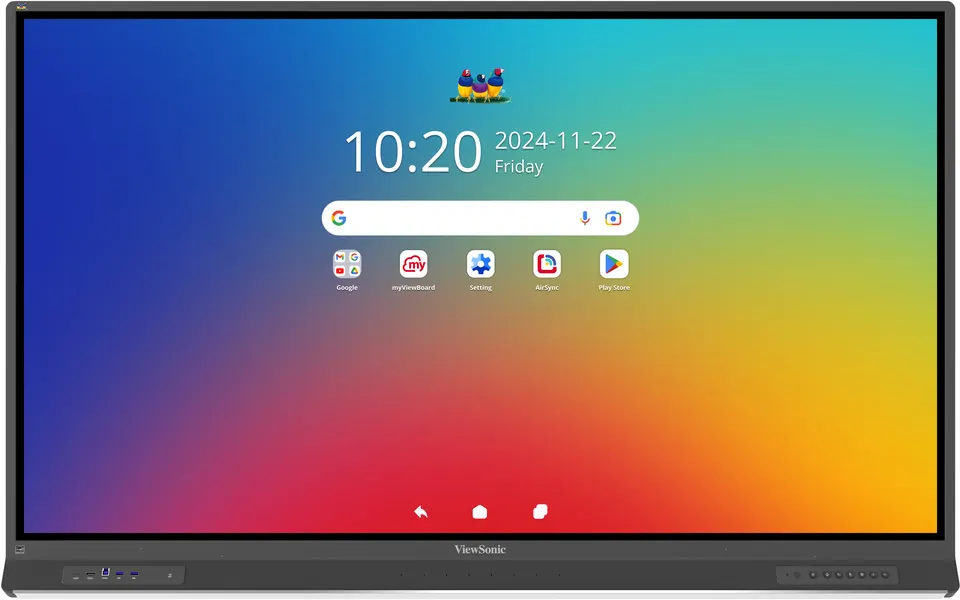
IFP8653-ED
ViewSonic ViewBoard IFP8653-ED 86-inch Interactive Flat Panel
- Screen size
- 86"
- Resolution
- UHD 3840x2160
- Touch
- 40 points touch
- Memory
- 16GB
The ViewSonic IFP8653-ED is an 86-inch 4K interactive display for classrooms, lecture halls and boardrooms where people write and share at the screen. It runs EDLA-certified Android 14 with an octa-core processor, 16GB RAM and 128GB storage, and offers four USB-C ports with up to 100W charging at the front. An 8-microphone array and anti-glare panel suit Doha schools, universities and offices that run hybrid meetings.
What the ViewBoard IFP8653-ED is
The ViewSonic IFP8653-ED is an 86-inch interactive flat panel from the ViewBoard IFP53 Series, built for classrooms, lecture halls and meeting rooms where people write, annotate and share directly on the screen. It combines a UHD 3840x2160 LCD panel with a built-in Android 14 system, so a lesson or meeting can start without bringing a laptop into the room.
Panel, touch and writing performance
The 16:9 screen has a typical brightness of 450 nits and a typical contrast ratio of 1200:1, rising to a minimum of 5000:1 with DCR enabled. The anti-glare coating and 7H surface hardness help content stay readable under classroom lighting and resist everyday wear. Touch uses UFT technology with a 32767 x 32767 touch resolution, recognising up to 40 points on Windows and 20 points on Android, with an 8 ms response time for smooth handwriting. Four-colour switching is available with the optional VB-PEN-010 stylus.
Ports and connectivity for mixed-device rooms
- Four HDMI inputs, one at the front and three at the rear, all with HDMI 2.1 and CEC, and one rear input with ARC
- DisplayPort, RGB/VGA and PC audio inputs for laptops and older sources
- Four USB-C ports: the front input supplies up to 100W, the rear inputs 65W and 15W, and one port outputs DisplayPort
- Two RJ45 LAN ports, an RS232 control port and an OPS module slot
The front USB-C port can charge a compatible laptop while it is connected, which reduces cables across the front of the room. A list of compatible slot-in PC models is included in the specification, covering the VPCF5-W33-G1, VPC37-W53-G1, VPC35-W53-G1 and VPC-A31-O1.
Where it fits in Qatar
In a private school in Al Wakrah fitting out new classrooms, NFC card sign-in and SSO options let teachers and students reach their own launchers and cloud files quickly, while guest login avoids shared passwords. In a university teaching space in Education City, the 8-microphone array and speaker system help a lecture reach the back row and remote students. In a Doha ministry or company boardroom, the 86-inch size suits a group reviewing shared documents together at the screen.
What to plan for before installation
The panel measures 1952.4 x 1197.2 x 118.4 mm and weighs 63.35 kg net, so the wall must carry the load and match the 800 x 600 VESA pattern. The box includes eight screws, four of them for wall mounting. The operating range is 0°C to 40°C with 20% to 80% humidity, non-condensing, so keep the panel out of direct sunlight and away from unconditioned lobbies or sun-facing glass, where Qatar summer heat can exceed that range. The power input covers 100-240 VAC, which includes Qatar's 240 V supply, drawing 131.53W when on and under 0.5W when off. Confirm that the supplied 3m power cord and plug suit BS 1363 sockets before installation.
Ordering from SmartRooms Qatar
SmartRooms Qatar supplies this panel across all eight municipalities of Qatar, with professional installation and a free site survey before any wall mounting of a panel this heavy. Schools, government bodies and companies buying several units can issue a purchase order or LPO, and government tenders are supported. Payment is accepted by bank transfer, cheque or purchase order, and the product is covered by the manufacturer's warranty. Request a quote with your room sizes and quantities, and the team will usually respond within one working day.
Highlights
- 86-inch UHD 3840x2160 panel with 450 nits typical brightness
- EDLA-certified Android 14 with octa-core CPU, 16GB RAM and 128GB storage
- Four USB-C ports, with the front input supplying up to 100W
- Touch recognition of 40 points on Windows and 20 points on Android
- Built-in 8-array microphone and 16W x 2 soundbar with 20W subwoofer
- Operating range 0°C to 40°C, 20% to 80% humidity non-condensing
Classroom fit
At 86″ the farthest student should sit within about 6.4 m (6× the screen height).
Estimated timeline
Quotation within 1 working day · delivery timing depends on stock availability, and we confirm it with your quotation.
Specifications
Display13
- Panel Size
- 86"
- Panel Type
- TFT LCD Module with DLED Backlight
- Display Area (mm)
- 1895.04 (H) x 1065.96 (V) (86.5" diagonal)
- Aspect Ratio
- 16:9
- Resolution
- UHD 3840x2160(Pixels)
- Colors
- 1.07B colors
- Brightness
- 450 nits (typ)
- Contrast Ratio
- 1200:1(Typ.) 5000:1(Min. with DCR enabled)
- Response Time
- 8 ms
- Viewing Angles
- H = 178, V = 178 typ.
- Backlight Life
- 50,000 hrs (typ).
- Surface Treatment
- Hardness: 7H. Anti-glare coating
- Orientation
- Landscape
Platform3
- Processor
- Octa-Core CPU
- RAM
- 16GB
- Storage
- 128GB
Touch3
- Type/ Tech
- UFT (Ultra Fine Touch) Technology
- Touch Resolution
- 32767 x 32767
- Touch Point
- Windows: 40 points touch, Android: 20 points touch
INPUT6
- HDMI
- x4 ( Frontx1:HDMI2.1 with CEC ; Rearx3: (HDMI2.1 with CEC)x2 & (HDMI2.1 with CEC, ARC)x1
- RGB / VGA
- x1
- DisplayPort
- x1
- Audio
- x1 (PC audio in)
- RS232
- x1
- OPS
- module slot x 1
OUTPUT3
- HDMI
- x1
- Audio
- x1 (Earphone out)
- SPDIF
- x1
LAN1
- RJ45
- x2
USB3
- Type A
- USB3.2 Gen 1x4 (Frontx2; Rearx2) USB2.0x1 (Rear)
- Type B
- USB3.2 Gen 1x3 (Frontx1; Rearx2)
- Type C
- Input:x3 (Frontx1 with USB3.2 Gen 1, DP1.2, Ethernet 100M, PD 100W; Rearx1 with USB3.2 Gen 1, DP1.2, Ethernet 100M, PD 65W; Rearx1 with USB3.2 Gen 1, PD 15W) Output:x1, DP
SPEAKERS1
- Value
- 16W x 2 front soundbar + 20W x 1 subwoofer
MICROPHONE1
- Value
- built-in 8-array microphone
Top Camera Plate1
- Value
- Yes
Embedded OS1
- Value
- EDLA-Certified with Android 14
Bundled Software5
- Basic Annotation Software
- myViewBoard for Android
- Pro Annotation Software
- myViewBoard for Windows (embedded in VPC)
- Wireless Presentation
- AirSync
- Device Management
- Manager
- ViewSonic Launcher
- Yes
Special Features5
- All-in-one USB port
- USB3.2 Gen 1 “SmartPort USB” to all channels.
- Simple LAN sharing between IFP and slot-in device
- 10/100/1000M (USB Type-C 10/100, Android & PC 10/100/1000)
- Light Sensor
- Yes
- NFC Reader
- Yes
- Pen Sensor
- Yes
Power2
- Voltage
- 100-240VAC +/- 10% Wide Range
- Consumption
- On:131.53W / Off:
ERGONOMICS1
- Wall Mount (VESA® )
- 800 x 600
OPERATING CONDITIONS2
- Temperature (º C)
- 0°C to 40°C
- Humidity
- 20% ~ 80% RH non-condensing
DIMENSIONS (W x H x D)2
- Physical (inch / mm)
- 76.87 x 47.13 x 4.66 in / 1952.4 x 1197.2 x 118.4 mm
- Packaging (inch / mm)
- 85.04 x 51.17 x 8.86 in / 2160 x 1310 x 225 mm
WEIGHT2
- Net (lb / kg)
- 139.66 lb / 63.35 kg
- Gross (lb / kg)
- 179.01 lb / 81.2 kg
REGULATIONS1
- Value
- DOE EPEAT, DOE Energy Star, CE EMC, LVD or CB, RoHS Green BOM & RoHS DoC, ErP (2009/125/EC), REACH SVHC List & DoC, EEL, WEEE, BSMI, Green Mark
PACKAGE CONTENTS1
- Value
- 1. 3m power cord by ship area 2. Type C cable 1.8m(USB-IF certified) 3. Remote control with AAA battery (new VS remote control) 4. 3m touch USB cable(USB 2.0) 5. Touch pen x 2 6. Quick Start Guide 7. RS232 adapter 8. Clamp x 5 9. Camera Plate 10. Screw x 8 (camera 2+2, wall mount 4) 11. HDMI cable 3m(HDMI LA certified) 12. AAA Battery x 2 13. Compliance statement
Compatible Slot-in PC1
- Value
- VPCF5-W33-G1, VPC37-W53-G1, VPC35-W53-G1, VPC-A31-O1




