





Thursday, 22 October 2026 · 11 Jumada I 1448 AH Sun – Thu · 9:00 – 18:00
+971 56 914 9477 العربية
WhatsApp

VPC11-C33-G1

ViewSonic VPC11-C33-G1 Chromebox OPS for ViewBoard

Screen size
7.87 x 4.64 x 1.18 (in)/ 200 x…
System
ChromeOS
WhatsApp
Priceon request
QuotationWithin 1 working day
DeliveryConfirmed with your quote, based on stock
PDFDownload datasheet (VPC11-C33-G1_Datasheet.pdf)
Overview

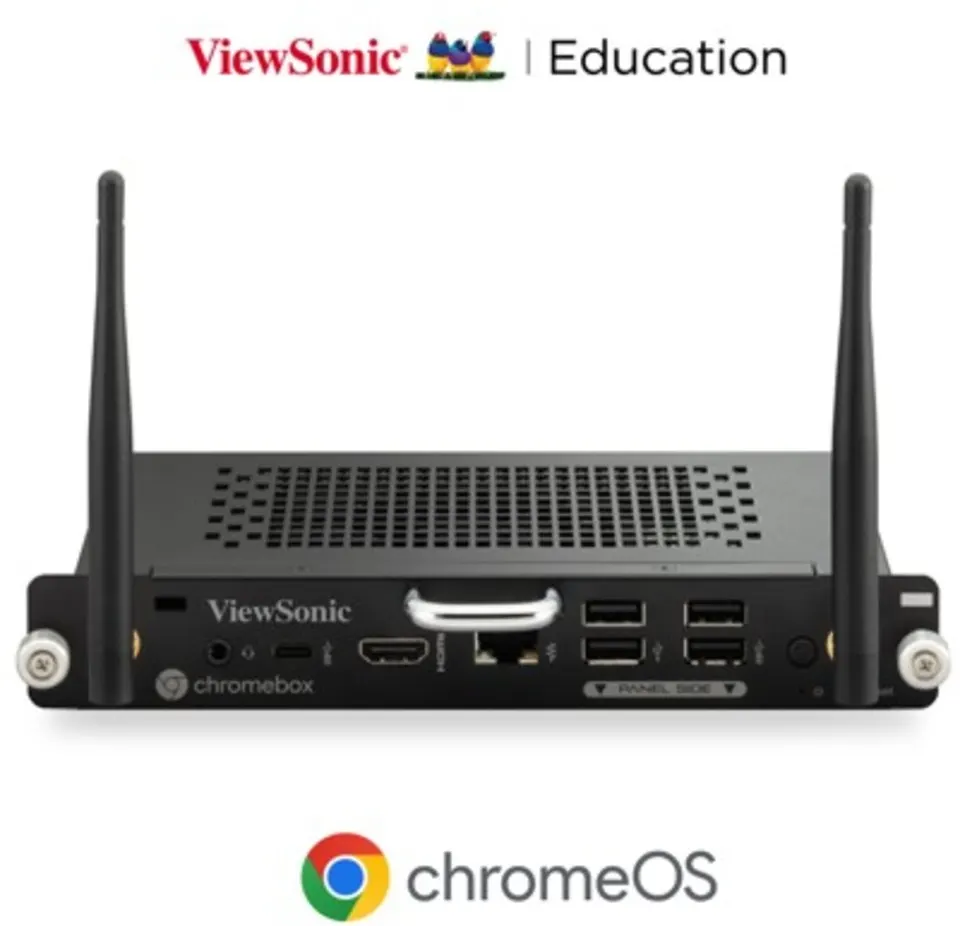
The ViewSonic VPC11-C33-G1 is a Chromebox OPS, a slot-in ChromeOS computer built for ViewBoard interactive displays. It pairs an Intel Celeron 7350E processor with 8GB DDR4 memory, a 256GB SSD, Wi-Fi 6E and Bluetooth 5.2. It suits classrooms and meeting rooms in Qatar that want a managed, Chrome-based PC inside the display. Request a quote from SmartRooms Qatar.

What this OPS module adds to a ViewBoard display

The ViewSonic VPC11-C33-G1 is a slot-in computer that runs ChromeOS, so a ViewBoard interactive panel can open lessons, meetings and shared files without a separate PC beside it. Because it sits in the display's OPS bay, cables stay short and the room keeps one tidy device for presenters and teachers.

The software side centres on Chrome-based tools. Users can add extensions from the Chrome Web Store, and Google Play support lets them install Android apps for classroom activities and interactive exercises. Which apps are available depends on account settings and the policy of the organisation.

Hardware facts that matter for planning

  • Processor and graphics: Intel Celeron 7350E (1.0G) with Intel UHD Graphics.
  • Memory and storage: 8GB DDR4 across two 4GB modules, with a 256GB SSD.
  • Wireless: Intel AX211 with Wi-Fi 6E and Bluetooth 5.2, with two antennas in the box.
  • Ports: one HDMI 2.0a output, one combo audio jack input, one RJ45 LAN port, two Type-A USB 2.0 ports, two Type-A USB 3.2 Gen1 (5Gbps) ports and one USB-C port.
  • Power input: DC +12V to +19V, 8A maximum.
  • Operating conditions: 0°C to 40°C and 20% to 80% RH, non-condensing.
  • Size and weight: 200 x 118 x 30 mm, 1 kg net.

The built-in security chip and automatic updates help keep each unit current without manual updates at every display. That matters for schools and offices running several panels at once.

Where it fits in Qatar

A private school in Al Wakrah fitting out new classrooms can standardise on one OPS unit per interactive display, so teachers use the same sign-in and browser setup in every room. Each classroom needs its own display and unit, so count units against the rooms that will actually use them.

In a West Bay office, a boardroom panel can run Chrome-based presentations and video calls from the same screen. When Wi-Fi coverage in the room is weak, the RJ45 port offers a wired connection. In a training room at Education City, the unit suits workshops where participants sign in with their own accounts.

What to plan before ordering

  • Confirm that your ViewBoard model accepts this OPS unit. The manufacturer lists only the ViewBoard IFPG1 as Works With Chromebook certified, so ask us to check your exact display model.
  • Keep the display in an air-conditioned room. The rated operating range tops out at 40°C, while Qatari summer temperatures regularly pass 45°C outdoors.
  • Review with the SmartRooms Qatar team how the unit is powered from the display and how cables will be routed before installation.
  • Plan network points with the two included antennas and the RJ45 port in mind.

Request a quote from SmartRooms Qatar. We will confirm compatibility, outline supply and professional installation across all eight municipalities, and arrange a free site survey where the room needs one.

Highlights

  • Intel Celeron 7350E processor with Intel UHD Graphics
  • 8GB DDR4 memory across two modules and a 256GB SSD
  • Intel AX211 with Wi-Fi 6E and Bluetooth 5.2
  • HDMI 2.0a output, combo audio jack, four Type-A USB ports, one USB-C
  • Built-in security chip with automatic updates
  • Operating range 0 to 40°C, 20% to 80% RH non-condensing

Estimated timeline

Quotation within 1 working day · delivery timing depends on stock availability, and we confirm it with your quotation.

Specifications

21 specifications · Source: manufacturer · checked Oct 2026
Software1
Operating System
ChromeOS
Core2
CPU
Intel Celeron 7350E (1.0G)
Graphics
Intel UHD Graphics
Memory2
Type
DDR
Capacity
8GB DDR4 (4GB *2)
Storage1
Capacity
256GB SSD
INPUT1
Combo Jack
*1
OUTPUT1
HDMI
2.0a *1
LAN1
RJ45
*1
Wireless / Bluetooth1
Wireless / Bluetooth
Intel Garfield Peak 2 AX211, Wi-Fi 6e +BT 5.2
USB2
Type A
Type A (2.0) *2 , Type-A (USB3.2Gen1(5Gbps)) *2
Type C
*1
Power1
Voltage
DC IN +12V~+19V @ 8A max
OPERATING CONDITIONS2
Temperature (º C)
0℃ ~ 40℃(working)
Humidity
20% ~ 80% RH Non-Condensing(working)
DIMENSIONS (W x H x D)2
Physical (inch / mm)
7.87 x 4.64 x 1.18 (in)/ 200 x 118 x 30 (mm)
Packaging (inch / mm)
9.53 x 8.15 x 2.56 (in)/ 242 x 207 x 65 (mm)
WEIGHT2
Net (lb / kg)
2.2 lb / 1 kg
Gross (lb / kg)
2.64 lb / 1.2 kg
PACKAGE CONTENTS1
PACKAGE CONTENTS
Quick Start Guide *1 , Antenna * 2
Disclaimer1
Value
Product specifications are subject to change without notice

Downloads

3 files from the manufacturer

Questions about VPC11-C33-G1

What is the ViewSonic VPC11-C33-G1 used for, and where in Qatar does it fit best?
It is a Chromebox OPS, a slot-in computer running ChromeOS and designed for ViewBoard interactive displays. It suits a school in Al Wakrah fitting out classrooms with interactive panels, or a West Bay office that wants meetings and presentations run from the screen itself without an extra desktop. It is a good fit for organisations that prefer one managed, browser-based system across rooms.
Which ViewBoard displays does it work with?
The unit is designed for ViewBoard interactive displays. The manufacturer states that it works with other ViewBoard models, but only the ViewBoard IFPG1 carries the Works With Chromebook certification. Before ordering, ask the SmartRooms Qatar team to confirm your exact display model and that its OPS connection matches this unit.
Can a school in Al Wakrah run Android learning apps on it?
Yes. The unit supports Google Play for Android apps and the Chrome Web Store for extensions. Which apps are available depends on Google account settings and your school's policy. A school using these apps for practice activities should set those permissions before the first lesson, so teachers do not need to fix settings in the middle of a class.
What processor, memory and storage does it have?
It uses an Intel Celeron 7350E (1.0G) processor with Intel UHD Graphics, 8GB of DDR4 memory built from two 4GB modules, and a 256GB SSD. This configuration suits browser-based lessons, presentations and video calls, with room for several browser windows and shared files open at once. Its specification points to everyday classroom and meeting work rather than heavy design or editing tasks.
Which ports and wireless features are included?
The unit has one HDMI 2.0a output, one combo audio jack input, one RJ45 LAN port, two Type-A USB 2.0 ports, two Type-A USB 3.2 Gen1 (5Gbps) ports and one USB-C port. Wireless is provided by an Intel AX211 with Wi-Fi 6E and Bluetooth 5.2, and two antennas are supplied in the box. Check these connections against your display before purchase.
Will it cope with the heat in a hotel lobby in Lusail?
Only in an air-conditioned space. The rated operating range is 0°C to 40°C at 20% to 80% RH, non-condensing, while summer temperatures in Qatar often exceed 45°C. A lobby with large glass frontages can heat up quickly, so keep the display away from direct sunlight and ask our team to review ventilation and cooling at your installation site.
How does it help protect data in a government office in Msheireb?
It includes a dedicated security chip and receives automatic updates, which helps keep each unit current without manual work at every display. Your IT team remains responsible for account policies, sign-in rules and any content filtering the ministry or authority requires. The unit supports those controls but does not replace them.
Is it suitable for a lecture hall or training room at Education City?
It suits ChromeOS-based teaching and workshops in a lecture hall or training room. Participants can use Chrome and Android apps, and the RJ45 port provides a wired network connection when Wi-Fi is congested. Confirm wireless coverage and the seating capacity of the room before choosing the display size that the unit will sit in.
What power does it need?
The unit requires DC input from +12V to +19V with a maximum current of 8A. Ask the SmartRooms Qatar team to explain how it draws power from your display and how the supply should be arranged for Qatar's 240V, 50Hz mains before installation, so the cabling and power distribution are planned together.
How much space does it need, and how heavy is it?
The unit measures 200 x 118 x 30 mm (7.87 x 4.64 x 1.18 in) and weighs 1 kg net, or 1.2 kg in packaging. Its small size is designed for fitting inside the display's OPS bay, so the main planning task is the space around the panel, such as clearances for a West Bay boardroom wall mount, rather than desk space.
What comes in the box?
The package includes a Quick Start Guide and two antennas. The packaged dimensions are 242 x 207 x 65 mm and the gross weight is 1.2 kg. Keep the packaging until installation is complete, and tell the SmartRooms Qatar team promptly if anything is missing on delivery so it can be resolved before the installation visit.
Can we order it on a purchase order or through a government tender?
Yes. SmartRooms Qatar accepts purchase orders (LPOs) and government tenders, including Monaqasat, and accepts payment by bank transfer, cheque or purchase order. Send the quantity and the display models with your request, and the team usually returns a quotation within one working day.

Similar models

Hisense OPS72D/72E Hisense OPS72D/72E OPS On Board Computer for Interactive Displays
8GB
Clevertouch OPS i5 Clevertouch OPS i5 PC Module with Intel Core i5 and 256GB SSD
Windows 11 - Home / Pro /… Memory: 16GB DDR4
Clevertouch OPS i7 Clevertouch OPS i7 PC Module with Intel Core i7 13620H
Windows 11 - Home / Pro /… 16GB DDR4
Hikvision DS-D5AC12G5-8S2 Hikvision DS-D5AC12G5-8S2 OPS Module for Interactive Panels
8G 256G
Hikvision DS-D5AC13G7-16S5 Hikvision DS-D5AC13G7-16S5 OPS Module with Intel Core i7-13620H
16G 512G
Email Call



