





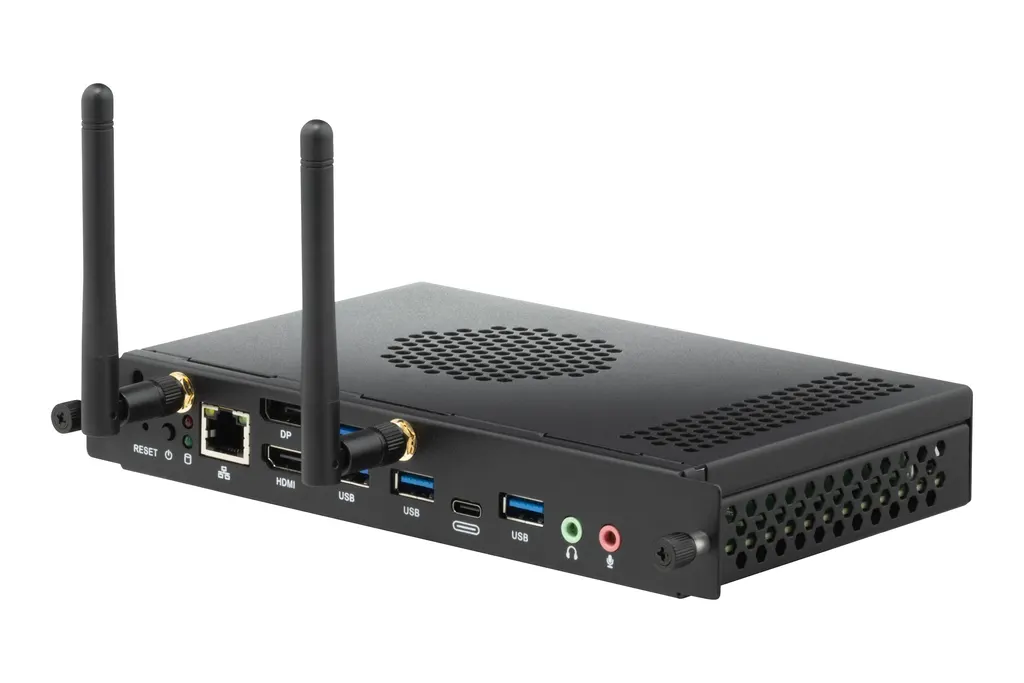
VPC35-W53-G1
ViewSonic VPC35-W53-G1 Slot-in PC for ViewBoard Displays
- Screen size
- 7.95 x 4.83 x 1.18 in / 202 x…
- System
- Windows 11 Pro
The ViewSonic VPC35-W53-G1 is an OPS slot-in computer that runs Windows 11 Pro inside a ViewBoard interactive display or presentation display. It pairs an Intel Core i5-1240P with 16GB DDR4 memory and a 256GB SSD, and provides Wi-Fi 6, Bluetooth 5.1, four USB 3.0 ports and a 4K HDMI output. Suited to Qatari schools and offices that want a built-in computer rather than a separate desktop PC.
What the VPC35-W53-G1 adds to a ViewBoard panel
The ViewSonic VPC35-W53-G1 is an OPS slot-in computer built for ViewBoard interactive displays and Presentation Displays. Once fitted, the display runs Windows 11 Pro from its own internal computer, so a teacher or presenter does not need a separate desktop or laptop beside the panel for everyday lessons, briefings and meetings. Before ordering, confirm that your panel model has a compatible OPS slot.
Processing, memory and storage
The unit is built around an Intel Core i5-1240P, listed with a base clock of 1.7 GHz and turbo boost up to 4.4 GHz. Its integrated Intel Iris Xe Graphics (80 EU) draw on system memory, and the specification gives a total of 32GB of available graphics memory. The machine ships with 16GB of DDR4 SO-DIMM memory that supports up to 32GB, and a 256GB M.2 2280 SSD using PCIe and SATA 3 interfaces. The manufacturer recommends a dual-channel memory setup for the best graphics results, as single-channel use can disable some graphics features.
Ports and connectivity for daily use
- Video: one DisplayPort 1.4 output and one HDMI 2.0 output, with HDMI rated up to 3840x2160 at 60Hz.
- Network: one Gigabit RJ45 LAN port, Intel Wi-Fi 6 AX200 (802.11 a/b/g/n/ac/ax, 2T2R) and Bluetooth 5.1.
- USB: four USB 3.0 Type-A ports and one USB Type-C port that carries data only.
- Audio: one microphone input and one line-out.
The bundled software list includes myViewBoard for Windows, Adobe Reader, a BIOS flashing tool and FinchGuard, a watchdog utility. An embedded TPM 2.0 chip is included, and the regulatory listing covers cTUVus, FCC, CE EMC, RoHS and WEEE.
Where it fits in Qatar
A private school in Al Wakrah refitting classrooms can standardise on one configuration, so every room runs the same Windows 11 Pro setup and the same bundled teaching tools. In a West Bay boardroom where staff join calls with colleagues abroad, the Wi-Fi 6 link and Gigabit LAN port give two network options, and the USB 3.0 ports leave room for a conference camera or microphone chosen separately. In Doha, where summer temperatures can rise above 45°C, the unit must sit in an air-conditioned room because its stated operating range tops out at 40°C.
Planning the installation
- Check the host panel's OPS slot and its DC supply against the 12 to 19V, 8A input rating.
- Allow for a maximum consumption of 96W per unit in your room power plan.
- Leave air to circulate around the unit; it measures 202 x 122.6 x 30 mm and weighs 0.6 kg net.
- Decide whether the room needs a wired RJ45 connection or Wi-Fi 6 for network access.
SmartRooms Qatar offers free site surveys, so a technical team can check your panel model, room conditions and cable routes before anything is ordered. Schools and government departments buying several units can raise a purchase order (LPO), and quotations are usually issued within one working day. Send your panel model and room details to SmartRooms Qatar and request a quote for the VPC35-W53-G1.
Highlights
- Intel Core i5-1240P with turbo boost up to 4.4 GHz
- 16GB DDR4 SO-DIMM memory, expandable to 32GB
- 256GB M.2 SSD with PCIe and SATA 3 interfaces
- Intel Wi-Fi 6 AX200 with Bluetooth 5.1
- Four USB 3.0 Type-A ports plus one USB-C data port
- DisplayPort 1.4 and HDMI 2.0 video outputs
- Operating range -5°C to 40°C, non-condensing humidity
Estimated timeline
Quotation within 1 working day · delivery timing depends on stock availability, and we confirm it with your quotation.
Specifications
Software1
- Operating System
- Windows 11 Pro
Core2
- CPU
- Intel® Core™ i5-1240P 1.7G Turbo boost 4.4G
- Graphics
- Integrated Intel® iris Xe Graphics (80EU)* Total Available Graphics Memory: 32GB Max Resolution up to 7680x4320@60Hz (DP)
Memory2
- Type
- DDR4 SO-DIMM
- Capacity
- 16GB (Up to 32GB)
Storage3
- Dimension
- M.2 2280 (22 x 80 mm)
- Capacity
- 256GB SSD
- Interface
- PCIE and SATA 3
INPUT1
- MIC(Microphone)
- x1
OUTPUT3
- DisplayPort
- x1 (1.4 max. resolution 7860x4320@60Hz)
- HDMI
- x 1 (2.0 max, resolution 3840x2160@60Hz)
- Audio
- x 1 Line out
LAN1
- RJ45
- x1
Wireless / Bluetooth1
- Wireless / Bluetooth
- Intel® Wi-Fi 6 AX200 802.11 a/b/g/n/ac/ax 2T2R + BT5.1
USB2
- Type A
- USB 3.0 x 4
- Type C
- x 1 (data only)
Bundled Software1
- Bundle Software
- myViewBoard for Window Adobe Reader BIOS Winflash tool FinchGuard (Watch Dog)
Power2
- Voltage
- DC 12-19V/ 8A
- Consumption
- 96 W (Max)
OPERATING CONDITIONS2
- Temperature (º C)
- -5~40°C
- Humidity
- 10% ~ 90% @ 40°C Non-condensing.
DIMENSIONS (W x H x D)2
- Physical (inch / mm)
- 7.95 x 4.83 x 1.18 in / 202 x 122.6 x 30 mm
- Packaging (inch / mm)
- 10.51 x 7.56 x 2.83 in / 267x 192 x 72mm
WEIGHT2
- Net (lb / kg)
- 1.33lb/0.6kg
- Gross (lb / kg)
- 2.14 lb/0.97kg
REGULATIONS1
- REGULATIONS
- cTUVus, FCC/ICES003, FCC ID/ ICID, TPCH DoC, Packing waste, CA65 DoC, CE EMC, (LVD or CB,CE R&TTE, ErP, RoHS Green BOM & DoC,REACH SVHC,WEEE
PACKAGE CONTENTS1
- PACKAGE CONTENTS
- 1. VPC OPS 2. Quick Start Guide
Disclaimer1
- Value
- * Intel® Iris® Xe Graphics in this model is an integrated GPU. Actual graphics performance may vary depending on the system-memory configuration. For optimal results, a dual-channel memory setup is recommended. When only single-channel memory is used, certain graphics features may be unavailable and overall GPU performance may differ.




