





Thursday, 22 October 2026 · 11 Jumada I 1448 AH Sun – Thu · 9:00 – 18:00
+971 56 914 9477 العربية
WhatsApp

VPC37-W53-G1

ViewSonic VPC37-W53-G1 Slot-in PC for ViewBoard Displays

Screen size
7.95 x 4.83 x 1.18 in / 202 x…
System
Windows 11 Pro
WhatsApp
Priceon request
QuotationWithin 1 working day
DeliveryConfirmed with your quote, based on stock
PDFDownload datasheet (VPC37-W53-G1_Datasheet.pdf)
Overview

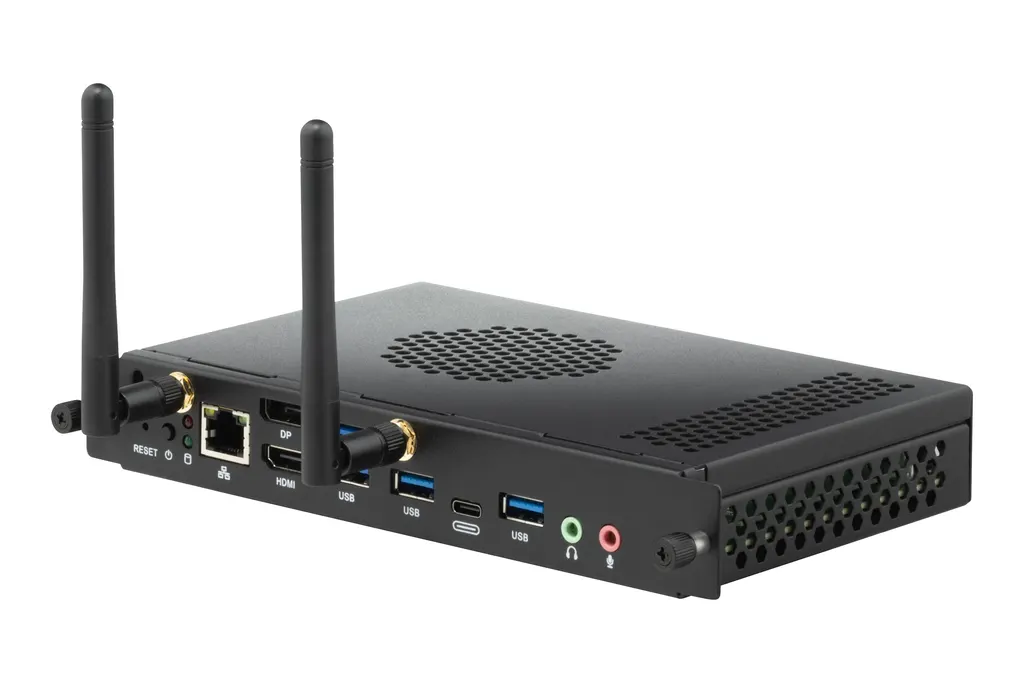
The ViewSonic VPC37-W53-G1 is an OPS computer that installs in a compatible ViewBoard interactive or presentation display. It pairs an Intel Core i7-1260P processor with 16GB DDR4 memory, a 256GB SSD and Windows 11 Pro, so the display runs lessons without a separate PC on the desk. Its HDMI, DisplayPort, four USB 3.0 ports and Wi-Fi 6 with Bluetooth 5.1 suit schools, universities and corporate boardrooms. Request a quote today.

What this slot-in PC adds to a ViewBoard display

The VPC37-W53-G1 is an OPS module that installs inside a compatible ViewBoard interactive display or presentation display, so the panel itself becomes the computer. Teachers and presenters can open lesson files, web applications and video calls directly on the screen rather than connecting a laptop at the start of every session. The unit is supplied with Windows 11 Pro and a bundle of software that includes myViewBoard for Windows.

Processor, memory and storage

The module is built around an Intel Core i7-1260P processor, rated at 2.1 GHz with turbo up to 4.7 GHz. It has 16GB of DDR4 SO-DIMM memory that can be expanded to 32GB, and a 256GB SSD in the M.2 2280 format connected over PCIe and SATA 3. Graphics come from integrated Intel Iris Xe hardware with 96 execution units. The manufacturer notes that graphics performance depends on the memory configuration, recommends a dual-channel setup for best results, and warns that single-channel memory can switch off some graphics features.

Ports and connections for daily use

  • Video output: one DisplayPort 1.4 rated up to 7680x4320 at 60Hz, and one HDMI 2.0 rated up to 3840x2160 at 60Hz
  • USB: four USB 3.0 Type-A ports and one USB-C port for data
  • Audio: one microphone input and one line-out
  • Networking: one Gigabit RJ45 port, Intel Wi-Fi 6 AX200 with 802.11 a/b/g/n/ac/ax at 2T2R, and Bluetooth 5.1

Where it fits in Qatar

A secondary school in Al Rayyan refitting its science and mathematics rooms can equip each display with one module, so teachers keep the same files and login from room to room. A corporate office in West Bay running Sunday to Thursday meetings can put the panel in a boardroom and join video calls from the screen, with a choice of wired Gigabit or dual-band Wi-Fi. A training centre in Education City can use the four USB 3.0 ports during workshops, when participants bring their own storage devices.

Planning power, heat and fit before you order

The module takes a DC input of 12 to 19V at up to 8A and draws a maximum of 96 W, so check that the host display's OPS slot matches this input before ordering. Its rated operating temperature is -5 to 40°C at 10 to 90% humidity, non-condensing. Summer temperatures in Qatar can exceed 45°C, so the display should sit in an air-conditioned room, and the airflow around the slot should be confirmed with the SmartRooms Qatar team. The unit measures 202 x 122.6 x 30 mm and weighs 0.6 kg net. Its listed approvals include CE, FCC, cTUVus and RoHS.

Request a quote from SmartRooms Qatar and tell us which ViewBoard display models you are equipping. We will check the fit with you before quoting, and quotations are usually issued within one working day.

Highlights

  • Intel Core i7-1260P processor with turbo up to 4.7 GHz
  • 16GB DDR4 memory, expandable to 32GB
  • 256GB M.2 2280 SSD over PCIe and SATA 3
  • One DisplayPort 1.4 and one HDMI 2.0 video output
  • Four USB 3.0 ports, Gigabit RJ45, Wi-Fi 6, Bluetooth 5.1
  • Windows 11 Pro with myViewBoard software bundle

Estimated timeline

Quotation within 1 working day · delivery timing depends on stock availability, and we confirm it with your quotation.

Specifications

28 specifications · Source: manufacturer · checked Oct 2026
Software1
Operating System
Windows 11 Pro
Core2
CPU
Intel® Core™ i7-1260P 2.1G Turbo boost 4.7G
Graphics
Integrated Intel® iris Xe Graphics (96EU)* Total Available Graphics Memory: 32GB Max Resolution up to 7680x4320@60Hz (DP)
Memory2
Type
DDR4 SO-DIMM
Capacity
16GB (up to 32GB)
Storage3
Dimension
M.2 2280 (22 x 80 mm)
Capacity
256GB SSD
Interface
PCIE and SATA 3
INPUT1
MIC(Microphone)
x1
OUTPUT3
DisplayPort
x1 (1.4 max. resolution 7860x4320@60Hz)
HDMI
x 1 (2.0 max. , resolution 3840x2160@60Hz)
Audio
x 1 Line out
LAN1
RJ45
x1
Wireless / Bluetooth1
Wireless / Bluetooth
Intel® Wi-Fi 6 AX200 802.11 a/b/g/n/ac/ax 2T2R + BT5.1
USB2
Type A
USB 3.0 x 4
Type C
x 1 (data only)
Bundled Software1
Bundle Software
myViewBoard for Window Adobe Reader BIOS Winflash tool FinchGuard (Watch Dog)"
Power2
Voltage
DC 12-19V/ 8A
Consumption
96 W (Max)
OPERATING CONDITIONS2
Temperature (º C)
-5~40°C
Humidity
10% ~ 90% @ 40°C Non-condensing.
DIMENSIONS (W x H x D)2
Physical (inch / mm)
7.95 x 4.83 x 1.18 in / 202 x 122.6 x 30 mm
Packaging (inch / mm)
10.51 x 7.56 x 2.83 in / 267x 192 x 72mm
WEIGHT2
Net (lb / kg)
1.33lb/0.6kg
Gross (lb / kg)
2.14 lb/0.97kg
REGULATIONS1
REGULATIONS
cTUVus, FCC/ICES003, FCC ID/ ICID, TPCH DoC, Packing waste, CA65 DoC, CE EMC, (LVD or CB,CE R&TTE, ErP, RoHS Green BOM & DoC,REACH SVHC,WEEE
PACKAGE CONTENTS1
PACKAGE CONTENTS
1. VPC37-W53-G1 2. Quick Start Guide
Disclaimer1
Value
*Intel® Iris® Xe Graphics in this model is an integrated GPU. Actual graphics performance may vary depending on the system-memory configuration. For optimal results, a dual-channel memory setup is recommended. When only single-channel memory is used, certain graphics features may be unavailable and overall GPU performance may differ.


Downloads

5 files from the manufacturer

Questions about VPC37-W53-G1

Who should buy the VPC37-W53-G1 instead of a separate desktop PC?
This module suits organisations that already run or are buying ViewBoard interactive or presentation displays and want the panel to act as its own computer. A government ministry in Doha upgrading several meeting rooms, for example, can avoid placing a desktop PC in each room. Check that each display has a compatible OPS slot and matching power input, then request a quote from SmartRooms Qatar with your list of display models.
Does it include Windows and ViewBoard software?
Yes. The unit runs Windows 11 Pro and comes with a bundle that includes myViewBoard for Windows, Adobe Reader, a BIOS flash utility and the FinchGuard watchdog tool. The package contains the module and a quick start guide. Confirm any licence requirements for the bundled software with SmartRooms Qatar when you request your quotation, so the software side of the order is clear before purchase.
What processor, memory and storage does it have?
It uses an Intel Core i7-1260P processor rated at 2.1 GHz base, with turbo up to 4.7 GHz. Memory is 16GB of DDR4 SO-DIMM, expandable to 32GB, and storage is a 256GB SSD in the M.2 2280 format. The manufacturer recommends a dual-channel memory setup, because single-channel use can make some graphics features unavailable and reduce overall GPU performance.
What resolutions can the video outputs drive?
The DisplayPort 1.4 output is rated for up to 7680x4320 at 60Hz, and the HDMI 2.0 output for up to 3840x2160 at 60Hz. These figures apply to connecting an external screen. If you plan a multi-panel video wall, confirm the layout and its requirements with the SmartRooms Qatar team before requesting a quote, because wall layouts depend on the rest of the system.
Which wired and wireless connections are available?
The module has one Gigabit RJ45 LAN port for wired networking, Intel Wi-Fi 6 AX200 supporting 802.11 a/b/g/n/ac/ax with 2T2R antennas, and Bluetooth 5.1. Wired Ethernet suits meeting rooms where a stable link matters for video calls, while Wi-Fi and Bluetooth cover wireless peripherals and guest devices. Agree your network plan with your IT team before installation.
Can it run in a hot classroom or boardroom in Qatar?
Its rated operating temperature is -5 to 40°C, with humidity from 10 to 90% at 40°C, non-condensing. Qatar summers can exceed 45°C, so a secondary school classroom in Al Rayyan or a boardroom in Doha should keep the display in an air-conditioned room and confirm airflow around the module before installation. Ask the SmartRooms Qatar team to review the room when you request a quote.
Is it suitable for a West Bay office boardroom that holds video calls?
Yes, it can serve as the computer behind a boardroom display, so meetings run from the panel rather than from a laptop. The Gigabit wired port, Wi-Fi 6 and Bluetooth 5.1 give the room several connection options. Offices in West Bay that meet from Sunday to Thursday should confirm that their video conferencing software runs on Windows 11 Pro before purchase, and test it on the display during planning.
What about a training centre in Education City running workshops?
Four USB 3.0 Type-A ports let participants connect their storage devices, while the USB-C port is rated for data only. The 256GB SSD keeps course material on the unit, and the Core i7-1260P processor handles lesson applications and browsers. If many participant devices will connect at once, define your port needs with the SmartRooms Qatar team before requesting a quote, so the workshop room is set up correctly.
How do I plan power and installation space?
The module needs a DC input of 12 to 19V at up to 8A and draws a maximum of 96 W. Its physical size is 202 x 122.6 x 30 mm, with a net weight of 0.6 kg and a packed weight of 0.97 kg. Compare these figures with the host display's OPS bay and power supply before ordering, and measure the space behind the panel so the module sits without strain on its connections.
Which approvals and regulatory declarations does it carry?
The listed regulatory approvals include cTUVus, FCC, CE EMC, CE R&TTE, RoHS, WEEE, ErP and REACH SVHC, plus a CA65 declaration. These help procurement teams in organisations that need documented compliance for IT equipment. Request the documents you need for your tender file when you ask for a quotation, so the paperwork is ready before the purchase order is raised.
Can a government entity or school group buy several units on an LPO?
Yes. SmartRooms Qatar accepts purchase orders (LPOs) and supports government tenders, including those on Monaqasat. A school group in Lusail equipping several classrooms can send one LPO covering multiple units, and payment can be made by bank transfer, cheque or purchase order. Quotations are usually issued within one working day, so list each display model so every module matches the correct panel.
Is the module covered by a warranty?
Yes. The VPC37-W53-G1 is covered by the manufacturer's warranty. The source data does not state the warranty period or terms, so we do not quote them here. Ask SmartRooms Qatar to confirm the warranty details in writing with your quotation, and compare them with the warranty on the host display before you place the order.

Similar models

Hisense OPS72D/72E Hisense OPS72D/72E OPS On Board Computer for Interactive Displays
8GB
Clevertouch OPS i5 Clevertouch OPS i5 PC Module with Intel Core i5 and 256GB SSD
Windows 11 - Home / Pro /… Memory: 16GB DDR4
Clevertouch OPS i7 Clevertouch OPS i7 PC Module with Intel Core i7 13620H
Windows 11 - Home / Pro /… 16GB DDR4
Hikvision DS-D5AC12G5-8S2 Hikvision DS-D5AC12G5-8S2 OPS Module for Interactive Panels
8G 256G
Hikvision DS-D5AC13G7-16S5 Hikvision DS-D5AC13G7-16S5 OPS Module with Intel Core i7-13620H
16G 512G
Email Call


