





Thursday, 22 October 2026 · 11 Jumada I 1448 AH Sun – Thu · 9:00 – 18:00
+971 56 914 9477 العربية
WhatsApp

VPCF5-W33-G1-2A

ViewSonic VPCF5-W33-G1-2A Slot-in PC for ViewBoard Interactive Displays

Screen size
7.87 x 4.68 x 1.18 in / 200 x…
System
Windows 11 Pro
WhatsApp
Priceon request
QuotationWithin 1 working day
DeliveryConfirmed with your quote, based on stock
PDFDownload datasheet (VPCF5-W33-G1-2A_Datasheet.pdf)
Overview

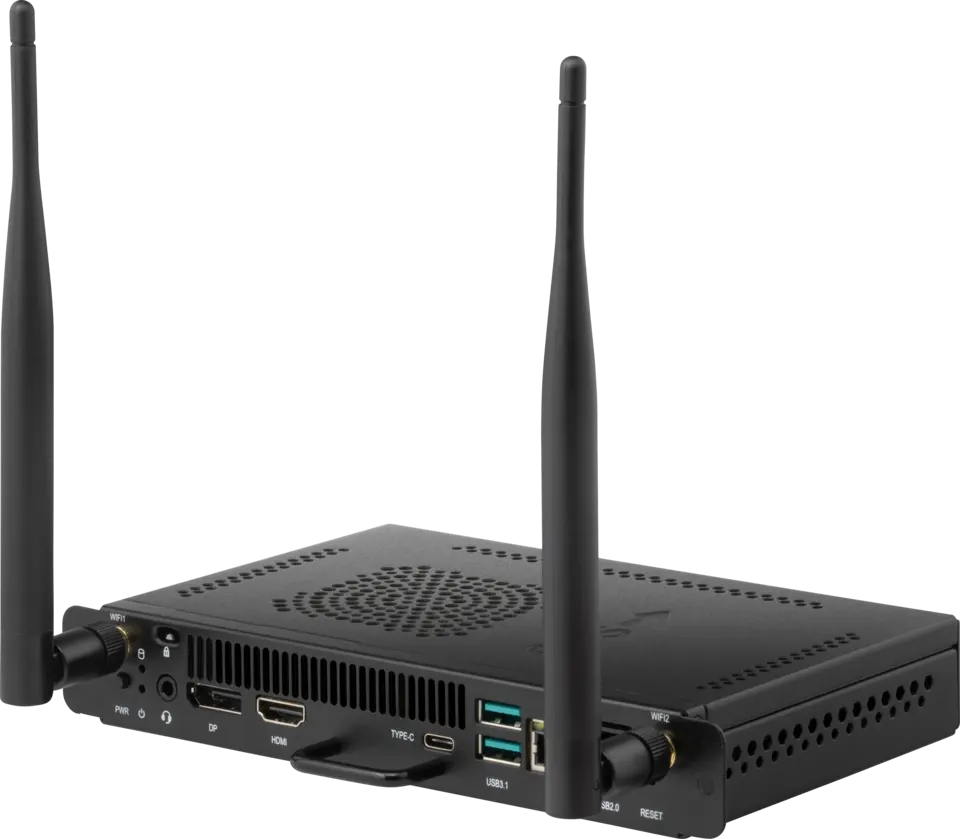
The ViewSonic VPCF5-W33-G1-2A is a slot-in PC that plugs into the OPS slot of a compatible ViewBoard interactive display, turning the panel into a Windows 11 Pro PC without a separate desktop. It carries an Intel 12th generation Core i5 or later processor, 8GB DDR4 memory, a 256GB M.2 PCIe SSD, dual-band Wi-Fi 6 and Bluetooth 5.2. It suits schools, ministries and meeting rooms across Doha.

What the module does inside a ViewBoard panel

The ViewSonic VPCF5-W33-G1-2A is an OPS slot-in computer. Rather than running a separate desktop beside a classroom or boardroom display, you fit this module into the 80-pin OPS slot of a compatible ViewBoard interactive or presentation display, and the panel runs Windows 11 Pro itself. Annotation software, web conferencing, shared files and browsers then sit on the same screen people are looking at, which keeps cabling and equipment in the room to a minimum.

Processor, memory and storage

The module uses an Intel 12th generation Core i5 or later processor with Intel Iris Xe integrated graphics, 8GB of DDR4 memory and a 256GB M.2 SSD with a PCIe interface. The specification notes that graphics performance depends on the memory configuration, and that a dual-channel memory setup is recommended for best results. Ask the team to confirm the configuration if your room will run video calls and large presentation files at the same time.

Video output and connectivity

Through the OPS connector, the module carries HDMI 2.0 at 4K and 60Hz and DisplayPort at 5K and 60Hz, alongside one USB 3.0 port, two USB 2.0 ports and a DC 12 to 19 V supply. Its own HDMI output is rated up to 3840x2160 at 30Hz. The ports and wireless options are:

  • Wireless: dual-band Intel Wi-Fi 6 AX101 (802.11ax) with Bluetooth 5.2, plus two antennas in the box.
  • Wired: one Gigabit RJ45 LAN port (10/100/1000M).
  • USB: two USB 3.1 Type A, two USB 2.0 Type A and one USB 3.1 Gen2 Type C port for data only.
  • Audio: one combined microphone-in and line-out connector.
  • Security and software: embedded TPM 2.0, Windows 11 Pro and built-in myViewBoard software.

Where it fits across Qatar

A ministry meeting room in West Bay might use the module with a large ViewBoard panel so that bilingual teams can annotate and share the same file during the Sunday to Thursday working week. A private school in Al Wakrah fitting out several classrooms could standardise on one model, so teachers learn a single interface across the building. In Education City, a lecture room can run lessons and join calls with colleagues abroad directly from the panel, without a separate laptop on the lectern.

Heat, power and installation planning

The rated operating range is 0°C to 40°C at 20% to 80% relative humidity, non-condensing. Outdoor temperatures in Qatar regularly pass 45°C in summer, so the panel should sit in an air-conditioned room, and the room conditions should be confirmed before installation. The rated power is DC 19 V at 4.74 A, with a maximum consumption of 90 W, which is worth including in electrical and cooling planning when several panels share a room. The module measures 200 x 119 x 30 mm and weighs 0.7 kg, so check the OPS bay clearance on your panel and plan the cable route before mounting.

Tell the SmartRooms Qatar team your panel model, the number of rooms and the intended use, and we will prepare a quotation, usually within one working day. Purchase orders and government tenders are accepted, and we deliver to all eight municipalities of Qatar with professional installation. Request a quote today to confirm the right module for your display.

Highlights

  • Installs in the OPS slot of compatible ViewBoard displays
  • Intel 12th generation Core i5 or later processor
  • 8GB DDR4 memory and 256GB M.2 PCIe SSD
  • Windows 11 Pro with embedded TPM 2.0
  • HDMI output up to 3840x2160 at 30Hz
  • Dual-band Wi-Fi 6, Bluetooth 5.2 and Gigabit LAN

Estimated timeline

Quotation within 1 working day · delivery timing depends on stock availability, and we confirm it with your quotation.

Specifications

26 specifications · Source: manufacturer · checked Oct 2026
Software1
Operating System
Windows 11 Pro
Core2
CPU
Intel Gen12th core i5 CPU or later Gen. CPU
Graphics
Intel® Iris® Xe Graphics* (DP Supports up to 8K@30Hz, HDMI Supports up to 3840x2160@30Hz)
Memory2
Type
DDR4
Capacity
8GB
Storage3
Dimension
M.2 SSD
Capacity
256GB
Interface
PCIE
INPUT2
MIC(Microphone)
MIC-In&Line-Out two in one connector
OPS Standard
80 PIN x1 (HDMI 2.0 4K@60Hz, DP 5K@60Hz, USB3.0 x1 + USB2.0 x2, DC 12-19V)
OUTPUT2
HDMI
x1 (Max 3840x2160@30Hz)
Audio
MIC-In&Line-Out two in one connector
LAN1
RJ45
x1 (RJ45 10/100/1000M)
Wireless / Bluetooth1
Wireless / Bluetooth
Intel® Wi-Fi 6 AX101 WIFI 6 802.11 ax + BT5.2
USB2
Type A
USB 3.1 x 2 / USB 2.0 x 2
Type C
USB 3.1 Gen2 x 1 (Data Only)
Power2
Voltage
DC 19 V/ 4.74A
Consumption
Max 90 W
OPERATING CONDITIONS2
Temperature (º C)
0℃ ~ 40℃(working)
Humidity
20% ~ 80% RH Non-Condensing(working)
DIMENSIONS (W x H x D)2
Physical (inch / mm)
7.87 x 4.68 x 1.18 in / 200 x 119 x 30 mm
Packaging (inch / mm)
10 x 7.72 x 2.76 in / 254 x 196 x 70 mm
WEIGHT2
Net (lb / kg)
1.54 lb / 0.7 kg
Gross (lb / kg)
1.54 lb / 3.4 kg
PACKAGE CONTENTS1
PACKAGE CONTENTS
1. Quick Start Guide(With Compliance Statement ) 2. Screws x 2 3. Antenna x 2
Disclaimer1
Value
* Intel® Iris® Xe Graphics in this model is an integrated GPU. Actual graphics performance may vary depending on the system-memory configuration. For optimal results, a dual-channel memory setup is recommended. When only single-channel memory is used, certain graphics features may be unavailable and overall GPU performance may differ.


Downloads

5 files from the manufacturer

Questions about VPCF5-W33-G1-2A

Who is this slot-in PC for?
It suits organisations that already own, or are buying, a compatible ViewBoard interactive or presentation display and want the panel to run its own Windows 11 Pro environment. In Qatar, that often means a ministry meeting room in West Bay, a school staff room in Al Rayyan or a hotel conference suite in Lusail, where IT teams want one display to handle annotation, apps and video calls without an extra desktop beside it. Confirm your panel's OPS slot with the SmartRooms Qatar team before ordering.
Which ViewBoard displays will accept the VPCF5-W33-G1-2A?
The manufacturer positions this module as an integrated solution for ViewBoard interactive displays and presentation displays that have an 80-pin OPS slot. Compatibility depends on the exact panel model and how its OPS slot is implemented, so do not assume it fits every ViewBoard. Send us your panel model and our team will confirm compatibility as part of the quotation.
What video resolutions does it output?
The module's own HDMI output is rated up to 3840x2160 at 30Hz. Through the 80-pin OPS connector, the specification lists HDMI 2.0 at 4K 60Hz and DisplayPort at 5K 60Hz, which is the signal path a compatible panel uses. The Intel Iris Xe graphics are listed as supporting DisplayPort up to 8K at 30Hz. For a lesson or presentation that depends on high-resolution slides, check the panel's input path with the team.
What processor, memory and storage does it have?
It uses an Intel 12th generation Core i5 or later processor with Intel Iris Xe integrated graphics, 8GB of DDR4 memory and a 256GB M.2 SSD with a PCIe interface. The specification notes that graphics performance depends on memory configuration and that dual-channel memory is recommended for best results. If your room will run video conferencing alongside large files, ask the team to confirm the configuration suits your workload.
Does it come with Windows 11 Pro and built-in software?
Yes. The module ships with Windows 11 Pro and includes built-in myViewBoard software. It has an embedded TPM 2.0 security chip that supports hardware-based security features. IT managers in schools or government offices can administer the panel like other Windows machines, although your own IT policies will determine the final setup.
Which ports and audio connections are included?
The module has one HDMI output, one Gigabit RJ45 LAN port (10/100/1000M), two USB 3.1 Type A ports, two USB 2.0 Type A ports and one USB 3.1 Gen2 Type C port that carries data only. A combined microphone-in and line-out connector handles audio. Plan cable runs for wired network access in meeting rooms where Wi-Fi coverage is weak, such as thick-walled conference rooms in older buildings.
Does it support Wi-Fi 6 and Bluetooth?
Yes. It uses an Intel Wi-Fi 6 AX101 module supporting 802.11ax, described as dual-band, with Bluetooth 5.2. Two antennas are supplied in the box. In a university lecture room where many devices connect at once, Wi-Fi 6 helps with crowded networks, but the speed you actually get depends on your access points and building layout, which our team can review before installation.
Can it run in a hot room during Qatar summers?
Its rated operating temperature is 0°C to 40°C, with 20% to 80% relative humidity, non-condensing. Outdoor temperatures in Doha regularly go above 45°C in summer, so the panel and its slot module must stay inside an air-conditioned room. Do not place it in a sun-facing lobby or near an unshaded window. Confirm the room's cooling capacity and airflow with the SmartRooms Qatar team before you choose a location.
How much power does it draw?
The specification lists a DC 19 V input at 4.74 A and a maximum consumption of 90 W. Ask the SmartRooms Qatar team to confirm how the host display supplies that power to the slot, because the OPS standard also cites a 12 to 19 V DC range. Factor the 90 W maximum into electrical and cooling planning, especially when several panels run in the same room.
Will it fit a boardroom with a large ViewBoard panel?
The module measures 200 x 119 x 30 mm and weighs 0.7 kg, so it takes up very little space compared with a desktop computer. In a boardroom in West Bay, the real question is whether the panel's OPS bay leaves enough room for the module and its two antennas, which should be planned during installation. Ask your installer to check the bay clearance and cable route before mounting the display on the wall.
We need several units for classrooms. Can we order by LPO?
Yes. SmartRooms Qatar accepts purchase orders (LPOs) and government tenders, and quotations are usually issued within one working day. A private school in Al Wakrah fitting out several classrooms should send the panel models, the number of rooms and the number of OPS modules together, so the quotation covers the full order. Free site surveys are available before installation.
How could it support lectures linked to teams overseas?
In an Education City lecture room, a presenter can run lessons, shared documents and video calls from the panel itself, and the RJ45 port gives a wired link to the university network for the most dependable connection. The module can be paired with a suitable camera and microphone. Ask the SmartRooms Qatar team which conferencing setup works with your network policy and room size.

Similar models

Hisense OPS72D/72E Hisense OPS72D/72E OPS On Board Computer for Interactive Displays
8GB
Clevertouch OPS i5 Clevertouch OPS i5 PC Module with Intel Core i5 and 256GB SSD
Windows 11 - Home / Pro /… Memory: 16GB DDR4
Clevertouch OPS i7 Clevertouch OPS i7 PC Module with Intel Core i7 13620H
Windows 11 - Home / Pro /… 16GB DDR4
Hikvision DS-D5AC12G5-8S2 Hikvision DS-D5AC12G5-8S2 OPS Module for Interactive Panels
8G 256G
Hikvision DS-D5AC13G7-16S5 Hikvision DS-D5AC13G7-16S5 OPS Module with Intel Core i7-13620H
16G 512G
Email Call


