





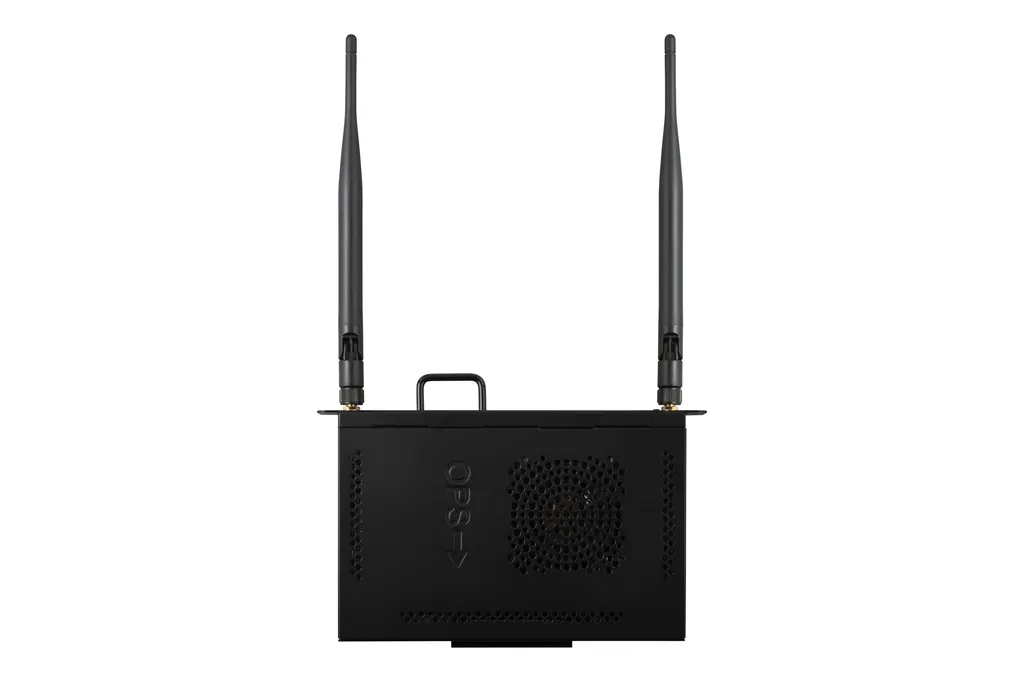
VPCF5-W55-G1
ViewSonic VPCF5-W55-G1 OPS Slot-in PC for ViewBoard Displays
- Screen size
- 7.87 x 4.68 x 1.18 in / 200 x…
- System
- Windows 11 pro
The ViewSonic VPCF5-W55-G1 is a slot-in PC that installs in the OPS bay of compatible ViewBoard interactive and presentation displays, turning the panel into a Windows 11 Pro computer. It carries an Intel Tiger Lake processor (11th gen Core i5 or later), 16GB DDR4 memory and a 512GB PCIe SSD, plus Wi-Fi 6, Bluetooth 5.2 and Gigabit LAN. Schools, boardrooms and training rooms in Qatar can request a quote.
What this module adds to a ViewBoard display
The VPCF5-W55-G1 is an OPS slot-in computer, a small Windows PC that sits in the OPS bay of a compatible display so the panel can run its own applications without a separate desktop beside it. In a classroom or boardroom this means fewer devices to install, cable and maintain. It is designed for ViewBoard interactive displays and presentation displays, so it suits rooms where the panel is already on the wall or on order.
Processing, memory and storage for lessons and meetings
The module uses an Intel Tiger Lake mobile processor, specified as an Intel 11th generation Core i5 or later, paired with 16GB of DDR4 memory and a 512GB M.2 SSD on a PCIe interface. Graphics come from integrated Intel Iris Xe with 96 execution units, and the data lists total available graphics memory at 32GB. The data sheet notes that graphics performance depends on the memory configuration and that dual-channel memory gives the best results. Single-channel use can make some graphics features unavailable.
Ports and connectivity on the module
- HDMI: one output, up to 3840x2160 at 30Hz
- DisplayPort: maximum listed resolution of 7680x4320 at 60Hz
- USB: two USB 3.1 Type A, one USB 3.1 Gen2 Type C (data only), one USB 2.0 Type A
- Network: Gigabit RJ45 LAN at 10/100/1000 Mbps
- Wireless: Intel AX101NGW with Wi-Fi 6 (802.11ax), Bluetooth 5.2 and two antennas
- Audio: combined microphone-in and line-out connector
If a project needs 4K at 60Hz over HDMI, ask the SmartRooms Qatar team to confirm the connection route before you commit, because the HDMI output is listed at 30Hz for 4K.
Where it fits in Qatar
A private school in Al Wakrah fitting out new classrooms can standardise on the same OPS module in every room, so each teacher gets the same Windows setup and the same myViewBoard Whiteboard tools throughout the academic year.
A boardroom in West Bay that holds regular calls with teams abroad can use the Wi-Fi 6 connection and Gigabit LAN where the building network supports them, while the Type A and Type C ports handle a presenter's USB drives and devices.
A training centre in Education City setting up lecture rooms can rely on Windows 11 Pro and the embedded TPM 2.0 to keep devices consistent across rooms. The bundle also lists FinchGuard (Watchdog) and Winflash, and the SmartRooms Qatar team can explain what each does on this build.
Planning the installation and operating environment
The module is rated for operation from 0 to 40 degrees Celsius at 10 to 90 percent humidity, non-condensing. Summer temperatures in Qatar can exceed 45 degrees Celsius, so keep the display in an air-conditioned room and check the temperature around the OPS bay, especially in lobbies or rooms exposed to direct sun. The module draws DC 12 to 19V at up to 8A and consumes a maximum of 90 W, so confirm that your display's OPS power supply matches.
Physical size is 200 x 119 x 30 mm, weight is 0.7 kg net and 1.2 kg gross, and the box contains a quick start guide with compliance statement, two screws and two antennas. Plan antenna placement and cable routing before installation. SmartRooms Qatar offers a free site survey before mounting, and quotations usually arrive within one working day. Request a quote with your display models and room conditions, and the team will confirm compatibility and availability with the quotation.
Highlights
- Intel 11th gen Core i5 or later, Tiger Lake mobile processor
- 16GB DDR4 memory and 512GB M.2 PCIe SSD
- Windows 11 Pro with embedded TPM 2.0
- Wi-Fi 6 (802.11ax) and Bluetooth 5.2 with two antennas
- HDMI up to 3840x2160 at 30Hz; DisplayPort listed to 7680x4320 at 60Hz
- Operating range 0 to 40 degrees Celsius, 10 to 90 percent non-condensing humidity
Estimated timeline
Quotation within 1 working day · delivery timing depends on stock availability, and we confirm it with your quotation.
Specifications
Software1
- Operating System
- Windows 11 pro
Core2
- CPU
- Intel® Tiger Lake Mobile Processor Intel Gen11th core i5 CPU or later Gen. CPU
- Graphics
- Integrated Intel® Iris Xe Graphics (96EU)* Total Available Graphics Memory: 32GB Max Resolution up to 7680x4320@60Hz (DP)
Memory2
- Type
- DDR4
- Capacity
- 16GB
Storage3
- Dimension
- M.2 SSD
- Capacity
- 512GB
- Interface
- PCIE
INPUT2
- MIC(Microphone)
- MIC-In&Line-Out two in one connector
- OPS Standard
- x1(USB type A 3.1X2, USB type C 3.1 X1 (DATA ONLY), USB 2.0 x1)
OUTPUT2
- HDMI
- x1 (Max 3840x2160@30Hz)
- Audio
- MIC-In&Line-Out two in one connector
LAN1
- RJ45
- x1 (10M/100M/1000M)
Wireless / Bluetooth1
- Wireless / Bluetooth
- Intel® AX101NGW WIFI 6 802.11 ax + BT5.2
USB2
- Type A
- USB 3.1 x 2 / USB 2.0 x 1
- Type C
- USB 3.1 Gen2 *1 (Data Only)
Bundled Software1
- Bundle Software
- myViewBoard Whiteboard, Adobe Reader, FinchGuard(Watchdog)/Winflash
Power2
- Voltage
- DC 12-19V/8A Max
- Consumption
- Max 90 W
OPERATING CONDITIONS2
- Temperature (º C)
- 0℃ ~ 40℃(working)
- Humidity
- 10% ~ 90% @ 40°C Non-condensing(working)
DIMENSIONS (W x H x D)2
- Physical (inch / mm)
- 7.87 x 4.68 x 1.18 in / 200 x 119 x 30 mm
- Packaging (inch / mm)
- 10.23xx 7.87 x 3.15 in / 260 x 200 x 80 mm
WEIGHT2
- Net (lb / kg)
- 1.54 lb / 0.7 kg
- Gross (lb / kg)
- 2.65 lb / 1.2 kg
REGULATIONS1
- REGULATIONS
- CE EMC / LVD / CE RED / RoHS /REACH / WEEE / CB2018
PACKAGE CONTENTS1
- PACKAGE CONTENTS
- 1. Quick Start Guide(With Compliance Statement ) 2. Screws x 2 3. Antenna x 2
Disclaimer1
- Value
- *Intel® Iris® Xe Graphics in this model is an integrated GPU. Actual graphics performance may vary depending on the system-memory configuration. For optimal results, a dual-channel memory setup is recommended. When only single-channel memory is used, certain graphics features may be unavailable and overall GPU performance may differ.




