





Thursday, 22 October 2026 · 11 Jumada I 1448 AH Sun – Thu · 9:00 – 18:00
+971 56 914 9477 العربية
WhatsApp

MCore-OPS-G2-MCore-OPS-G2T

Yealink MCore-OPS-G2-MCore-OPS-G2T OPS Computing Module for MeetingBoard

WhatsApp
Priceon request
QuotationWithin 1 working day
DeliveryConfirmed with your quote, based on stock
PDFDownload datasheet (Yealink MCore-OPS (Gen 2) Datasheet.pdf)
Overview

Yealink MCore-OPS-G2 and MCore-OPS-G2T are embedded OPS computing modules for Yealink MeetingBoard and MeetingBoard Pro panels. Each runs an Intel Core Ultra 5 125H with a built-in 34 TOPS NPU, 16GB DDR5 memory and a 256GB SSD, plus 4K HDMI-IN casting. The G2T variant is Microsoft Teams certified. It suits Doha boardrooms and training rooms that need a built-in computer for video meetings. Request a quote from SmartRooms Qatar.

An embedded computer for Yealink MeetingBoard panels

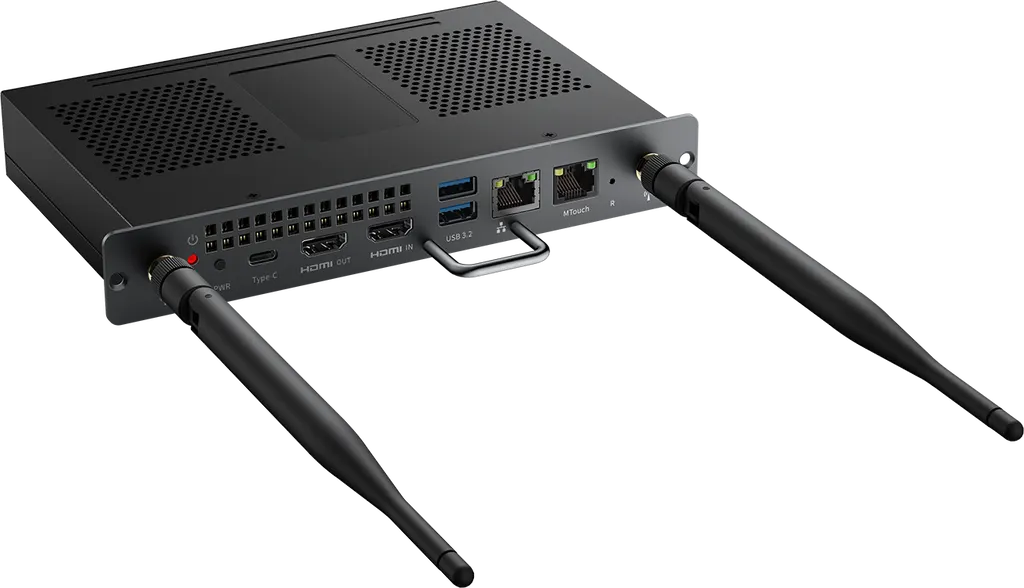
The Yealink MCore-OPS-G2 and MCore-OPS-G2T are OPS computing modules made for Yealink MeetingBoard and MeetingBoard Pro panels. Instead of connecting a separate PC, a room can run its meeting software from a module that sits inside the display system. The two models share the same core hardware and differ in software and Microsoft Teams support, so the order code matters when you request a quote. Part numbers are 1303292 for the MCore-OPS-G2 and 1303293 for the MCore-OPS-G2T.

Processing power, memory and storage

At the core is an Intel Core Ultra 5 125H processor with a built-in NPU rated at 34 TOPS. Memory is 16GB of DDR5 arranged as two 8GB modules, and storage is a 256GB SSD. That combination suits rooms that run a meeting app, a shared whiteboard and large files at the same time. The module ships with Windows 11 IoT Enterprise x64 preloaded.

Connectivity, casting and Teams readiness

  • HDMI-IN: accepts 4K content from a laptop or other source for casting to the panel.
  • Ports: one HDMI out, two USB 3.0 Type-A and one USB 3.0 Type-C port without DisplayPort, plus an MTouch RJ-45 port and a LAN RJ-45 port.
  • Wireless: Wi-Fi 6 (802.11 a/b/g/n/ac/ax) and Bluetooth 5.2.

Built-in EDID and CEC support help the module and panel work together, and CEC allows the module to wake a connected display. Security features include TPM 2.0, UEFI Secure Boot and Kernel DMA support, which matter to organisations with strict IT policies. The G2T model is Microsoft Teams certified and supports the Microsoft Teams Rooms app and Teams meetings. On that model the HDMI out port is not available in Teams Rooms mode.

Where it fits across Qatar

A campus lecture hall in Education City can run classroom presentations and video sessions from the panel, with no separate computer at the lectern. A bank or law firm in West Bay, where staff present in Arabic and English, can share a laptop through HDMI-IN and keep the session on the room system. A government ministry in Msheireb could standardise several boardrooms on one embedded configuration, which simplifies support across rooms.

Planning the installation and operating environment

Confirm that your MeetingBoard or MeetingBoard Pro panel is compatible before quoting, and check the power arrangement, since the module lists a 12–19 V input at 4.7–7.5 A. The operating ambient range is -10°C to 50°C with 10–90% humidity. Summer temperatures in Doha and Al Khor can exceed 45°C, so keep the room air-conditioned and the module's surroundings clear of obstructions. The module measures 180 mm by 119 mm by 30 mm and weighs 0.7 kg. The package includes two antennas, two screws, a screwdriver and a Quick Start Guide. SmartRooms Qatar offers a free site survey, delivery to all eight municipalities, professional installation, and quotations usually within one working day. Request a quote with your panel model and room count, and the SmartRooms Qatar team will confirm the right configuration.

Highlights

  • Intel Core Ultra 5 125H with built-in 34 TOPS NPU
  • 16GB DDR5 memory (2 x 8GB) and 256GB SSD
  • 4K HDMI-IN casting with built-in EDID and CEC support
  • TPM 2.0 and UEFI Secure Boot support
  • Windows 11 IoT Enterprise x64 preloaded
  • G2T variant is Microsoft Teams certified and supports Teams Rooms

Estimated timeline

Quotation within 1 working day · delivery timing depends on stock availability, and we confirm it with your quotation.


Specifications

Source: manufacturer · checked Oct 2026
The full specification and datasheet for this model are available on request; we send them with your quotation.

Downloads

14 files from the manufacturer
PDF Datasheets Yealink MCore-OPS (Gen 2) Datasheet.pdf 1.4 MB Yealink MCore-OPS-G2-MCore-OPS-G2T datasheets (PDF, 1.4 MB) URL Datasheets · Opens on manufacturer site MCore-OPS Series Specifications and Compatibility Lists Yealink MCore-OPS-G2-MCore-OPS-G2T datasheets (URL) PDF Manuals & guides · Opens on manufacturer site Yealink MCore-OPS-G2 Quick Start Guide (EN, DE, FR, ES) V1.0.pdf Yealink MCore-OPS-G2-MCore-OPS-G2T manuals & guides (PDF) PDF Manuals & guides · Opens on manufacturer site Yealink MCore-OPS-G2 Quick Start Guide (IT) V1.0.pdf Yealink MCore-OPS-G2-MCore-OPS-G2T manuals & guides (PDF) PDF Manuals & guides · Opens on manufacturer site Yealink MCore-OPS-G2 Quick Start Guide (NL) V1.0.pdf Yealink MCore-OPS-G2-MCore-OPS-G2T manuals & guides (PDF) PDF Manuals & guides · Opens on manufacturer site Yealink MCore-OPS-G2T Quick Start Guide (EN, DE, FR, ES) V1.0.pdf Yealink MCore-OPS-G2-MCore-OPS-G2T manuals & guides (PDF) PDF Manuals & guides · Opens on manufacturer site Yealink MCore-OPS-G2T Quick Start Guide (IT) V1.0.pdf Yealink MCore-OPS-G2-MCore-OPS-G2T manuals & guides (PDF) PDF Manuals & guides · Opens on manufacturer site Yealink MCore-OPS-G2T Quick Start Guide (NL) V1.0.pdf Yealink MCore-OPS-G2-MCore-OPS-G2T manuals & guides (PDF) MP4 Manuals & guides · Opens on manufacturer site Yealink Windows OPS Installation V1.0.mp4 Yealink MCore-OPS-G2-MCore-OPS-G2T manuals & guides (MP4) STP Drawings & CAD · Opens on manufacturer site MCore-OPS (Gen 2) CAD Drawings.stp Yealink MCore-OPS-G2-MCore-OPS-G2T drawings & cad (STP) PDF Other documents Yealink Regulatory Notice V1.2.pdf 1.0 MB Yealink MCore-OPS-G2-MCore-OPS-G2T other documents (PDF, 1.0 MB) URL Other documents · Opens on manufacturer site Rooms Accessories Compatibility Lists Yealink MCore-OPS-G2-MCore-OPS-G2T other documents (URL) URL Other documents · Opens on manufacturer site Yealink MCore-OPS-G2 Image File Yealink MCore-OPS-G2-MCore-OPS-G2T other documents (URL) URL Other documents · Opens on manufacturer site Yealink MCore-OPS-G2T Image File Yealink MCore-OPS-G2-MCore-OPS-G2T other documents (URL)

Questions about MCore-OPS-G2-MCore-OPS-G2T

What is the MCore-OPS-G2 used for?
The MCore-OPS-G2 is an OPS computing module that adds a built-in computer to compatible Yealink MeetingBoard and MeetingBoard Pro panels. It suits meeting rooms, classrooms and boardrooms that want to run meeting software and presentations from the panel itself rather than a separate PC, such as corporate boardrooms in West Bay or campus classrooms in Education City.
What is the difference between the MCore-OPS-G2 and MCore-OPS-G2T?
The G2T carries the T suffix, which marks it as Microsoft Teams certified. It supports the Microsoft Teams Rooms app and Teams meetings, and on that model the HDMI out port is not available in Teams Rooms mode. The standard G2 is supplied with Yealink RoomConnect instead. Both share the same processor, memory and SSD, so state the exact variant and part number, 1303292 or 1303293, when you request a quote.
What processor, memory and storage does the module have?
It uses an Intel Core Ultra 5 125H processor with a built-in NPU rated at 34 TOPS, 16GB of DDR5 memory in two 8GB modules, and a 256GB SSD. This configuration suits a room where a video meeting, a shared whiteboard and large presentation files run at the same time. Windows 11 IoT Enterprise x64 comes preloaded on the module.
Can it show 4K content from a laptop?
Both variants have one HDMI-IN port that accepts 4K content from a laptop or other source for casting. A presenter can connect a laptop to HDMI-IN and continue the session on the panel, whether the meeting runs in Arabic, English or both. The module also has one HDMI out port on the G2, which is useful for feeding a second display.
Will the display switch on automatically when the module starts?
The module supports CEC, which allows it to wake the connected display, so staff do not need the remote to switch the screen on before a meeting. Built-in EDID support handles display information. Check that your panel is a MeetingBoard or MeetingBoard Pro model, since the module is designed for those panels, before you request a quote.
Which wireless and Bluetooth standards does it support?
The module supports Wi-Fi 6 with IEEE 802.11 a/b/g/n/ac/ax and Bluetooth 5.2 through the AX201 module. The package includes two antennas, two screws, a screwdriver and a Quick Start Guide. Confirm that the wireless network in your building supports these standards and that the signal reaches the panel location before installation.
What security features are included?
The module supports TPM 2.0, UEFI Secure Boot and Kernel DMA, and it allows a custom boot logo. For a ministry or bank with strict information security policies, these settings help bring the room computer in line with the organisation's managed device standards. Ask the SmartRooms Qatar team to review the configuration with your IT department before deployment.
How much space does the module need?
The module measures 180 mm by 119 mm by 30 mm and weighs 0.7 kg, and it ships in a carton of 267 mm by 215 mm by 65 mm. Before ordering, check with the installer that the space in or behind your panel can take the unit and its cabling. SmartRooms Qatar offers free site surveys to confirm this for your room.
What power does it need?
The datasheet lists an input of 12 to 19 V at 4.7 to 7.5 A. Because the power arrangement depends on the panel it is fitted to, include your panel model in the request so the SmartRooms Qatar team can confirm the correct supply setup before installation. This avoids delays once the module is on site.
Can it run in Doha's summer heat?
The operating ambient range is -10°C to 50°C with humidity from 10% to 90%. Summer temperatures in Doha can exceed 45°C, so install the module in an air-conditioned meeting room with its vents unobstructed. Avoid unconditioned spaces, lobbies exposed to sunlight and dusty areas, where the margin below the 50°C limit becomes small.
Is it a good fit for a university lecture hall in Education City?
Yes, if the hall uses a compatible Yealink MeetingBoard panel. The module removes the need for a separate computer at the lectern, so the lecturer presents from the panel's own system and can bring in content from another device through HDMI-IN. This suits halls where several lecturers need the same setup and the same operating routine.
How do we order the module for several rooms in a school or government entity?
SmartRooms Qatar usually issues a quotation within one working day and accepts purchase orders (LPOs) and government tenders, including Monaqasat. Payment can be made by bank transfer, cheque or purchase order. Send a list of rooms with the MeetingBoard model for each, because compatibility is confirmed panel by panel.

Similar models

Hisense OPS72D/72E Hisense OPS72D/72E OPS On Board Computer for Interactive Displays
8GB
Clevertouch OPS i5 Clevertouch OPS i5 PC Module with Intel Core i5 and 256GB SSD
Windows 11 - Home / Pro /… Memory: 16GB DDR4
Clevertouch OPS i7 Clevertouch OPS i7 PC Module with Intel Core i7 13620H
Windows 11 - Home / Pro /… 16GB DDR4
Hikvision DS-D5AC12G5-8S2 Hikvision DS-D5AC12G5-8S2 OPS Module for Interactive Panels
8G 256G
Hikvision DS-D5AC13G7-16S5 Hikvision DS-D5AC13G7-16S5 OPS Module with Intel Core i7-13620H
16G 512G
Email Call


