






Biamp
Evoko Kleeo Desk Manager 6-pack + 1yr license
Biamp Evoko Kleeo Desk Manager 6-Pack (910-01972) Desk Booking Display
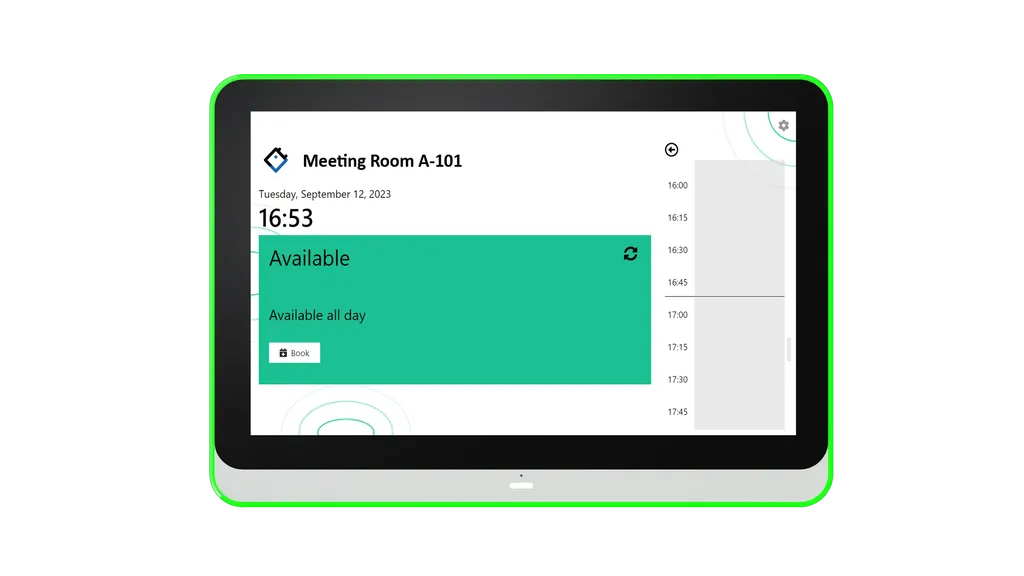
Booking for Outlook
IAdea Booking for Outlook Room Booking Software
Priceon request
QuotationWithin 1 working day
DeliveryConfirmed with your quote, based on stock
Overview
IAdea Booking for Outlook links your Exchange calendar to IAdea room panels, so people can book a room, extend a meeting or end it from the screen outside the door. When Outlook is the backend calendar, Microsoft Teams and Zoom meetings appear alongside standard Outlook bookings. The Premium tier, which requires a license, adds multi-panel configuration and corporate branding. It suits Doha offices, universities and schools managing many shared rooms. Request a quote.
What IAdea Booking for Outlook does at the door
IAdea Booking for Outlook is room booking software for IAdea room panels. It links the Exchange calendar your staff already use to the screen outside each meeting room, so the room schedule is visible exactly where people need it. Someone arriving at a door can check whether the room is free, reserve a 30-minute slot, or extend the meeting already under way, all from the panel.
Because the panel is the booking terminal, nobody has to open a laptop, search for a conference room or install an app to make a reservation. For organisations with many small rooms, this reduces the common problem of rooms being booked in one calendar and used by someone else.
Standard and Premium tiers side by side
Both tiers show booking information on screen, including meeting name, time and duration. Both also use an LED status light that reflects the meeting status, and offer a timeline view of today's agenda. The difference lies in control and branding.
- Standard: room information on screen, an LED status light and a timeline agenda view.
- Premium (license required): everything in Standard, plus on-site booking, extension and cancellation, tailored space management settings, Unified Setting for multi-panel configuration, and corporate branding with your logo and background.
Choose the tier room by room. A small meeting room with simple scheduling needs may suit Standard, while a boardroom or a shared floor managed by facilities staff usually justifies Premium.
Teams and Zoom meetings on the same screen
Where Outlook serves as the backend calendar, Microsoft Teams and Zoom meetings are shown on the panel alongside standard Outlook bookings. This matters in Qatar, where a meeting room in Doha often hosts discussions with colleagues in Europe, Asia or elsewhere in the region. Staff see the room and its online meetings in one place rather than switching between tools. Confirm your Outlook and Exchange setup during the quotation stage so the panels are configured to match.
Where it fits in Qatar
A government ministry office in Msheireb with boardrooms across several floors can use Premium so administrators decide whether staff may book or cancel on-site, while the Outlook calendar remains the single record. A private school in Al Sadd fitting out classrooms and meeting rooms can use Unified Setting to push one configuration to every panel in the building, keeping branding and rules consistent. A hotel in West Bay with conference rooms on several levels can let event teams extend a session from the door without calling the front desk.
Planning your deployment
Start with a free site survey. SmartRooms Qatar will check where each panel will sit beside its meeting room, how it will be powered and networked, and which Exchange and Outlook environment will serve as the calendar backend. Map each room to a tier and list which rooms need Premium features, then send that list with your quotation request. Quotations are usually issued within one working day. Organisations ordering for several rooms can raise a purchase order (LPO) or respond to a government tender, and pay by bank transfer, cheque or purchase order. Products are covered by the manufacturer's warranty.
Ready to plan your rooms? Request a quote from SmartRooms Qatar and tell us how many rooms you need and which tier each one requires.
Highlights
- Book, extend and end meetings from the room panel
- Uses your Exchange calendar as the scheduling backend
- Microsoft Teams and Zoom meetings shown with Outlook bookings
- Standard tier: room information, LED status light, timeline agenda
- Premium tier (license required): on-site management and Unified Setting
- Corporate logo and background on every panel
Room fit
Tell us the room size and platform (Teams, Zoom or BYOD) and we confirm the right combination with your quotation.
Estimated timeline
Quotation within 1 working day · delivery timing depends on stock availability, and we confirm it with your quotation.
Specifications
Source: manufacturer · checked Oct 2026
The full specification and datasheet for this model are available on request; we send them with your quotation.
Downloads
4 files from the manufacturerQuestions about Booking for Outlook
What is IAdea Booking for Outlook?
It is room booking software that connects an Exchange and Outlook calendar to IAdea room panels mounted outside meeting rooms. Staff check availability, reserve a 30-minute slot, or extend and end the current meeting directly from the panel. It is aimed at organisations that want the room schedule shown at the door, using the calendars their teams already work in every day.
Do staff need a phone app or a browser tab to book a room?
No. The booking happens on the room panel itself, so staff do not need a phone app or a browser tab. This suits offices in Doha where people walk up to a meeting room, see it is free and book it on the spot, rather than opening a laptop or searching for a calendar invitation first.
Which calendar system does Booking for Outlook use?
It runs Exchange as the calendar backend and connects to the Outlook calendar your teams already use. Before deployment, confirm that your Exchange and Outlook environment is the one you want the panels to read and write. SmartRooms Qatar can review this during the free site survey so bookings made at the door appear in the same calendars as desktop bookings.
Can Microsoft Teams and Zoom meetings appear on the panel?
Yes, when Outlook is used as the backend calendar, Microsoft Teams and Zoom meetings are shown on the panel alongside standard Outlook bookings. Staff can see which room is in use and which online meetings are scheduled there. Confirm this setup with your IT team during the quotation stage, so the panels are configured for the platforms your organisation uses.
What is the difference between Standard and Premium?
Standard displays booking information on screen, including meeting name, time and duration, shows an LED status light and offers a timeline view of today's agenda. Premium adds on-site booking, extension and cancellation, tailored space management settings, Unified Setting and corporate branding. Premium requires a license, so include the tier and licence needs for each room in your quotation request.
Can administrators stop staff from cancelling meetings on the panel?
Yes, with Premium you can set whether on-site bookings or meeting cancellations are permitted. A government ministry office in Msheireb with boardrooms on several floors could allow staff to book and extend from the door while restricting cancellations to administrators, so the Outlook calendar stays accurate and the room is not released without authorisation.
How do we keep the same settings across many rooms?
Premium includes Unified Setting, which pushes one configuration to all panels in the building at once. A private school in Al Sadd fitting out classrooms and meeting rooms could set booking rules and display settings once, then apply them to every panel. This keeps the experience consistent across floors and reduces the time spent configuring each room separately.
Can we add our own logo and colours to the panel?
Yes. Premium lets you personalise the panel with corporate branding, including your logo and background. For a school or government body, this means each meeting room display reflects the organisation's identity rather than a generic booking screen. Include your logo files and colour preferences in the quotation request so the setup can be planned in advance.
Is this suitable for a hotel in West Bay with conference rooms?
It suits hotels with conference and meeting rooms on several levels. Event teams in West Bay can see whether a room is free, extend a session from the door when a workshop overruns, and end a booking early so the room is released. Hotels that already manage events through Outlook can keep one calendar for their conference spaces without asking staff to use a separate system.
Would it work for a university or training centre in Education City?
Yes, for shared seminar rooms and training rooms that several departments book. The timeline view shows the day's agenda at the door, so students and faculty can see when a room is occupied. Premium's space management settings can control who may book or cancel on-site, which helps when a room is shared between faculties and external training providers.
Could an office in Lusail use it for meetings with overseas teams?
An office in Lusail that runs meetings with colleagues abroad can use the panels to show Microsoft Teams and Zoom sessions alongside ordinary bookings. Staff see the room status and the online meeting in one place, which reduces double bookings for hybrid meetings. Confirm the Outlook backend and calendar permissions during the survey, so overseas invitations land in the correct room calendar.
What should we plan before mounting the panels?
Plan the mounting position beside each meeting room, the power and network routes, and the calendar setup before installation. SmartRooms Qatar offers a free site survey, which is worth booking for multi-floor offices in Doha where panels must line up with room doors. Share a room list with the tier for each room so the quotation reflects the exact deployment.
Similar models



Biamp
Evoko Liso Freestand Mount - Boltable
Biamp Evoko Liso Freestand Mount (Boltable) 910-01935 Floor Stand
