Sennheiser
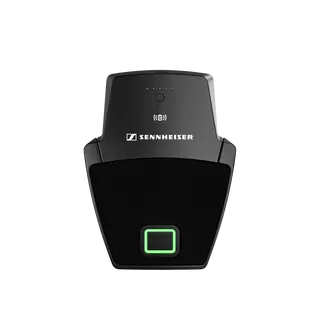
SL Boundary 114-S DW-3 B
Sennheiser SL Boundary 114-S DW-3 B Wireless Table Boundary Microphone
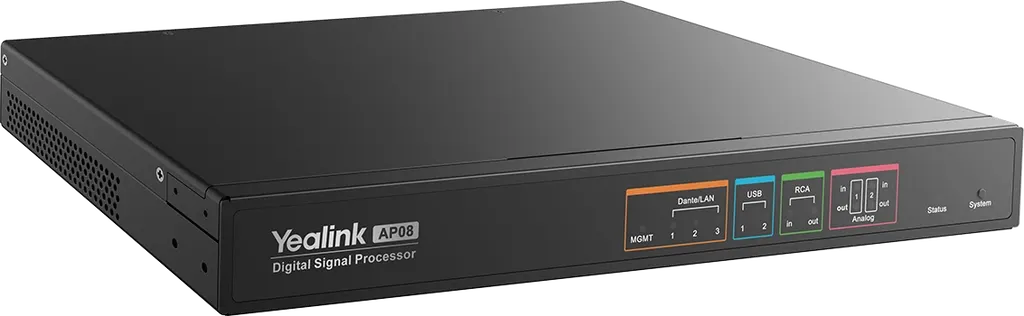
AP08
Yealink AP08 Digital Signal Processor for Meeting Room Audio
- Pickup range
- 86dB
Priceon request
QuotationWithin 1 working day
DeliveryConfirmed with your quote, based on stock
Overview
The Yealink AP08 is a digital signal processor for meeting rooms and boardrooms. It handles up to 16 x 16 Dante audio channels, including 8 channels with dynamic echo cancellation, alongside 4 x 4 analog channels and two USB 3.0 Type-B interfaces. Three PoE+ ports power connected audio devices, and Yealink Room Designer helps plan and tune the audio layout. It suits Doha offices, lecture theatres and government meeting suites that need dependable conferencing audio.
What the Yealink AP08 does in a meeting room
The Yealink AP08 is a digital signal processor (DSP) that sits between microphones, loudspeakers and the conferencing system, shaping room audio before it reaches remote participants. Its core is 16 x 16 Dante channels, so one unit can carry many audio paths over an IP network. Eight of those channels include dynamic acoustic echo cancellation (AEC), which keeps a remote caller from hearing their own voice returned from the room.
Connectivity and power over the network
Beyond Dante, the AP08 provides four analog inputs and four analog outputs. Two of each are RCA unbalanced connections, and the other two of each are 3-pin balanced Phoenix connectors. The balanced inputs support +48 V phantom power at 10 mA maximum. Two USB 3.0 Type-B device interfaces allow direct connection to computers and compatible conferencing devices. Three RJ-45 Dante ports are PoE+ powered, each supporting IEEE 802.3at power sourcing, with a total maximum of 90 W across the unit.
Key specifications for technical and procurement teams
- Dante audio: 48 kHz sampling, 24-bit depth, 50 Hz to 20 kHz frequency response and 86 dB dynamic range.
- Analog audio: 20 Hz to 20 kHz frequency response, 96 dB input dynamic range and 98 dB output dynamic range.
- Control: RS-232 port, RJ-45 management port for API control, and eight GPIO inputs and eight GPIO outputs.
- Power: 100 to 240 V, 50/60 Hz, 2 A, a range that covers Qatar's 240 V, 50 Hz mains supply.
- Size and weight: 360 x 189 x 44 mm, 2.2 kg, Advanced Black finish with SGCC steel construction.
Where it fits in Qatar
In a boardroom in Msheireb or West Bay, the AP08 can bring ceiling microphones and loudspeakers onto a Dante network alongside a Microsoft Teams Rooms setup, with audio tuned to the room layout rather than by trial and error. A private school in Al Sadd fitting out lecture halls can use the balanced analog inputs to reuse existing wired microphones alongside new network devices. A training centre in Al Rayyan equipping several rooms can use Yealink Room Designer to document the audio links for each room.
What to plan before ordering
Confirm the installation environment first. The AP08 is rated for operating temperatures of 0 to 40 °C and humidity of 0 to 93% RH, so install it in an air-conditioned room or equipment cabinet rather than an outdoor or unconditioned space, where summer temperatures in Qatar can exceed 45 °C. Plan the 90 W PoE+ budget across the three powered ports and review the Dante network design with your IT team. The intelligent design features require both the processor and Yealink Room Designer to be fully operational, so include the software in your planning.
SmartRooms Qatar offers a free site survey, so our team can check the room and network before quoting. Quotations are usually issued within one working day. We accept purchase orders (LPOs) and government tenders, including Monaqasat. Request a quote for the AP08 and tell us the room size, the number of microphones and loudspeakers, and whether the site already has a Dante network.
Highlights
- 16 x 16 Dante audio channels at 48 kHz and 24-bit
- Eight channels with dynamic acoustic echo cancellation (AEC)
- Four analog inputs and four outputs, plus two USB 3.0 Type-B
- Three RJ-45 Dante ports with PoE+, 90 W total
- 100 to 240 V, 50/60 Hz supply covers Qatar's 240 V mains
- Operating range 0 to 40 °C; install in air-conditioned rooms
Room fit
Tell us the room size and platform (Teams, Zoom or BYOD) and we confirm the right combination with your quotation.
Estimated timeline
Quotation within 1 working day · delivery timing depends on stock availability, and we confirm it with your quotation.
Specifications
57 specifications · Source: manufacturer · checked Oct 2026
Dante Channels7
- Input Channels
- 16 Dante input (8 AEC channels)
- Output Channels
- 16 Dante output
- Frequency Response
- 50 Hz - 20 kHz
- THD+N
- <1%
- Sampling Rate
- 48 kHz
- Bit Depth
- 24-bit
- Dynamic Range
- 86dB
Analog Channels10
- Frequency Response
- 20 Hz - 20 kHz
- THD+N
- <1%
- Input Dynamic Range
- 96dB
- Output Dynamic Range
- 98dB
- RCA (Unbalanced)
- -94 dBu
- Analog (Balanced)
- -86 dBu
- Input Clipping Range
- 0 to 64 dB
- Output Sensitivity Range
- -40 dBu to 24 dBu
- Phantom Power
- +48VDC 10 mA max
- Details
- Input Channels: 2 × RCA input 2 × 3-pin Analog input Output Channels: 2 × RCA output 2 × 3-pin Analog output Self-Noise:
USB Channels4
- Input Channels
- 2 × USB input
- Output Channels
- 2 × USB output
- Sampling Rate
- 48 kHz
- Bit Depth
- 16-bit/24-bit
Control Ports12
- MGMT
- RJ-45 for API control
- RS232
- 1 × 3-pin phoenix port
- Input voltage range
- 0 to 24VDC
- Input impedance
- 29k ohms
- Programmable pullup
- 1k ohms to +5VDC (default: disable)
- Threshold low to high
- Programmable range: 0~24VDC, default=2.8V
- Threshold high to low
- Programmable range: 0~24VDC, default=2V
- Analog Inputs
- 12bit A/D, 0 to 24VDC
- GPIO out
- 8-pin Phoenix port, 1-8 outputs, open-drain output (up to 24V, 0.3A), default state +3.3V
- +12VDC
- 0.1A
- GND
- Earth
- Details
- GPIO in: Digital Inputs (default):
LAN Ports2
- LAN 1-3
- Dante network port
- Details
- Power Supply: Each port supports IEEE802.3at PSE Total maximum PSE 90 W
Product Design6
- Size
- L360 × W189 × H44 mm
- Weight
- 2.2 kg
- Color
- Advanced Black
- Material
- SGCC
- Operating Temperature
- 0 - 40 ℃
- Operating Humidity
- 0 - 93 % RH
Logistics Information3
- Giftbox
- 410 × 325 × 70 mm
- Storage Temperature
- -30 - 70 ℃
- Details
- Weight: N.W/CTN 2.94 kg G.W/CTN 3.45 kg
RCA in1
- Details
- 2 × RCA unbalanced analog input
RCA out1
- Details
- 2 × RCA unbalanced analog output
Analog in1
- Details
- 2 × 3-Pin Phoenix connectors for balanced analog input, supports 48V phantom power
Analog out1
- Details
- 2 × 3-Pin Phoenix connectors for balanced analog output
GPIO in1
- Details
- 1-8 input, simulated input or contact closure (maximum 24V), switchable 5V pull-up
GPIO out1
- Details
- 1-8 output, open-drain output (maximum 24V, 0.3A), default +3.3V
+12VDC1
- Details
- 0.1A
GND1
- Details
- Earth ground
RS-2321
- Details
- Interface control
USB Type-B1
- Details
- 2 × USB 3.0 device interfaces
MGMT1
- Details
- Network Interface Control
LAN1
- Details
- 3 × RJ-45 Dante PoE+ powered interfaces
Power1
- Details
- 100–240 V, 50/60 Hz, 2A
Downloads
27 files from the manufacturer
PDF
Yealink AP08 datasheets (PDF, 1.5 MB)
PDF
Yealink AP08 manuals & guides (PDF, 2.7 MB)
PDF
Yealink AP08 manuals & guides (PDF, 1.6 MB)
URL
Yealink AP08 manuals & guides (URL)
URL
Yealink AP08 manuals & guides (URL)
URL
Yealink AP08 manuals & guides (URL)
URL
Yealink AP08 manuals & guides (URL)
URL
Yealink AP08 manuals & guides (URL)
URL
Yealink AP08 manuals & guides (URL)
DXF
Yealink AP08 drawings & cad (DXF)
STP
Yealink AP08 drawings & cad (STP)
30 -
Yealink AP08 software & firmware (30 - FIRMWARE & RELEASE NOTE)
35 -
Yealink AP08 software & firmware (35 - FIRMWARE & RELEASE NOTE)
45 -
Yealink AP08 software & firmware (45 - FIRMWARE & RELEASE NOTE)
25 -
Yealink AP08 software & firmware (25 - FIRMWARE & RELEASE NOTE)
35 -
Yealink AP08 software & firmware (35 - FIRMWARE & RELEASE NOTE)
55 -
Yealink AP08 software & firmware (55 - FIRMWARE & RELEASE NOTE)
PDF
Yealink AP08 other documents (PDF, 1.0 MB)
URL
Yealink AP08 other documents (URL)
URL
Yealink AP08 other documents (URL)
URL
Yealink AP08 other documents (URL)
URL
Yealink AP08 other documents (URL)
URL
Yealink AP08 other documents (URL)
MP4
Yealink AP08 other documents (MP4)
MP4
Yealink AP08 other documents (MP4)
MP4
Yealink AP08 other documents (MP4)
URL
Yealink AP08 other documents (URL)
Questions about AP08
What is the Yealink AP08 used for?
The Yealink AP08 is a digital signal processor that shapes audio for meeting rooms, handling Dante network audio, analog sources and USB connections in one unit. It suits boardrooms, training rooms and lecture halls in Qatar where remote participants need clear sound. Eight of its Dante inputs use dynamic acoustic echo cancellation, which helps stop a remote caller hearing their own voice returned from the room.
How many Dante audio channels does the AP08 support?
The AP08 supports 16 x 16 Dante audio channels, meaning 16 inputs and 16 outputs over the network. Eight of the input channels include dynamic AEC, so plan which ceiling microphones or sources will use them. Audio runs at 48 kHz with 24-bit depth, with a 50 Hz to 20 kHz frequency response and 86 dB dynamic range on the Dante side.
What analog connections does the AP08 provide?
The AP08 has four analog inputs and four analog outputs. Two inputs and two outputs are RCA unbalanced connections, and the other two of each are 3-pin balanced Phoenix connectors. The balanced inputs support +48 V phantom power at 10 mA maximum. A private school in Al Sadd fitting out lecture halls could reuse existing wired microphones alongside new network devices without replacing every component.
Does the AP08 work with Yealink SkySound audio devices?
The manufacturer lists the CM50 Dante beamforming ceiling microphone, the CS10 and CS10-D network ceiling loudspeaker, and the CM20 AI-powered beamforming ceiling microphone as related accessories. SkySound devices connected to the same network can have their audio links set up automatically for the room. Confirm your exact device mix with the SmartRooms Qatar team when you request a quote.
How much power can the AP08 deliver over PoE+?
Each of the three RJ-45 Dante ports supports IEEE 802.3at power sourcing, with a total maximum of 90 W across the unit. Add up the power needs of any PoE-powered devices before you choose the switch and cabling. The AP08 itself is rated 100 to 240 V, 50/60 Hz, 2 A, so confirm the power arrangement for your room during the site survey.
Can the AP08 be installed in a hot plant room or outdoor cabinet in Qatar?
No. The AP08 is rated for operating temperatures of 0 to 40 °C and humidity of 0 to 93% RH, and its storage range is -30 to 70 °C. Summer temperatures in Qatar can exceed 45 °C, so install it in an air-conditioned meeting room or equipment cabinet. If site conditions are unclear, the SmartRooms Qatar team can review the location during the free site survey before you order.
Is the AP08 compatible with Qatar's 240 V power supply?
The AP08 is rated for 100 to 240 V at 50/60 Hz, which covers Qatar's 240 V, 50 Hz mains supply. The source data does not specify the plug type, so confirm the power cord and socket arrangement with SmartRooms Qatar when you request a quote. This matters when the audio rack in a comms room is powered from existing sockets.
Does the AP08 support Microsoft Teams Rooms?
Yes. The manufacturer describes the AP08 as designed for optimized performance in Microsoft Teams Rooms. Its Dante audio for Teams Room solution is controlled through the MVC control panel, with synchronized mute and automatic EQ. A company in Doha running Teams Rooms across several meeting spaces can therefore manage mute across the room from one panel, according to the manufacturer's data.
What does Yealink Room Designer do with the AP08?
Yealink Room Designer is software that works with the AP08. Auto design produces an audio plan from basic room data, acoustic adaptation detects the room's acoustic environment and adjusts the algorithms, and Auto EQ adjusts output according to the Teams meeting state. The manufacturer notes that these intelligent design features need both the processor and the software fully operational, so plan for the software from the start.
Can the AP08 be controlled by a room control system?
The AP08 offers an RS-232 3-pin port, an RJ-45 management port for API control, and eight GPIO inputs and eight GPIO outputs. GPIO outputs are open-drain, rated up to 24 V and 0.3 A. An education centre in Education City could use these interfaces to link audio functions to a room control system, but confirm the integration approach with the SmartRooms Qatar team before ordering.
Which Qatar sites suit a multi-room AP08 order?
Training centres, universities and government offices fitting out several rooms are typical examples. A training centre in Al Rayyan equipping four rooms could order under a purchase order (LPO) and document each room's audio links with Room Designer. SmartRooms Qatar usually issues quotations within one working day, and government tenders, including Monaqasat, are accepted. Include room sizes and microphone counts in your request.
What size is the AP08 and how is it mounted?
The AP08 measures 360 x 189 x 44 mm and weighs 2.2 kg, with an Advanced Black finish and SGCC steel construction. The source data does not list mounting options, so ask the SmartRooms Qatar team to confirm the mounting method during a free site survey. Check the space, cable routing and ventilation before installation.
Similar models
Sennheiser
SL Boundary 114-S DW-4 B
Sennheiser SL Boundary 114-S DW-4 B Wireless Table Boundary Microphone