Thursday, 22 October 2026 · 11 Jumada I 1448 AH Sun – Thu · 9:00 – 18:00
+971 56 914 9477 العربية
WhatsApp

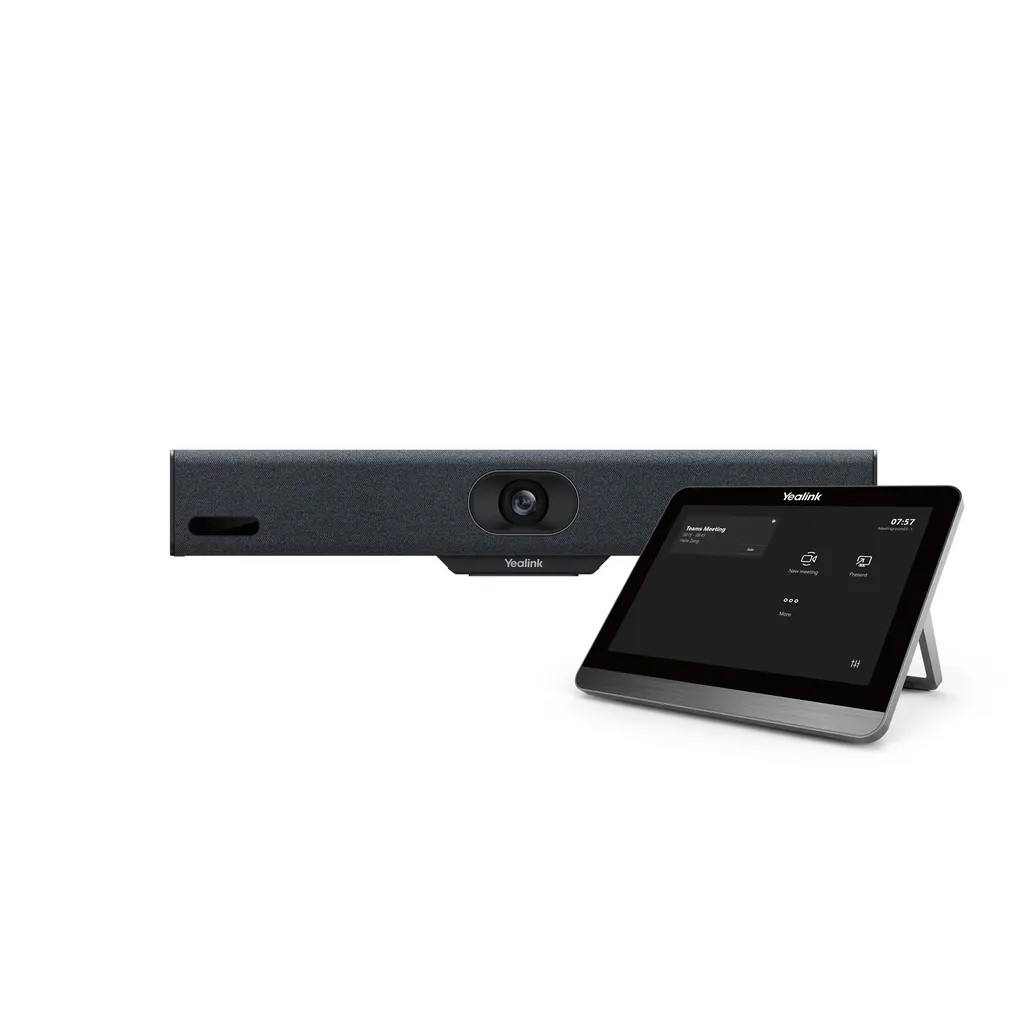
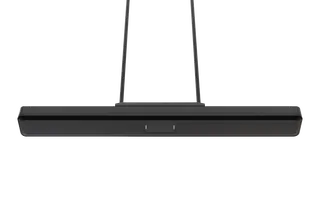
MeetingBar A10

Yealink MeetingBar A10 All-in-One Android Video Bar

Video
1080p30 / 720p30
Speakers
88db SPL@1W
WhatsApp
Priceon request
QuotationWithin 1 working day
DeliveryConfirmed with your quote, based on stock
PDFDownload datasheet (Yealink MeetingBar A10 Datasheet.pdf)
Overview

The Yealink MeetingBar A10 is an all-in-one Android video bar that combines a 4K camera, eight microphones, a 5 W speaker and computing in one unit. It offers auto framing, speaker tracking and native Teams, Zoom and Device Mode support. It suits home offices and small meeting rooms in Doha, Lusail and Al Rayyan. Teams, Zoom and RingCentral editions are listed separately. Request a quote from SmartRooms Qatar for supply, installation and delivery to all eight municipalities.

An all-in-one video bar for small rooms and home offices

The Yealink MeetingBar A10 packs a camera, microphone array, speaker, computing unit and wireless connectivity into one enclosure that mounts with an adjustable TV clamp. Because Android 13 runs the meeting software inside the bar, a small room does not need a separate PC to start a call. It is designed for home offices, huddle rooms and small meeting rooms where a full conference system would be more equipment than the space needs.

Platform editions are listed separately, so confirm the variant you need before ordering. The data lists a Microsoft Teams Rooms on Android edition for 1 to 5 people, a Zoom Rooms edition for 1 to 7 people and a RingCentral edition. Across these editions the bar supports native Teams and Zoom, along with a Device Mode, in one SKU.

Framing that follows the people in the room

The camera has a 120° diagonal and 105° horizontal field of view, and the data lists output resolutions of 1080p30 and 720p30. Auto Framing counts the people in the room and chooses a suitable view, while Speaker Tracking zooms toward whoever is talking without manual adjustment. Multi-focus framing is also supported. Smart Gallery, which follows active speakers across remote participants, is listed for Zoom only. An electric privacy shutter covers the lens when the room is not in use.

Eight microphones and full-duplex audio

The built-in array of eight MEMS microphones is rated for a 4.5 m pickup distance, with 3.5 m for high-quality pickup. AI-based noise cancellation reduces keyboard noise, mouse clicks and footsteps. Acoustic echo cancellation, automatic gain control and full-duplex operation let both sides of a call speak at once. The 5 W forward-facing speaker has a 210 Hz to 20 kHz frequency response, which suits a bar placed to face the people seated around a table.

Connections, sharing and remote management

  • HDMI output with CEC support, so the display can be controlled from the bar
  • USB-C port for content sharing, plus a USB 2.0 port and line in/line out
  • Gigabit Ethernet, a Yealink VCH port (RJ-45) and dual-band Wi-Fi at 2.4 GHz and 5 GHz
  • Bluetooth 4.2, and the optional WPP30 wireless presentation pod for plug-and-share sharing
  • TLS 1.2/1.3, AES 256-bit encryption, IEEE 802.1X and VLAN support for network security teams

Remote management covers the Yealink HTTPS web portal, the Yealink Device Management Platform, the Yealink Management Cloud Service, Teams Admin Center and Zoom device management, for monitoring, configuration, updates and diagnostics.

Where it fits in Qatar

  • A consultancy office in Msheireb equipping a small meeting room for regular calls with clients abroad, where a Teams edition suits a team of up to five.
  • A private school in Al Wakrah setting up a staff huddle room for remote training sessions, using a Zoom edition sized for up to seven people.
  • A clinic administration office in Al Sadd that needs a tidy, low-cabling room for calls with specialist partners overseas.

Planning the installation

The bar measures 380 mm x 57 mm x 57 mm. Check the mounting position, the top edge of the display and the cable route before ordering, because the package includes a 3 m Ethernet cable and a 1.8 m HDMI cable. The operating range is 0 to 40°C, so install it indoors in an air-conditioned room; storage is rated from -30 to +70°C. The power adapter accepts 100 to 240 V input and outputs 48 V DC at 0.7 A, with average consumption of 4.6 W and peak of 8.1 W. Kit A10-010 includes the VCR11 remote, and kit A10-020 includes the CTP18 touch console.

To plan a single room or several, send SmartRooms Qatar the room size, the number of seats and the platform you use. We offer a free site survey, usually send quotations within one working day, and accept LPOs and government tenders. Request a quote today and we will confirm the right edition and kit for your room.

Highlights

  • 4K camera with 120\u00b0 diagonal field of view
  • Eight MEMS microphones with 4.5 m pickup distance
  • Built-in 5 W forward-facing speaker
  • Android 13 with native Teams, Zoom and Device Mode
  • HDMI with CEC, USB-C sharing and gigabit Ethernet
  • Operating range 0 to 40\u00b0C, indoor installation advised

Room fit

Tell us the room size and platform (Teams, Zoom or BYOD) and we confirm the right combination with your quotation.

Estimated timeline

Quotation within 1 working day · delivery timing depends on stock availability, and we confirm it with your quotation.

Specifications

37 specifications · Source: manufacturer · checked Oct 2026
Camera2
Resolution
1080p30, 720p30
Details
4K camera 120° DFoV 105° HFoV 4 x e-PTZ camera Electric privacy shutter Intelligence features Auto framing Speaker tracking Multi-focus framing Smart gallery (Zoom only)
Audio11
Built-in microphone frequency response
100Hz to 8kHz
Frequency response
210-20kHz
Speaker volume
88db SPL@1W, 93db SPL@3W both +/-2db at 0.5m
Maximum power
8 W
Rated power
5 W
Sensitivity
84db SPL @ 1W @ 0.5 meter
Sampling rate
48 kHz
Sound emission angle
Forward-facing
Total Harmonic Distortion (THD)
at 5W, 1KHZ,<5%
Rated impedance
4 ohms
Details
Built-in 8 MEMS microphone array 4.5-meter pickup distance, 3.5-meter high-quality pickup distance Advanced AI noise cancellation algorithm Excellent full-duplex AGC (Automatic Gain Control) Incredible echo cancellation technology Speaker: Built-in 5 W high-fidelity speaker
Operating System1
Details
Android 13
Meeting Features1
Details
Calendar One-click join Meeting collaboration Content sharing Meeting control: Add participants Hold/Resume Camera on/off Mute/Unmute Volume up/down Hang up
Video Standard and Network Suitability1
Video codecs
H.264 high profile, H.264 SVC, H.264
Network and Security Features3
QoS
802.1p/q, Diff-serv
Network diagnosis
ping, trace route
Details
Built-in dual-band Wi-Fi (2.4 GHz/5 GHz) Built-in Bluetooth 4.2 IPv4 and IPv6, DHCP/static IP HTTP/HTTPS web server TLS 1.2/1.3, AES 256-bit encryption VLAN, LLDP IEEE802.1X EAP-MD5/EAP-TLS PEAP-MSCHAPv2 EAP-TTLS/EAP-MSCHAPv2 Time and date synchronization using SNTP Built-in certificate
Ports1
Details
1 x HDMI output (CEC supported) 1 x USB 2.0 1 x USB-C for content sharing 1 x Line in/Line out 1 x 10 M/100 M/1000 M Ethernet port 1 x Yealink VCH port (RJ-45) 1 x Power port 1 x Security lock slot 1 x Reset slot
Other Physical Features10
Power adapter
AC 100-240 V input and DC 48 V/0.7 A output
USB output
5 V 0.5 A
Standby power consumption
7.9 W
Average power consumption
4.6 W
Peak power consumption
8.1 W
Dimension (W.D.H)
380 mm x 57 mm x 57 mm
Operating humidity
10 - 90%
Operating temperature
0 - 40°C
Storage temperature
-30 to +70°C
Details
Power consumption (PSU):
Weight4
Qty
4; 1
N.W/CTN
8.31 kg; 3.59 kg
G.W/CTN
9.25 kg; 4.27 kg
Details
A10-010: A10-020:
MeetingBar A10 Package2
Carton meas
447 mm x 165 mm x 150 mm
Details
Package contents: MeetingBar A10 endpoint 3 m Ethernet cable 1.8 m HDMI cable Mounting bracket and accessories Power adapter Quick start guide Controller device (optional): CTP18 touch console VCR11 remote control Sharing & BYOD device (optional): Wireless presentation pod Full-featured USB-C cable
Device Management1
Details
Yealink HTTPS web portal Yealink device management platform Yealink management cloud service Teams admin center Zoom device management

Downloads

124 files from the manufacturer
PDF Datasheets Yealink MeetingBar A10 Datasheet.pdf 604 KB Yealink MeetingBar A10 datasheets (PDF, 604 KB) PDF Datasheets Yealink MeetingBar Specification Comparison List.pdf 106 KB Yealink MeetingBar A10 datasheets (PDF, 106 KB) PDF Manuals & guides Controller Quick User Guide for Zoom.pdf 400 KB Yealink MeetingBar A10 manuals & guides (PDF, 400 KB) PDF Manuals & guides Quick User Guide for General Mode (BYOM).pdf 2.9 MB Yealink MeetingBar A10 manuals & guides (PDF, 2.9 MB) PDF Manuals & guides Quick User Guide for Microsoft Teams.pdf 4.2 MB Yealink MeetingBar A10 manuals & guides (PDF, 4.2 MB) PDF Manuals & guides Set Up a Yealink MeetingBar.pdf 15.0 MB Yealink MeetingBar A10 manuals & guides (PDF, 15.0 MB) PDF Manuals & guides Setup Checklist.pdf 38 KB Yealink MeetingBar A10 manuals & guides (PDF, 38 KB) PDF Manuals & guides Yealink MeetingBar A10 Quick Start Guide (EN, DE, FR, ES) V1.3.pdf 1.9 MB Yealink MeetingBar A10 manuals & guides (PDF, 1.9 MB) URL Manuals & guides · Opens on manufacturer site About Device Yealink MeetingBar A10 manuals & guides (URL) URL Manuals & guides · Opens on manufacturer site Accessibility Yealink MeetingBar A10 manuals & guides (URL) URL Manuals & guides · Opens on manufacturer site Accessibility Yealink MeetingBar A10 manuals & guides (URL) URL Manuals & guides · Opens on manufacturer site Administrator Password Yealink MeetingBar A10 manuals & guides (URL) URL Manuals & guides · Opens on manufacturer site Advanced Network Yealink MeetingBar A10 manuals & guides (URL) URL Manuals & guides · Opens on manufacturer site AirPlay Content Sharing Yealink MeetingBar A10 manuals & guides (URL) URL Manuals & guides · Opens on manufacturer site Allow App Customization on Home Screen for General Mode (BYOM) Yealink MeetingBar A10 manuals & guides (URL) URL Manuals & guides · Opens on manufacturer site Audio Settings Yealink MeetingBar A10 manuals & guides (URL) URL Manuals & guides · Opens on manufacturer site Auto Framing Yealink MeetingBar A10 manuals & guides (URL) URL Manuals & guides · Opens on manufacturer site BYOD Yealink MeetingBar A10 manuals & guides (URL) URL Manuals & guides · Opens on manufacturer site Backup and Reset Yealink MeetingBar A10 manuals & guides (URL) URL Manuals & guides · Opens on manufacturer site Basic Settings Yealink MeetingBar A10 manuals & guides (URL) URL Manuals & guides · Opens on manufacturer site Bluetooth Yealink MeetingBar A10 manuals & guides (URL) URL Manuals & guides · Opens on manufacturer site Call Features Yealink MeetingBar A10 manuals & guides (URL) URL Manuals & guides · Opens on manufacturer site Camera Preset Yealink MeetingBar A10 manuals & guides (URL) URL Manuals & guides · Opens on manufacturer site Camera Settings Yealink MeetingBar A10 manuals & guides (URL) URL Manuals & guides · Opens on manufacturer site Certificate Yealink MeetingBar A10 manuals & guides (URL) URL Manuals & guides · Opens on manufacturer site Codec Yealink MeetingBar A10 manuals & guides (URL) URL Manuals & guides · Opens on manufacturer site Contact Yealink MeetingBar A10 manuals & guides (URL) URL Manuals & guides · Opens on manufacturer site Content Sharing Methods Yealink MeetingBar A10 manuals & guides (URL) URL Manuals & guides · Opens on manufacturer site Content Sharing Setting for General Mode (BYOM) Yealink MeetingBar A10 manuals & guides (URL) URL Manuals & guides · Opens on manufacturer site Create Account Yealink MeetingBar A10 manuals & guides (URL) URL Manuals & guides · Opens on manufacturer site DHCP Option Yealink MeetingBar A10 manuals & guides (URL) URL Manuals & guides · Opens on manufacturer site Dial Yealink MeetingBar A10 manuals & guides (URL) URL Manuals & guides · Opens on manufacturer site Digital Signage for Zoom Yealink MeetingBar A10 manuals & guides (URL) URL Manuals & guides · Opens on manufacturer site Direct Sharing in Zoom Rooms Yealink MeetingBar A10 manuals & guides (URL) URL Manuals & guides · Opens on manufacturer site Display Settings Yealink MeetingBar A10 manuals & guides (URL) URL Manuals & guides · Opens on manufacturer site Electric Privacy Shutter Yealink MeetingBar A10 manuals & guides (URL) URL Manuals & guides · Opens on manufacturer site Firmware Update Yealink MeetingBar A10 manuals & guides (URL) URL Manuals & guides · Opens on manufacturer site General Settings Yealink MeetingBar A10 manuals & guides (URL) 323 Manuals & guides · Opens on manufacturer site H.323 Yealink MeetingBar A10 manuals & guides (323) 323 Manuals & guides · Opens on manufacturer site H.323 SIP Dialing for General Mode (BYOM) Yealink MeetingBar A10 manuals & guides (323 SIP DIALING FOR GENERAL MODE (BYOM)) URL Manuals & guides · Opens on manufacturer site Instant Meeting Yealink MeetingBar A10 manuals & guides (URL) URL Manuals & guides · Opens on manufacturer site Invite Participants Yealink MeetingBar A10 manuals & guides (URL) URL Manuals & guides · Opens on manufacturer site Join Meeting Yealink MeetingBar A10 manuals & guides (URL) URL Manuals & guides · Opens on manufacturer site LDAP Yealink MeetingBar A10 manuals & guides (URL) URL Manuals & guides · Opens on manufacturer site Language Yealink MeetingBar A10 manuals & guides (URL) URL Manuals & guides · Opens on manufacturer site Layout Yealink MeetingBar A10 manuals & guides (URL) URL Manuals & guides · Opens on manufacturer site Layout Settings Yealink MeetingBar A10 manuals & guides (URL) URL Manuals & guides · Opens on manufacturer site License Yealink MeetingBar A10 manuals & guides (URL) URL Manuals & guides · Opens on manufacturer site Log In and Out Teams Account Yealink MeetingBar A10 manuals & guides (URL) URL Manuals & guides · Opens on manufacturer site Log In and Out Zoom Account Yealink MeetingBar A10 manuals & guides (URL) URL Manuals & guides · Opens on manufacturer site Manage Audio Yealink MeetingBar A10 manuals & guides (URL) URL Manuals & guides · Opens on manufacturer site Manage Participants for Microsoft Teams Yealink MeetingBar A10 manuals & guides (URL) URL Manuals & guides · Opens on manufacturer site Manage Participants for Zoom Yealink MeetingBar A10 manuals & guides (URL) URL Manuals & guides · Opens on manufacturer site Manage Video Yealink MeetingBar A10 manuals & guides (URL) URL Manuals & guides · Opens on manufacturer site Manual Controls Yealink MeetingBar A10 manuals & guides (URL) URL Manuals & guides · Opens on manufacturer site Meeting Control for Microsoft Teams Yealink MeetingBar A10 manuals & guides (URL) URL Manuals & guides · Opens on manufacturer site Meeting Control for Zoom Yealink MeetingBar A10 manuals & guides (URL) URL Manuals & guides · Opens on manufacturer site Meeting Layout for Microsoft Teams Yealink MeetingBar A10 manuals & guides (URL) URL Manuals & guides · Opens on manufacturer site Meeting Layout for Zoom Yealink MeetingBar A10 manuals & guides (URL) URL Manuals & guides · Opens on manufacturer site Meeting Settings Yealink MeetingBar A10 manuals & guides (URL) URL Manuals & guides · Opens on manufacturer site Microsoft Teams Admin Center Yealink MeetingBar A10 manuals & guides (URL) URL Manuals & guides · Opens on manufacturer site Miracast Content Sharing Yealink MeetingBar A10 manuals & guides (URL) URL Manuals & guides · Opens on manufacturer site Multi-Focus Yealink MeetingBar A10 manuals & guides (URL) URL Manuals & guides · Opens on manufacturer site Multi-Stream (Smart Gallery) for Zoom Yealink MeetingBar A10 manuals & guides (URL) URL Manuals & guides · Opens on manufacturer site Network Diagnostics Yealink MeetingBar A10 manuals & guides (URL) URL Manuals & guides · Opens on manufacturer site Proxy Server Yealink MeetingBar A10 manuals & guides (URL) URL Manuals & guides · Opens on manufacturer site Quick Call Widget Yealink MeetingBar A10 manuals & guides (URL) URL Manuals & guides · Opens on manufacturer site Reboot Yealink MeetingBar A10 manuals & guides (URL) URL Manuals & guides · Opens on manufacturer site Reboot Device Yealink MeetingBar A10 manuals & guides (URL) URL Manuals & guides · Opens on manufacturer site Register Account Yealink MeetingBar A10 manuals & guides (URL) URL Manuals & guides · Opens on manufacturer site Remote Control Yealink MeetingBar A10 manuals & guides (URL) URL Manuals & guides · Opens on manufacturer site SIP Account Yealink MeetingBar A10 manuals & guides (URL) URL Manuals & guides · Opens on manufacturer site SIP IP Direct Dial Yealink MeetingBar A10 manuals & guides (URL) URL Manuals & guides · Opens on manufacturer site Screen Cast Yealink MeetingBar A10 manuals & guides (URL) URL Manuals & guides · Opens on manufacturer site Screen Lock Settings Yealink MeetingBar A10 manuals & guides (URL) URL Manuals & guides · Opens on manufacturer site Screenshot Yealink MeetingBar A10 manuals & guides (URL) URL Manuals & guides · Opens on manufacturer site Share Content via Zoom APP Yealink MeetingBar A10 manuals & guides (URL) URL Manuals & guides · Opens on manufacturer site Shut Down Yealink MeetingBar A10 manuals & guides (URL) URL Manuals & guides · Opens on manufacturer site Single and Dual Displays Yealink MeetingBar A10 manuals & guides (URL) URL Manuals & guides · Opens on manufacturer site Sleep Yealink MeetingBar A10 manuals & guides (URL) URL Manuals & guides · Opens on manufacturer site Small FoV Mode Yealink MeetingBar A10 manuals & guides (URL) URL Manuals & guides · Opens on manufacturer site Speaker Tracking Yealink MeetingBar A10 manuals & guides (URL) URL Manuals & guides · Opens on manufacturer site System Diagnostic Yealink MeetingBar A10 manuals & guides (URL) URL Manuals & guides · Opens on manufacturer site Time and Date Yealink MeetingBar A10 manuals & guides (URL) URL Manuals & guides · Opens on manufacturer site Touch Panel Configuration Yealink MeetingBar A10 manuals & guides (URL) URL Manuals & guides · Opens on manufacturer site Video Fence Yealink MeetingBar A10 manuals & guides (URL) URL Manuals & guides · Opens on manufacturer site Virtual Meeting Room (VMR) Yealink MeetingBar A10 manuals & guides (URL) URL Manuals & guides · Opens on manufacturer site Wired BYOD Mode Yealink MeetingBar A10 manuals & guides (URL) URL Manuals & guides · Opens on manufacturer site Wired Content Sharing (USB-C Cable) Yealink MeetingBar A10 manuals & guides (URL) URL Manuals & guides · Opens on manufacturer site Wired Content Sharing (VCH51 & VCH51 Pro) Yealink MeetingBar A10 manuals & guides (URL) URL Manuals & guides · Opens on manufacturer site Wired Network Yealink MeetingBar A10 manuals & guides (URL) URL Manuals & guides · Opens on manufacturer site Wireless Content Sharing Yealink MeetingBar A10 manuals & guides (URL) URL Manuals & guides · Opens on manufacturer site Wireless IP BYOD Yealink MeetingBar A10 manuals & guides (URL) URL Manuals & guides · Opens on manufacturer site Wireless Network Yealink MeetingBar A10 manuals & guides (URL) URL Manuals & guides · Opens on manufacturer site XML Contacts Yealink MeetingBar A10 manuals & guides (URL) URL Manuals & guides · Opens on manufacturer site YMCS Platform Yealink MeetingBar A10 manuals & guides (URL) URL Manuals & guides · Opens on manufacturer site YeaCast Content Sharing for General Mode (BYOM) Yealink MeetingBar A10 manuals & guides (URL) MP4 Manuals & guides · Opens on manufacturer site Yealink MP, MB, AX0 Audio Log Export Guide V1.0.mp4 Yealink MeetingBar A10 manuals & guides (MP4) MP4 Manuals & guides · Opens on manufacturer site Yealink MP, MB, AX0 Log Export Guide V1.0.mp4 Yealink MeetingBar A10 manuals & guides (MP4) URL Manuals & guides · Opens on manufacturer site Yealink Microsoft Teams Rooms on Android Setup Guide with Microsoft Configuration Platforms Yealink MeetingBar A10 manuals & guides (URL) URL Manuals & guides · Opens on manufacturer site Zoom Admin Management Yealink MeetingBar A10 manuals & guides (URL) DXF Drawings & CAD · Opens on manufacturer site MeetingBar A10 & UVC34 Mounting Bracket CAD.dxf Yealink MeetingBar A10 drawings & cad (DXF) STP Drawings & CAD · Opens on manufacturer site MeetingBar A10 & UVC34 Mounting Bracket CAD.stp Yealink MeetingBar A10 drawings & cad (STP) DXF Drawings & CAD · Opens on manufacturer site MeetingBar A10 CAD Drawings.dxf Yealink MeetingBar A10 drawings & cad (DXF) STP Drawings & CAD · Opens on manufacturer site MeetingBar A10 CAD Drawings.stp Yealink MeetingBar A10 drawings & cad (STP) 48 - Software & firmware · Opens on manufacturer site MeetingBar A10 278.320.0.48 - Firmware & Release Note Yealink MeetingBar A10 software & firmware (48 - FIRMWARE & RELEASE NOTE) 58 - Software & firmware · Opens on manufacturer site MeetingBar A10 278.320.0.58 - Firmware & Release Note Yealink MeetingBar A10 software & firmware (58 - FIRMWARE & RELEASE NOTE) 70 - Software & firmware · Opens on manufacturer site MeetingBar A10 278.320.0.70 - Firmware & Release Note Yealink MeetingBar A10 software & firmware (70 - FIRMWARE & RELEASE NOTE) 86 - Software & firmware · Opens on manufacturer site MeetingBar A10 278.320.0.86 - Firmware & Release Note Yealink MeetingBar A10 software & firmware (86 - FIRMWARE & RELEASE NOTE) 77 - Software & firmware · Opens on manufacturer site MeetingBarA10 278.320.0.77 - Firmware & Release Note Yealink MeetingBar A10 software & firmware (77 - FIRMWARE & RELEASE NOTE) PDF Other documents Mounts Bracket Compatibility Lists.pdf 65 KB Yealink MeetingBar A10 other documents (PDF, 65 KB) PDF Other documents Yealink Regulatory Notice V1.2.pdf 1.0 MB Yealink MeetingBar A10 other documents (PDF, 1.0 MB) PDF Other documents Yealink-MeetingBar-A10-Collaboration-Bar-Datas.pdf 565 KB Yealink MeetingBar A10 other documents (PDF, 565 KB) URL Other documents · Opens on manufacturer site Audio Input and Output Compatibility Lists Yealink MeetingBar A10 other documents (URL) URL Other documents · Opens on manufacturer site HTTPS API Yealink MeetingBar A10 other documents (URL) URL Other documents · Opens on manufacturer site Required Ports Yealink MeetingBar A10 other documents (URL) URL Other documents · Opens on manufacturer site Rooms Accessories Compatibility Lists Yealink MeetingBar A10 other documents (URL) URL Other documents · Opens on manufacturer site Rooms Product Family Yealink MeetingBar A10 other documents (URL) URL Other documents · Opens on manufacturer site Rooms Supported Features List Yealink MeetingBar A10 other documents (URL) URL Other documents · Opens on manufacturer site Socket API Yealink MeetingBar A10 other documents (URL) MP4 Other documents · Opens on manufacturer site Teams-Yealink MeetingBar A10 Unboxing V1.1.mp4 Yealink MeetingBar A10 other documents (MP4) URL Other documents · Opens on manufacturer site Yealink MeetingBar Security White Paper Yealink MeetingBar A10 other documents (URL) MP4 Other documents · Opens on manufacturer site Yealink Video Fence Feature Demo V1.0.mp4 Yealink MeetingBar A10 other documents (MP4) MP4 Other documents · Opens on manufacturer site Zoom-Yealink MeetingBar A10 Unboxing V1.0.mp4 Yealink MeetingBar A10 other documents (MP4)

Questions about MeetingBar A10

Which rooms is the MeetingBar A10 designed for?
The MeetingBar A10 is built for home offices, huddle rooms and small meeting rooms. The Microsoft Teams Rooms on Android edition is listed for 1 to 5 people, and the Zoom Rooms edition for 1 to 7 people. For a small office in Doha or a training room in Education City, the bar covers the room without the cost of a full conference system. For larger rooms, ask SmartRooms Qatar to compare the bigger models in the range with your room dimensions.
What camera does the A10 have and what resolution does it output?
The A10 has a 4K camera with a 120 degree diagonal and 105 degree horizontal field of view. The data lists output resolutions of 1080p30 and 720p30, so confirm that these meet the requirements of your meeting platform and the quality your team expects. An electric privacy shutter covers the lens when the camera is not in use, which helps in shared rooms where the camera should not be exposed.
How do Auto Framing and Speaker Tracking work in a small room?
Auto Framing recognises how many people are in the room and where they sit, then picks the view that suits everyone. Speaker Tracking moves the camera toward the person speaking and zooms in without manual adjustment. In a meeting room in Lusail where two colleagues sit at one end of the table and a third joins from the side, the camera keeps the active speaker in view for the whole call without anyone adjusting it by hand.
Does the A10 work with Microsoft Teams and Zoom, and do I need separate models?
The data states that the A10 supports native Teams and Zoom and a Device Mode in one SKU. Yealink also lists separate editions for Microsoft Teams Rooms on Android, Zoom Rooms and RingCentral. Choose the edition that matches your subscription, because Smart Gallery is listed for Zoom only. If your organisation has already standardised on one platform, tell the SmartRooms Qatar team before requesting a quote so the correct edition is quoted.
Does the A10 support the Yealink array microphone and DECT wireless microphone?
The data refers to the Yealink accessories compatibility list rather than confirming these products directly, so support cannot be stated from the data alone. Check that list for the exact accessory model you intend to use, and install the latest firmware by following the release notes. If you need an extra microphone for a large table, send your room layout with your quote request and the SmartRooms Qatar team will confirm the options.
What are the audio pickup distances and speaker output?
The built-in array of eight MEMS microphones has a 4.5 m pickup distance and a 3.5 m high-quality pickup distance. The 5 W speaker has a 210 Hz to 20 kHz frequency response, a 48 kHz sampling rate and a forward-facing sound emission angle. Full-duplex operation, echo cancellation and automatic gain control are included. Measure the distance from the bar to the furthest seat before choosing where it will sit, so that the far end of the table stays within pickup range.
Can the A10 run in a room without air conditioning during Qatar summers?
No. The operating temperature is 0 to 40 degrees Celsius and the operating humidity is 10 to 90 percent. Temperatures in Qatar often exceed 45 degrees Celsius in summer, so the bar should be installed inside an air-conditioned meeting room, not in an open lobby or near a sun-facing window without cooling. Storage is rated from -30 to +70 degrees Celsius, but operation requires a controlled indoor environment.
What power adapter does the A10 use and how much power does it draw?
The power adapter accepts AC 100 to 240 V input and outputs DC 48 V at 0.7 A. Yealink lists average consumption of 4.6 W and peak consumption of 8.1 W. The 100 to 240 V input range covers Qatar's 240 V mains supply, but the plug and socket arrangement should be checked for the room before installation, and the SmartRooms Qatar team can help with that check.
What comes in the box, and which accessories are optional?
The package includes the MeetingBar A10 endpoint, a 3 m Ethernet cable, a 1.8 m HDMI cable, a mounting bracket with accessories, the power adapter and a quick start guide. Kit A10-010 adds the VCR11 remote control, and kit A10-020 adds the CTP18 touch console. The WPP30 wireless presentation pod and a full-featured USB-C cable are optional sharing accessories for rooms that need wireless content sharing.
Can the A10 be mounted on a display in a meeting room in Doha?
The mounting kit includes an adjustable TV clamp, and the bar measures 380 mm by 57 mm by 57 mm. Before ordering, check the display's mounting height, the depth of its bracket and the route for the 1.8 m HDMI cable. In a room in Msheireb or Al Sadd, a free site survey from SmartRooms Qatar can confirm the best position and cable path before installation, so the bar and display are mounted correctly the first time.
How do we manage several A10 units across a school or company?
Units can be managed through the Yealink HTTPS web portal, the Yealink Device Management Platform, the Yealink Management Cloud Service, Teams Admin Center or Zoom device management, depending on the edition. The data lists remote monitoring, configuration, updates and diagnostics. For a school in Al Wakrah ordering units for several classrooms, one purchase order (LPO) can cover the whole order, with a quotation for each room's kit.

Similar models

Biamp Parlé ABC 2500a Biamp Parlé ABC 2500a All-in-One Conferencing Audio Bar
Zoom Certified Microsoft Teams Certified
Biamp Parlé CBC 2500 CM Biamp Parlé CBC 2500 CM Ceiling-Mounted Conferencing Bar
Zoom Certified Microsoft Teams Certified
Biamp Parlé CBC 2500 PM Biamp Parlé CBC 2500 PM Pole-Mounted Conferencing Bar
Zoom Certified Microsoft Teams Certified
Biamp Parlé N 100 Biamp Parlé N 100 Network and USB Expander for Parlé Conferencing Bars
TAA Compliant
Biamp Parlé PMA 2000-DM Biamp Parlé PMA 2000-DM Display Mount Kit for Parlé 2000 Video Bars
Video bars
Email Call