





Thursday, 22 October 2026 · 11 Jumada I 1448 AH Sun – Thu · 9:00 – 18:00
+971 56 914 9477 العربية
WhatsApp

MVC S50

Yealink MVC S50 Microsoft Teams Rooms System for Medium to Large Rooms

Pickup range
22-108dBSPL
WhatsApp
Priceon request
QuotationWithin 1 working day
DeliveryConfirmed with your quote, based on stock
PDFDownload datasheet (Yealink MVC S50-C5U Datasheet.pdf)
Overview

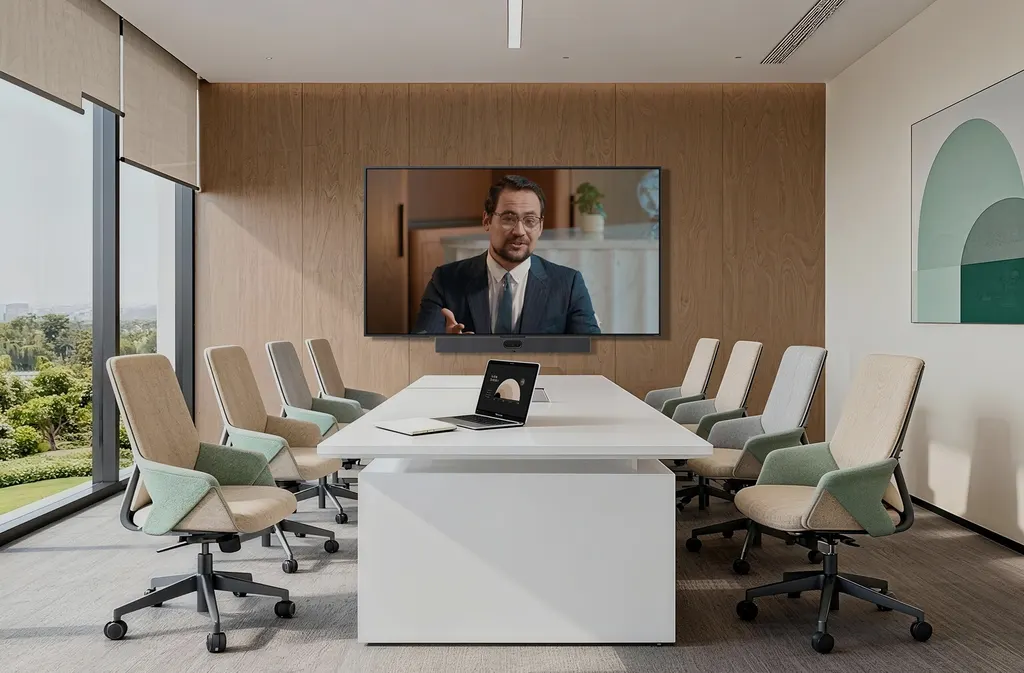
The Yealink MVC S50 is a Microsoft Teams Rooms on Windows bundle for medium to large meeting rooms. It combines the MeetingBar A50 all-in-one video bar with triple 50MP cameras, the MCore 4 mini-PC, the 11.6-inch MTouch Plus touch panel and a RoomSensor. It suits boardrooms and training rooms in Doha and Lusail where one kit should cover camera, audio, control and sharing. Request a quote.

What the MVC S50 bundle includes

The Yealink MVC S50 is a complete Microsoft Teams Rooms on Windows kit built for medium to large meeting rooms. Rather than sourcing a camera, computer, control panel and sensor separately, buyers receive four components in one package: the MeetingBar A50 all-in-one video bar, the MCore 4 mini-PC, the MTouch Plus touch console and the RoomSensor. The MCore 4 is preloaded with Windows 11 IoT Enterprise, the Microsoft Teams Rooms app and Yealink RoomConnect.

Camera and audio built for larger rooms

The MeetingBar A50 uses three 50MP cameras. The wide-angle lens has a 98 degree horizontal field of view, and the two telephoto lenses have a 41.6 degree horizontal view, so the camera can frame people at both ends of a long table. An electronic gimbal, 8x digital zoom and nine preset positions help the framing suit different seating layouts. A physical privacy shutter closes automatically when the meeting ends. Audio comes from a 16-microphone MEMS array with a 10-metre pickup distance, four built-in 5W speakers, full-duplex operation, echo cancellation and AI-enhanced noise suppression. The bar supports up to three expansion microphones for bigger tables.

Computing, touch control and cabling

The MCore 4 runs an Intel Core Ultra 5 125H processor with an integrated NPU rated at 34 TOPS, 16GB of DDR5 memory and a 256GB SSD. It provides three HDMI video outputs with CEC and EDID support, an HDMI input for 4K auxiliary content and four USB 3.0 Type-A ports. The MTouch Plus has an 11.6-inch narrow-bezel IPS display at 1920 x 1080, tilts between 30 and 70 degrees, and can sit on a desk or mount on a wall. A single CAT5e cable carries both power and data between the MCore 4 and the touch panel. The RoomSensor reports occupancy, temperature, humidity and light over Bluetooth 5.2 and shows those readings on the touch panel.

Where the MVC S50 fits in Qatar

  • Executive boardroom in West Bay: senior teams join calls with colleagues abroad, and the wide lens keeps the whole table in frame.
  • Research seminar room in Education City: a university group runs hybrid meetings, using the touch panel for one-touch calls and wireless sharing through the WPP30 adapter at 1080p/30fps.
  • Government meeting room in Msheireb: Arabic and English participants share documents from laptops through the USB-C or HDMI inputs on the touch panel.

Planning the installation

  • Measure the room and confirm seating positions so the 98 and 41.6 degree fields of view cover the table.
  • The MeetingBar A50 and RoomSensor are rated for 0 to 40 degrees Celsius and 10 to 95 percent humidity, so install them in air-conditioned rooms and confirm the environment with the SmartRooms Qatar team before fitting.
  • The MeetingBar A50 measures 910 x 88 x 102 mm, so confirm its wall or table position before ordering.
  • A free site survey is available before wall-mounting the touch panel or the video bar.

Request a quote from SmartRooms Qatar and our team will confirm the right configuration for your room, with quotations usually issued within one working day.

Highlights

  • Triple 50MP cameras: one wide-angle and two telephoto lenses
  • 98-degree wide and 41.6-degree telephoto horizontal fields of view
  • 16-microphone array with 10-metre pickup distance
  • MCore 4 with Intel Core Ultra 5 125H and 34 TOPS NPU
  • 11.6-inch narrow-bezel MTouch Plus with wired or wireless sharing
  • Single CAT5e cable carries power and data to the touch panel

Room fit

Tell us the room size and platform (Teams, Zoom or BYOD) and we confirm the right combination with your quotation.

Estimated timeline

Quotation within 1 working day · delivery timing depends on stock availability, and we confirm it with your quotation.

Specifications

32 specifications · Source: manufacturer · checked Oct 2026
Package Content1
Details
MCore 4 MTouch Plus RoomSensor MeetingBar A50, all-in-one video collaboration
Preload1
Details
Windows 11 IoT enterprise X64 Windows 11 IoT enterprise license Microsoft Teams rooms app Yealink RoomConnect
MCore 4, Gen-4 Mini-PC6
Processor
Intel® Core™ Ultra 5 125H
Memory
16GB(2*8GB) DDR5
Storage
256GB SSD
Wi-Fi
IEEE 802.11 a/b/g/n/ac/ax
Bluetooth
BT 5.2
Details
BIOS features: 3x HDMI video output - CEC - EDID TPM2.0 Kernel DMA Interfaces: 1 x HDMI-Out 2.1 port 2 x HDMI-Out 2.0 port 1 x HDMI-In port 4 x USB3.0 type-A port 1 x MTouch port (RJ-45) 1 x LAN port for AV network 1 x 10/100/1000 Gigabit Ethernet port 1 x power supply port 1 x 3.5mm headphone port 1 x reset port 1 x security slot
MTouch Plus1
Details
Physical features: 11.6-inch narrow bezel IPS display Angle between screen and desktop (30° ~ 70°) Adjustable angle of support frame (50° ~ 180°) Function features: 1920 x 1080 video resolution Support wired and wireless (with WPP30) content sharing Support external PD power supply to power the sharing device Support HDMI/USB-C video input Support desktop placement, desktop fixed, and wall-mounted deployment
RoomSensor4
Detection angle
120°
Adjustable detection angle
±20°
Operating temperature
0°C-40°C
Operating humidity
10%-95%
MeetingBar A5019
Number of preset positions
9
- Rated Power
4 x 5W
- Maximum Power
4 x 10W
Maximum sound pressure level
97 dBSPL @ 10 W @ 1 m; 130dBSPL (whole device), 100dBSPL (individual microphone)
Frequency response
80-20kHz; 100-20kHz
Sensitivity
104±3dB 1W/0.1m; -38dBV/Pa
Sampling rate
48kHz; 48kHz
Sound emission angle
0-180°
Rated impedance
4 ohms
Signal-to-noise ratio
72dB@1kHz
Dynamic range
22-108dBSPL
Bit depth
32-bit
Audio processing
Full duplex, AEC (Acoustic Echo Cancellation), AGC (Automatic Gain Control)
Noise suppression
AI-enhanced noise suppression
Expansion mics
Supports 3 expansion microphones
MeetingBar A50
910 × 88 × 102 mm
Operating humidity
10 - 95%
Operating temperature
0 - 40°C
Details
Camera: Electronic gimbal 1 x Wide HFOV 98°, VFOV 81° 2 x Tele HFOV 41.6° VFOV 31.8° 8 x digital zoom Speaker: Built-in 4 x 5W speakers Microphone: Built-in 16 MEMS microphone array, 10-meter pickup distance Interfaces: 1 x USB3.0 Type-A port 1 x USB3.0 Type-B port 1 x USB2.0 Type-C port 1 x Ethernet port 2 x Yealink VCH port (RJ-45) 1 x 3.5mm line-in & line-out port 1 x power port 1 x security lock slot 1 x reset slot 2 x HDMI-out Dimensions and environmental factors:


Downloads

76 files from the manufacturer
PDF Datasheets Yealink MVC S50-C5U Datasheet.pdf 587 KB Yealink MVC S50 datasheets (PDF, 587 KB) PDF Manuals & guides Controller Quick User Guide for Microsoft Teams.pdf 993 KB Yealink MVC S50 manuals & guides (PDF, 993 KB) PDF Manuals & guides Quick Setup.pdf 3.6 MB Yealink MVC S50 manuals & guides (PDF, 3.6 MB) PDF Manuals & guides Setup Checklist.pdf 43 KB Yealink MVC S50 manuals & guides (PDF, 43 KB) PDF Manuals & guides Windows Autopilot and Autologin.pdf 47 KB Yealink MVC S50 manuals & guides (PDF, 47 KB) PDF Manuals & guides Yealink MVC S50-C5U Quick Start Guide (EN, DE, FR, ES) V1.2.pdf 2.6 MB Yealink MVC S50 manuals & guides (PDF, 2.6 MB) 1X Manuals & guides · Opens on manufacturer site 802.1x Yealink MVC S50 manuals & guides (1X) URL Manuals & guides · Opens on manufacturer site AirPlay Content Sharing Yealink MVC S50 manuals & guides (URL) URL Manuals & guides · Opens on manufacturer site Audio Diagnostics Yealink MVC S50 manuals & guides (URL) URL Manuals & guides · Opens on manufacturer site Audio Settings Yealink MVC S50 manuals & guides (URL) URL Manuals & guides · Opens on manufacturer site Auto Framing (MeetingBar USB Mode) Yealink MVC S50 manuals & guides (URL) URL Manuals & guides · Opens on manufacturer site BIOS Update Yealink MVC S50 manuals & guides (URL) URL Manuals & guides · Opens on manufacturer site Basic Settings (MeetingBar USB Mode) Yealink MVC S50 manuals & guides (URL) URL Manuals & guides · Opens on manufacturer site CEC Yealink MVC S50 manuals & guides (URL) URL Manuals & guides · Opens on manufacturer site Camera Preset Yealink MVC S50 manuals & guides (URL) URL Manuals & guides · Opens on manufacturer site Change Device Password Yealink MVC S50 manuals & guides (URL) URL Manuals & guides · Opens on manufacturer site Configure Accounts for Microsoft Teams Rooms System in Batches Yealink MVC S50 manuals & guides (URL) URL Manuals & guides · Opens on manufacturer site Connect Device to YDMP or YMCS Yealink MVC S50 manuals & guides (URL) URL Manuals & guides · Opens on manufacturer site Connect YRC to YDMP or YMCS Yealink MVC S50 manuals & guides (URL) URL Manuals & guides · Opens on manufacturer site Device Firmware Update Yealink MVC S50 manuals & guides (URL) URL Manuals & guides · Opens on manufacturer site Export Log Yealink MVC S50 manuals & guides (URL) URL Manuals & guides · Opens on manufacturer site Feedback Yealink MVC S50 manuals & guides (URL) URL Manuals & guides · Opens on manufacturer site Image Settings (MeetingBar USB Mode) Yealink MVC S50 manuals & guides (URL) URL Manuals & guides · Opens on manufacturer site Instant Meeting Yealink MVC S50 manuals & guides (URL) URL Manuals & guides · Opens on manufacturer site IntelliFocus (MeetingBar USB Mode) Yealink MVC S50 manuals & guides (URL) URL Manuals & guides · Opens on manufacturer site IntelliFrame (MeetingBar USB Mode) Yealink MVC S50 manuals & guides (URL) URL Manuals & guides · Opens on manufacturer site IntelliVision (MeetingBar USB Mode) Yealink MVC S50 manuals & guides (URL) URL Manuals & guides · Opens on manufacturer site Join Meeting Yealink MVC S50 manuals & guides (URL) URL Manuals & guides · Opens on manufacturer site LLDP Yealink MVC S50 manuals & guides (URL) URL Manuals & guides · Opens on manufacturer site Language Yealink MVC S50 manuals & guides (URL) URL Manuals & guides · Opens on manufacturer site Line-out Output (Hearing aid system) Yealink MVC S50 manuals & guides (URL) URL Manuals & guides · Opens on manufacturer site Local Camera Yealink MVC S50 manuals & guides (URL) URL Manuals & guides · Opens on manufacturer site Local Microphone Yealink MVC S50 manuals & guides (URL) URL Manuals & guides · Opens on manufacturer site Local Speaker Yealink MVC S50 manuals & guides (URL) URL Manuals & guides · Opens on manufacturer site Log In Yealink MVC S50 manuals & guides (URL) URL Manuals & guides · Opens on manufacturer site Manage Participants Yealink MVC S50 manuals & guides (URL) URL Manuals & guides · Opens on manufacturer site Meeting Control Yealink MVC S50 manuals & guides (URL) URL Manuals & guides · Opens on manufacturer site Meeting Layout Yealink MVC S50 manuals & guides (URL) URL Manuals & guides · Opens on manufacturer site Microsoft Management Porta Yealink MVC S50 manuals & guides (URL) URL Manuals & guides · Opens on manufacturer site Microsoft Teams Rooms App Update Yealink MVC S50 manuals & guides (URL) URL Manuals & guides · Opens on manufacturer site Miracast Content Sharing Yealink MVC S50 manuals & guides (URL) URL Manuals & guides · Opens on manufacturer site Proxy Server Yealink MVC S50 manuals & guides (URL) URL Manuals & guides · Opens on manufacturer site Raise Your Hand Yealink MVC S50 manuals & guides (URL) URL Manuals & guides · Opens on manufacturer site Recovery Mode Yealink MVC S50 manuals & guides (URL) URL Manuals & guides · Opens on manufacturer site Remote Management Yealink MVC S50 manuals & guides (URL) URL Manuals & guides · Opens on manufacturer site Send Reactions Yealink MVC S50 manuals & guides (URL) URL Manuals & guides · Opens on manufacturer site Single and Dual Layouts Yealink MVC S50 manuals & guides (URL) URL Manuals & guides · Opens on manufacturer site Switch Account Yealink MVC S50 manuals & guides (URL) URL Manuals & guides · Opens on manufacturer site Teams Cast Yealink MVC S50 manuals & guides (URL) URL Manuals & guides · Opens on manufacturer site Time and Date Yealink MVC S50 manuals & guides (URL) URL Manuals & guides · Opens on manufacturer site Tracking Mode Yealink MVC S50 manuals & guides (URL) URL Manuals & guides · Opens on manufacturer site Troubleshoot Yealink MVC S50 manuals & guides (URL) URL Manuals & guides · Opens on manufacturer site Turn on Dual Monitor Mode Yealink MVC S50 manuals & guides (URL) URL Manuals & guides · Opens on manufacturer site VLAN Yealink MVC S50 manuals & guides (URL) URL Manuals & guides · Opens on manufacturer site Video Diagnostics Yealink MVC S50 manuals & guides (URL) URL Manuals & guides · Opens on manufacturer site Video Fence (MeetingBar USB Mode) Yealink MVC S50 manuals & guides (URL) URL Manuals & guides · Opens on manufacturer site Whiteboard Yealink MVC S50 manuals & guides (URL) URL Manuals & guides · Opens on manufacturer site Windows Update Yealink MVC S50 manuals & guides (URL) URL Manuals & guides · Opens on manufacturer site Wired Content Sharing Yealink MVC S50 manuals & guides (URL) URL Manuals & guides · Opens on manufacturer site Wired Network Yealink MVC S50 manuals & guides (URL) URL Manuals & guides · Opens on manufacturer site Yealink Deployment Tool User Guide Yealink MVC S50 manuals & guides (URL) URL Manuals & guides · Opens on manufacturer site Yealink Microsoft Teams Rooms on Windows Setup Guide with Microsoft Configuration Platforms Yealink MVC S50 manuals & guides (URL) URL Manuals & guides · Opens on manufacturer site Yealink RoomConnect Update Yealink MVC S50 manuals & guides (URL) PDF Other documents Yealink Regulatory Notice V1.2.pdf 1.0 MB Yealink MVC S50 other documents (PDF, 1.0 MB) URL Other documents · Opens on manufacturer site Audio Input and Output Compatibility Lists Yealink MVC S50 other documents (URL) URL Other documents · Opens on manufacturer site HTTPS API Yealink MVC S50 other documents (URL) MP4 Other documents · Opens on manufacturer site How to Change the Login Accounts V1.0.mp4 Yealink MVC S50 other documents (MP4) MP4 Other documents · Opens on manufacturer site How to Share Content with USB Cable V1.0.mp4 Yealink MVC S50 other documents (MP4) MP4 Other documents · Opens on manufacturer site How to Share Content with WPP30 V1.0.mp4 Yealink MVC S50 other documents (MP4) URL Other documents · Opens on manufacturer site Rooms Accessories Compatibility Lists Yealink MVC S50 other documents (URL) URL Other documents · Opens on manufacturer site Rooms Product Family Yealink MVC S50 other documents (URL) URL Other documents · Opens on manufacturer site Rooms Supported Features List Yealink MVC S50 other documents (URL) URL Other documents · Opens on manufacturer site Socket API Yealink MVC S50 other documents (URL) MP4 Other documents · Opens on manufacturer site Yealink IntelliFocus Update Features V1.0.mp4 Yealink MVC S50 other documents (MP4) MP4 Other documents · Opens on manufacturer site Yealink MVC S50-C5U Unboxing V1.1.mp4 Yealink MVC S50 other documents (MP4) URL Other documents · Opens on manufacturer site Yealink MVC Security Whitepaper Yealink MVC S50 other documents (URL)

Questions about MVC S50

What is the Yealink MVC S50 and who is it for?
The Yealink MVC S50 is a video conferencing bundle that runs Microsoft Teams Rooms on Windows and is designed for medium to large meeting rooms. It suits companies and universities in Qatar that want one kit for camera, audio, control and sharing, such as an executive boardroom or a lecture room. Request a quote to check whether it fits your room size.
What components are included in the MVC S50 bundle?
The bundle contains the MeetingBar A50 all-in-one video bar, the MCore 4 mini-PC, the MTouch Plus 11.6-inch touch panel and a RoomSensor. The MCore 4 is preloaded with Windows 11 IoT Enterprise, the Microsoft Teams Rooms app and Yealink RoomConnect. Request a quote that covers all four components in a single quotation.
How many cameras does the MeetingBar A50 have and what do they cover?
The MeetingBar A50 has three 50MP cameras: a wide-angle lens with a 98 degree horizontal field of view and two telephoto lenses at 41.6 degrees. It also offers 8x digital zoom and nine preset positions. In a long boardroom, the wide lens captures the entire table, while the telephoto lenses bring individual speakers into clear focus.
Is the MVC S50 suitable for a large boardroom in West Bay?
Yes, provided the room falls within the medium to large range the bundle is designed for. In a boardroom in a West Bay office tower, the 10-metre pickup distance and four built-in 5W speakers help cover a full table. SmartRooms Qatar can confirm the right size and layout for your room before you order.
What is the audio pickup range and can it be extended?
The 16-microphone MEMS array picks up voices up to 10 metres away, and the MeetingBar A50 supports up to three expansion microphones for larger tables. Audio uses full-duplex operation with echo cancellation and AI-enhanced noise suppression. A free site survey can identify the best positions for expansion microphones in your room.
Can participants share content wirelessly?
Yes. Wireless sharing uses the WPP30 adapter and supports one-click sharing at 1080p and 30fps. For wired sharing, the MTouch Plus has HDMI and USB-C video inputs, and the MCore 4 has an HDMI input for 4K auxiliary content. A project team in Lusail reviewing designs from laptops can share either way without changing cables.
What temperature and humidity range is the system rated for?
The MeetingBar A50 and RoomSensor are rated for operating temperatures from 0 to 40 degrees Celsius and humidity from 10 to 95 percent. Outdoor temperatures in Doha can exceed 45 degrees Celsius in summer, so install the equipment in air-conditioned meeting rooms and ask SmartRooms Qatar to confirm the room conditions before installation.
What does the RoomSensor measure and how does it connect?
The RoomSensor detects occupancy, temperature, humidity and light, and shows the environmental readings on the MTouch Plus screen. It uses Bluetooth 5.2 on the 2.4 GHz band with a reach of 30 metres and supports up to four connections at once in a BLE mesh. Its detection angle is 120 degrees, and it wakes the system as participants enter the room.
How is the system installed and cabled?
A single CAT5e cable connects the MCore 4 and the MTouch Plus and carries both power and data, which reduces cable runs in the room. The touch panel can sit on a desk in a fixed position or mount on a wall, and its support frame adjusts from 50 to 180 degrees. A training centre in Al Sadd fitting out new classrooms would benefit from this simpler cabling.
Can the IT team manage the system remotely?
Yes. The system works with the Yealink Device Management Platform and cloud service, which let IT staff monitor, configure, update and diagnose connected devices remotely. A private school with meeting rooms at more than one campus could manage every room from a single IT team without visiting each room in person.
How can a school or government entity order the MVC S50?
SmartRooms Qatar accepts purchase orders (LPOs) and government tenders, including those issued through Monaqasat. Quotations are usually issued within one working day, and payment can be made by bank transfer, cheque or purchase order. A school equipping several rooms with the same specification can request one quotation covering all of them.

Similar models

Yealink MVC S60 Yealink MVC S60 Microsoft Teams Rooms System with 360° Camera
360°
Biamp Evoko Liso Wall Mount Kit Biamp Evoko Liso Wall Mount Kit (910-01930) for Room Scheduling Displays
TAA Compliant
Email Call


