NGS-D320 FLEX Pro
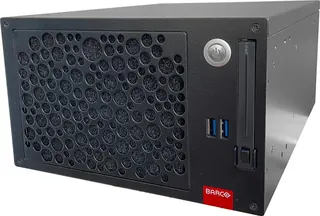
Barco NGS-D320 FLEX Pro 4K Dual Channel Networked Encoder
The Barco NGS-D320 FLEX Pro is a compact networked encoder that takes 4K DVI, HDMI or DisplayPort content and streams it over the network using H.264 or V2D, with one or two channels. It supports remote keyboard and mouse control, has two 1GbE network ports and draws a typical 35W. It suits control rooms, training suites and boardrooms in Doha and beyond where graphics must stay sharp on distant screens.
What the NGS-D320 FLEX Pro does on a network
The Barco NGS-D320 FLEX Pro is a networked encoder. It takes a live computer or AV source connected through DVI, HDMI or DisplayPort and converts it into a stream that any compatible display, decoder or software client on the network can receive. Because the source is encoded rather than cabled directly, the same feed can reach screens in several rooms or floors without extra video cabling, which suits buildings where workstations and video walls sit far apart.
Each unit runs one or two streaming channels, and each channel can use either H.264 or V2D. H.264 is set between 384kbps and 24Mbps, which suits lighter network traffic, while V2D runs between 25Mbps and 200Mbps for demanding graphics. The unit encodes up to 4096x2160 at 30fps for the largest format and up to 2560x1600 at 60Hz, so spreadsheets, CAD drawings and fine diagram lines keep their detail. The device is part of the TFN and OpSpace product families.
Facts that matter when you specify it
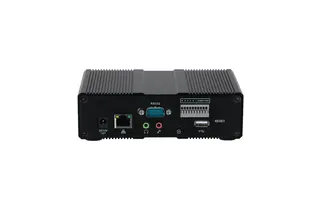
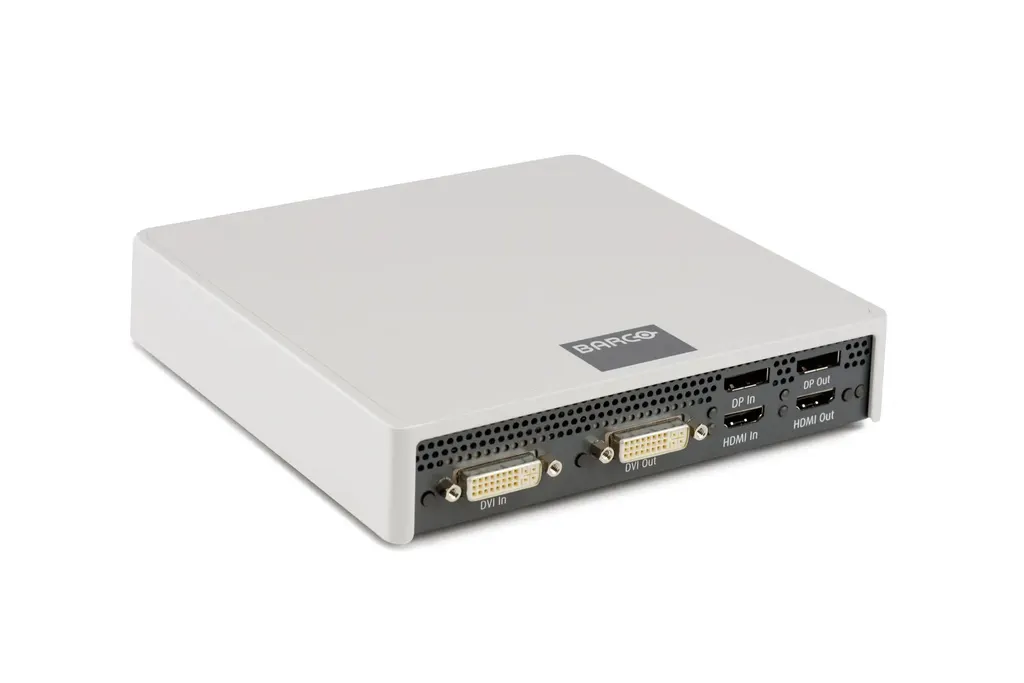
- Inputs: one Dual Link DVI, one DisplayPort 1.1a and one HDMI 1.4 input, with matching outputs and flexible loop through, up to a maximum input bandwidth of 330MHz.
- Network: two 1GbE full duplex ports for redundant connection, DHCP, link local or fixed IP addressing, and multicast using IGMP v3 with RTP and RTSP.
- Peripherals: three USB Type A connectors and one Micro-B connector, with remote keyboard and mouse support using the native keymap.
- Audio: 3.5mm stereo line in and out, plus a combined mic in and headphone out.
- Power and noise: typical 35W, maximum 48W, an external 12VDC supply accepting 100-240VAC, and a typical sound level of 32dBA at 20°C.
Where it fits in Qatar
In a control room in Doha, an operator often needs an application running on one workstation to appear on a video wall in the next room. The encoder streams that source over the existing Ethernet network, the wall or a decoder displays it, and the operator keeps keyboard and mouse control from a remote station.
At a university in Education City, a simulation or training lab may need the instructor's screen sent to several viewing rooms at once. Multicast with IGMP v3 lets one stream serve many screens, within the limit of 12 simultaneous multicast RTSP sessions per channel.
At an industrial site in Mesaieed or Ras Laffan, a central operations desk can share process screens with a supervisory room. The unit starts streaming as soon as a valid input signal arrives, so technicians do not have to start each feed by hand.
What to plan before ordering
Plan the network first. If you intend to serve several screens, the switch must handle multicast traffic with IGMP v3, and you should confirm how many unicast sessions, up to two per channel, your layout needs. Check the room temperature as well. The operating range is 0°C to 40°C, so a cabinet in an unventilated space that heats up in Qatar summers is not suitable. Mount the unit on the optional VESA adapter plate, or use the optional 1U rack mount that holds two devices. Each unit weighs 1 kg and measures 38 mm high, 170 mm wide and 170 mm deep.
Firmware can be updated through the HTTPS web interface or from a USB storage device. The device is validated for Barco TransForm N 3.3 or higher, so confirm your current version before ordering. SmartRooms Qatar offers a free site survey to check cable routes, rack space and network layout before installation, and quotations are usually issued within one working day. We accept purchase orders and government tenders, including Monaqasat. Request a quote for the NGS-D320 FLEX Pro and our team will set out the configuration and next steps in the quotation.
Highlights
- 4K input with H.264 or V2D streaming
- Two streaming channels from one compact unit
- Two 1GbE ports for redundant network connection
- Remote keyboard and mouse control supported
- Operating range 0°C to 40°C, typical 35W draw
- Validated for Barco TransForm N 3.3 or higher
Estimated timeline
Quotation within 1 working day · delivery timing depends on stock availability, and we confirm it with your quotation.
Specifications
Number of inputs and outputs4
- Audio
- 1 3.5mm jack stereo line level in & line out 1 3.5mm jack mono mic in & stereo headphones out (combined)
- USB
- 3 Type A connectors, 1 Micro-B connector
- Network
- RJ45 (redundant 1Gb Ethernet copper)
- Video
- 1 Dual Link DVI & 1 DisplayPort 1.1a & 1 HDMI™ 1.4 input 1 Dual Link DVI & 1 DisplayPort 1.2 & 1 HDMI™ 1.4 output Flexible Loop Through Maximum input bandwidth of 330Mhz
Network interfaces5
- Ethernet
- 2x 1GbE full duplex
- IP addressing
- DHCP, link local, fixed IP
- Protocols
- Unicast, Multicast (IGMP v3), RTP, RTSP
- RTSP Sessions
- Multicast: maximum 12 simultaneous RTSP session per channel Unicast : maximum 2 simultaneous RTSP session per channel
- Discovery
- Zeroconf, SAP (RFC 2974)
Management interfaces2
- Firmware upgrade
- HTTPS Web interface, USB Storage Device
- Standalone
- HTTPS Web interface
Advanced features3
- Image processing
- Color space conversion, scaling, frame rate reduction
- Automatic downscaling
- Y (Adjust to profile)
- Remote keyboard and mouse
- Supported (native keymap)
General specifications8
- Dimensions
- 38 mm H x 170 mm W x 170 mm D | 1.5” H x 6.7” W x 6.7” (+/-2mm / 0.1”)
- Weight
- 1 ± 0.01 kg (2.20 lbs)
- Power
- Typical 35W, maximum 48W
- Power supply
- 12VDC, 100-240VAC 60W, external locking power
- Operating temperature
- 0°C to 40°C (32°F to 104°F)
- Storage temperature
- -20°C to 70°C (-4°F to 158°F)
- Sound level
- Typical 32dBA at 20°C
- Mounting
- Optional VESA adapter plate or 1U rack mount for 2 devices
Certification3
- EMC
- CE, FCC Part 15 Class A, ICES003
- Safety
- UL/ cUL/ EN/ IEC 60950-1 CB report
- Regulatory name
- NGS-D320
Packaging characteristics2
- Dimensions (packaged)
- 382mmx273mmx85mm | 15,04"x10,75"x3,35"
- Weight (packaged)
- 2.2 kg | 4.8 lbs
NGS-D320 Pro8
- Number of channels
- Up to 2
- Number of streams
- Up to 2
- Graphics
- 640x480 -2560x1600 24-60Hz 640x480 -4096x2160 24-30Hz
- Audio
- uncompressed
- Codec
- Video: H.264 up to level 5.1 and/or V2D -60fps: up to 1920x1200 (2x) -30fps: up to 2560x1600 (2x) -60fps: up to 2560x1600 (1x) -30fps: up to 4096x2160 (1x) (version 2.1 or higher)
- Bandwidth
- Video: H.264 384kbps – 24Mbps V2D 25Mbps – 200Mbps Audio: uncompressed
- Latency encoder-decoder end-to-end
- 80-200ms (typical 100ms)
- Boot time
- 15s