Thursday, 22 October 2026 · 11 Jumada I 1448 AH Sun – Thu · 9:00 – 18:00
+971 56 914 9477 العربية
WhatsApp

DS-C66S-04DI

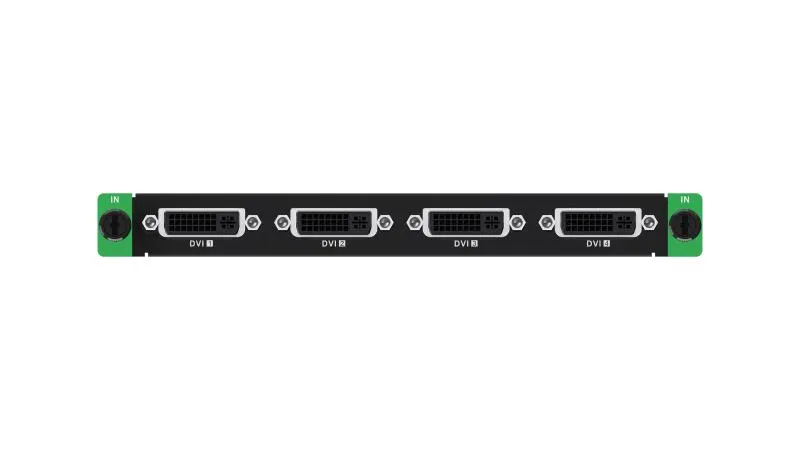
Hikvision DS-C66S-04DI 4-Channel DVI Input Board for Video Wall Controllers

WhatsApp
Priceon request
QuotationWithin 1 working day
DeliveryConfirmed with your quote, based on stock
PDFDownload datasheet (DS-C66S-04DI_Datasheet_20260625.pdf)
Overview

The Hikvision DS-C66S-04DI is a 4-channel DVI-D input board for C66S Series video wall controllers. It installs in an input slot and accepts four DVI-D sources at resolutions up to 1080P, with frame rates from 24 Hz to 60 Hz. HDCP 1.4 support with backward compatibility to HDCP 1.3 helps it carry protected content. It suits Qatar control rooms, command centres and lobbies that feed several computers into one video wall.

What the DS-C66S-04DI adds to a C66S video wall

The DS-C66S-04DI is an input board rather than a display or a standalone controller. It fits into an input slot of a C66S Series video wall controller and provides four DVI-D video inputs. Each input receives a digital signal from a computer or media source, so one controller can place several sources on a wall without a separate external switcher.

Specifications that shape the design

Standard computer modes listed for the board include 1024 × 768, 1280 × 1024, 1366 × 768, 1440 × 900, 1680 × 1050 and 1920 × 1200 at 60 Hz, plus 1280 × 720 and 1920 × 1080 at 50 Hz and 60 Hz. The highest listed input resolution is 1080P, so designers should treat 4K sources as outside the standard input path.

Custom resolutions give extra flexibility. Width can be set from 800 to 2560 pixels and height from 600 to 2560 pixels. At 30 Hz the custom range covers 1280 × 720 up to 2048 × 1152, and at 60 Hz it covers 800 × 600 up to 2048 × 1152. The accepted input frame rate spans 24 Hz to 60 Hz.

HDCP support is built in. The board supports HDCP 1.4 and is backward compatible with HDCP 1.3, so protected content from licensed players can reach the wall where the source uses a compatible version.

Where it fits in Qatar

Three situations show how the board is used in practice.

  • A ministry operations room in Doha where four workstations feed live dashboards to one wall, each desk PC on its own DVI-D input.
  • A bank operations centre in West Bay that shows payments, branch and security monitoring screens side by side, with frame rates kept within the 24 Hz to 60 Hz range.
  • A university research lab in Education City presenting simulation output from several computers, where a custom resolution matches a non-standard workstation output.

What to plan before ordering

  • Confirm the controller is a C66S Series unit with a free input slot.
  • List each source, its DVI-D output, resolution and refresh rate.
  • Check whether any source needs a resolution above 1080P, which falls outside the standard input path.
  • Plan an air-conditioned equipment room, because the source data gives no operating temperature range for this board.

SmartRooms Qatar offers a free site survey before installation, which helps confirm cable runs, rack space and the slot count for the wall. Quotations are usually issued within one working day, and payment can be made by bank transfer, cheque or purchase order. The board is covered by the manufacturer's warranty.

To get a quote for the DS-C66S-04DI, send your source list along with the number of controllers and walls, and the SmartRooms Qatar team will prepare a quotation for your project.

Highlights

  • Four DVI-D video input channels per board
  • Maximum listed input resolution of 1080P
  • Input frame rate range from 24 Hz to 60 Hz
  • HDCP 1.4 with backward compatibility to HDCP 1.3
  • Installs in an input slot of C66S Series controllers
  • Custom input resolutions up to 2048 × 1152

Estimated timeline

Quotation within 1 working day · delivery timing depends on stock availability, and we confirm it with your quotation.

Specifications

7 specifications · Source: manufacturer · checked Oct 2026
Processing Performance1
Input Frame Rate
24 Hz to 60 Hz
Chassis1
Occupied Slot
Input slot
General1
HDCP
Supports HDCP 1.4 with backward compatibility to HDCP 1.3
Video Input4
Video Input Interface Type
DVI-D
Video Input Interfaces
4
Max. Video Input Resolution
1080P
Video Input Resolution
1024 × 768@60 Hz, 1280 × 1024@60 Hz, 1366 × 768@60 Hz, 1440 × 900@60 Hz, 1680 × 1050@60 Hz, 1280 × 960@60 Hz, 1600 × 1200@60 Hz, 1280 × 720p@50 Hz, 1280 × 720p@60 Hz, 1920 × 1080p@50 Hz, 1920 × 1080p@60 Hz, 1920 × 1200@60 Hz Custom resolution range: Width: 800 to 2560, height: 600 to 2560 (width aligned to 4, height aligned to 2), frame rate: 30/60 Hz. At 30 Hz: Resolution range 1280 × 720 ~ 2048 × 1152. At 60 Hz: Resolution range 800 × 600 ~ 2048 × 1152.
Downloads

6 files from the manufacturer

Questions about DS-C66S-04DI

What is the Hikvision DS-C66S-04DI used for?
It is a 4-channel DVI-D input board for Hikvision C66S Series video wall controllers. Its job is to bring up to four digital video sources into the controller so they can be shown on a video wall. It suits organisations in Qatar that feed one wall from several PCs, such as command centres or monitoring rooms, and want the inputs handled inside the controller chassis.
How many video inputs does it provide and what type are they?
The board provides four video inputs, all of the DVI-D type. Each input carries a digital signal from a computer or media source. Before ordering, check that every source on the planned wall has a DVI-D output, and confirm with the SmartRooms Qatar team how any source without DVI-D will be connected, because the specification lists no other input interface.
What is the maximum input resolution?
The maximum listed video input resolution is 1080P. Standard modes in the list include 1920 × 1080 at 50 Hz and 60 Hz, 1920 × 1200 at 60 Hz and 1600 × 1200 at 60 Hz. A 4K signal such as 3840 × 2160 does not appear among the listed resolutions, so confirm the source output with SmartRooms Qatar before you specify the wall.
Can I use custom resolutions?
Yes, the board supports a custom resolution range. Width can be set from 800 to 2560 pixels and height from 600 to 2560 pixels, with width aligned to multiples of 4 and height to multiples of 2. At 30 Hz the custom range runs up to 2048 × 1152, and at 60 Hz it runs from 800 × 600 up to 2048 × 1152. This helps when a computer output does not match a standard mode.
Does it support HDCP-protected content?
Yes. The board supports HDCP 1.4 and is backward compatible with HDCP 1.3. This matters when a licensed media player or other source sends protected content to the wall. Check which HDCP version your source uses, because the board data describes only these two versions and does not state compatibility with any others.
What input frame rates does it accept?
The input frame rate range is 24 Hz to 60 Hz. That covers typical computer output at 60 Hz as well as the 50 Hz modes in the standard list, such as 1920 × 1080 at 50 Hz and 1280 × 720 at 50 Hz. Custom resolutions run at 30 Hz or 60 Hz only, so match sources that use custom modes to one of those rates before specifying the wall.
Which chassis and slot does it use?
The board belongs to the C66S Series and occupies an input slot in the chassis. Before ordering, confirm that your controller is a C66S Series unit and has a free input slot. During a free site survey, the SmartRooms Qatar team can review the existing controller configuration and recommend how many boards the wall needs.
Is it suitable for hot equipment rooms or outdoor use?
The source data gives no operating temperature range and no outdoor rating for this board, so do not assume it suits outdoor cabinets or unventilated spaces. In Qatar, where summer temperatures can exceed 45°C, install the controller in an air-conditioned equipment room, and confirm the environment with the SmartRooms Qatar team before the installation is quoted.
How would a government ministry in Doha use this board?
A ministry operations room in Doha might display the outputs of four workstations on one wall for live monitoring. Each desk PC connects to its own DVI-D input, and the controller arranges the four feeds across the wall. Before buying, check that desk outputs match the board, and ask for a site survey to confirm the room layout and cable routes.
How could a bank operations centre in West Bay benefit?
A bank operations centre in West Bay could show payments, branch activity and security monitoring on one wall. Four inputs from separate workstations keep each dashboard live, and the 24 Hz to 60 Hz frame rate range covers common computer outputs. Include the number of sources and their resolutions when you request a quote so the controller configuration is right first time.
How does a university research lab in Education City use it?
A research lab in Education City might present simulation output from four computers on one wall during team reviews. If one machine uses a non-standard output, the custom resolution range can match it, for example 800 × 600 up to 2048 × 1152 at 60 Hz. List the resolution of each computer in your quote request so the SmartRooms Qatar team can confirm it fits the board.
Can a government entity or school order it on an LPO?
Yes. SmartRooms Qatar supplies against purchase orders (LPOs) and government tenders, including Monaqasat, and payment can be made by bank transfer, cheque or purchase order. If you are ordering several boards for a school or authority, send the source list and the number of controllers with your request so the quotation covers the full configuration.

Similar models

Barco TransForm NSD-220 Barco TransForm NSD-220 Video Wall Controller
Controllers & processors
Dahua DSCON2100-0410H Dahua DSCON2100-0410H 1.5U Embedded Multi-Screen Video Wall Controller
Controllers & processors
Dahua DSCON2100-0416H Dahua DSCON2100-0416H 1.5U Embedded Multi-Screen Video Wall Controller
Controllers & processors
Dahua DSCON8000-S13 Dahua DSCON8000-S13 5U Splicing Controller for Video Walls
Supports video decoding at 32 MP
Dahua DSMS0105UHI-4K Dahua DSMS0105UHI-4K Distributed Ultra HD AVoIP Encoder
Controllers & processors
Email Call