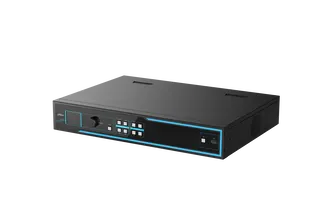
DS-C80K-01HO/4K
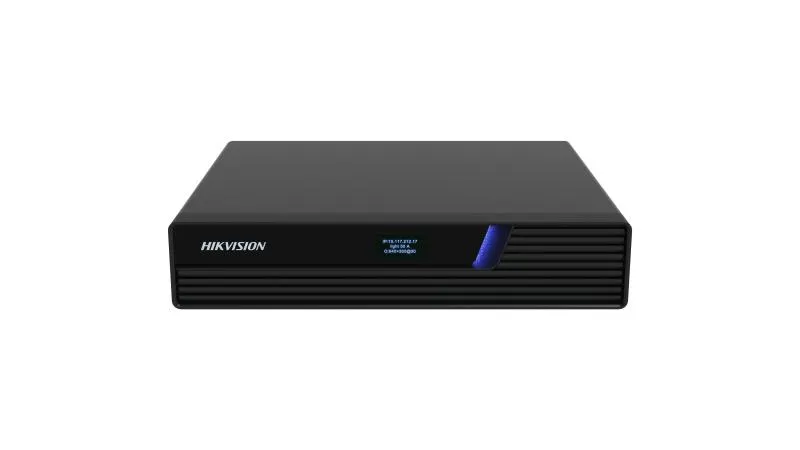
Hikvision DS-C80K-01HO/4K KVM 4K HDMI Output Node
The Hikvision DS-C80K-01HO/4K is a KVM output node that drives one HDMI 2.0 display at up to 4K60 and sits in a video wall or control room system. It is PoE-powered (802.3at), has a Gigabit SFP and Ethernet uplink, and works with up to 256 seats. Suited to operations centres and lecture halls in Doha, Lusail and Education City that need remote host control across a network. Request a quote.
What the DS-C80K-01HO/4K does in a KVM video wall system
The Hikvision DS-C80K-01HO/4K is an output node in the C80K KVM and distributed controller family. It takes a signal arriving over the network and sends it to a single HDMI 2.0 display, with the output rated at 4K60 (3840 × 2160 at 60 Hz). It is one half of a KVM system, paired with input nodes that capture sources such as computers, and it does not need a central server. Each node runs independently, so a single node failure does not stop the rest of the system.
Specifications that matter when you plan the system
Signal processing uses a dual-engine design with DSP and FPGA stages, and YUV 4:4:4 sampling is kept through capture, transmission and output, which helps text-heavy dashboards and drawings look sharp on the wall. The source states a minimum delay within 10 ms for keyboard and mouse operation at a remote seat. Each node uses a half-width body, so two nodes fill one rack width.
- Power: 110 to 240 VAC input with up to 30 W consumption, or PoE under 802.3at.
- Network: one Gigabit SFP optical port and one Gigabit Ethernet port, with hot backup between them.
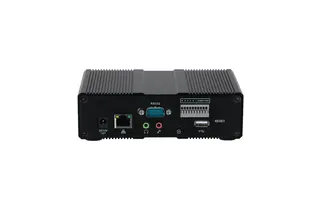
- Control I/O: RS-232, RS-485, IO/IR input and output terminals, a relay terminal and a 3.3 V IR power output.
- Operating range: 0 °C to 50 °C and 0% to 95% humidity.
Where it fits in Qatar
A government operations room in Doha might use a video wall to show traffic, utilities or security feeds, with several operators sharing one keyboard and mouse across screens. The KVM seat matrix supports up to 3 × 5 and roaming control across screens. A university lecture theatre or teaching lab in Education City can show a lecturer's PC on the wall in another room, and the remote power on and power off function lets IT staff restart a host without walking to it. A corporate control centre in West Bay or Lusail can link to a site in Mesaieed or Ras Laffan over the network, with long-range transmission carried by the Gigabit connection.
What to plan before you order
Count your signal sources, seats and screens before requesting a quote, because the system is sized by these numbers. Confirm the network design: the node supports unicast and multicast, and time can be synchronised manually or through NTP. If you plan to power the node by PoE, confirm the switch supports 802.3at; otherwise use the external power supply. Qatar summers can push equipment temperatures up, so keep the node in an air-conditioned room or ventilated cabinet within its 0 °C to 50 °C range. The box includes a power cord, a mounting bracket and a connecting bracket.
SmartRooms Qatar supplies the DS-C80K-01HO/4K, delivers it to all eight municipalities of Qatar and can arrange professional installation. Free site surveys are available before you order. Request a quote and our team will usually respond within one working day with a configuration matched to your screens and sources.
Highlights
- 4K60 HDMI 2.0 output at 3840 × 2160 @ 60 Hz
- Dual DSP and FPGA signal processing with YUV 4:4:4 sampling
- Keyboard and mouse delay within 10 ms at remote seats
- PoE 802.3at or 110 to 240 VAC power input
- Half-width body; two nodes fit one rack width
- KVM seat matrix up to 3 × 5 with 256-seat scale
Estimated timeline
Quotation within 1 working day · delivery timing depends on stock availability, and we confirm it with your quotation.
Specifications
Device Feature2
- Device Type
- Output node
- KVM Function
- Yes
Interface12
- Optical Interface
- 1 channel of 1000 Mbps SFP port
- Electrical Interface
- 1 channel of 1000 Mbps Ethernet port
- USB Interface
- 4 × USB 2.0 port
- Screen Type
- OLED 128 × 64 dot-matrix screen
- Other Interfaces
- 1 × Console port for debugging
- RS-232 Interface
- 1 channel, Phoenix terminal
- RS-485 Interface
- 1 channel, Phoenix terminal
- IO/IR IN Interface
- 1 channel, Phoenix terminal, customized by software
- IO/IR OUT Interface
- 1 channel, Phoenix terminal, customized by software
- IR POWER Interface
- 1 channel, 3.3 V, Phoenix terminal
- RELAY Interface
- 1 channel, Phoenix terminal
- RESET Interface
- 1 channel
General10
- Working Temperature
- 0 °C to 50 °C
- Working Humidity
- 0% to 95%
- Indicator
- 1 × single double base color light indicator, 1 × optical port indicator, 1 × network port indicator
- Net Weight
- 1.25 kg (2.76 lb.)
- Gross Weight
- 1.67 kg (3.68 lb.)
- Dimensions (W × H × D)
- 210 mm × 42 mm × 180 mm ( 8.27 inch × 1.65 inch × 7.09 inch)
- Installation Method
- Magnetic installation (optional), planar arrangement, rack installation
- Packing List
- 1 × DS-C80K-01HO/4K, 1 × regulatory compliance and safety information manual, 1 × power cord, 1 × mounting bracket, 1 × connecting bracket
- Power Consumption
- ≤ 30 W
- Power Supply
- Power supply: 110 VAC to 240 VAC, 0.7 A POE: 802.3at protocol
Video4
- Video Output Interface Type
- HDMI 2.0
- Video Output Interfaces
- 1
- Max. Video Output Resolution
- 4K60
- Video Output Resolution
- 1600 × 1200@60 Hz, 1920 × 1080@60 Hz, 1920 × 1200@60 Hz, 3840 × 2160@60 Hz
Audio7
- Audio Input Interfaces
- 1
- Audio Input Interface Type
- 3.5 mm coaxial audio jack
- Audio Channel
- Dual audio channel
- Audio Output Interfaces
- 1
- Audio Output Interface Type
- 3.5 mm coaxial audio jack
- Audio Talk
- Use the audio input port and audio output port
- Audio Sampling Rate
- 24 bit, 48 KHz
Video Decoding3
- Video Decoding Format
- Customized in program
- Video Decoding Channels
- Customized in program
- Video Decoding Capability
- Customized in program
Audio Decoding2
- Audio Decoding Format
- G711A, G711U, G722, G722.1, AAC_LC
- Audio Decoding Channels
- 1
KVM Seat6
- Seat Scale
- 256 seat input nodes, 256 seat output nodes
- Window Division per Output Port
- 1/4/6/8, or custom window division
- Scenes
- One user can save 8 scenes.
- Seat Output Matrix
- Supports up to 3 × 5 scale and roaming control by one set of keyboard and mouse.
- Graphics Card Expansion
- 1 × 1, 1 × 2, 1 × 3, 1 × 4
- Users
- ≤ 500