Thursday, 22 October 2026 · 11 Jumada I 1448 AH Sun – Thu · 9:00 – 18:00
+971 56 914 9477 العربية
WhatsApp
Sharp Video Walls Current

VX Series 4K AV over IP System

Sharp VX Series 4K AV over IP System for Video Walls

WhatsApp
Priceon request
QuotationWithin 1 working day
DeliveryConfirmed with your quote, based on stock
Overview

The Sharp VX Series 4K AV over IP System distributes 4K inputs and outputs across a network, so IT and AV teams can route sources to video walls and displays without a central server or control box. It controls video walls with up to 16 windows per screen and supports KVM workstation control, scaling, source switching, and RS232, RS485, relay and I/O control. It suits command rooms, control centres and campus AV networks in Doha.

How the VX Series distributes 4K signals without a central server

The Sharp VX Series 4K AV over IP System moves 4K inputs and outputs across a network, so one installation can feed several screens from many sources. It needs no server or control box. Each unit works as both encoder and decoder, and its role is set from the user interface of the video wall controller. Because the units operate independently, a fault in one unit does not affect overall system stability.

Video wall, KVM and switching features that matter on site

Video wall control covers up to 16 windows on each screen, so operators can arrange several sources in one layout. Input and output previews let them check what is on screen before making a change. Up-scaling and down-scaling match sources of different resolutions to the display. Audio can be embedded into or separated from the video, and scrolling text and background images can be added to the layout.

  • KVM control: keyboard and mouse input from a workstation can operate a connected host.
  • Custom control interface: the control UI can be customised to match how a room is run.

Connectivity and control interfaces

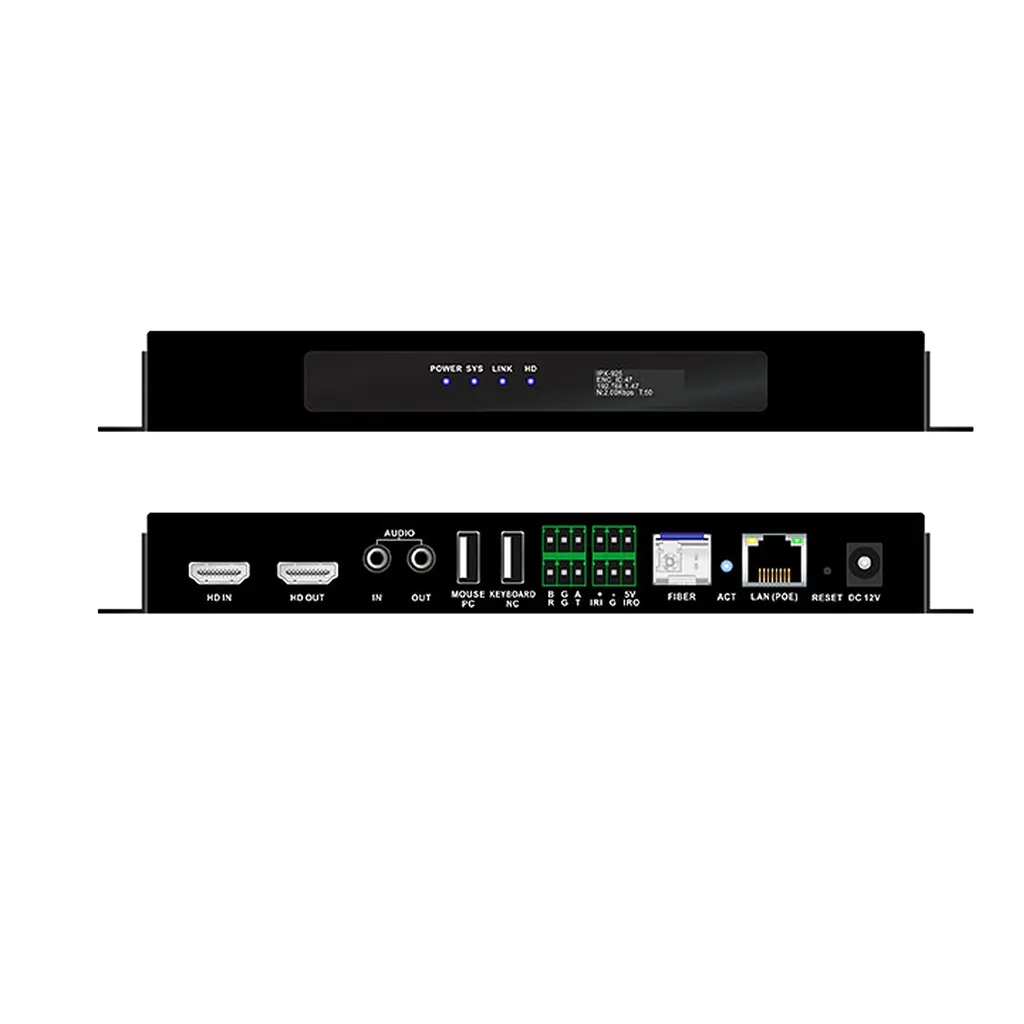
Transmission runs over LAN or fiber, with reach up to 150m over CAT6 cable or up to 2km over fiber. The unit includes two 3.5mm audio input and output ports, two USB ports for a keyboard, mouse or host, and RS232, RS485, relay and I/O interfaces for central control. A front-panel LCD displays model, ID, IP address and system status, which helps engineers commission and check units.

Where it fits in Qatar and what to plan for

A ministry operations room in Msheireb could use the system to show several data feeds on one wall while operators work from workstations. A campus in Education City might link a central AV room to lecture theatres over fiber. An operations centre in the Industrial Area could place dashboards and camera feeds on a wall and act on them from a connected computer.

Before installation, plan network routes, cable lengths, rack space and the connection points for control interfaces. A free site survey lets the SmartRooms Qatar team check distances and the installation environment first. The source data for this model does not list an operating temperature range, so the environment is confirmed before quoting. Quotations usually follow within one working day.

To scope a system for your control room, request a quote with your room layout, the number of screens and the sources you need to connect.

Highlights

  • 4K distributed inputs and outputs over AV over IP
  • No server or control box required in the system
  • Video wall control with up to 16 windows per screen
  • LAN transmission up to 150m over CAT6, fiber up to 2km
  • KVM workstation control with keyboard and mouse
  • RS232, RS485, relay and I/O central control interfaces

Estimated timeline

Quotation within 1 working day · delivery timing depends on stock availability, and we confirm it with your quotation.
Specifications

Source: manufacturer · checked Oct 2026
The full specification and datasheet for this model are available on request; we send them with your quotation.

Downloads

0 files from the manufacturer
No downloadable files are listed for this model yet. Ask us and we will send the datasheet.

Questions about VX Series 4K AV over IP System

What is the Sharp VX Series 4K AV over IP System used for?
It distributes 4K input and output signals over a network and controls video walls from one interface. Typical uses include command rooms, control centres and boardrooms where several sources must reach several screens. It suits organisations in Doha that need flexible routing without dedicating a central server to the job.
Does this system need a central server or control box?
No. The system does not require a server or control box. Each unit acts as an encoder or decoder, and its role is set from the video wall controller interface. For a Qatar project this means fewer components to procure, install and maintain, and no single central device whose failure would stop the whole installation.
How many windows can it show on one screen?
Video wall control supports up to 16 windows per screen. Operators can arrange several sources, such as a workstation feed, a camera feed and a dashboard, into one layout. Layouts can be customised to suit the operating procedures of the control room.
How far can the signals travel?
Transmission works over LAN or fiber. Using CAT6 cable the signal can travel up to 150m, and over fiber up to 2km. These distances matter at a campus in Education City or an industrial site in Mesaieed where equipment rooms sit far from the display wall. Confirm cable routes during the site survey.
Can operators control a workstation from the video wall?
Yes. The KVM workstation function supports mouse and keyboard control, so an operator can use a connected computer from the wall position. This suits operations centres in Doha where staff monitor data on the wall and act on it from a workstation.
Does it support resolution scaling?
Yes, the system supports resolution down-scaling and up-scaling, so sources with different resolutions can be fitted to the display. This helps when a wall is fed by a mix of older computers, cameras and newer sources at the same time.
Which control systems can it integrate with?
The unit supports RS232, RS485, relay and I/O control. These interfaces let a building or room control system trigger switching, change layouts or operate other devices. Confirm the exact control commands with the SmartRooms Qatar team before the integration stage.
Is audio supported?
Audio can be embedded into or de-embedded from the video signal, and the unit includes two 3.5mm audio input and output ports. This is useful in meeting rooms where sound must go to a separate speaker system rather than through the display.
What does the front panel show and which ports are included?
The front-panel LCD shows model, ID, IP address and system status, so an engineer can check a unit during commissioning or fault finding without a laptop. Two USB ports are provided for a keyboard, mouse or host connection.
What should I plan for before installing this system in Qatar?
Plan network routes, cable lengths, rack space and the connection points for control interfaces. Book a free site survey before fixing equipment. The source data does not list an operating temperature range for this model, so SmartRooms Qatar will confirm the installation environment before the quotation is finalised.
Can a government entity buy this with a purchase order?
Yes. SmartRooms Qatar accepts purchase orders (LPOs) and government tenders, including Monaqasat, and payment by bank transfer, cheque or purchase order. To request a quote, send your room layout, the number of screens and the sources that need to be connected.

Similar models

Barco TransForm NSD-220 Barco TransForm NSD-220 Video Wall Controller
Controllers & processors
Dahua DSCON2100-0410H Dahua DSCON2100-0410H 1.5U Embedded Multi-Screen Video Wall Controller
Controllers & processors
Dahua DSCON2100-0416H Dahua DSCON2100-0416H 1.5U Embedded Multi-Screen Video Wall Controller
Controllers & processors
Dahua DSCON8000-S13 Dahua DSCON8000-S13 5U Splicing Controller for Video Walls
Supports video decoding at 32 MP
Dahua DSMS0105UHI-4K Dahua DSMS0105UHI-4K Distributed Ultra HD AVoIP Encoder
Controllers & processors
Email Call