





Thursday, 22 October 2026 · 11 Jumada I 1448 AH Sun – Thu · 9:00 – 18:00
+971 56 914 9477 العربية
WhatsApp

X-Sign Broadcast

BenQ X-Sign Broadcast School Announcement Software

WhatsApp
Priceon request
QuotationWithin 1 working day
DeliveryConfirmed with your quote, based on stock
PDFDownload datasheet (X-Sign Broadcast_AR_190306133405.pdf)
Overview

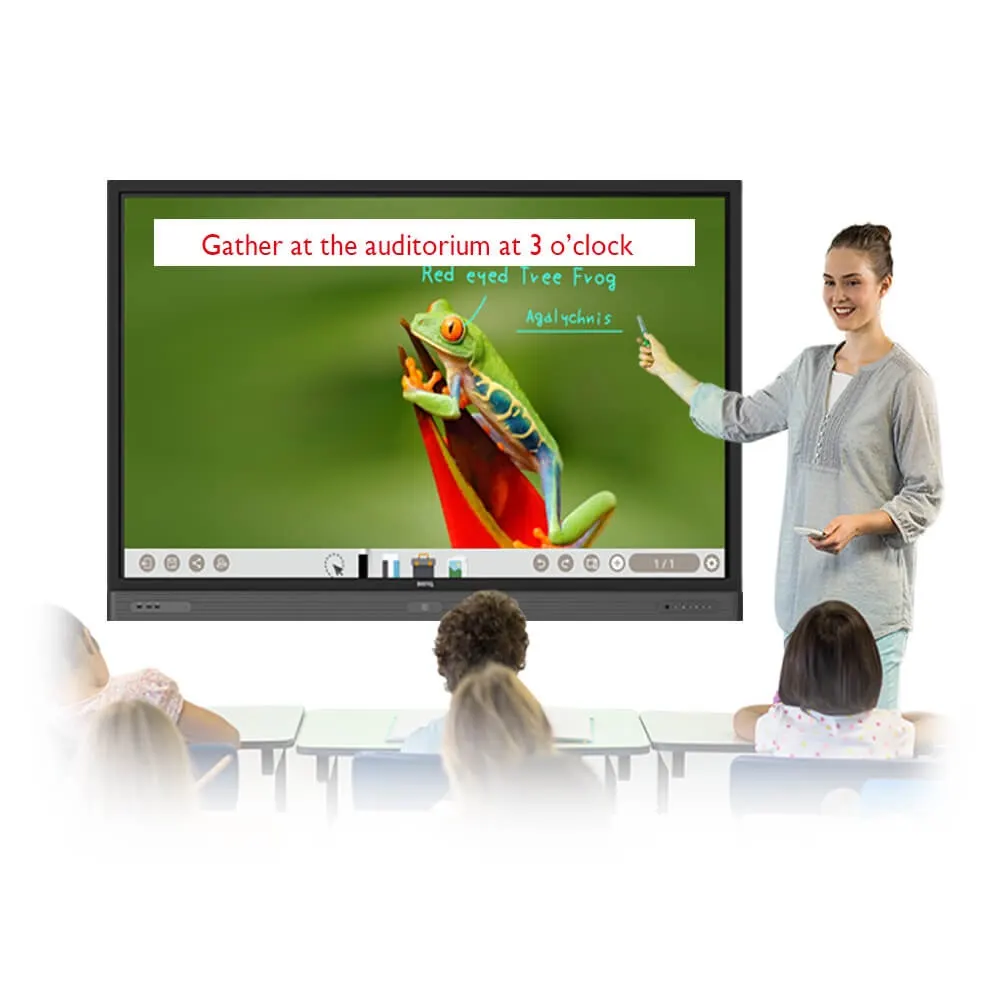
X-Sign Broadcast is announcement software for BenQ devices. Staff can push messages straight away or schedule them, target screens by grade, floor or campus, and show text, images, PDFs, Office files, videos and YouTube links. A Prayer Time feature displays prayer reminders across classrooms. It suits private and international schools in Qatar that want to complement an existing PA system with visual notices. Request a quote.

What X-Sign Broadcast does on a school campus

X-Sign Broadcast is an announcement system for BenQ displays. It works alongside your school PA system, adding visual notices to classroom and corridor screens so that morning announcements, event reminders and urgent warnings reach students who may not be listening to a speaker. Staff create and send every message from one centralised dashboard, so the front office can reach the whole school without walking between rooms.

Scheduled messages, instant alerts and how they appear

Messages can be published straight away or scheduled for a later time. That suits a sports day reminder sent the day before, or a registration deadline announced a week ahead. When something urgent happens, the interrupt feature pushes a message to devices immediately. Messages appear on top of whatever is already on the screen. A teacher can dismiss a notice by tapping it, or an administrator can mark it as important so it stays up for a specified duration.

Content can be varied to suit the notice. Teams can use customisable banner text for short, clear messages, full-screen images or slideshows for visual announcements, and Word, PowerPoint, PDF and Google Slides files for detailed notices. Videos can be uploaded as files or added through a YouTube link, and the supported formats also include YouTube Live Streaming.

Targeting, permissions and the Prayer Time feature

Targeted announcements go to devices grouped by grade, floor or campus, so a Year 11 exam notice reaches only the relevant screens and every intended recipient sees it at the same time. Group permissions let admins authorise individual staff to create and send messages to specific groups, which spreads the workload across departments. The message history lets admins check past announcements and confirm that every class is up to date.

The Prayer Time feature displays prayer reminders automatically across classrooms. For schools in Qatar, where the timetable is built around prayer times, this removes a daily manual task from the front office.

Where it fits in Qatar

A private school in Al Wakrah with classrooms spread over two floors can target floor-level reminders within its Sunday to Thursday timetable and send urgent warnings to every screen when a class is cancelled. An international school in Lusail with separate buildings can group devices by campus so that each building receives only its own notices. A training centre in Education City can post registration deadlines and workshop reminders in the corridors where learners wait.

What to plan before you order

  • Confirm which BenQ display models in your building will run the software.
  • Map your groups, such as grades, floors and campuses, and decide who may send to each.
  • Decide which notices are urgent and which are routine, so staff know when to use the interrupt feature.
  • Collect the file types you already use, such as PDFs, Word documents and YouTube links.

The product information does not set out licence terms or system requirements for this software, so the SmartRooms Qatar team will confirm these with you before anything is ordered. Request a quote, and we will check compatibility with your BenQ devices and send a quotation, usually within one working day.

Highlights

  • Schedule messages or push instant alerts to all BenQ devices
  • Interrupt feature alerts students during emergencies
  • Prayer Time feature displays prayer reminders across classrooms
  • Targeted messages by grade, floor or campus
  • Text, images, videos, YouTube links and Office or PDF files
  • Group permissions and message history for administrators

Estimated timeline

Quotation within 1 working day · delivery timing depends on stock availability, and we confirm it with your quotation.


Specifications

Source: manufacturer · checked Oct 2026
The full specification and datasheet for this model are available on request; we send them with your quotation.

Downloads

2 files from the manufacturer

Questions about X-Sign Broadcast

What is BenQ X-Sign Broadcast?
X-Sign Broadcast is announcement software for BenQ devices. It lets school staff send scheduled messages and instant alerts to screens across a campus from one centralised dashboard. It is designed to complement an existing school PA system by adding visual announcements such as morning notices, event reminders and warnings, so messages reach students who are not listening for audio.
Does X-Sign Broadcast replace our school PA system?
No. The software is built to complement a school PA system, not replace it. Audio announcements still go through the PA, while X-Sign Broadcast adds visual notices on BenQ screens in classrooms and corridors. For a school in Al Wakrah that already has a PA system, morning announcements and urgent warnings can be read on screen as well as heard, which helps students who miss the audio in a noisy corridor.
Which file types can I show on screen?
X-Sign Broadcast supports image files, video files, YouTube videos, YouTube Live Streaming, Office PowerPoint, PDF and Office Word files. Google Slides can also be shown, and messages can use customisable banner text or full-screen image slideshows. A school sending a timetable change as a Word document or an exam schedule as a PDF can display that file directly.
Can we schedule messages or send them straight away?
Both. Administrators can push an announcement immediately or schedule it to display at a later time on any BenQ device. A sports day reminder for a school in Doha can be scheduled for the day before the event, and a registration notice for a training centre can be set to appear in the weeks leading up to the deadline. Staff do not need to be at the screen when the notice should appear.
How do emergency alerts appear on screens?
The interrupt feature pushes a message to devices straight away, which suits urgent updates. Messages display on top of whatever is already on the screen, so a class cancellation is visible even when a lesson video is playing. Recipients can dismiss a notice by tapping it, or an admin can set it as important so it remains until a specified duration has passed. Plan in advance which staff can send urgent alerts.
Can we send a notice to one floor or one campus only?
Yes. Targeted announcements can be sent to devices grouped by grade, floor or campus. In a multi-building school in Lusail, a notice about a science lab closure can go only to the science floor, while a general reminder goes to every building. The main planning task before go-live is grouping devices into clear sets, which ensures all intended recipients see the message at the same time.
How does the Prayer Time feature work in a school?
The Prayer Time feature automatically displays prayer reminders across classrooms. Schools in Qatar build their timetables around prayer times, so an automatic reminder removes a daily manual step for front-office staff. Before ordering, ask the SmartRooms Qatar team how the reminders are configured for your location, so that the displayed times match the schedule your school follows.
Can teachers send messages without full admin rights?
Yes, through group permissions. Admins can authorise individual users to create and send messages to specific groups. A head of department in a Doha school can post notices for their year group without access to the whole school. This spreads the workload across departments while whole-school messages stay under administration control. Agree on the named senders for each group before roll-out.
Can we review announcements we sent earlier?
Yes. The message history lets admins check past announcements and confirm that every class has received the latest news. A private school in Al Khor or Al Rayyan preparing a term report, or answering a parent query about a specific notice, can use the record to see which announcements were sent. The history covers messages sent through the dashboard.
Which displays does it work with?
The product information describes X-Sign Broadcast as working with all your BenQ devices. It does not list display model numbers or operating requirements for this software. Confirm the BenQ display models in your building with the SmartRooms Qatar team before ordering, so the quotation matches your fleet. The information does not address other brands, so do not assume compatibility with them.
What should we plan before rollout at a school in Lusail or Al Rayyan?
Start by defining groups: grades, floors and campuses, and name the staff allowed to send to each one. Decide which notices count as urgent, collect the file types you use, and confirm which BenQ displays will run the software. Share this plan with the SmartRooms Qatar team when you request a quote, so devices and groups are set up clearly. Organising the group structure early avoids rework later.
How do we request a quote and pay through an LPO?
Send your request with the school name, the number of BenQ devices and the groups you need, and the SmartRooms Qatar team will reply with a quotation, usually within one working day. Schools and government bodies can issue a purchase order (LPO) or bid through government tenders, including Monaqasat. Payment can be made by bank transfer, cheque or purchase order, and products are covered by the manufacturer's warranty.

Similar models

Hisense VisionInfo Hisense VisionInfo Cloud Digital Signage CMS Software
Software
IAdea IAdeaCare IAdea IAdeaCare Remote Device Management Software
Software
IAdea SignApps Express IAdea SignApps Express Digital Signage Content Management Software
Software
iiyama S2225AS-B1P iiyama ProLite S2225AS-B1P 21.5-inch Android Signage Display
22″ 1920 x 1080 (2 megapixel HD) 500 cd/m²
iiyama S2425AS-B1P iiyama ProLite S2425AS-B1P 24-inch Android Digital Signage Display
24″ 1920 x 1080 (2 megapixel HD) 500 cd/m²
Email Call


