





Thursday, 22 October 2026 · 11 Jumada I 1448 AH Sun – Thu · 9:00 – 18:00
+971 56 914 9477 العربية
WhatsApp

Newline Signage Pro

Newline Signage Pro Digital Signage Software

WhatsApp
Priceon request
QuotationWithin 1 working day
DeliveryConfirmed with your quote, based on stock
PDFDownload datasheet (Newline-Signage-Pro.pdf)
Overview

Newline Signage Pro is cloud-based digital signage software for scheduling and managing content across many registered displays. Devices join by serial number, QR code or Excel upload, then get grouped and assigned one of six layouts. Google Slides, Google Calendar, Canva, YouTube Live and RSS feeds plug in directly. Suited to schools and businesses in Qatar running multiple screens. Request a quote to confirm display compatibility.

What Newline Signage Pro does

Newline Signage Pro is software for running digital signage across many screens from one place. It is a cloud-based content management system, so administrators build content, set schedules and manage devices through a web console instead of visiting each display. The manufacturer's material says it comes fully integrated for Newline displays, naming the STV+ and Q Pro, which makes it a practical choice for schools and businesses standardising on one platform.

Device registration, grouping and control

Screens can be registered one by one or in bulk, using serial numbers, QR codes or an Excel file. That matters when a campus or healthcare group is rolling out dozens of displays, because the device list can be prepared before installers reach each site. Once registered, displays are placed into groups so a single schedule reaches every screen on a floor, in a wing or at one branch. The device list also shows online, offline or disabled status, LAN and WAN IP addresses, MAC address and OS version, which helps IT teams spot a screen that has lost its connection.

Content, layouts and live feeds

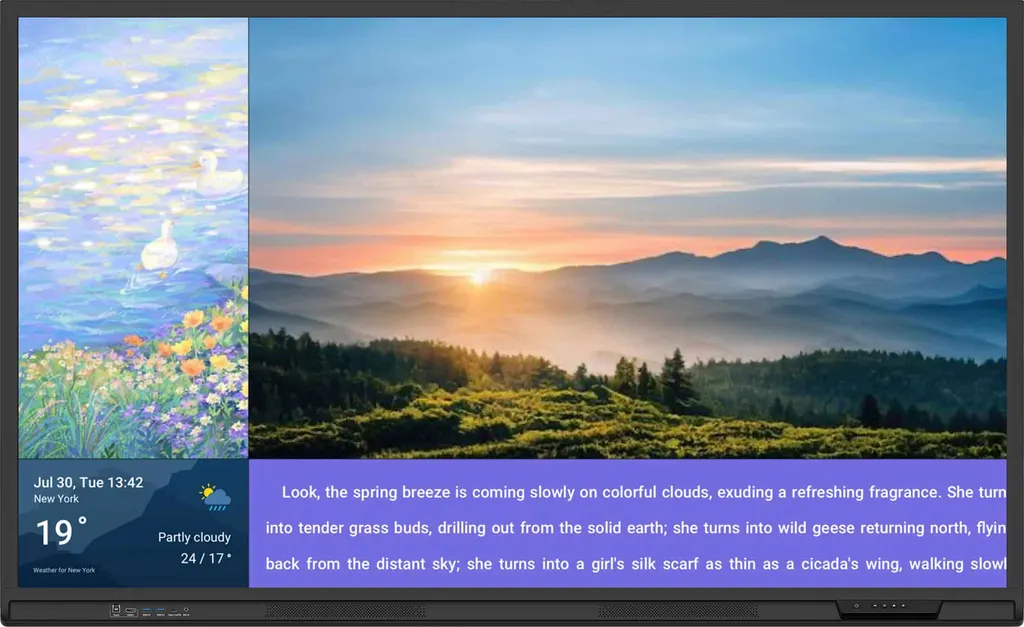
Content is built with a drag-and-drop interface and customisable text formatting, so staff without design training can publish notices. Six pre-defined layouts cover different display configurations, including landscape and five portrait types. Content can mix images, video, text, weather, QR codes, timers, announcements and live feeds from YouTube Live, Twitch and RSS. Google Slides presentations and Google Calendar events can be synced, and Canva designs can be brought in. Scheduling and automatic app launch keep the right content on screen without manual starts.

Where it fits in Qatar

  • Schools and universities: A private school in Al Wakrah can show timetable changes, club updates and calendar events on corridor screens, while each department on a campus in Education City manages its own sub-account.
  • Clinics and hospitals: A clinic in Doha can run waiting area content, health awareness messages and a weather strip, with a portrait layout matched to a screen beside the reception desk.
  • Offices and retail: A company in West Bay or a shopping centre in Lusail can run promotions or wayfinding from one admin portal, updating groups by location and time of day.

Security, planning and requesting a quote

Newline Signage Pro is CASA Tier 2 certified, following an independent assessment by DEKRA DIGITAL against Google's Cloud Application Security Assessment requirements. The manufacturer says this covers secure handling of user data and OWASP ASVS requirements. Before rollout, list the screens, groups, content owners and the Google accounts that will connect Slides and Calendar, and confirm the display model for each location. Where screens sit in lobbies, near windows or in areas that run hot, check their environment against the display's own data. SmartRooms Qatar offers a free site survey to plan network access, mounting and placement. Send us the number of screens, the display models, the locations and the content you plan to show, and we will issue a quotation usually within one working day. We supply against purchase orders (LPOs) and government tenders including Monaqasat, with payment by bank transfer, cheque or purchase order. Request a quote to get a compatibility check and a plan for Newline Signage Pro across your sites.

Highlights

  • Bulk device registration by serial number, QR code or Excel
  • Six pre-defined layouts, including landscape and five portrait types
  • Google Slides, Google Calendar and Canva integration
  • YouTube Live, Twitch and RSS live feed support
  • CASA Tier 2 certification assessed by DEKRA DIGITAL
  • Device groups, scheduling and automatic app launch

Estimated timeline

Quotation within 1 working day · delivery timing depends on stock availability, and we confirm it with your quotation.


Specifications

Source: manufacturer · checked Oct 2026
The full specification and datasheet for this model are available on request; we send them with your quotation.

Downloads

3 files from the manufacturer

Questions about Newline Signage Pro

Is Newline Signage Pro hardware or software?
Newline Signage Pro is software, not a display. It runs as a cloud-based content management system, so administrators build content, set schedules and manage devices through a web console instead of visiting each screen. Because compatibility depends on the display model, SmartRooms Qatar confirms the right models for your site when you request a quote.
Which displays does it work with?
The manufacturer's material says Newline Signage Pro comes fully integrated for Newline displays, naming the STV+ and Q Pro. Newline also offers a separate media player for non-Newline displays and for older Newline displays not running Android 11 or above. Send us your current display models and we will confirm which route suits each location in the quotation.
How are screens added to the system?
Devices can be registered individually or in bulk using serial numbers, QR codes or an Excel file. This suits a school or hospital installing dozens of screens, because the device list can be prepared in a spreadsheet before installers reach each site. Once registered, each screen is placed into the group that should receive its content.
Can one schedule control screens in different buildings?
Yes, through device grouping. Screens are organised into groups that receive the same content, and each group can be managed separately. For example, a company in Doha with reception screens in West Bay and a training room in Lusail can send a welcome loop to one group and a safety notice to another from the same admin portal.
What layouts are available?
Six pre-defined layouts are included for different display configurations, covering landscape and five portrait types. Templates also support image, video and live feed layouts. A portrait layout suits a totem beside a lift lobby, while a landscape layout suits a boardroom wall. Both orientations can be set up on one account, so a mixed site does not need two platforms.
Can it show live feeds from YouTube Live or Twitch?
Yes. The manufacturer lists YouTube Live, Twitch and RSS feeds as live content sources, alongside weather, QR codes, timers and announcements. A hotel in Doha could show a news or weather feed in its lobby, or a clinic could run health awareness messages in its waiting area, with content updated from the admin portal as needed.
Does it integrate with Google Slides, Google Calendar and Canva?
Yes. Google Slides presentations and Google Calendar events can be synced into signage, and Canva designs can be used as content. A private school in Al Wakrah could show a weekly calendar of events on corridor screens, while its marketing team designs posters in Canva and adds them to the same content library.
What does the CASA Tier 2 certification mean?
The manufacturer states that Newline Signage Pro is CASA Tier 2 certified after an independent assessment by DEKRA DIGITAL. The assessment checks against Google's standards for cloud application security, covering secure handling of user data, OWASP ASVS requirements and secure access to sensitive Google APIs. Government bodies and schools handling sensitive data can have their IT team review this against their security policy.
Can screens switch on and launch content automatically?
Yes. Display times can be scheduled with a straightforward setup, and the automatic app launch feature ensures content is ready when the screen starts. This suits a school that wants morning announcements and afternoon club updates, or an office that wants its screens running only during the Sunday to Thursday working week.
Who can use the admin portal?
The portal supports admin, user, sub-account and school user roles, so an IT manager can keep overall control while departments manage their own content. A university campus in Education City could give each faculty a sub-account to publish its own notices on screens in its building, without changing content on the rest of the campus network.
What should we plan before installation?
Each screen needs a network connection, and the installation environment should suit the display model. SmartRooms Qatar offers a free site survey to plan cable routes and mounting positions, which matters for screens in lobbies, near windows or in outdoor-facing areas where summer temperatures exceed 45°C. Operating conditions should be checked against the specific display's data before mounting.
How do I request a quote?
Send SmartRooms Qatar the number of screens, their display models, the locations and the type of content you plan to show. The team usually issues a quotation within one working day. We supply against purchase orders (LPOs) and government tenders including Monaqasat, and payment can be made by bank transfer, cheque or purchase order. Request a quote to receive a compatibility check and a plan across your sites.

Similar models

Hisense VisionInfo Hisense VisionInfo Cloud Digital Signage CMS Software
Software
IAdea IAdeaCare IAdea IAdeaCare Remote Device Management Software
Software
IAdea SignApps Express IAdea SignApps Express Digital Signage Content Management Software
Software
iiyama S2225AS-B1P iiyama ProLite S2225AS-B1P 21.5-inch Android Signage Display
22″ 1920 x 1080 (2 megapixel HD) 500 cd/m²
iiyama S2425AS-B1P iiyama ProLite S2425AS-B1P 24-inch Android Digital Signage Display
24″ 1920 x 1080 (2 megapixel HD) 500 cd/m²
Email Call


