





Thursday, 22 October 2026 · 11 Jumada I 1448 AH Sun – Thu · 9:00 – 18:00
+971 56 914 9477 العربية
WhatsApp

RP6504

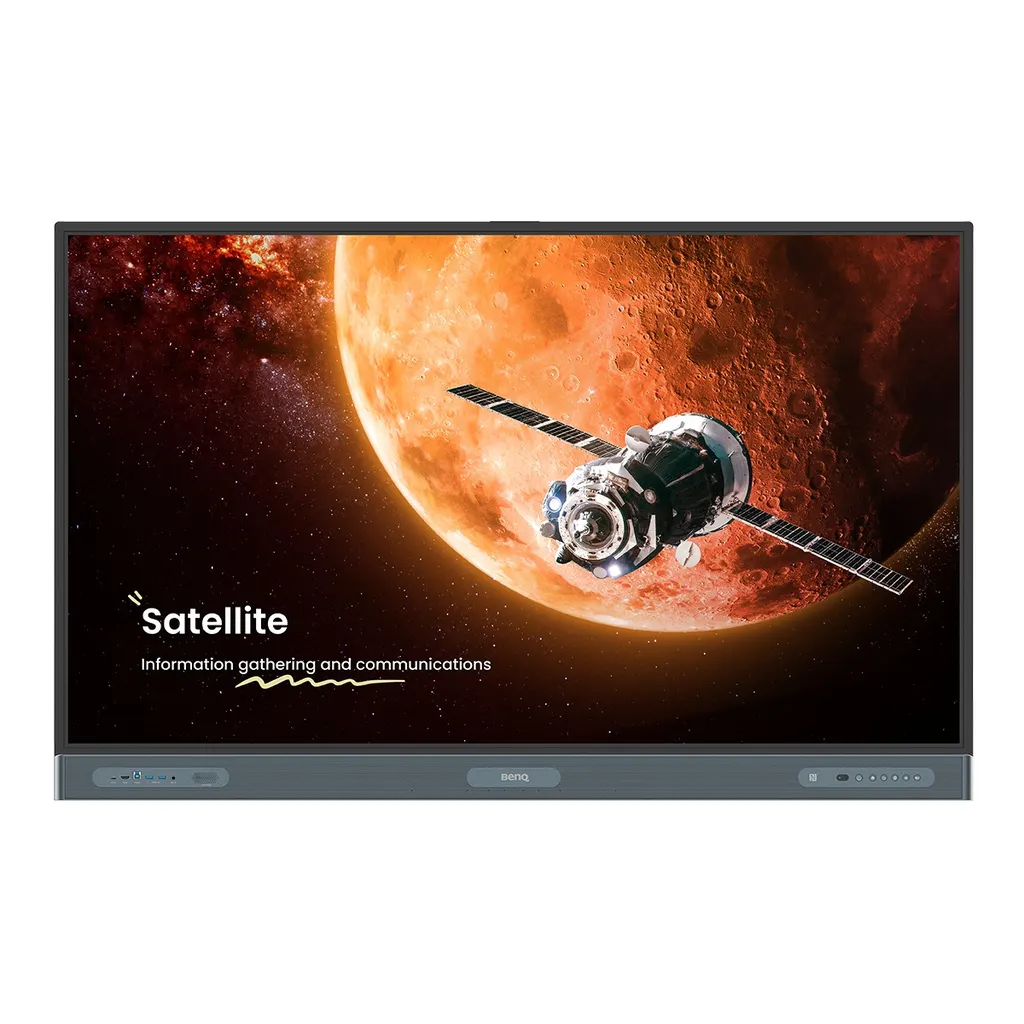
BenQ Board Pro RP6504 65-inch Interactive Display

Screen size
65''
Resolution
UHD 3840 × 2160 pixels
Touch
Ultra Precision IR
System
Android 15.0
WhatsApp
Priceon request
QuotationWithin 1 working day
DeliveryConfirmed with your quote, based on stock
PDFDownload datasheet (benq-rp04-series-ebrochure-2025-4-22-digital.pdf)
Overview

The BenQ Board Pro RP6504 is a 65-inch 4K UHD interactive display with a 10-bit IPS panel, up to 50 touch points and Android 15 running Google EDLA-certified services. It has one OPS slot for a slot-in PC, a 100 W USB-C port and an 8-microphone array for lessons and meetings. It suits classrooms, training rooms and medium meeting rooms in Qatar. Request a quote for supply, installation and delivery.

What the BenQ RP6504 is

The BenQ Board Pro RP6504 is a 65-inch interactive display with a 4K UHD (3840 × 2160 pixels) IPS panel, built for teaching rooms and meeting spaces where people write, annotate and share directly on the screen. It belongs to the Board Pro RP04 series and runs Android 15 with Google EDLA certification, so approved Google services such as Google Drive and Google Play are available on the board itself.

Panel, touch and writing performance

The panel offers 450 nits typical brightness, a 1200:1 typical contrast ratio and 10-bit colour depth with a 72% NTSC colour gamut. Touch uses Ultra Precision IR with up to 50 touch points and a touch response time below 2.5 ms, so several users can write at the same time. The glass is 9H tempered and anti-glare, and it carries a nano-ionic silver germ-resistant treatment.

Connectivity and the OPS slot

Four HDMI 2.0 inputs, one HDMI 2.0 output, a DisplayPort 1.2a input and a VGA input cover most laptops and presentation sources. The 100 W USB-C port can charge a connected device while it drives the screen and supports touchback. A single OPS slot accepts a slot-in PC module, and the board also includes Wi-Fi 6, Bluetooth 5.2, two Ethernet ports, RS-232 control and an optical S/PDIF output.

Where it fits in Qatar

  • Classrooms in Education City or Al Wakrah: a 65-inch size suits a standard classroom with a few rows of seats.
  • Meeting rooms in West Bay or Msheireb: a compact board for a team room, with cloud whiteboarding that lets remote colleagues join the session.
  • Training centres in Lusail or the Industrial Area: multi-user touch and split-screen mode suit practical sessions where two applications run side by side.

What to plan before installation

The panel weighs 40.6 kg and measures 1488.4 × 937.6 × 117.7 mm. It uses a VESA 600 × 400 mm mounting pattern with M8 screws, and a wall mount is included. Because the board is heavy, SmartRooms Qatar recommends a free site survey to check wall structure, mounting height and cable routes. The operating temperature range is 0°C to 40°C, so install it in an air-conditioned room, since outdoor summer heat in Qatar is far above that limit. Power input is 100 to 240 V at 50/60 Hz, with typical consumption of 95.0 W.

Schools ordering several units can raise a purchase order (LPO), and government buyers can respond to tenders, including Monaqasat. Request a quote from SmartRooms Qatar and we will confirm the configuration and installation scope, usually within one working day.

Highlights

  • 65-inch 4K UHD IPS panel at 3840 × 2160 pixels
  • Up to 50 touch points with Ultra Precision IR touch
  • Android 15 with Google EDLA certification and Google Play
  • One OPS slot for a slot-in PC module
  • 100 W PD USB-C port for display, charging and touchback
  • 2 × 20 W speakers, 16 W subwoofer and 8-microphone array

Classroom fit

At 65″ the farthest student should sit within about 4.9 m (6× the screen height).

Estimated timeline

Quotation within 1 working day · delivery timing depends on stock availability, and we confirm it with your quotation.

Specifications

74 specifications · Source: manufacturer · checked Oct 2026
Panel14
Screen size
65''
Panel type
IPS
Active area
1428.5 × 803.5 mm
Aspect ratio
16:9
Resolution
UHD 3840 × 2160 pixels
Response time
8 ms
Color depth
10-bit
Orientation
Landscape
Operation hours
18 hours / 7 days
Panel brightness (typical)
450 nits
Contrast ratio (typical)
1200:1
Dynamic contrast ratio
50,000:1
Color gamut
72% NTSC
Backlight life (typical)
50,000 hrs
Glass3
Germ-resistant technology
Nano-ionic silver
Anti-glare
Yes
Hardness
9H tempered
Touch screen3
Touch technology
Ultra Precision IR
Touch points
up to 50
Touch response time
< 2.5 ms
Connectivity16
HDMI (in | out)
4 × HDMI 2.0 | 1 × HDMI 2.0
DisplayPort
1 × 1.2a
USB-A
7 × 3.0, 1 × 2.0
USB-C
1 × 3.0 (PD 100 W), 2 × 3.0, 1 × 2.0 (PD 65 W)
USB-B (for touch)
3 × 3.0
3.5 mm Line in (1)
Mic × 1
VGA
1
3.5 mm Line out
Earphone × 1
OPS slot (for slot-in PC)
1
Micro SD reader
N/A
Wi-Fi
Wi-Fi 6
Bluetooth®
Bluetooth 5.2
S/PDIF out
1 (optical)
Ethernet
2
3.5 mm Line in (2)
PC Audio × 1
RS-232
1
Built-in peripherals10
NFC sensor
Yes
Ambient light sensor
Yes
IR sensor
Yes
Motion sensor
Yes
Microphone
8-microphone array (range: up to 8 m | 26ft)
Speaker
2 × 20 W (max)
Camera
N/A
Air sensor
CO₂, PM₂.₅, PM₁₀, TVOC, CH₂O, temperature, humidity
Subwoofer
1 × 16 W
Air Ionizer
Yes
Power3
ENERGY STAR®
Yes
Power
AC 100-240V 50/60Hz
Typical power consumption
95.0 W
Physical5
Dimensions (W x H x D)
1488.4 × 937.6 × 117.7 mm (58.6 × 36.9 × 4.6 inch)
Shipping dimensions (W x H x D)
1628 × 1024 × 208 mm (64.1 × 40.3 × 8.2 inch)
Weight (product I shipping)
40.6 kg | 47.8 kg (89.5 lbs | 105.4 lbs)
Mount (screws)
VESA 600 × 400 mm (4 × M8 × 25L)
Pen Tray
Yes
Environment4
Operating temperature
0°C ~ 40°C | 32°F ~ 104°F
Storage temperature
-20°C ~ 60°C | -4°F ~ 140°F
Storage humidity
10% ~ 90% RH Non-Condensing
Operating humidity
10% ~ 90% RH non-condensing
Software8
Whiteboarding
EZWrite 6.0
Wireless screen sharing
InstaShare 2
Device management
DMS
Account management
AMS
Flicker Free
Yes
Quick access tool
Floating Tool
Broadcast system
X-Sign Broadcast
Low Blue Light
Yes
Accessories4
Cables
1 × VGA (3 m | 9.8 ft), 1 × HDMI (3 m | 9.8 ft), 1 × USB-B for touch (3 m | 9.8 ft), 1 × USB-C (1.5 m | 4.9 ft)
Wall mount
1
Pen
2
Remote control
1
System4
GPU
Arm Mali-G57 MC5
CPU
Arm Cortex-A78 × 4 + A55 × 4
Memory | Storage
8 GB | 64 GB/128 GB
OS
Android 15.0

Downloads

12 files from the manufacturer

Questions about RP6504

Who is the BenQ RP6504 best suited for?
The BenQ Board Pro RP6504 suits a classroom, training room or medium-sized meeting room where a 65-inch screen is the right size. Its 4K UHD IPS panel and 50-point touch let presenters write, annotate and share from the front of the room. Schools, government offices and corporate teams in Qatar commonly choose interactive boards like this for lessons and internal briefings. For a larger hall, a bigger size may work better, so confirm the room dimensions with us before ordering.
Does the RP6504 run Android 15 and Google apps?
Yes. The board runs Android 15 and carries Google EDLA certification, which allows it to use Google core apps and services, including Google Play and Google Drive. Teachers can open lesson files from Drive and save them back once class is done. Because the operating system and apps are part of the board, you do not need a separate computer to use Google services. Confirm that the specific apps your school or office needs are available before purchase.
How many touch points does the RP6504 support?
The RP6504 uses Ultra Precision IR touch with up to 50 touch points, so several people can write or tap at the same time. The touch response time is below 2.5 ms, which keeps writing responsive during group work. The glass is 9H tempered and anti-glare. The package includes two pens and a remote control, and the USB-C port supports touchback when a laptop is connected to the board.
How bright is the panel, and will it work in a room with strong sunlight?
The panel has 450 nits typical brightness, a 1200:1 typical contrast ratio and 10-bit colour depth with a 72% NTSC gamut. The anti-glare glass reduces reflections from windows and ceiling lights. For rooms with strong sunlight, place the board away from direct sun and use blinds or curtains. The resolution is 3840 × 2160 pixels, so text and diagrams stay sharp from the back rows of a classroom.
Can I add a computer to the board?
Yes. The RP6504 has one OPS slot for a slot-in PC module, which lets a teacher or presenter run a computer inside the board without a separate desktop beside it. The OPS module is not in the accessory list, so it is a separate purchase. Tell us which module you intend to use, and we will confirm compatibility with the board and the scope of the quotation.
Which ports and inputs does it have?
The board has four HDMI 2.0 inputs, one HDMI 2.0 output, one DisplayPort 1.2a input and one VGA input. It also has USB-A ports (seven USB 3.0 and one USB 2.0), USB-C ports including a 100 W PD port and a 65 W PD port, a USB-B port for touch, two Ethernet ports, an optical S/PDIF output, RS-232 and 3.5 mm audio connections. Front-facing ports make everyday connections easy during a lesson.
Will the RP6504 cope with Qatar's summer heat?
The operating temperature range is 0°C to 40°C, and the storage range is -20°C to 60°C. Outdoor summer temperatures in Qatar regularly exceed 45°C, so the RP6504 should be installed indoors in an air-conditioned room, not in an outdoor lobby, sunroom or unconditioned store. If your space has high temperatures or dust, confirm the environment with the SmartRooms Qatar team before planning the installation.
How heavy is it, and what should I plan for mounting?
The panel weighs 40.6 kg and uses a VESA 600 × 400 mm mounting pattern with four M8 screws. A wall mount is included. Two people should lift the board, and the wall must be checked for load and height. SmartRooms Qatar offers a free site survey before wall mounting, which covers wall structure, mounting height, cable routes and the distance to the nearest power point.
What power does it need, and how much does it use?
The power input is 100 to 240 V at 50/60 Hz, and typical consumption is 95.0 W, with standby consumption below 0.5 W. Qatar's mains supply is 240 V at 50 Hz, which falls within the stated input range. The board is ENERGY STAR rated. The source data does not list a plug type, so confirm the plug and any adaptor with our team before installation.
We are fitting out several classrooms at a private school in Al Wakrah. How do we order?
Send us the room list, the number of units and the wall or stand plan for each classroom. We will check mounting, cable routes and power at each location, then issue a quotation, usually within one working day. Schools can raise a purchase order (LPO) for the full set, and payment can be made by bank transfer, cheque or purchase order. Each board includes a wall mount, two pens and a remote control.
How does the board help with classroom air quality?
The RP6504 includes an air sensor that measures CO₂, PM₂.₅, PM₁₀, TVOC, CH₂O, temperature and humidity. It also has an air ionizer that helps regulate impurities when pollutant levels rise. Facilities managers can use the readings to adjust ventilation in busy classrooms. The glass has a germ-resistant treatment, and the pens and remote are also germ-resistant, which helps in shared teaching spaces.
We are a government office in West Bay. Can we use the board for meetings and tenders?
Government offices in West Bay can use the RP6504 for internal briefings and meeting rooms, where a 65-inch touch display gives participants a shared writing surface. The Floating Tool lets presenters annotate on top of any app or document, and cloud whiteboarding lets remote colleagues take part in the session. Public bodies can buy through tenders, including Monaqasat, or by purchase order. Request a quote to confirm the specification for your meeting room.

Similar models

BenQ CM7505 BenQ Board CM7505 75-inch Interactive Display
75″ UHD 3840 × 2160 pixels Ultra Precision IR
SMART SBID-6286S-V3 SMART Board 6086S-V3 86-inch Interactive Display with iQ
86″ 4K UHD (3840 × 2160) HyPr Touch with InGlass
SMART SBID-6286S-V3-P SMART Board 6086S-V3 Pro 86-inch Interactive Display with iQ
86″ 4K UHD (3840 × 2160) HyPr Touch with InGlass
Clevertouch Clevertouch Edge 65" Clevertouch Edge 65" 4K Interactive Display with Camera and Speakers
65″ 4K UHD (3840x2160 @60Hz) Android 15
Clevertouch Clevertouch Edge 86" Clevertouch Edge 86" 4K Interactive Flat Panel
86″ 4K UHD (3840x2160 @60Hz) Android 15
Email Call




