





Thursday, 22 October 2026 · 11 Jumada I 1448 AH Sun – Thu · 9:00 – 18:00
+971 56 914 9477 العربية
WhatsApp

TCY31

BenQ TCY31 InstaShare Dock Tabletop Accessory Storage

WhatsApp
Priceon request
QuotationWithin 1 working day
DeliveryConfirmed with your quote, based on stock
Overview

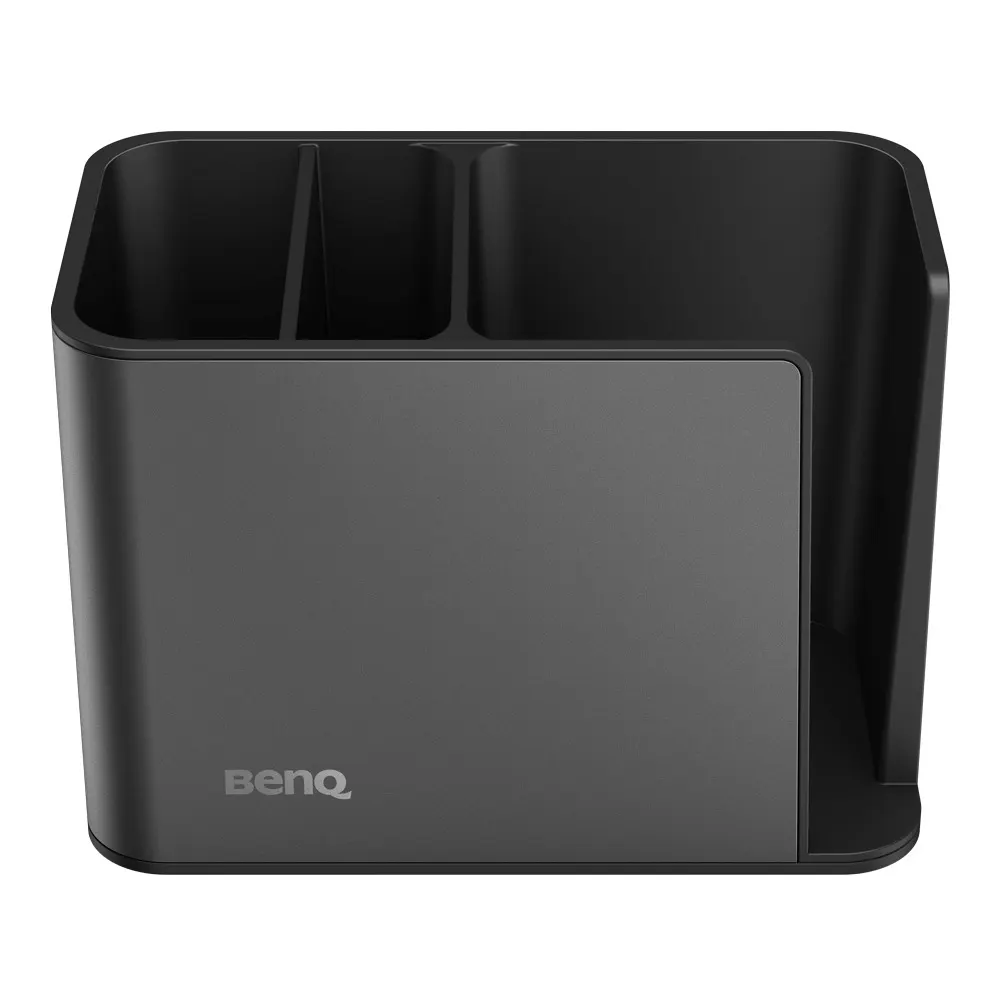
The BenQ TCY31 InstaShare Dock is a tabletop storage unit for the InstaShare Button and other BenQ display accessories such as pens and remotes. It has separate compartments, a side opening for quick InstaShare Button access, and an anti-slip rubber base that keeps it steady on a table. Its matte metallic finish suits meeting rooms and classrooms across Qatar where BenQ displays are installed.

Keeping BenQ display accessories in one place

The TCY31 InstaShare Dock is a tabletop storage unit designed for the InstaShare Button and the other accessories that come with BenQ displays. Instead of pens, remotes and buttons being spread across a table or lost in a drawer, each item has a designated compartment inside the dock. It is a small part of a BenQ Board setup, but it keeps accessories close to the screen and ready when a session begins.

Features that matter during everyday use

  • Separate compartments for each InstaShare Button, pen and remote, so nothing has to be searched for.
  • Side opening designed for InstaShare Buttons, allowing quick access during a meeting or lesson.
  • Anti-slip rubber base that reduces the chance of the dock sliding off a table or tipping over.
  • Rounded edges that give a comfortable grip and a safer handling experience in busy classrooms.
  • Matte metallic coating that matches BenQ displays and accessories.

Where it fits in Qatar

In a boardroom in West Bay or Lusail where a BenQ display is used for client presentations and video calls, the dock keeps the InstaShare Button within easy reach of the presenter, so the session does not stall while someone looks for it. In a lecture room at Education City, a lecturer can keep pens and remotes in fixed places, which helps when several staff share the same room across the week. For a private school in Al Wakrah fitting out several new classrooms at once, one dock per room can be added to the same order.

What to plan before ordering

Confirm how many BenQ displays are going into each room, because each display needs its own set of accessories and a dock on a table or lectern. Measure the surface so the dock sits comfortably beside the display, and list the accessories your team actually uses so the compartments suit them. The dock is a tabletop item, so no wall mounting is involved. For larger quantities, a purchase order (LPO) can cover the whole order, and the SmartRooms Qatar team will confirm quantities and estimated lead times, based on stock, in your quotation.

Request a quote

Tell us how many BenQ displays and rooms you are equipping, and we will send a quotation, usually within one working day. SmartRooms Qatar delivers to all eight municipalities of Qatar. Request a quote for the TCY31 InstaShare Dock today.

Highlights

  • Designated compartments for InstaShare Buttons, pens and remotes
  • Side opening designed specifically for quick InstaShare Button access
  • Anti-slip rubber base reduces sliding and toppling on tables
  • Rounded edges for a comfortable grip and safer handling
  • Matte metallic coating designed to match BenQ displays

Estimated timeline

Quotation within 1 working day · delivery timing depends on stock availability, and we confirm it with your quotation.


Specifications

Source: manufacturer · checked Oct 2026
The full specification and datasheet for this model are available on request; we send them with your quotation.

Downloads

1 file from the manufacturer

Questions about TCY31

What is the BenQ TCY31 InstaShare Dock used for?
It is a tabletop storage dock for the InstaShare Button and other BenQ display accessories. It keeps InstaShare Buttons, pens and remotes in designated compartments beside the display, so they stay within reach. It suits meeting rooms and classrooms where BenQ displays are used daily and accessories are often misplaced between sessions.
Which accessories have a place in the dock?
The dock includes designated compartments for InstaShare Buttons, pens and remotes. Its side opening is designed specifically for InstaShare Buttons, so a button can be taken out quickly during a meeting or lesson. The product data does not list other accessory types, so confirm any additional items with the SmartRooms Qatar team before ordering.
Will the dock slide across a meeting table?
The base is anti-slip rubber, which reduces the chance of the dock sliding off a table or toppling over. Place it on a flat, stable surface such as a conference table, lectern or teacher's desk near the display. The rounded edges also give a comfortable grip when you move it between uses.
Is the dock suitable for classrooms with younger pupils?
The dock has rounded edges for a comfortable grip and is described as creating a safe environment, which suits busy classrooms. Its compartments help teachers keep pens and remotes in one place instead of scattered around the room. For a school in Al Wakrah or Al Khor, check the position of the dock with your facilities team so it stays clear of pupil walkways.
What finish does the TCY31 have?
The dock has a matte metallic coating, chosen to match BenQ displays and accessories. This gives a consistent look in meeting rooms and classrooms that already use BenQ equipment. The product data does not list other finishes or colours, so confirm availability with your quotation.
Is it designed only for BenQ displays?
It is designed as storage for BenQ display accessories and is described as matching BenQ displays. It belongs to the BenQ Board accessories series. Before ordering for a particular display model, confirm the match with the SmartRooms Qatar team and include the exact display model in your quotation request.
Can I order the dock together with a BenQ Board?
Yes. You can include the TCY31 InstaShare Dock in the same quotation as a BenQ Board or another BenQ display, which helps a meeting room or classroom be equipped in one order. Telling us the room size and display model lets us match the accessories to the setup and quote the complete set clearly.
How many docks should a school order for a new block?
Order one dock for each display that has a set of InstaShare Buttons, pens and remotes to store. For a private school in Al Wakrah fitting out several new classrooms, a single purchase order (LPO) can cover every room, and the quotation can list each classroom separately. Send your room list so we can confirm an exact count.
Where should the dock sit in a meeting room?
The dock is a tabletop unit, so it sits on a flat surface such as a conference table or lectern rather than being fixed to a wall. Place it within easy reach of the presenter and close enough to the BenQ display that the InstaShare Button is convenient to use. Measure the surface first so the dock does not crowd other equipment.
Would a boardroom in West Bay benefit from this dock?
The dock is an accessory that sits alongside the display rather than inside it. In a West Bay boardroom where presenters switch between a BenQ display and video calls, the dock keeps the InstaShare Button and remote in fixed places so meetings start without a search.
Is the dock covered by warranty, and where do you deliver?
Products supplied by SmartRooms Qatar are covered by the manufacturer's warranty. We deliver to all eight municipalities of Qatar, from Doha and Lusail to Al Khor and Mesaieed. Requests are usually answered with a quotation within one working day, and payment can be made by bank transfer, cheque or purchase order.

Similar models

Clevertouch CleverCam Clevertouch CleverCam 4K ePTZ Camera for Video Conferencing
Main Stream: 3840×2160 @30fps
Clevertouch CleverInk Clevertouch CleverInk Writing Technology for Interactive Displays
Accessories
Clevertouch Intelligent Sensor Module Clevertouch Intelligent Sensor Module for Interactive Flat Panels
Accessories
Clevertouch LUX Mini Clevertouch LUX Mini Android 13 OPS Upgrade Module
8GB 64GB
Email Call


