





Thursday, 22 October 2026 · 11 Jumada I 1448 AH Sun – Thu · 9:00 – 18:00
+971 56 914 9477 العربية
WhatsApp

TWY31

BenQ TWY31 InstaShare Button for BenQ Boards

WhatsApp
Priceon request
QuotationWithin 1 working day
DeliveryConfirmed with your quote, based on stock
PDFDownload datasheet (TWY31_UM_EN_260918172002.pdf)
Overview

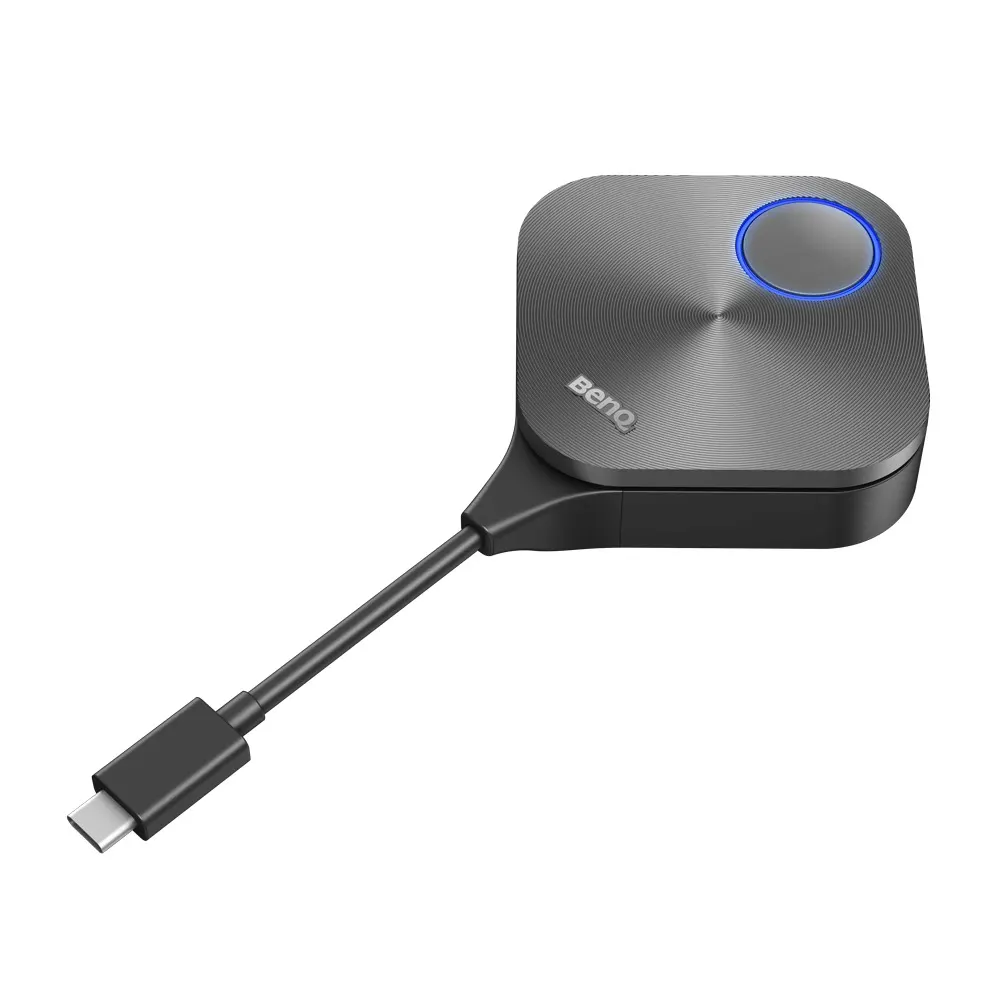
The BenQ TWY31 InstaShare Button is a silver USB Type-C accessory for BenQ Boards that lets a teacher or presenter cast a laptop screen to the display without installing software on the notebook. One cable handles casting and touchback and powers the button, and the InstaShare 2 software shows up to 9 devices side by side. It suits classrooms and meeting rooms across Qatar that run BYOM sessions.

What the TWY31 adds to a BenQ Board

The BenQ TWY31 InstaShare Button is a compact silver accessory measuring 67 x 67 x 23.2 mm. It plugs into the USB Type-C port of a notebook, and from there the notebook's screen, a camera feed or a file can be sent wirelessly to a compatible BenQ Board, so no cable has to run across the room. The notebook does not need any extra software installed.

Casting, touchback and multi-device sharing

The button uses IEEE 802.11ac on the 5 GHz band with 2T2R MIMO. Its wireless transmission reaches up to 60 fps depending on environment, at 1080p60 or 4K30p, and its input accepts up to 4K30P. Audio is stereo at 16-bit, 48 kHz. Through InstaShare 2, up to nine devices can cast at the same time, shown side by side on the panel. Touchback lets the presenter control a device directly from the BenQ Board. Wireless coverage is rated at a maximum of 15 m between the button and the interactive flat panel. Connections use WPA2/3 Personal or WPA2 Enterprise security with AES-256 encryption.

Where it fits in Qatar

In a secondary school in Al Wakrah, a teacher who moves between classrooms can carry one laptop loaded with lesson materials and cast it to any compatible board, without reconnecting cables in each room. In a ministry boardroom in West Bay, visiting staff often arrive with Windows laptops, MacBooks or Chromebooks, and each person can share their own screen from their seat. A training centre in Lusail running workshops can have groups share work side by side on one panel, which makes comparing answers faster.

Planning for heat, power and compatibility

Check the environment first. The rated operating range is 0°C to 40°C and storage is -10°C to 60°C, while summer temperatures in Qatar can exceed 45°C. Keep the button in air-conditioned rooms, away from sun-facing windows and closed, unventilated cabinets.

  • Power comes through the same USB Type-C cable: DC 5V ±10%, minimum 0.9A.
  • Maximum power consumption is 4.5W at full load.
  • Casting compatibility covers RP03 v1, RP03, RM03, RM03A, RP04, RM04, RE03A, RE03N1 and RE03N2.
  • RM03A pairs with the TDY31 Wi-Fi dongle and RE03N2 with the WD02AT Wi-Fi dongle for casting.

Confirm your exact board model before ordering, because compatibility is listed by model.

Requesting a quote

Send SmartRooms Qatar the exact board model, the number of buttons and the site location. The team offers a free site survey, delivery to all eight municipalities of Qatar and professional installation. Purchase orders, LPOs and government tenders, including Monaqasat, are accepted, and payment can be made by bank transfer, cheque or purchase order. Products are covered by the manufacturer's warranty. Request a quote and we usually respond within one working day.

Highlights

  • USB Type-C cable carries casting, touchback and power
  • Casting up to 1080p60 or 4K30p, depending on environment
  • Wi-Fi 802.11ac on 5 GHz with 2T2R MIMO and AES-256 encryption
  • Up to nine devices cast simultaneously via InstaShare 2
  • Wireless reach up to 15 m between button and panel
  • Operating range 0°C to 40°C; storage -10°C to 60°C

Estimated timeline

Quotation within 1 working day · delivery timing depends on stock availability, and we confirm it with your quotation.

Specifications

21 specifications · Source: manufacturer · checked Oct 2026
Physical1
Dimensions (W x H x D)
67 x 67 x 23.2 mm (26.4 × 26.4 × 9.1 inch)
Environment4
Operating temperature
0°C ~ 40°C
Storage temperature
-10°C ~ 60°C
Storage humidity
10% ~ 80% RH Non-Condensing
Operating humidity
5% ~ 90% RH Non-Condensing
Software1
Wireless screen sharing
InstaShare 2
InstaShare Button15
Color
Silver
Wireless Transmission Frame Rate
Up to 60 fps depending on environment (1080P60/4K30P)
TX Button Input resolution
Up to 4K30P
Audio Rate
Stereo, Radio quality 16bits 48KHz
Wi-Fi Standard
IEEE 802.11ac 5GHz, 2T2R MIMO
Authentication protocol
Wi-Fi Standard
Wireless Security (Encryption)
WPA2/3 Personal/WPA2 Enterprise Support AES-256
Wireless Coverage Reach
Max. 15 m (Between Button and IFP)
Cable
USB Type C
Power Supply
DC 5V±10%, Minimum 0.9A
Power Consumption
Max 4.5W Full Loading
Dimension (WxHxD)
67mm x 67mm x23.2mm
Temperature range
Operating: 0°C to +40°C (+32°F to +104°F) Storage: -10°C to +60°C (+14°F to +140°F)
Humidity range
Operating: 10% to 80% relative humidity Storage: 5% to 90% relative humidity (non-condensing)
Compatibility
Casting: RP03 v1, RP03, RM03, RM03A-pair with TDY31 Wi-Fi dongle, RP04, RM04, RE03A, RE03N1, RE03N2-pair with WD02AT Wi-Fi dongle BYOM: RP03 v1, RP03, RM03, RM03A-pair with TDY31 Wi-Fi dongle, RP04, RM04-pair with WD02AT Wi-Fi dongle


Downloads

2 files from the manufacturer

Questions about TWY31

What is the TWY31 InstaShare Button used for?
It lets a notebook share its screen wirelessly to a compatible BenQ Board. The button plugs into the notebook's USB Type-C port and InstaShare 2 handles casting, so a teacher or presenter can start sharing from their seat without walking to the panel. It suits schools and training centres where staff move between rooms with their own laptops.
Which notebooks work with the button?
The button is designed for notebooks with a USB-C port. The manufacturer lists compatibility with Windows laptops, MacBooks and Chromebooks, and no additional software is needed on the notebook. Casting, touchback and power all run through one USB Type-C cable, so check that your notebook has a free USB-C port before ordering, especially for visiting staff in West Bay or Lusail.
Which BenQ Boards can receive casting from the TWY31?
The compatibility data lists casting with the RP03 v1, RP03, RM03, RM03A, RP04, RM04, RE03A, RE03N1 and RE03N2. Some of these models need a Wi-Fi dongle for pairing. Confirm your exact board model with the SmartRooms Qatar team before ordering, because compatibility is listed by model rather than by series name.
Do I need a Wi-Fi dongle for any board?
Yes, for some models. For casting, the RM03A pairs with the TDY31 Wi-Fi dongle and the RE03N2 pairs with the WD02AT. For BYOM sessions, the RM03A pairs with the TDY31 and the RM04 pairs with the WD02AT. Ask for these dongles to be included in your quotation so the room is complete when installed.
How far can the presenter stand from the board?
The wireless coverage is rated at a maximum of 15 m between the button and the interactive flat panel. In a long lecture hall in Education City, the presenter may need to stay within that range. Check the room length and panel position during the free site survey before finalising the layout.
How many devices can share at once in a training room?
With InstaShare 2, up to nine devices can cast at the same time, and the board shows their screens side by side. Touchback lets the facilitator control a device from the BenQ Board. In a workshop room in Msheireb or Lusail where groups compare their work, this lets the facilitator review every contribution without swapping cables.
Can the button be used in a hot classroom or outdoors in Qatar?
Its rated operating range is 0°C to 40°C, so it is not suited to hot or unconditioned spaces. Summer temperatures in Qatar can exceed 45°C. Keep the button in an air-conditioned room, away from sun-facing windows and closed cabinets. If a classroom's cooling is unreliable, confirm the environment with the SmartRooms Qatar team before installation.
What power does the button need?
It is powered through the same USB Type-C cable that carries casting and touchback. The power specification is DC 5V with a tolerance of ±10% and a minimum of 0.9A, with maximum consumption of 4.5W at full load. Test the notebook and button together in the room before any larger rollout.
Is the wireless connection secure enough for a government office network?
The wireless link supports WPA2/3 Personal and WPA2 Enterprise security with AES-256 encryption, according to the specification. The WPA2 Enterprise option suits networks where users sign in with individual credentials. Ask your IT team to review the network policy and authentication method during the site survey, before the button goes live.
How should a school plan buttons for several classrooms?
Start by recording the BenQ Board model in each classroom, because compatibility and dongle requirements vary by model. Group classrooms with the same model and list the quantity for each. A school in Al Wakrah fitting out several new rooms can then request a free site survey to check the layout of each classroom before the buttons are placed.
Can we order through an LPO or a government tender?
Yes. SmartRooms Qatar accepts purchase orders and LPOs and supports government tenders, including Monaqasat. Payment can be made by bank transfer, cheque or purchase order. Send the board models, quantities and tender reference so the quotation matches the specification. Installation is professional, and the product is covered by the manufacturer's warranty.
How do I request a quote for the TWY31?
Send the board model, the number of buttons, the installation site in Qatar and whether you need installation. The team usually replies with a quotation within one working day. Lead times are estimates based on stock and are confirmed in the quotation. A free site survey is available for rooms where placement needs checking.

Similar models

Clevertouch CleverCam Clevertouch CleverCam 4K ePTZ Camera for Video Conferencing
Main Stream: 3840×2160 @30fps
Clevertouch CleverInk Clevertouch CleverInk Writing Technology for Interactive Displays
Accessories
Clevertouch Intelligent Sensor Module Clevertouch Intelligent Sensor Module for Interactive Flat Panels
Accessories
Clevertouch LUX Mini Clevertouch LUX Mini Android 13 OPS Upgrade Module
8GB 64GB
Email Call


