





Thursday, 22 October 2026 · 11 Jumada I 1448 AH Sun – Thu · 9:00 – 18:00
+971 56 914 9477 العربية
WhatsApp

WD02AT

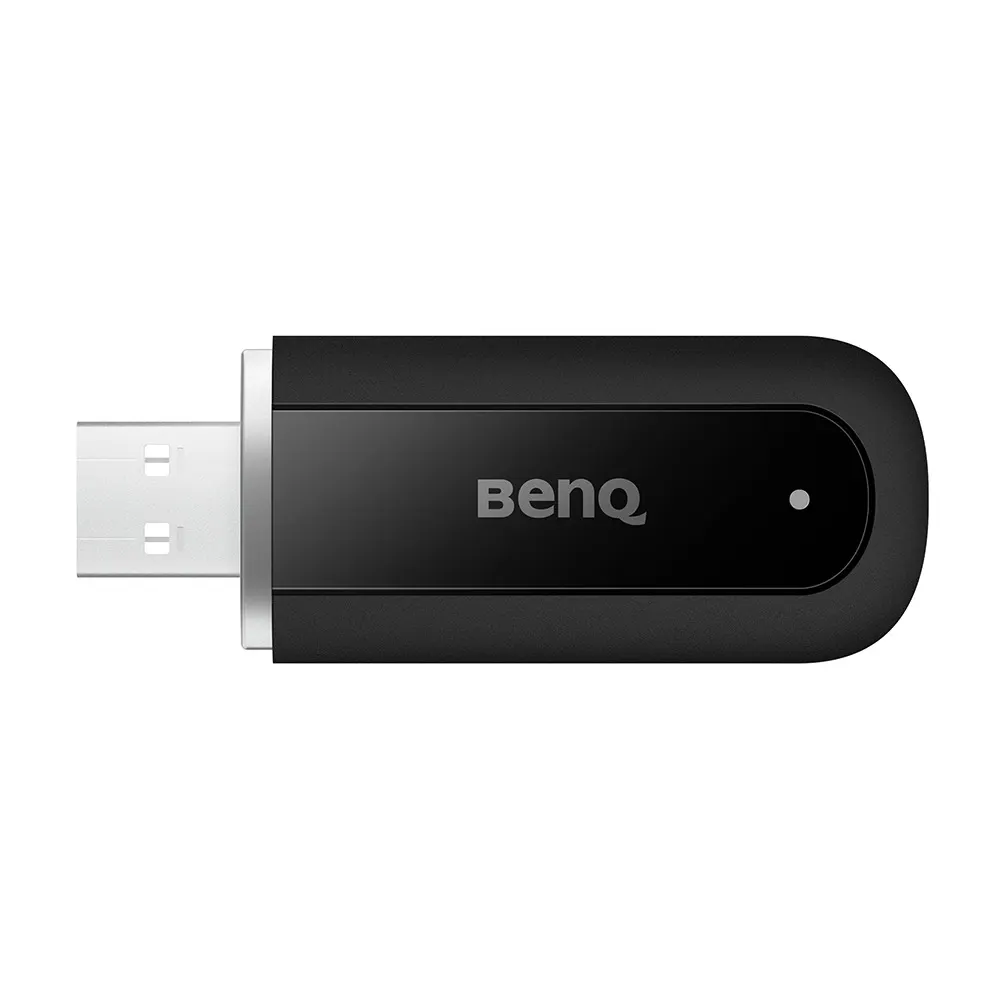
BenQ WD02AT 2-in-1 WiFi Bluetooth Adapter for BenQ Boards

WhatsApp
Priceon request
QuotationWithin 1 working day
DeliveryConfirmed with your quote, based on stock
PDFDownload datasheet (WD02AT_UM_AR_230830081707.pdf)
Overview

The BenQ WD02AT is a 2-in-1 WiFi Bluetooth adapter for BenQ Boards. It uses a USB 2.0 Type-A interface to add dual-band Wi-Fi 6, with speeds up to 1201 Mbps on 5GHz, plus Bluetooth 5.2 for keyboards, mice and speakers. It can also share a wired Ethernet connection as a Wi-Fi hotspot, suiting Qatari classrooms and meeting rooms that need wireless screen sharing without extra cabling.

What the WD02AT adds to a BenQ Board

The WD02AT is a small USB 2.0 Type-A adapter that gives a compatible BenQ Board two extra capabilities: dual-band Wi-Fi 6 and Bluetooth 5.2. It is listed for the RP04, RM04, RE04, RM03, RP03, RE03, RM03A, RE03A, RE03N1, RE03N2 and RE01 models. Measuring 65 × 25 × 11 mm and weighing 0.011 kg, it is compact enough to fit where the display has a free port.

Wireless performance and what the numbers mean

The adapter supports Wi-Fi 6 (802.11 a/b/g/n/ac/ax) on both the 2.4GHz and 5GHz bands, with MU-MIMO. The rated maximum is 574 Mbps on 2.4GHz and 1201 Mbps on 5GHz. These are maximum rates, and the manufacturer notes that real internet speed depends on the network environment, so a crowded campus network or a room far from the access point will deliver less. Where your network supports it, target the 5GHz band for wireless screen sharing.

Bluetooth 5.2 connects keyboards, mice and speakers without cables, and the adapter lists a range of up to 10 m (33 ft). External microphones are not supported, so audio capture for a lecture hall or boardroom needs a separate plan.

Where it fits in Qatar

A private school in Al Wakrah refitting its classrooms may have a wired network point in the room while students want to share their screens from their own devices. Plugging the adapter into the display and setting up a hotspot that shares that Ethernet connection with several devices covers this need without running new cabling across the room.

In a ministry meeting room in Msheireb, presenters may prefer a Bluetooth speaker and keyboard to cables stretched across a long table. In a training centre in Education City, a seminar room used by rotating lecturers benefits from wireless peripherals that can be set up quickly between sessions.

Planning the installation

  • Confirm a free USB 2.0 Type-A port on the compatible display.
  • Keep the room within the 0 to 45 degrees Celsius operating range, which in Qatar's summer means air-conditioned spaces.
  • Check that the power arrangement meets the DC 5V, 0.9A maximum rating.
  • If you want hotspot sharing, identify the Ethernet point and the security mode your IT team requires, from WEP through WPA3.
  • Test Wi-Fi speed at the desk or seat where devices will actually be used.

SmartRooms Qatar offers free site surveys, so our team can check the port, network point and wireless coverage before delivery and professional installation. Quotations are usually issued within one working day, and we accept purchase orders (LPOs) and government tenders, including Monaqasat. Request a quote for the BenQ WD02AT and tell us your BenQ Board model code, your room type and the devices you need to connect.

Highlights

  • Dual-band Wi-Fi 6 on 2.4GHz and 5GHz bands
  • Up to 1201 Mbps on 5GHz and 574 Mbps on 2.4GHz
  • Bluetooth 5.2 for keyboards, mice and speakers
  • External microphones are not supported
  • Hotspot mode shares an Ethernet connection with several devices
  • Operating range 0 to 45 degrees Celsius; USB 2.0 Type-A

Estimated timeline

Quotation within 1 working day · delivery timing depends on stock availability, and we confirm it with your quotation.

Specifications

20 specifications · Source: manufacturer · checked Oct 2026
Physical1
Dimensions (W x H x D)
133 × 80 × 30 mm (5.2 × 3.1 × 1.2 inch)
Environment4
Operating temperature
0°C ~ 45°C | 32°F ~ 113°F
Storage temperature
0℃ ~ 70℃ | 32°F ~ 158°F
Storage humidity
10% ~ 90% RH Non-Condensing
Operating humidity
10% ~ 80% RH non-condensing
BenQ Wireless USB Dongle15
Color
Black
Wi-Fi Standard
802.11 a/b/g/n/ac/ax
Interface
USB Type-a 2.0
Wi-Fi band
Dual Band: 2.4GHz and 50 GHz
MU-MIMO
Y
Wi-Fi Performance
2.4 GHz: up to 574 Mbps|5 GHz: up to 1201 Mbps
Supported OS
Android
Wireless Coverage Reach
Up to 10 meters (33 feet)
Security
64/128-bit WEP/WPA/WPA2/WPA3/ WPA-PSK/WPA2-PSK/WPS3-PSK
Power Supply
DC 5V, 0.9A max
Dimension L*H*W
65 x 25 x 11 mm
Net Weight
0.011 kg (0.024 lbs)
Temperature range
Operation: 0℃-45℃(32℉-113℉)I Storage : 0℃-70℃ (32℉-140℉)
Humidity range
Operating: 10% to 80% relative humidity I Storage: 10% to 90% relative humidity (non-condensing)
Compatibility
RP04, RM04, RE04, RM03, RP03, RE03, RM03A, RE03A, RE03N1, RE03N2, RE01

Downloads

3 files from the manufacturer

Questions about WD02AT

Which BenQ Boards is the WD02AT compatible with?
The WD02AT is listed as compatible with the RP04, RM04, RE04, RM03, RP03, RE03, RM03A, RE03A, RE03N1, RE03N2 and RE01 BenQ Board models. Before ordering, check the model code on your display against this list. If your board is not on it, send the code with your quote request so the SmartRooms Qatar team can confirm compatibility before you buy.
How fast is the Wi-Fi, and will a busy network slow it down?
The adapter supports Wi-Fi 6 on 2.4GHz and 5GHz with MU-MIMO, rated up to 574 Mbps on 2.4GHz and 1201 Mbps on 5GHz. These are maximum rates. BenQ notes that internet speed depends on the network environment, so a crowded network or a room far from the access point will see lower throughput. Test the signal at the exact spot where the display will be used.
Can I connect a Bluetooth microphone to the WD02AT?
No. The WD02AT supports Bluetooth keyboards, mice and speakers through Bluetooth 5.2, but the manufacturer states that it does not support external microphones. If your lecture hall or boardroom needs a microphone, plan a separate audio solution and mention it in your quote request from the start so the system is specified correctly.
Which Wi-Fi security modes does it support?
The adapter supports 64/128-bit WEP, WPA, WPA2, WPA3, WPA-PSK, WPA2-PSK and WPS3-PSK. Organisations often set the security mode through an IT policy, so agree the required mode with your IT department before setup. That way the hotspot or Wi-Fi connection is configured to match your network from the first day of use.
Is the WD02AT suitable for Qatar's summer heat?
Its rated operating range is 0 to 45 degrees Celsius with 10% to 80% non-condensing humidity, and its storage range is 0 to 70 degrees Celsius. Qatar summer temperatures can exceed 45 degrees Celsius outdoors, so install the adapter only in air-conditioned rooms and confirm with your facilities team that the space stays within range. Avoid unconditioned lobbies, storerooms and outdoor areas.
How does the hotspot feature help a classroom?
Plugged into a compatible BenQ display, the adapter can set up a Wi-Fi hotspot that shares an Ethernet connection with multiple devices. If the wired network point sits on the wall while students use tablets or laptops at their desks, this allows wireless screen sharing without new cabling across the room. It also suits teachers who move between lessons and share content from their own devices.
What should I check before installing the adapter?
Check that the display has a free USB 2.0 Type-A port, that your power arrangement meets the DC 5V, 0.9A maximum rating, and that a wired Ethernet point is close to the display if you want hotspot sharing. The adapter measures 65 × 25 × 11 mm and weighs 0.011 kg. SmartRooms Qatar offers free site surveys, so we can confirm these points before the adapter is delivered and professionally installed.
Which operating systems does the WD02AT support?
The product data lists Android as the supported operating system for this adapter. Before you request a quote, tell us which devices and operating systems your staff will use with the board. That lets the SmartRooms Qatar team confirm how the adapter fits your existing equipment and avoid surprises at installation time.
Would a government ministry meeting room in Msheireb benefit from this adapter?
It can, when meetings include presenters who prefer wireless keyboards, mice or speakers instead of cables across the table. Bluetooth 5.2 supports these peripherals, but external microphones are not supported, so pair the adapter with a separate microphone solution for conference calls. Include the room size and the number of connected peripherals in your request.
How far can the adapter's wireless connection reach?
The product data lists a wireless coverage reach of up to 10 metres (33 feet). In a long lecture hall, a large boardroom or a seminar room, measure the distance from the display to the furthest seat or device before you buy. Confirm that the display position gives a clear path to the rest of the room so the connection stays usable.
Can a school or government body buy the WD02AT on a purchase order?
Yes. SmartRooms Qatar supplies the WD02AT by quotation, and we accept purchase orders (LPOs) and government tenders, including Monaqasat. Payment can be made by bank transfer, cheque or purchase order. If you are equipping several BenQ Boards in one school, list every board model code in your request so the quotation covers all compatible units.

Similar models

Clevertouch CleverCam Clevertouch CleverCam 4K ePTZ Camera for Video Conferencing
Main Stream: 3840×2160 @30fps
Clevertouch CleverInk Clevertouch CleverInk Writing Technology for Interactive Displays
Accessories
Clevertouch Intelligent Sensor Module Clevertouch Intelligent Sensor Module for Interactive Flat Panels
Accessories
Clevertouch LUX Mini Clevertouch LUX Mini Android 13 OPS Upgrade Module
8GB 64GB
Email Call



