





Thursday, 22 October 2026 · 11 Jumada I 1448 AH Sun – Thu · 9:00 – 18:00
+971 56 914 9477 العربية
WhatsApp

PKC-UC0A

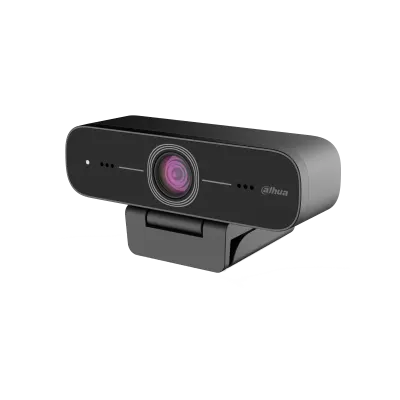
Dahua PKC-UC0A 2MP 1080p USB Camera with Built-in Microphone

Resolution
1920 (H) × 1080 (V)
WhatsApp
Priceon request
QuotationWithin 1 working day
DeliveryConfirmed with your quote, based on stock
PDFDownload datasheet (PKC-UC0A_datasheet_20230504.pdf)
Overview

The Dahua PKC-UC0A is a 2MP USB camera that outputs 1920 × 1080 video and includes a built-in microphone. It connects over USB 2.0, supports UVC and UAC standards, and attaches with a clamp or sits on a tripod. Its 85-degree horizontal field of view and 0.5 lux minimum illumination suit small meeting rooms, training rooms and reception desks across Qatar.

What the PKC-UC0A does over a single USB connection

The PKC-UC0A is a USB camera built around a 2MP CMOS sensor that delivers 1920 × 1080 video. It connects to a USB 2.0 port and works as a plug-and-play device, so a meeting room computer or laptop can use it without a separate capture card. The camera supports MJPEG, YUY2, H.264 and NV12 encoding, which lets the video format match the software receiving the stream. Frame rates of 30 fps and 25 fps are listed across resolutions from 1920 × 1080 down to 320 × 180.

Lens, low light and sound

The fixed-focus lens has a focal length of 3.24 mm and a maximum aperture of F2.1, giving a horizontal field of view of 85 degrees, a vertical field of 52 degrees and a diagonal field of 92 degrees. The camera can work in dim rooms, with a minimum illumination of 0.5 lux at F1.8 with AGC switched on. A built-in microphone and an audio input cover sound capture, and the signal-to-noise ratio is rated above 50 dB. Image controls include brightness, contrast, saturation, white balance and anti-flicker, and digital zoom is rated at 3×.

Mounting, power and the USB connection

An attached clamp fixes the camera to the edge of a display or table, and the tripod option suits a lectern, a shelf or a desk. The unit operates from 5 V with a maximum current of 500 mA and a maximum power consumption of 2.5 W. Its USB 2.0 port also supports charging and device updating. The package weighs 0.15 kg and includes one camera and a user's manual, so its footprint on a desk is small.

Where it fits in Qatar

  • Boardroom in West Bay: a company holding hybrid meetings with partners in Lusail or abroad can clamp the camera to a display edge to frame the conference table.
  • Training room in Education City: a university training centre can use it to show a presenter at a demonstration bench while remote students follow the stream.
  • Clinic reception in Al Rayyan: a small clinic can place it on a reception desk for video calls where a compact camera is easier to fit than a full conferencing system.

Planning the installation

Choose the camera position before mounting. Check that a USB 2.0 port on the host computer is within cable reach and that the clamp suits the edge of your display. Keep the unit in an air-conditioned room. The rated operating range is –10 °C to +50 °C with 20–80% relative humidity, and the storage range is –10 °C to +60 °C. Those limits are useful to know, but a camera on a window sill facing the sun in Qatar's summer heat would be a poor position, so confirm the environment with the SmartRooms Qatar team if the camera will sit near glass or in a space that is not air-conditioned.

Request a quote

To confirm compatibility with your computer, room system or conferencing software, or to add the PKC-UC0A to a larger order, request a quote from SmartRooms Qatar. Quotations are usually issued within one working day, and we deliver to all eight municipalities of Qatar. Purchase orders and LPOs are accepted, a free site survey is available before installation, and the product is covered by the manufacturer's warranty.

Highlights

  • 2MP CMOS sensor delivering 1920 × 1080 video
  • USB 2.0 plug-and-play with UVC and UAC support
  • Built-in microphone plus separate audio input
  • 85° horizontal field of view with fixed-focus lens
  • 0.5 lux minimum illumination at F1.8, AGC on
  • Clamp or tripod mounting; operating range –10 °C to +50 °C

Estimated timeline

Quotation within 1 working day · delivery timing depends on stock availability, and we confirm it with your quotation.

Specifications

28 specifications · Source: manufacturer · checked Oct 2026
Function17
Image Sensor
2MP CMOS
Max. Resolution
1920 (H) × 1080 (V)
Video Frame Rate
USB port: 1920 × 1080@30fps/25fps;1600 × 896@30fps/25fps; 1280 × 720@30fps/25fps; 1024 × 576@30fps/25fps; 960 × 540@30fps/25fps; 800 × 600@30fps/25fps; 800 × 448@30fps/25fps; 720 × 576@30fps/25fps; 720 × 480@30fps/25fps; 640 × 480@30fps/25fps; 640 × 360@30fps/25fps; 480 × 270@30fps/25fps; 320 × 240@30fps/25fps; 352 × 288@30fps/25fps; 320 × 180@30fps/25fps and more
Field of View
H: 85° V: 52° D: 92°
Focal Length
3.24 mm
Digital Zoom
3×
Min. Illumination
0.5 lux (F1.8, AGC on)
Lens Type
Fixed-focal
Max. Aperture
F2.1
Exposure
Supports auto exposure and adjusting the parameters.
Image Setting
Brightness, definition, saturation, contrast, white balance, gain, anti-flicker, brightness compensation and more
S/N Ratio
>50 dB
USB
USB 2.0 (for charging and updating)
Video Compression
MJPEG, YUY2, H264, NV12
Built-in MIC
1
Audio Input
Yes
USB Video Communication Protocol
UVC, UAC
General11
Operating Voltage
5 V
Operating Current
Max. 500 mA
Power Consumption
Max. 2.5 W
Operating Temperature
–10 °C to +50 °C (+14 °F to +122 °F)
Operating Humidity
20%–80% (RH)
Storage Temperature
–10 °C to +60 °C (+14 °F to +140 °F)
Storage Humidity
20%–95% (RH)
Product Dimensions
102 mm × 47 mm × 30 mm (4.02" × 1.85" × 1.18") (L × W × H)
Packaging Dimensions
170 mm × 110 mm × 70 mm (6.69" × 4.33" × 2.76") (L × W × H)
Weight
0.15 kg (0.33 lb)
Packing List
1 × camera, 1 × user's manual

Downloads

3 files from the manufacturer

Questions about PKC-UC0A

What is the Dahua PKC-UC0A used for?
The Dahua PKC-UC0A is a 2MP USB camera that captures 1920 × 1080 video and connects to a computer through USB 2.0. It suits meeting rooms, training rooms and reception desks that need a compact camera for video calls or recording. Its built-in microphone and audio input mean one device can handle both picture and sound for small spaces, so a separate webcam and microphone are not always needed.
Does the camera need a driver to work?
The PKC-UC0A is a plug-and-play device that uses the UVC and UAC protocols for video and audio. These are standard USB classes, so a compatible computer can usually recognise the camera and microphone without a separate vendor driver. Your IT team should still test it with the conferencing software and operating system in use before a wider rollout across classrooms or offices.
What video resolutions and formats does it support?
The maximum resolution is 1920 × 1080, listed at 30 fps and 25 fps. Lower modes include 1280 × 720, 960 × 540, 640 × 480 and 320 × 180. Supported encoding formats are MJPEG, YUY2, H.264 and NV12. Choose the format that your conferencing or recording software accepts, and select a lower resolution if your computer or network needs a lighter stream.
How well does it perform in dim rooms?
The camera has a minimum illumination rating of 0.5 lux at F1.8 with AGC switched on, and a maximum aperture of F2.1. That suits meeting and training rooms with ordinary ceiling lighting, although very dark corners will not look bright. Brightness, contrast and anti-flicker can be adjusted in the image settings. Test the picture from the actual seat position before fixing the camera in place.
What field of view will it cover?
The field of view is 85 degrees horizontal, 52 degrees vertical and 92 degrees diagonal, with a fixed 3.24 mm focal length. In a small boardroom this is usually enough to frame a conference table from a position near the display, provided the seating distance is planned. The lens is fixed-focus and digital zoom is rated at 3×, so for tighter framing it is better to position the camera closer than to rely on zoom.
Does it have a microphone, and how good is the audio?
Yes. The unit includes one built-in microphone and an audio input, and its signal-to-noise ratio is rated above 50 dB. Audio is carried using the UAC protocol. For large rooms or lecture halls a dedicated microphone may still be needed, so check the room acoustics and the distance to the speaker before relying on the built-in microphone alone.
Is it suitable for a boardroom in West Bay running hybrid meetings?
It can suit a small to medium boardroom. Clamped to the edge of a display, the PKC-UC0A can frame the table for participants joining from Lusail or abroad. Plan the mounting height and cable route before installation, and keep the 85-degree horizontal view in mind when placing chairs. Send the room size and seating layout with your quote request so the right setup can be confirmed.
Can it be used in a training room at a school or university in Education City or Al Sadd?
Yes, it can show a presenter at a demonstration bench, lab station or lectern while remote students follow the stream. The tripod option lets the camera stand on a desk or shelf, and its maximum power consumption is 2.5 W. Schools or training centres fitting out several rooms can ask for one quotation covering all units, so every room is specified consistently.
Is it practical for a clinic reception desk in Al Rayyan?
A clinic reception in Al Rayyan may need a compact camera for video calls with a doctor or with a head office. The clamp fits a monitor edge and the tripod sits on the counter, which avoids a larger conferencing unit. Keep the camera away from direct sunlight from a window, check the cable route along the desk, and confirm the room is air-conditioned.
Can it be mounted on a flat panel, a monitor or a tripod?
Yes. The camera can be fixed with the attached clamp or placed on a tripod. Clamp mounting suits the top edge of a display, while the tripod is better for a lectern or desk. The product measures 102 mm × 47 mm × 30 mm and weighs 0.15 kg, so it is small and light. Plan the cable length from the camera to the host computer before mounting.
What operating conditions does it tolerate?
The operating temperature range is –10 °C to +50 °C, with humidity between 20% and 80% RH, and the storage range is –10 °C to +60 °C. In Qatar, where summer temperatures can exceed 45 °C, keep the camera in an air-conditioned room and out of direct sun. During dust storms an enclosed, conditioned room is also the safer place for the unit.
How do I order, and what is included in the box?
The package includes one camera and a user's manual. Request a quote from SmartRooms Qatar and we usually reply within one working day. We accept purchase orders and LPOs, and deliver to all eight municipalities of Qatar. The product is covered by the manufacturer's warranty, and a free site survey is available if you need help choosing the mounting position.

Similar models

Clevertouch CleverCam Clevertouch CleverCam 4K ePTZ Camera for Video Conferencing
Main Stream: 3840×2160 @30fps
Clevertouch CleverInk Clevertouch CleverInk Writing Technology for Interactive Displays
Accessories
Clevertouch Intelligent Sensor Module Clevertouch Intelligent Sensor Module for Interactive Flat Panels
Accessories
Clevertouch LUX Mini Clevertouch LUX Mini Android 13 OPS Upgrade Module
8GB 64GB
Email Call




