





Thursday, 22 October 2026 · 11 Jumada I 1448 AH Sun – Thu · 9:00 – 18:00
+971 56 914 9477 العربية
WhatsApp

PKP-IP1A

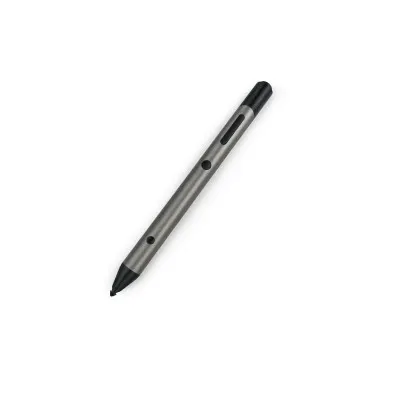
Dahua PKP-IP1A Smart Pen for Interactive Flat Panels

WhatsApp
Priceon request
QuotationWithin 1 working day
DeliveryConfirmed with your quote, based on stock
PDFDownload datasheet (PKP-IP1A_datasheet_20240729.pdf)
Overview

The Dahua PKP-IP1A is a wireless smart pen whose USB receiver supports Android and Windows 10 systems, with a range of up to 15 m. It links over 2.4 GHz, reads 4,096 pressure levels and supports zoom, laser and spotlight functions. Schools and meeting rooms in Qatar where presenters annotate from their seats will find it practical. Request a quote from SmartRooms Qatar.

What the Dahua PKP-IP1A does on a panel

The Dahua PKP-IP1A is a wireless smart pen that lets a presenter write, annotate and navigate from a distance instead of standing at the display. Its pen point measures 1.6 mm. Input travels to a small USB receiver over a 2.4 GHz link operating between 2402 and 2480 MHz, with a stated communication range of up to 15 m. That reach lets a teacher move around the room, step back to face the class, or work from the far side of a boardroom table without losing the connection.

Specifications that matter for planning

  • Pressure sensing: up to 4,096 levels, so stroke weight responds to how firmly the pen is pressed.
  • Battery: built-in 150 mAh lithium cell, charged by contact through the charging pen post or through the Type C port.
  • Power draw: around 10 mA operating current, with a transmission rate of 250 Kbps.
  • Receiver: USB 2.0 port, compatible with USB 1.1 and USB 3.0 ports, powered from the USB bus at 3.3V to 4.2V.
  • Operating temperature: –30 °C to +55 °C, with a net weight of 45 g and product dimensions of 185 mm × 20 mm × 20.2 mm.

Where it fits in Qatar

A private school in Al Wakrah fitting out a primary classroom can give teachers a way to annotate lessons from anywhere in the room, using the laser and spotlight functions to point at a passage or diagram. In a training centre in Msheireb, an instructor can switch between writing and zooming to walk trainees through a detailed chart. In a West Bay boardroom, a presenter can mark up a shared slide while standing at the head of the table. Because the receiver lists Android and Windows 10 and later systems, confirm your host devices before ordering.

What to plan for before ordering

Start with the host side. The receiver needs a free USB port, and the stated operating systems are Android and Windows 10 and later. Position the receiver where it can reach the pen across the whole room, because 15 m is a maximum figure and walls, furniture and crowded rooms can shorten real-world range. Keep the charging cable and charging pen post with the pen, since the built-in battery is recharged through them. During Qatar's summer, keep the pen indoors and out of direct sunlight, and never leave it on a hot dashboard or sunlit windowsill.

Ordering with SmartRooms Qatar

The packing list includes the smart pen, a charging pen post, a charging cable and the user's manual. It does not name a separate receiver, so confirm exactly what is supplied when you request the quotation. Because the pen is an accessory, it is most useful when quoted with the interactive display and host PC it will be used with, so the setup is checked as one order. SmartRooms Qatar supplies and delivers to all eight municipalities of Qatar, arranges professional installation, and carries out free site surveys. Schools and government bodies can order through a purchase order (LPO) or a Monaqasat tender. Request a quote from SmartRooms Qatar and our team will reply with a quotation, usually within one working day.

Highlights

  • 2.4 GHz link with a stated range of up to 15 m
  • Pressure sensing up to 4,096 levels
  • Zoom, laser and spotlight functions supported
  • Built-in 150 mAh battery charged via Type C or charging post
  • USB 2.0 receiver for Android and Windows 10 systems
  • Operating temperature –30 °C to +55 °C; CE listed

Estimated timeline

Quotation within 1 working day · delivery timing depends on stock availability, and we confirm it with your quotation.

Specifications

21 specifications · Source: manufacturer · checked Oct 2026
Stylus11
Pen Point
1.6 mm (0.06")
Data Transmission Party
2.4 GHz RF wireless technology
Port
Charges by contact and through the Type C port
Built-in Battery
Built-in 150 mAh lithium battery
Operating Current
Around 10 mA
Transmission Rate
250 Kbps
Receiver Sensitivity
5 dBm to –40 dBm
Communication Distance
The communication range reaches up to 15 m.
Wireless Standard
Private Protocol 2.4G
Wireless Frequency Range
2402–2480 MHz
MAX Transmission Power (Wireless)
5 dBm
Receiver3
Supported Operating Systems
Android, WIN10 and later systems
Port
Comes with a USB 2.0 port, and is compatible with USB 1.1 ports and USB 3.0 ports.
Operating Voltage
USB bus power supply (3.3V–4.2V)
General6
Operating Temperature
–30 °C to +55 °C (–22 °F to +131 °F)
Product Dimensions
185 mm × 20 mm × 20.2 mm (7.28" × 0.79" × 0.80")
Packaging Dimensions
189 mm × 64 mm × 13 mm (7.44" × 2.52" × 0.51")
Net Weight
45 g (0.10 lb)
Gross Weight
119 g (0.26 lb)
Packing List
Smart pen × 1; Charging pen post × 1; Charging cable × 1; User's manual × 1;
Certifications1
Certifications
CE

Downloads

3 files from the manufacturer

Questions about PKP-IP1A

What is the Dahua PKP-IP1A used for?
The PKP-IP1A is a wireless smart pen for writing, annotating and navigating content from a distance. It sends input over a 2.4 GHz link to a USB receiver, with a stated range of up to 15 m, so the presenter can work on a shared display from anywhere in a classroom or meeting room. Zoom, laser and spotlight functions help direct attention to a specific part of the screen during a lesson or presentation.
Which operating systems does the receiver support?
The receiver is listed for Android and Windows 10 and later systems. Before ordering, confirm that the host device connected to your display runs one of these platforms. If your setup uses a different operating system, ask the SmartRooms Qatar team to review the configuration before you commit to a quantity, so the order matches the devices you actually run.
How far can a presenter stand from the receiver?
The stated communication range reaches up to 15 m. Real-world reach depends on the room, so walls, furniture and crowded seating can shorten it. For a large lecture hall at Education City, test the pen from the furthest seat before deciding where the receiver sits. Placing the receiver with a clear line of sight to the presenter's usual standing position generally gives the most reliable link.
How is the built-in battery charged?
The pen has a built-in 150 mAh lithium battery. It charges by contact through the supplied charging pen post, or through its Type C port using the supplied charging cable. Keep the charging pen post at the teacher's desk or presenter's lectern so the pen is ready for the next session. The product data does not list a charging time or runtime, so ask the SmartRooms Qatar team for those figures if you need them before ordering.
Can the pen cope with the heat in Qatar's summer?
The stated operating temperature range is –30 °C to +55 °C. Temperatures in Qatar can exceed 45 °C in summer, so keep the pen indoors, out of direct sunlight, and never leave it in a car or near a sunlit window. In a logistics company's training room in the Industrial Area, the pen should stay in the air-conditioned room with the display, not in a hot storage cupboard near the front windows.
Does the pen support pressure sensitivity for handwriting?
Yes. It recognises up to 4,096 pressure levels, so stroke thickness changes with how firmly the pen is pressed. This suits bilingual schools where teachers write Arabic and English side by side on the same board. How handwriting is converted or recognised depends on the software running on the host device, so confirm that with your software provider before ordering.
What comes in the box?
The packing list shows one smart pen, one charging pen post, one charging cable and one user's manual. It does not name a separate USB receiver, so confirm with the SmartRooms Qatar team exactly what is supplied before you approve the quotation. The receiver data lists a USB 2.0 port with compatibility for USB 1.1 and USB 3.0 ports.
Which USB ports can the receiver use?
The receiver has a USB 2.0 port and is compatible with USB 1.1 and USB 3.0 ports. It draws power from the USB bus, with an operating voltage of 3.3V to 4.2V, so the data does not call for a separate power adaptor. Choose a port on the host computer that is easy to reach and not blocked by other cables, so the receiver stays connected during the lesson.
Is this pen useful for live annotation in a West Bay boardroom?
Yes, particularly for executives who mark up slides while standing at the head of the table. The zoom, laser and spotlight functions let a presenter enlarge a figure in a financial chart or point at a clause in a contract without walking to the screen. Multiple writing colours help separate comments from the original content, and the stated 15 m range lets the presenter move around the room during discussion.
Can schools and government offices buy this with an LPO?
Yes. SmartRooms Qatar accepts purchase orders (LPOs), and payment can be made by bank transfer, cheque or purchase order. Quotations can also be prepared for government tenders, including Monaqasat. Because the pen works with a host device and a display, ask for it to be quoted with the panel it will support so the purchase order lists every item together.
Is the pen covered by a warranty?
Products supplied by SmartRooms Qatar are covered by the manufacturer's warranty. The manufacturer data for the PKP-IP1A does not state a warranty period, so ask the team for the written terms with your quotation before ordering several units for a school or office.

Similar models

Clevertouch CleverCam Clevertouch CleverCam 4K ePTZ Camera for Video Conferencing
Main Stream: 3840×2160 @30fps
Clevertouch CleverInk Clevertouch CleverInk Writing Technology for Interactive Displays
Accessories
Clevertouch Intelligent Sensor Module Clevertouch Intelligent Sensor Module for Interactive Flat Panels
Accessories
Clevertouch LUX Mini Clevertouch LUX Mini Android 13 OPS Upgrade Module
8GB 64GB
Email Call




