





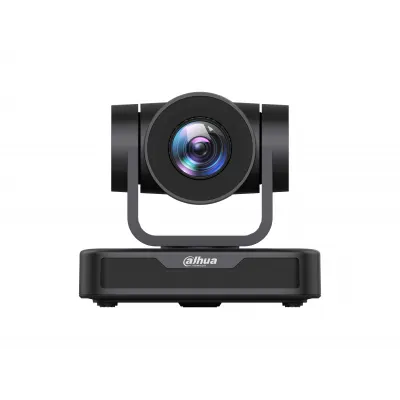
PKP-UC10A
Dahua PKP-UC10A USB PTZ Camera with 10× Optical Zoom
- Resolution
- 1920 (H) × 1080 (V)
The Dahua PKP-UC10A is a USB pan-tilt-zoom camera with a 2 MP sensor delivering 1920 × 1080 video, 10× optical zoom and remote-recallable presets. It pans 170° each side, tilts 30° up and down, and stores 255 positions. It suits meeting rooms, lecture theatres and training rooms in Qatar where a speaker must be framed without a dedicated camera operator.
What the PKP-UC10A does in a meeting room
The Dahua PKP-UC10A is a USB pan-tilt-zoom camera built around a 2 MP CMOS sensor that outputs full HD 1920 × 1080 video. It connects to a computer through a single USB 2.0 Type A cable, so the host device recognises it as a standard USB video source. Because the lens moves, the camera can frame a presenter, a whiteboard or a seated panel without anyone touching it during the meeting.
Optics, movement and presets that matter
The lens covers a focal length from 4.34 mm to 41.66 mm, giving 10× optical zoom and a horizontal and vertical field of view from 8.8° at the narrow end to 66° at the wide end. Pan reaches 170° in each direction and tilt reaches 30° up and down, with pan speed adjustable from 0.1° to 60° per second and tilt speed from 0.1° to 40° per second. The camera stores up to 255 preset positions, and 10 of them can be recalled from the supplied remote control, which helps when one room hosts several regular speakers or camera angles.
Image quality is supported by automatic, manual and one-click focus, 2D and 3D noise reduction, white balance adjustable between 2400K and 7100K, and a backlight compensation switch. The stated minimum illumination is 0.5 lux at F1.8 with AGC on, and the signal-to-noise ratio is above 50 dB.
Video formats and control connections
Compression options include H.264, MJPG, YUY2 and NV12. At 1920 × 1080 the camera runs at up to 30 fps with H.264 or MJPG, while uncompressed YUY2 at full HD is limited to 5 fps, so the IT team should choose the format their conferencing application supports. For control, the RS 232 port accepts VISCA, Pelco-D and Pelco-P commands, allowing a room control system to move the camera.
Where it fits in Qatar
In a West Bay boardroom, the camera can sit above a wall-mounted display to capture both the table and the screen for teams joining from Doha, Lusail or abroad. In a lecture hall at Education City, one operator can move the camera between the lecturer and the screen. A private school in Al Wakrah fitting out a training room can store separate presets for different seating layouts and recall them in one action.
Planning the installation
Plan the location around the camera's indoor rating. The operating range is -10 °C to +50 °C with 20% to 80% humidity, and the camera is specified for indoor environments only, so keep it inside air-conditioned rooms and out of direct sunlight through windows. At 1.0 kg and 156.8 mm × 112.6 mm × 139.0 mm it is light, but the supplied data does not list a mounting bracket, so confirm the mounting method during a free site survey. The camera runs on 12 V DC through an HEC3800 socket and a power adapter is included. Ask the SmartRooms Qatar team to confirm the adapter's input rating for Qatar's 240 V, 50 Hz supply before cable runs are fixed.
The box contains the camera, power adapter, remote control, USB 2.0 video cable, users' manual, warranty card and packing list. The product is covered by the manufacturer's warranty.
- Confirm the conferencing application accepts a UVC camera.
- Choose the video format and frame rate before installation.
- Plan the RS-232 cable route if a control system will drive the camera.
- Check mounting position and sightlines during the site survey.
Request a quote
Send your room size, intended mounting position and control system to SmartRooms Qatar to request a quote. Quotations usually arrive within one working day. We supply and deliver to all eight municipalities of Qatar, and we accept purchase orders for government and school buyers.
Highlights
- 2 MP CMOS sensor with 1920 × 1080 maximum resolution
- 10× optical zoom, focal length 4.34–41.66 mm
- Pan ±170° and tilt ±30° with adjustable speed
- 255 preset positions, 10 recalled from remote control
- USB 2.0 UVC output; RS-232 control via VISCA or Pelco
- Indoor use only, operating range -10 °C to +50 °C
Estimated timeline
Quotation within 1 working day · delivery timing depends on stock availability, and we confirm it with your quotation.
Specifications
Device Lens9
- Image Sensor
- 2 MP CMOS sensor
- Max. Resolution
- 1920 (H) × 1080 (V)
- Video Frame Rate
- H264/MJPG: 1920×1080p@30/25/20/15/10/5 fps; 1280×720p@30/25/20/15/10/5 fps; 960×540@30/25/20/15/10/5 fps; 800×600@30/25/20/15/10/5 fps; 720×576@30/25/20/15/10/5 fps; 720×480@30/25/20/15/10/5 fps; 640×480@30/25/20/15/10/5 fps; 640×360@30/25/20/15/10/5 fps; 352×288@30/25/20/15/10/5 fps; 320×240@30/25/20/15/10/5 fps; YUY2: 1920×1080P@5 fps; 1280×720@10/5 fps; 1024×576@15/10/5 fps; 800×600@20/15/10/5 fps; 800×448@25/20/15/10/5 fps; 640×480@30/25/20/15/10/5 fps; 640×360@30/25/20/15/10/5 fps; 480×270@30/25/20/15/10/5 fps; 320×180@30/25/20/15/10/5 fps; NV12: 1280×720@10/5 fps; 1024×576@15/10/5 fps; 8
- Field of View
- Horizontal angle: 8.8° (narrow angle)–66°(wide angle) Vertical angle: 8.8° (narrow angle)–66°(wide angle)
- Focal Length
- f=4.34mm–41.66mm
- Digital Zoom
- 10X
- Min. Illumination
- 0.5 lux (F1.8, AGC ON)
- Aperture
- F1.85–F2.43
- Lens Type
- Automatic/manual/one-click focus
Function8
- Noise Reduction
- 2D and 3D digital noise reduction
- White Balance
- Automatic/manual/one-click WB/specified color temperature (2400K–7100K)
- Exposure
- Automatic and manual
- BLC
- On/off
- Image Adjustment
- Brightness, hue, saturation, contrast, sharpness, black-white mode, gamma ray curve
- S/N Ratio
- > 50 dB
- Video Compression
- YUY2/NV12/MJPG/H.264
- USB Video Communication Protocol
- UVC
Port4
- Video Output Port
- 1-channel USB 2.0 port: Type A
- Control Port
- RS 232
- Protocol
- VISCA/Pelco-D/Pelco-P
- Power
- HEC3800 power socket (VDC 12)
PTZ3
- PTZ Pan/Tilt
- Horizontal angle: –170°–+170° Pitch angle: –30°–+30°
- PTZ Speed
- Horizontal angle speed control: 0.1°–60° per second Pitch angle speed control: 0.1°–40° per second
- PTZ Presets
- The user can set up to 255 preset positions (with 10 preset positions accessible via the remote control)
General3
- Operating Voltage
- 12 V
- Operating Current
- 0.42 A (max)
- Power Consumption
- 5 W (max)
Environment5
- Operating Temperature
- –10 °C to +50 °C (–14 °F to +122 °F)
- Operating Humidity
- 20%–80% (RH)
- Storage Temperature
- –10 °C to +60 °C (–14 °F to +140 °F)
- Storage Humidity
- 20%–80% (RH)
- Operating Environment
- Indoor
Size and Weight3
- Product Dimensions
- 156.8 mm × 112.6 mm × 139.0 mm (6.17" × 4.43" × 5.47") (L × W × H)
- Packaging Dimensions
- 320.0 mm × 240.0 mm × 180.0 mm (12.60" × 9.45" × 7.09") (L × W × H)
- Weight
- 1.0 kg (2.20 lb)
Packing List1
- Packing List
- 1 camera, power adapter, remote control, USB 2.0 video cable, users' manual, warranty card, packing list.




