





Thursday, 22 October 2026 · 11 Jumada I 1448 AH Sun – Thu · 9:00 – 18:00
+971 56 914 9477 العربية
WhatsApp

PKP-WP0B

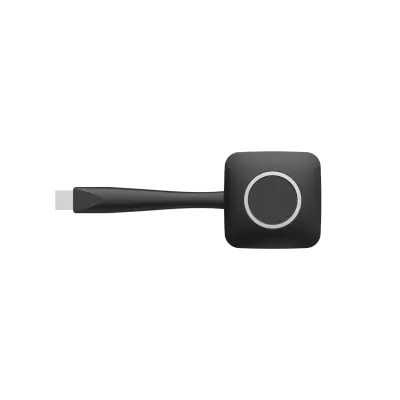
Dahua PKP-WP0B Wireless Screen Sharing Cable

System
Windows 7
WhatsApp
Priceon request
QuotationWithin 1 working day
DeliveryConfirmed with your quote, based on stock
PDFDownload datasheet (DHI-PKP-WP0B_datasheet_20211019.pdf)
Overview

The Dahua PKP-WP0B is a wireless screen sharing cable that projects a 1920 × 1080 image to a compatible display without a physical video cable. It is plug and play, so no software or driver installation is needed. It supports IEEE 802.11 a/g/n wireless, WPA2-PSK security and Windows and Mac OS X systems. Its 5 °C to 40 °C rating points to air-conditioned rooms, which matters given Qatar's summer heat. Request a quote from SmartRooms Qatar.

What the PKP-WP0B does in a meeting room

The Dahua PKP-WP0B is a wireless screen sharing cable that sends a presenter's screen to a compatible display without a physical video cable. It outputs at 1920 × 1080, so slides, spreadsheets and video from a laptop reach the room at full HD. The unit connects through one USB 2.0 port and draws 2.5 W from a 5 VDC input, a small load that keeps the desk or the area behind a display tidy.

Wireless figures to check against your network

The device uses IEEE 802.11 a/g/n at a 54 Mbps data rate and works on the 2.4 GHz and 5 GHz bands, with 5 GHz recommended. Its link is secured with CCMP encryption and WPA2-PSK authentication, and the stated range is up to 15 m between the host and the wireless projector. Frame rates are 25 fps at 1920 × 1080 and 1366 × 768 on Windows, and 30 fps at the same two resolutions on iOS.

  • Input resolution: 1920 × 1200
  • Output resolution: 1920 × 1080
  • Net weight: 63.3 g
  • Dimensions: 61 mm × 156 mm × 17 mm

Where it fits in Qatar

A university lecturer in Education City can keep a laptop on the lectern and share to the room display without a cable running across the floor. A ministry team in Msheireb holding a review meeting can have several staff take turns presenting from Windows laptops or iOS devices. A hotel events team in West Bay setting up a conference room for a half-day session can switch between speakers quickly, provided every presenter stays within 15 m of the display.

Planning before you order

  • Check that every presenter uses Windows 7, 8 or 10, or Mac OS X 10.6, 10.7 or later.
  • Keep the host within 15 m of the wireless projector or display.
  • Install in an air-conditioned room: the rated operating range is 5 °C to 40 °C with 0–80% humidity, no condensation.
  • Ask your IT team which band, 2.4 GHz or 5 GHz, is clearest in the room.
  • Confirm with the SmartRooms Qatar team that your display or projector works with this link before ordering several units.

A free site survey from SmartRooms Qatar can check the room layout, the distances and the display position before anything is installed.

Ordering for schools, ministries and companies

SmartRooms Qatar supplies the PKP-WP0B across all eight municipalities of Qatar and accepts purchase orders (LPOs), government tenders including Monaqasat, and payment by bank transfer, cheque or purchase order. Quotations are usually issued within one working day, and the product is covered by the manufacturer's warranty. To request a quote for a single unit or a batch for several rooms, contact SmartRooms Qatar with the number of units and the room types.

Highlights

  • 1080p output at 1920 × 1080 resolution
  • Plug and play with no software or driver installation
  • Wireless link over IEEE 802.11 a/g/n at 54 Mbps
  • Presentation range of up to 15 m from the host
  • Supports Windows 7, 8, 10 and Mac OS X 10.6 and later
  • Operating range 5 °C to 40 °C, 0–80% humidity, non-condensing

Estimated timeline

Quotation within 1 working day · delivery timing depends on stock availability, and we confirm it with your quotation.

Specifications

18 specifications · Source: manufacturer · checked Oct 2026
Hardware5
Input Resolution
1920 × 1200
Output Resolution
1920 × 1080
Port
1 × USB 2.0
Input Voltage
5 VDC
Power Consumption
2.5 W
System config7
Transmission Delay
< 120 m/s
Operating System
Windows 7, Windows 8, and Windows 10; Mac OS X 10.6, Mac OS X 10.7 and later
Encryption
CCMP
Authentication Protocol
WPA2-PSK
Wireless Transmission Protocol
IEEE 802.11 a/g/n
Wireless Data Rate
54 Mbps
Frame Rate
Windows: 1920 × 1080@25 fps/1366 × 768@25 fps IOS: 1920 × 1080@30 fps/1366 × 768@30 fps
Structure2
Net Weight
63.3 g (0.14 lb)
Dimensions
61 mm × 156 mm × 17 mm (2.40'' × 6.14" × 0.67")
Environment4
Operating Temperature
5 °C to 40 °C (41 °F to +104 °F)
Operating Humidity
0%–80% ((no condensation)
Transmission Distance
The distance between wireless projectors and the host is up to 15 m
Frequency Band
2.4 GHz and 5 GHz (recommended)

Downloads

2 files from the manufacturer

Questions about PKP-WP0B

What does the Dahua PKP-WP0B do?
It is a wireless screen sharing cable that sends a presenter's screen to a compatible display at 1920 × 1080 without a physical video cable. Presenters start sharing with a press of a button, which suits meeting rooms and classrooms where desks and walls need to stay free of cables. It connects through one USB 2.0 port, so it fits easily into a small office room.
Does it need software or drivers installed?
No. The PKP-WP0B is plug and play, so there is no software or driver to install on the presenter's computer. Connect it to a USB 2.0 port, start the share, and the screen appears on the display. This simple setup helps a school or ministry prepare several rooms during a single visit.
Which operating systems are supported?
The manufacturer lists Windows 7, Windows 8 and Windows 10, plus Mac OS X 10.6, Mac OS X 10.7 and later. Frame rates are also listed for iOS. Android and Linux are not listed in the source data, so confirm your devices with the SmartRooms Qatar team before ordering, especially if staff in an office in Lusail use a mix of device types.
What resolution and frame rates can I expect?
The output resolution is 1920 × 1080, and the data also lists 1366 × 768. Frame rates are 25 fps at both resolutions on Windows and 30 fps on iOS. The stated input resolution is 1920 × 1200. For a slide deck or spreadsheet at full HD, check that your display's native resolution matches 1920 × 1080.
How far can a presenter be from the device?
The stated distance between the host and the wireless projector is up to 15 m. In a classroom in Education City where the teacher moves across the front of the room, keep the host computer within that range of the device. Walls and furniture can reduce the usable distance, so test the link in the actual room before final installation.
Is the wireless connection secured?
The data lists CCMP encryption and WPA2-PSK authentication. In a government office in Msheireb, the IT team can manage the pre-shared key so that only authorised staff can connect. Ask your IT team to confirm the key policy before the cable is deployed across the building.
Should I use the 2.4 GHz or 5 GHz band?
The device supports both 2.4 GHz and 5 GHz, and the manufacturer recommends 5 GHz. In busy office buildings in West Bay or central Doha, many nearby networks may share the 2.4 GHz band, so ask your IT team which band is clearest in the room before installation.
Can it be installed in outdoor or unconditioned spaces?
No. The rated operating temperature is 5 °C to 40 °C with 0–80% humidity and no condensation. Summer temperatures in Qatar can exceed 45 °C, so install it only in air-conditioned rooms and avoid sunlit corners, glass-fronted lobbies and outdoor kiosks.
How large and heavy is the cable unit?
The net weight is 63.3 g, and the dimensions are 61 mm × 156 mm × 17 mm. Its compact size means it can sit behind a display or in a desk drawer. When planning placement, check that the USB 2.0 port is within easy reach of the position you choose.
Is it suitable for a school fitting out several classrooms?
Yes, provided each classroom has an air-conditioned space and a display that supports the wireless link. A school in Al Wakrah ordering units for several classrooms can request one quotation covering all of them. Using the same model in every room means teachers learn one setup method.
Does SmartRooms Qatar accept LPOs for this product?
Yes. SmartRooms Qatar accepts purchase orders (LPOs) and government tenders, including Monaqasat. Payment can be made by bank transfer, cheque or purchase order. Quotations are usually issued within one working day, and the PKP-WP0B is covered by the manufacturer's warranty.
Will it work with my existing display or projector?
The data describes the range between the host and wireless projectors, so the receiving side must support this wireless link. The source data does not list specific display brands or models, so SmartRooms Qatar should confirm compatibility with your current display before you order a quantity.

Similar models

Clevertouch CleverCam Clevertouch CleverCam 4K ePTZ Camera for Video Conferencing
Main Stream: 3840×2160 @30fps
Clevertouch CleverInk Clevertouch CleverInk Writing Technology for Interactive Displays
Accessories
Clevertouch Intelligent Sensor Module Clevertouch Intelligent Sensor Module for Interactive Flat Panels
Accessories
Clevertouch LUX Mini Clevertouch LUX Mini Android 13 OPS Upgrade Module
8GB 64GB
Email Call




