





Thursday, 22 October 2026 · 11 Jumada I 1448 AH Sun – Thu · 9:00 – 18:00
+971 56 914 9477 العربية
WhatsApp

PKP-WP1B

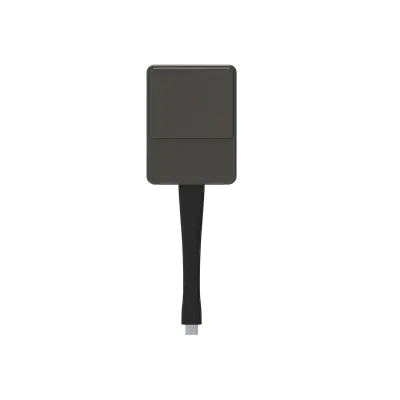
Dahua PKP-WP1B Wireless Screen Sharing Dongle

System
Windows® 7
WhatsApp
Priceon request
QuotationWithin 1 working day
DeliveryConfirmed with your quote, based on stock
PDFDownload datasheet (PKP-WP1B_datasheet-20230104.pdf)
Overview

The Dahua PKP-WP1B is a Type-C wireless screen sharing dongle that projects 4K content to a display over Wi-Fi without installing drivers. It supports IEEE 802.11 a/g/n at up to 54 Mbps, works with Windows, macOS, Chrome OS, Linux and Android, and passes touch control back with 10 points of support. Suited to meeting rooms and classrooms in Doha where staff want to share from their own laptops without cables.

What the PKP-WP1B adds to a shared display

The Dahua PKP-WP1B is a small wireless dongle built around a Type-C connector. It lets a presenter send a laptop screen to a compatible display over a wireless link, so people in the room can follow slides and spreadsheets without anyone swapping cables between laptops. Its 4K input and output support keeps detailed documents and drawings sharp on a large panel.

The unit needs no software or driver installation. It runs on 5 VDC supplied through its Type-C port, draws 2.5 W on average and 0.9 A at most, weighs 80 g and measures 176 mm × 58 mm × 17 mm. That compact size lets it sit in a drawer or a bag between meeting rooms.

Specifications that shape the purchase decision

  • Wireless: IEEE 802.11 a/g/n at a 54 Mbps data rate, using the 2.4 GHz and 5 GHz bands, with 5 GHz recommended.
  • Range: up to 15 m (49.21 ft) between the wireless projector and the host.
  • Security: WPA2 authentication with CCMP encryption, in WPA2-PSK or WPA2-Enterprise modes.
  • Video: 4K input, output up to 3840 × 2160, and up to 60 fps at Full HD depending on the environment.
  • Touch: touch control passed back with support for 10 points.
  • Operating systems: Windows 7, 8.1, 10 and 11, macOS, Chrome OS, Linux and Android.
  • Environment: operating range 0 °C to +40 °C, storage –20 °C to +60 °C, humidity 0%–80% RH non-condensing.

Where it fits in Qatar

In an office in West Bay or The Pearl, a project team can share slides from its own laptops in a boardroom during the Sunday-to-Thursday working week, with no cable handling at the table. In a school in Al Sadd or Education City, teachers using Windows and Android devices can project from their own equipment. In a government building in Msheireb that uses enterprise network authentication, the WPA2-Enterprise mode can be selected during setup.

Heat, placement and what to plan before ordering

Qatar summer temperatures often exceed 45 °C, while the listed operating range tops out at +40 °C. Keep the dongle in the air-conditioned room with the display, and avoid hot cars, unventilated media cabinets, sun-facing windowsills and dusty lobbies. The 15 m range is measured between host and projector, so plan the display position and presenter seating around that distance. Ask the SmartRooms Qatar team to confirm the right display input and power arrangement for your room before ordering.

Request a quote for your meeting rooms

SmartRooms Qatar supplies the PKP-WP1B with delivery to all 8 municipalities of Qatar and a free site survey for rooms that need planning. Quotations are usually issued within one working day, and we accept purchase orders (LPOs), government tenders and payment by bank transfer, cheque or purchase order. Request a quote and send us your room list so our team can confirm compatibility.

Highlights

  • Type-C interface powered at 5 VDC, 2.5 W average
  • Outputs up to 3840 × 2160 with 4K input support
  • IEEE 802.11 a/g/n, 54 Mbps, 2.4 GHz and 5 GHz
  • Transmission distance up to 15 m from the host
  • Windows 7 to 11, macOS, Chrome OS, Linux, Android
  • Operating range 0 °C to +40 °C, 0%–80% RH non-condensing

Estimated timeline

Quotation within 1 working day · delivery timing depends on stock availability, and we confirm it with your quotation.

Specifications

21 specifications · Source: manufacturer · checked Oct 2026
Hardware Parameters6
Input Resolution
480p, 576p, 720p, 1080p, 4K PC timing: 640 × 480, 800 × 600, 1024 × 768, 1280 × 720, 1920 × 1080, 3840 × 2160
Output Resolution
720 × 480, 720 × 576, 1280 × 720, 1920 × 1080 (1080p), 3840 × 2160
Interface
Full featured Type-C
Input voltage
5 VDC (Type-C power supply)
Power consumption
2.5 W (Average)
Current Consumption
0.9 A (Max.)
System config7
Operating system
Windows® 7, Windows 8.1, Windows 10 or Windows 11, macOS™, Chrome OS, Linux OS, Android OS. Any OS supports full featured Type-C
Encryption
CCMP
Authentication protocol
WPA2 (WPA2-PSK (Pre-Shared key) / WPA2-Enterprise)
Wireless transmission protocol
IEEE 802.11 a/g/n
Wireless data rate
54 Mbps
Frame Rate
Up to 60 fps depending on environment (FHD)
Touch control back
Support 10 points
Structure3
Net weight
80 g (0.18 lb)
Dimensions
176 mm × 58 mm × 17 mm (6.93" × 2.28" × 0.67")
LED
Blue, Green, Red
Environment Requirements5
Operating temperature
0 °C to +40 °C (+32 °F to +104 °F)
Storage Temperature
–20 °C to +60 °C (–4 °F to +140 °F)
Operating humidity
0%–80% (RH) (non-condensing)
Transmission distance
The distance between wireless projectors and the host is up to 15 m (49.21 ft)
Frequency band
2.4 GHz and 5 GHz (recommended)

Downloads

5 files from the manufacturer

Questions about PKP-WP1B

What is the Dahua PKP-WP1B used for?
The Dahua PKP-WP1B is a wireless screen sharing dongle that sends a laptop screen to a compatible display without cables. It suits meeting rooms, classrooms and training spaces where several people present from their own laptops during a working day. Its Type-C connector, 4K support and wireless link make it a practical add-on for an existing display. Request a quote to confirm it suits your room.
Does the PKP-WP1B need software or drivers installed?
No. The manufacturer states the dongle needs no software or driver installation, so presenters can connect without IT staff loading applications onto each laptop. This matters in Doha offices where visitors and contractors arrive with their own devices and need to share a slide deck quickly.
Which operating systems does it support?
The listed support covers Windows 7, Windows 8.1, Windows 10 and Windows 11, macOS, Chrome OS, Linux and Android. Schools and offices in Qatar often run Windows laptops alongside Chromebooks and Android devices, so check your device list against this range before ordering. SmartRooms Qatar can confirm the details for your fleet during the quotation.
What resolutions can it input and output?
Input is listed from 480p up to 4K, with PC timings up to 3840 × 2160. Output includes 1920 × 1080 and 3840 × 2160, so a 4K-capable display can receive 4K output. The source gives a frame rate of up to 60 fps at Full HD depending on the environment, so test video playback in your room before rolling out several units.
How far can the presenter sit from the host, and which Wi-Fi bands are used?
The source lists a transmission distance of up to 15 m (49.21 ft) between the wireless projector and the host. The dongle supports IEEE 802.11 a/g/n at 54 Mbps across the 2.4 GHz and 5 GHz bands, with 5 GHz recommended. In a large Lusail boardroom, plan the seating and display position so the presenter stays within that range.
Is the wireless connection secure enough for a government office?
The dongle supports WPA2 authentication with CCMP encryption, in either WPA2-PSK or WPA2-Enterprise mode. A government office in Msheireb or a bank in West Bay can therefore choose the mode that matches its network policy. Ask your IT team to decide the mode before installation, and include it in your quotation request.
What power does the dongle need?
It runs on 5 VDC supplied through its Type-C interface, with an average consumption of 2.5 W and a maximum current of 0.9 A. Because the source names the Type-C supply rather than a plug type, confirm the power arrangement with the SmartRooms Qatar team when you request a quote, especially for rooms with limited sockets.
Can it stay in a meeting room during Doha summers?
Yes, if it stays in the air-conditioned meeting room with the display. The listed operating range is 0 °C to +40 °C, while Qatar summer temperatures can exceed 45 °C. Do not leave it in a hot car, an unventilated media cabinet or a sun-facing lobby. The storage rating of –20 °C to +60 °C applies to storage only, not to running the device.
What does the 10-point touch control feature do?
The source lists touch control passed back with support for 10 points, meaning touch input from a compatible display can be returned to the connected device. Touch behaviour depends on the display and operating system combination, so ask SmartRooms Qatar to confirm the pairing for your room before ordering a set of units.
How would a classroom in Al Wakrah use this dongle?
A private school in Al Wakrah fitting out new classrooms could use the PKP-WP1B so teachers share lessons from their own laptops or Android devices without moving cables to the front of the room. Because it is a small accessory, planning focuses on the display position, the distance to the teacher's desk and confirming the operating systems in use.
Can the PKP-WP1B handle video conferencing as well as screen sharing?
No. The source describes screen sharing, touch control and the wireless link, but not video conferencing features. A meeting room in Doha that runs video calls should plan its conferencing equipment separately, while the dongle is used to show presentation content in the room.
What should I confirm before ordering several units for a school or office?
Confirm the device mix, the display input, the Wi-Fi band, the security mode and the distances in each room. SmartRooms Qatar supplies across all 8 municipalities, offers a free site survey, usually issues quotations within one working day, and accepts LPOs and government tenders, with payment by bank transfer, cheque or purchase order. Request a quote with your room list.

Similar models

Clevertouch CleverCam Clevertouch CleverCam 4K ePTZ Camera for Video Conferencing
Main Stream: 3840×2160 @30fps
Clevertouch CleverInk Clevertouch CleverInk Writing Technology for Interactive Displays
Accessories
Clevertouch Intelligent Sensor Module Clevertouch Intelligent Sensor Module for Interactive Flat Panels
Accessories
Clevertouch LUX Mini Clevertouch LUX Mini Android 13 OPS Upgrade Module
8GB 64GB
Email Call




