





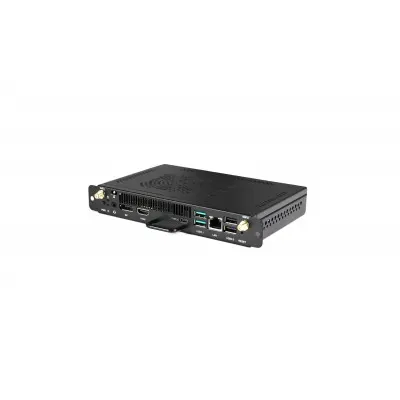
SP-PI7C82IS(Win 11 Pro Activated)
Dahua SP-PI7C82IS(Win 11 Pro Activated) OPS Computer Module
- System
- Supports Windows 11 Pro or…
- Memory
- 8 GB
The Dahua SP-PI7C82IS is an OPS computer module that plugs into a panel's OPS slot. It carries an Intel i7-12650H processor at up to 4.70 GHz, 8 GB DDR4 memory, a 256 GB SSD and a Windows 11 Pro activated designation. Ports cover HDMI, DisplayPort, USB 3.1 Type-C and gigabit Ethernet. It suits schools, ministries and offices in Qatar that want built-in computing for a wall-mounted touch display.
What the Dahua SP-PI7C82IS does inside an interactive panel
The Dahua SP-PI7C82IS is an OPS module, a compact computer designed to sit inside a compatible interactive flat panel rather than beside it on a desk. It is listed as an accessory in the interactive flat panel range and measures 119 mm × 180 mm × 30 mm with a net weight of 0.75 kg. For a school, ministry or office, this means one wall-mounted display that carries its own computing, with no separate tower or monitor in the room.
Processor, memory, storage and operating system
Computing is handled by an Intel Alder Lake-H i7-12650H processor running at up to 4.70 GHz, with 10 cores, 16 threads and a 24 MB Level 3 cache. Graphics come from Intel UHD Graphics for 12th Gen Intel processors, and audio from a Realtek ALC897 sound chip. The module carries 8 GB of DDR4 memory at 3200 MHz and a 256 GB 2280 SSD that accepts NVMe or SATA. The model designation includes Windows 11 Pro activated, and the manufacturer states that the module supports Windows 11 Pro or can be used without any operating system.
Ports, display outputs and network connections
Video leaves the module through one DisplayPort 1.2 output, rated to 4K at 60 Hz, and one HDMI 1.4 output, rated to 4K at 30 Hz. Alongside them sit two USB 3.1 ports, two USB 2.0 ports and one USB 3.1 Type-C port, plus a 2-in-1 audio connector that combines line-out and microphone input. A single RJ-45 port provides a 10/100/1000 Mbps wired network connection, and a 2230 CNVI AX101 Wi-Fi and Bluetooth module is fitted, with two antennas included. An 80-pin JAE extension interface completes the connector set.
Power draw, heat and environmental limits
The module accepts 12–19 VDC. Its typical power consumption is 53 W, its maximum is 58.8 W, and standby draw is 0.8 W. The rated operating temperature range is –5 °C to +45 °C with 10%–90% non-condensing humidity, and storage is rated from –20 °C to +70 °C. Qatar summers regularly exceed 45 °C, so the room should be air-conditioned and the panel kept away from direct sun and window glare. Confirm the exact location with the SmartRooms Qatar team during the site survey before wall-mounting.
Where it fits in Qatar
Three scenarios show where this module makes sense:
- A private school in Al Wakrah fitting out science and language classrooms, where one module per panel removes the desk PC from the front of each room.
- A government office in Msheireb running a boardroom display for presentations shared over the office network through its RJ-45 port.
- A training centre in Education City that needs a 4K-capable output for lecture slides, using the DisplayPort 1.2 output at 60 Hz.
What to plan before you order
- Confirm the host panel has a compatible OPS slot and matching connector before ordering.
- Check how the panel supplies the 12–19 VDC input and whether its power budget covers a typical 53 W draw.
- Choose cable routes for the DisplayPort or HDMI output, the network connection and USB peripherals.
- Decide which software configuration you need, since the model designation includes Windows 11 Pro activated.
SmartRooms Qatar offers free site surveys, professional installation across all 8 municipalities of Qatar, and quotations usually within one working day. Request a quote with your panel model, room list and quantity, and our team will confirm compatibility and the next steps for your organisation.
Highlights
- Intel i7-12650H processor, up to 4.70 GHz
- 8 GB DDR4 memory at 3200 MHz
- 256 GB 2280 SSD, NVMe or SATA
- Model designation includes Windows 11 Pro activated
- DisplayPort 1.2 up to 4K/60 Hz; HDMI 1.4 up to 4K/30 Hz
- Typical 53 W draw, maximum 58.8 W
- Rated operating range -5 °C to +45 °C
Estimated timeline
Quotation within 1 working day · delivery timing depends on stock availability, and we confirm it with your quotation.
Specifications
Function10
- Processor
- Intel® Alder lake-H i7-12650H, 4.70 GHz
- Chip
- SOC
- BIOS
- AMI UEFI BIOS
- Integrated Graphics Card
- Intel® UHD Graphics for 12th Gen Intel® Processors
- Sound Card
- Realtek ALC897
- Memory
- 8 GB
- Disk
- 256 GB
- Wireless
- 1 × 2230 CNVI AX101, Wi-Fi/BT Module
- Button
- Front, 1 × power button, 1 × resetting button (recessed socket)
- Operating System
- Supports Windows 11 Pro or without any operating system.
function3
- Number of Cores
- 10
- Number of Threads
- 16
- Level 3 Cache
- 24 MB
Device Ports8
- Power
- 1 × DC IN
- Network Port
- 1 × RJ-45 (10/100/1000 Mbps)
- USB
- 2 × USB 3.1, 2 × USB 2.0
- Type-C Port
- 1 × USB 3.1 Type-C
- DP
- 1 × DP1.2 out, Max.4K/60 Hz
- HDMI
- 1 × HDMI 1.4 out, Max.4K/30 Hz
- Audio Port
- 1 × Line-out and MIC-In, 2-in-1 Connector
- Extension Interface
- 1 × 80 pin JAE port
Power3
- Operating Voltage
- 12–19 VDC
- Standby Power Consumption
- 0.8 W
- Power Consumption
- Typ: 53 W; Max: 58.8 W
Environment4
- Operating Temperature
- –5 °C to +45 °C (+23 °F to +113 °F)
- Operating Humidity
- 10%–90%, non-condensing
- Storage Temperature
- –20 °C to +70 °C (–4 °F to +158 °F)
- Storage Humidity
- 10%–90%, non-condensing
Structure7
- Casing Material
- SGCC
- Product Dimensions
- 119 mm × 180 mm × 30 mm (4.69" × 7.09" × 1.18")
- Packaging Dimensions
- 254 mm × 196 mm × 77mm (10.00" × 7.72" × 3.03")
- Net Weight
- 0.75 kg (1.65 lb)
- Gross Weight
- 0.95 kg (2.09 lb)
- Casing Color
- Black
- Accessory
- 2 × antennas, 2 × M3 screws, 1 × desiccant, 1 × user's manual
Certifications1
- Certifications
- CE, Energy Star




