





Thursday, 22 October 2026 · 11 Jumada I 1448 AH Sun – Thu · 9:00 – 18:00
+971 56 914 9477 العربية
WhatsApp

IdeaHub K3

Huawei IdeaHub K3 65/75/86-inch Interactive Teaching Display

WhatsApp
Priceon request
QuotationWithin 1 working day
DeliveryConfirmed with your quote, based on stock
PDFDownload datasheet (HUAWEI IdeaHub K3 Datasheet.pdf)
Overview

The Huawei IdeaHub K3 is an interactive teaching display available in 65, 75 and 86-inch sizes, with a 4K anti-glare screen, a whiteboard with 16 ms writing latency and an HD camera. It runs HarmonyOS, supports Wi-Fi Direct projection without a network, and offers an optional Windows OPS module. It suits smart classrooms, lecture halls and remote teaching rooms at schools, universities and training centres across Qatar. Request a quote from SmartRooms Qatar.

What the IdeaHub K3 is built to do

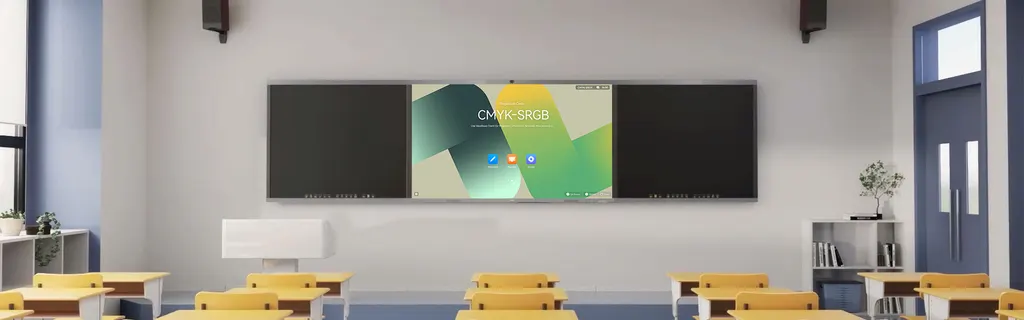
The Huawei IdeaHub K3 brings a large 4K touch screen, an intelligent whiteboard, an HD camera and a set of classroom tools into one unit. It suits digital classes, smart interactive teaching and remote interactive teaching. Teachers can prepare a lesson, teach it and review it afterwards from the same device, which reduces the number of separate screens, projectors and laptops a room needs.

Screen, touch and writing performance

The panel resolves 3840 x 2160 pixels, with 350 cd/m² luminance, a 1,200:1 contrast ratio and a 178 degree viewing angle. Anti-glare treatment helps when ceiling lights or windows are in view. The infrared touch layer supports 40 simultaneous touch points with ±1 mm accuracy and a response time of 4 ms or less. The dedicated stylus has a writing latency of 16 ms or less, and the whiteboard recognises Chinese and English characters and shapes. Whiteboard pages can be saved locally, to a USB flash drive, by email, or by scanning a QR code with a browser or third-party software.

Connectivity, projection and an optional Windows module

Front-panel ports include USB Type-C rated for 65 W charging, two USB 3.0 Type-A ports, a USB-B 2.0 port, a 4K-rated HDMI 2.0 input and an RS232 serial port. The side panel adds an HDMI output, a second HDMI input, USB-A and USB-B ports and an RJ45 network port at 10/100/1000M. Wi-Fi 5 and Wi-Fi 6 (802.11 a/b/g/n/ac/ax) work on 2.4 GHz and 5 GHz bands. Wi-Fi Direct lets a PC, phone or tablet project to the panel without a network connection. An OPS slot accepts an optional Windows module; the listed configuration is a Core i5 12400 processor, 8 GB memory, a 256 GB SSD and Windows 11 or later.

Where it fits in Qatar

A primary or secondary classroom in Al Wakrah or Al Rayyan: the 65-inch model suits a smaller classroom where teachers stand close to the board, and its front ports make it quick to connect a tablet or laptop during a lesson.

A seminar room in Education City: the 75-inch size fits mid-sized rooms. The camera records activity before, during and after class, and the microphone array of at least six microphones picks up speech from 10 m or more, which helps when a session links to a partner campus abroad. The datasheet does not name a conferencing platform, so confirm the software you plan to use before ordering.

A lecture hall in Doha or a training room for a government authority: the 86-inch panel, weighing 60.0 kg, suits larger rooms. It needs a planned wall or stand, so a free site survey from SmartRooms Qatar is worth booking before the unit is ordered.

What to plan before installation

  • Weight: 37.0 kg for the 65-inch, 48.7 kg for the 75-inch and 60.0 kg for the 86-inch.
  • Power: 100–240V AC at 50/60 Hz, maximum draw of 350 W, 420 W or 450 W by size, and standby below 0.5 W.
  • Environment: operating temperature 0–40°C, humidity 10% to 95%, altitude below 5,000 m. Outdoor summer temperatures in Qatar regularly exceed 45°C, so keep the unit in an air-conditioned room.
  • Software: the intelligent classroom analysis feature must be used with third-party teaching software.

The manufacturer rates the mean time between failures above 100,000 hours. SmartRooms Qatar offers professional installation and free site surveys, delivers to all eight municipalities of Qatar, and usually sends quotations within one working day. Request a quote for the size that fits your room, and any lead time will be confirmed in the quotation.

Highlights

  • 65, 75 and 86-inch sizes at 3840 x 2160 resolution
  • 16 ms writing latency with a dedicated stylus
  • TÜV Rheinland Low Blue Light and Eye Comfort certifications
  • Wi-Fi Direct projection without a network connection
  • Optional Windows OPS module in a dedicated slot
  • 0–40°C operating range and 100–240V AC power input

Estimated timeline

Quotation within 1 working day · delivery timing depends on stock availability, and we confirm it with your quotation.


Specifications

Source: manufacturer · checked Oct 2026
The full specification and datasheet for this model are available on request; we send them with your quotation.

Downloads

6 files from the manufacturer

Questions about IdeaHub K3

Which screen sizes does the IdeaHub K3 come in, and which suits a classroom in Al Wakrah?
The IdeaHub K3 is offered in 65, 75 and 86-inch versions, listed in the datasheet as the IHK3-65/75/86SA family. A 65-inch panel suits a standard classroom in a school in Al Wakrah or Al Rayyan, where students sit close to the board. The 75-inch size suits mid-sized seminar rooms and the 86-inch size suits lecture halls. Send your room dimensions and seating distance to SmartRooms Qatar so the size can be confirmed before the quotation.
What is the IdeaHub K3 designed for?
The IdeaHub K3 is designed for digital classes, smart interactive teaching and remote interactive teaching. It combines a 4K touch screen, an intelligent whiteboard, an HD camera and teaching software in one unit, covering preparation before class, teaching during class and review afterwards. In Qatar it suits schools, universities and training centres that want one display to handle lessons, group work and a live link to another site.
Is the screen comfortable for long lessons?
The screen uses a 4K soft-light panel with optical anti-blue light, flicker reduction and anti-glare treatment. The datasheet lists TÜV Rheinland Low Blue Light and Eye Comfort certifications. These features matter in classrooms where lessons run for hours under bright ceiling lights. A 178 degree viewing angle and 350 cd/m² luminance also help students seated at the edges of the room see content clearly. The certifications are as stated by the manufacturer.
How responsive is the whiteboard when writing by hand?
Writing latency is 16 ms or less. The infrared touch layer supports 40 simultaneous touch points with ±1 mm accuracy and a response time of 4 ms or less. The dedicated stylus is wear-resistant and anti-slip, and it is offered in several pen types and colours. Whiteboard content can be saved locally, to a USB flash drive, by email, or through a browser by scanning a QR code.
Can teachers project from a laptop without a network connection?
Yes. Wi-Fi Direct creates a direct connection between the panel and a PC, phone or tablet, so content can be shown without a network. The datasheet also lists projection through the app, HDMI, Type-C and NFC, with compatibility for Android, Windows, iOS, macOS and HarmonyOS. In schools where the network is busy or limited, this keeps a lesson running even when the connection is unreliable.
Do I need a built-in Windows computer?
No. The IdeaHub K3 runs HarmonyOS with an eight-core processor of at least 2 GHz, 12 GB of memory and 128 GB of storage. If some teaching software only runs on Windows, an optional OPS module can be fitted. The listed OPS configuration is a Core i5 12400 processor, 8 GB memory, a 256 GB SSD and Windows 11 or later. Ask for the quotation with or without the OPS module.
Is it suitable for lessons that link to students in another location?
The HD camera records at 1080P and 30 frames per second. The microphone array has at least six microphones with a pickup distance of 10 m or more, and at least two speakers rated at 30 W or more. These figures describe what the room captures and plays during a remote session. The datasheet does not name a specific conferencing platform, so confirm the software your university or training centre plans to use with SmartRooms Qatar.
Will it run on Qatar's 240 V mains supply?
The power input is listed as 100–240V AC at 50/60 Hz, which covers the 240 V, 50 Hz supply used in Qatar. Maximum power draw is 350 W for the 65-inch, 420 W for the 75-inch and 450 W for the 86-inch, with standby below 0.5 W. The datasheet does not state the plug type or the supplied power cord, so confirm these with SmartRooms Qatar before delivery to your site.
Can I install it near a window in summer?
Not in an unconditioned space. The listed operating temperature is 0–40°C with humidity from 10% to 95%. Summer temperatures in Qatar regularly pass 45°C, so lobbies, covered outdoor areas and rooms exposed to direct sunlight are unsuitable. Place the unit in an air-conditioned room and confirm the room conditions with the SmartRooms Qatar team during the free site survey.
How should I plan the wall or stand for an 86-inch model?
The 86-inch panel measures 1953.0 mm x 1188.9 mm x 90 mm and weighs 60.0 kg. Check the wall structure and mounting method before ordering, and leave lifting and fixing to qualified installers. SmartRooms Qatar provides professional installation and free site surveys, so book the survey before issuing a purchase order to confirm the mounting plan.
How does buying through an LPO or government tender work?
The IdeaHub K3 is supplied by quotation, and quotations usually arrive within one working day. SmartRooms Qatar accepts purchase orders (LPOs), government tenders including Monaqasat, and payment by bank transfer, cheque or purchase order. Delivery covers all eight municipalities of Qatar. A school ordering several units for different rooms can send the sizes and quantities together, and they will appear on a single quotation.

Similar models

BenQ CM7505 BenQ Board CM7505 75-inch Interactive Display
75″ UHD 3840 × 2160 pixels Ultra Precision IR
SMART SBID-6286S-V3 SMART Board 6086S-V3 86-inch Interactive Display with iQ
86″ 4K UHD (3840 × 2160) HyPr Touch with InGlass
SMART SBID-6286S-V3-P SMART Board 6086S-V3 Pro 86-inch Interactive Display with iQ
86″ 4K UHD (3840 × 2160) HyPr Touch with InGlass
Clevertouch Clevertouch Edge 65" Clevertouch Edge 65" 4K Interactive Display with Camera and Speakers
65″ 4K UHD (3840x2160 @60Hz) Android 15
Clevertouch Clevertouch Edge 86" Clevertouch Edge 86" 4K Interactive Flat Panel
86″ 4K UHD (3840x2160 @60Hz) Android 15
Email Call


