





105TR5WP
LG 105TR5WP 105-inch CreateBoard 5K Interactive Digital Board
- Screen size
- 105"
- Resolution
- 5120 X 2160 (5K)
- Touch
- Max 50 points
- System
- Android13
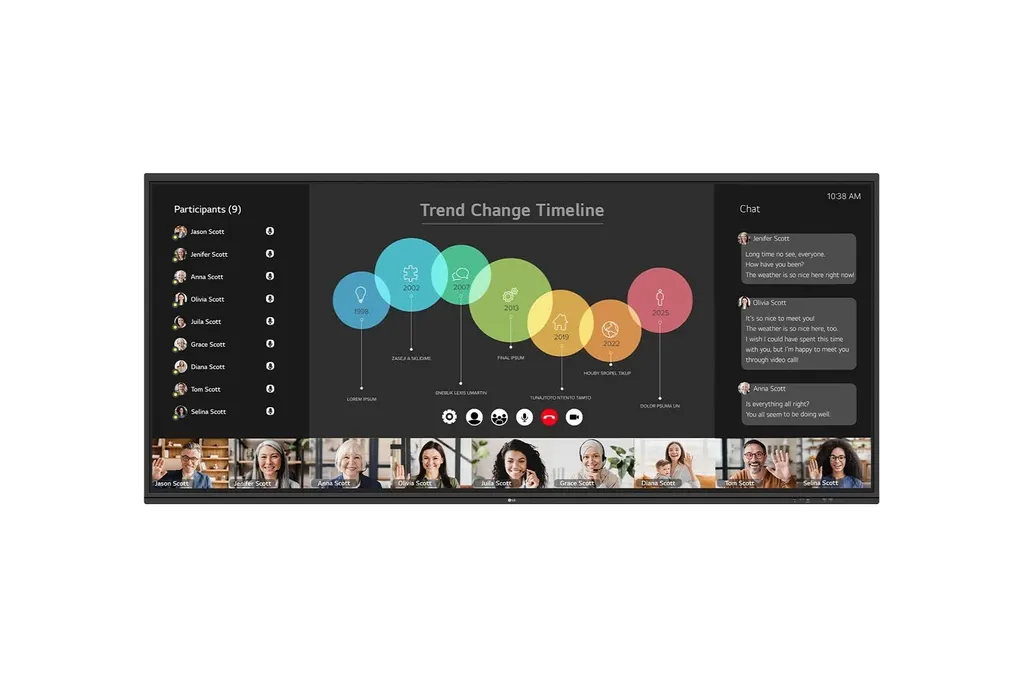
The LG 105TR5WP is a 105-inch interactive digital board with a 5,120 × 2,160 (5K) 21:9 panel, 400 nit typical brightness with glass and up to 50 touch points. It runs Android 13 and includes a built-in OPS slot for a Windows PC module, four HDMI inputs, one DisplayPort input, built-in speakers and microphones. It suits large boardrooms, lecture halls and training rooms in Doha, West Bay and Education City where teams join video calls across time zones.
A 105-inch 5K board for wide, shared workspaces
The LG 105TR5WP is a 105-inch interactive digital board built around a 5,120 × 2,160 (5K) panel with a 21:9 aspect ratio. That wide shape gives a meeting room a continuous horizontal workspace: a document beside a live video call, or a whiteboard beside a spreadsheet, without stacking windows. The VA panel uses direct backlighting, with a 4,000:1 contrast ratio, 10-bit colour depth and 400 nit typical brightness with glass.
Specifications that shape the purchase decision
- Touch: up to 50 touch points at once, a writing height of 2 mm or less and typical accuracy of ±1 mm.
- Ports: four HDMI inputs, one DisplayPort input, two USB Type-C ports, six USB 3.0 Type-A ports, RS232C control, an HDMI output and RJ45 LAN in and out.
- Computing: Android 13 with 8GB RAM and 64GB storage, plus a built-in OPS slot for a Windows PC module.
- Connectivity: Wi-Fi 6E, Bluetooth 5.3 and Gigabit LAN.
- Audio: built-in speakers and an array of eight microphones.
- Power: built-in power supply for 100-240 V, 50/60 Hz, with measured consumption of 315 W typical and 560 W maximum.
Where it fits in Qatar
Consider a lecture hall in Education City, where a lecturer shows slides and handwritten notes across the full width of the screen while a guest speaker joins from abroad over a video call. The 21:9 canvas keeps both views visible without shrinking either one.
Consider a boardroom in West Bay used by a government authority, where Arabic-speaking and English-speaking officials review the same file together. The on-screen menu includes Arabic (Egypt) among its many languages, so confirm your language needs before the quotation is issued.
Consider a project room at an energy or engineering company in Mesaieed or Ras Laffan, running progress reviews with teams in Doha and overseas, with drawings and tracking sheets displayed side by side.
What to plan before you order
The head weighs 84.6 kg and the panel is 2510.7 mm wide, so wall mounting needs a site survey, a lifting crew and a wall structure that can carry the load. The VESA mounting interface is 1000 x 600 mm, and the unit supports landscape orientation only. Free site surveys from SmartRooms Qatar cover wall checks, access routes and cable paths.
The operating range is 0 °C to 40 °C with humidity from 10% to 90%. Outdoor temperatures in Qatar can exceed 45 °C in summer, so place the board in an air-conditioned room and confirm the environment with the SmartRooms Qatar team before ordering. Avoid unshaded outdoor areas and direct sun.
SmartRooms Qatar supplies the board, delivers it to all eight municipalities of Qatar and arranges professional installation. Purchase orders (LPOs) and government tenders, including Monaqasat, are accepted, and the unit is covered by the manufacturer's warranty. Quotations are usually issued within one working day.
Request a quote from SmartRooms Qatar, and our team will confirm the mounting, power and cabling details for your room.
Highlights
- 105-inch panel with 5,120 × 2,160 (5K) resolution
- 21:9 aspect ratio, landscape orientation only
- Up to 50 touch points with 2 mm writing height
- Built-in OPS slot for a Windows PC module
- Wi-Fi 6E, Bluetooth 5.3 and built-in microphones
- Operating range 0 °C to 40 °C; 100-240 V power supply
Classroom fit
At 105″ the farthest student should sit within about 7.8 m (6× the screen height).
Estimated timeline
Quotation within 1 working day · delivery timing depends on stock availability, and we confirm it with your quotation.
Specifications
Info3
- Product
- Touch
- Year
- Y24
- Month
- M12
Panel18
- Screen Size (Inch)
- 105"
- Panel Technology
- VA
- Back Light Type
- Direct
- Aspect Ratio
- 21:9
- Native Resolution
- 5120 X 2160 (5K)
- Refresh Rate
- 60Hz
- Brightness
- 400nit (typ.) with glass
- Contrast Ratio
- 4,000:1
- Dynamic CR
- 5,000:1
- Color gamut
- 72% (NTSC)
- Viewing Angle (H x V)
- 178 x 178
- Color Depth (Number of Colors)
- 10bit(1.07B)
- Response Time
- 6.5ms(Typ)
- Surface Treatment (Haze)
- 25%
- Life time
- 50,000 Hrs (Min.)
- Operation Hours (Hours/Day)
- 16/7
- Portait / Landscape
- No / Yes
- Transparency
- 5.5%
Connectivity(Jack Interface)10
- HDMI IN
- Yes(4), HDCP2.3
- DP IN
- Yes(1), HDCP1.3/2.3
- Audio IN
- Yes(1)
- RS232C IN
- Yes(1)
- RJ45(LAN) IN
- Yes(1)
- USB IN
- USB3.0 Type A(6), USB2.0 Type A(1), USB Type C(2)
- HDMI Out
- Yes(1)
- Audio Out
- Yes(1), Optical O(1, SPDIF)
- Touch USB
- Yes(3)
- RJ45(LAN) Out
- Yes(1)
Mechanical8
- Bezel Color
- Black
- Bezel Width
- T/R/L/B : 29.8/19.5/19.5/41.2 mm
- Weight (Head)
- 84.6Kg
- Packed Weight
- 123.95Kg
- Monitor Dimensions (W x H x D)
- 2510.7×1129.9×91.7mm
- Carton Dimensions (W x H x D)
- 2668×1305×280mm
- Handle
- 4 Handle
- VESA<sup>TM</sup> Standard Mount Interface
- 1000 x 600mm
Protection Glass5
- Thickness
- 4mm
- Degree of Protection
- (TBD)
- Tempered / Chemical strengthening
- Yes
- Anti-Reflective
- Yes
- Shatter-Proof
- Yes
HW Feature6
- Internal Memory (eMMC)
- 64GB
- Wi-Fi/BT (Built-in)
- Yes (Slot type)
- Auto Brightness sensor
- Yes
- Power Indicator
- Yes
- Local Key Operation
- Yes
- MIC (Built-in)
- Yes (8)
SW Feature12
- OS Ver. (webOS)
- Android13
- Booting Logo Image
- Yes
- RS232C Sync
- Yes
- PIP
- Yes (1) external source
- PBP
- Yes (4)
- Screen Share
- Yes (CreateBoard Share)
- Cisco Certification
- No (not suppported now ,need more resource cost)
- Crestron Connected
- Yes
- Smart Energy Saving
- Yes (Energy Saving)
- Wake on LAN
- Yes
- Network Ready
- Yes (Fast Power On)
- HDMI-CEC
- Yes
Environment Conditions2
- Operation Temperature
- 0 °C to 40 °C
- Operation Humidity
- 10 % to 90 %
Power2
- Power Supply
- AC 100-240V~, 50/60Hz
- Power Type
- Built-In Power
Power Consumption6
- Typ.
- measured: 315W
- Max.
- measured: 560W
- BTU (British Thermal Unit)
- (TBD)
- Smart Enegy Saving (70%)
- Yes
- DPM
- 0.5W
- Power off
- 0.5W
Sound1
- Speaker (Built-in)
- Yes (18 W(4Ω)+ 18Wx2(6Ω) )
Certification3
- Safety
- IEC 62368-1:2018; UL 62368-1:2019
- EMC
- FCC Class "A" / CE / KC
- ErP / Energy Star
- Yes / Yes
OPS Compatibility2
- OPS Type Compatible
- Yes
- OPS Power Built-in
- Yes
Software Compatibility1
- Connected Care
- Yes
Language1
- OSD
- English, Simplified Chinese, Czech, Danish, Arabic(Egypt), Finnish, French, German, Greek, Italian, Korean, Netherlands(Dutch), Norwegian, Polish, Portuguese(Europe), Portuguese(Brazil), Romanian, Russian, Spanish, Swedish, Turkish, Ukrainian, Traditional Chinese, Hungarian, Thai, Indonesian, Kazakh, Catalan, Basque, Japanese, Estonian, Lithuanian
Accessory1
- Basic
- Power Cord 3 M*1, USB Cable(Type A-Type B) 5 M*1, USB Type-C Cable(C to C) 1.8 M*1, HDMI Cable 3 M*1, Writing Pen*2pcs, User Manual, QSG, Carton Box, Remote Controller(include battery 2ea), Wifi module
Product Dedicated Feature17
- Available Object Size for Touch
- Ø2 mm ↑
- Response Time
- ≤5ms
- Writing Height
- ≤2mm
- Accuracy (Typ.)
- ±1mm
- Interface
- USB2.0
- Protection Glass Thickness
- 4mm
- Protection Glass Transmission
- 88%
- Operating System Support
- Windows10/Windows8/Windows7/Android /Linux/Mac OS X/Chrome
- Multi Touch Point
- Max 50 points
- CPU
- Octa-core A76x4 + A55x4
- GPU
- Mali-G610 MP4
- Memory(RAM)
- 8GB
- Storage
- 64GB
- Wi-Fi
- WiFI 6E
- LAN
- Gigabit LAN
- Bluetooth
- BT5.3
- OS ver. (Android)
- Android 13




