





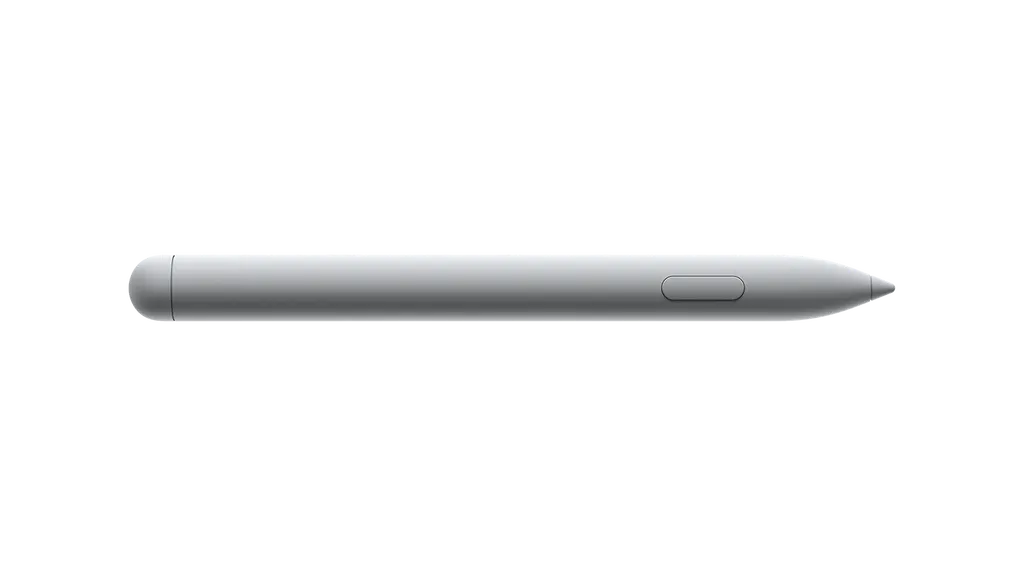
Surface Hub Pen
Microsoft Surface Hub Pen Stylus for Surface Hub Displays
The Microsoft Surface Hub Pen is a grey stylus for writing and annotating on Surface Hub displays. It weighs 41 g, has a barrel button and a tail eraser, and connects over Bluetooth 4.0. Microsoft lists it as compatible with the Surface Hub 3 for Business and Surface Hub 2S. It suits Doha offices, ministries and schools that need a replacement or an extra pen for an existing Surface Hub room. Request a quote from SmartRooms Qatar.
What the Surface Hub Pen does on a large screen
The Microsoft Surface Hub Pen is a grey stylus designed for writing, sketching and annotating on Surface Hub displays. Because the screens are large, the pen is the main tool for presenters who stand at the board and mark up documents, diagrams or slides in real time. Microsoft lists the Surface Hub 3 for Business and the Surface Hub 2S as compatible models.
Specifications that matter when you order
The pen measures 151 mm × 16.3 mm × 14.3 mm and weighs 41 g, a light body for long writing sessions in meetings and lectures. It has a barrel button and a tail eraser, so a presenter can switch functions without reaching for the screen controls. The connection type is Bluetooth 4.0.
- Dimensions: 151 mm × 16.3 mm × 14.3 mm
- Weight: 41 g
- Controls: barrel button and tail eraser
- Connection: Bluetooth 4.0
Where it fits in Qatar
In a boardroom in West Bay, a leadership team reviewing a tender can annotate a shared document on a Surface Hub while the pen stays within reach at the table. In a ministry meeting room in Doha, a spare pen keeps the room usable when the original pen is misplaced. In a lecture room in Education City, a lecturer can mark up slides during a seminar without leaving the front of the room.
What to plan before you order
Confirm the Surface Hub model you own before ordering. The data lists the Surface Hub 3 for Business and Surface Hub 2S, and it notes that the pen also works with select other Surface devices, which Microsoft Support covers. Count the rooms that need a pen and keep a spare with the facilities team. Microsoft publishes guides for troubleshooting the pen and for updating its firmware on Surface Hub, so keep them with your asset records. The source notes that one pen is included with a purchase but does not name the product, so check what your bundle includes when you request the quote. Government bodies, schools and companies can order against a purchase order (LPO) or a government tender, including Monaqasat. SmartRooms Qatar delivers to all eight municipalities of Qatar and accepts payment by bank transfer, cheque or purchase order. The source data does not give an operating temperature range for the pen, so keep it in an air-conditioned room with its Surface Hub and confirm any other environment with the SmartRooms Qatar team.
To request a quote for the Microsoft Surface Hub Pen, send your Surface Hub model and the number of pens you need. SmartRooms Qatar usually returns quotations within one working day, and a free site survey is available if you are planning a wider room upgrade.
Highlights
- Grey finish with a 41 g body
- Barrel button and tail eraser
- Bluetooth 4.0 connection type
- Listed as compatible with Surface Hub 3 for Business and Surface Hub 2S
- Dimensions 151 mm × 16.3 mm × 14.3 mm
- Microsoft guides for troubleshooting and firmware updates
Estimated timeline
Quotation within 1 working day · delivery timing depends on stock availability, and we confirm it with your quotation.
Specifications
Tech specs (Microsoft Store UK, Surface Hub 3 page — Surface Hub Pen)6
- Dimensions
- 151 mm × 16.3 mm × 14.3 mm (5.94" × 0.64" × 0.56")
- Weight
- 41 g (0.09 lb)
- Buttons
- Barrel button and tail eraser
- Colour
- Grey
- Connector type
- Bluetooth 4.0
- Compatibility
- Surface Hub 3 for Business Surface Hub 2S* * Also compatible with select Surface devices. Visit Microsoft Support for additional information.




