





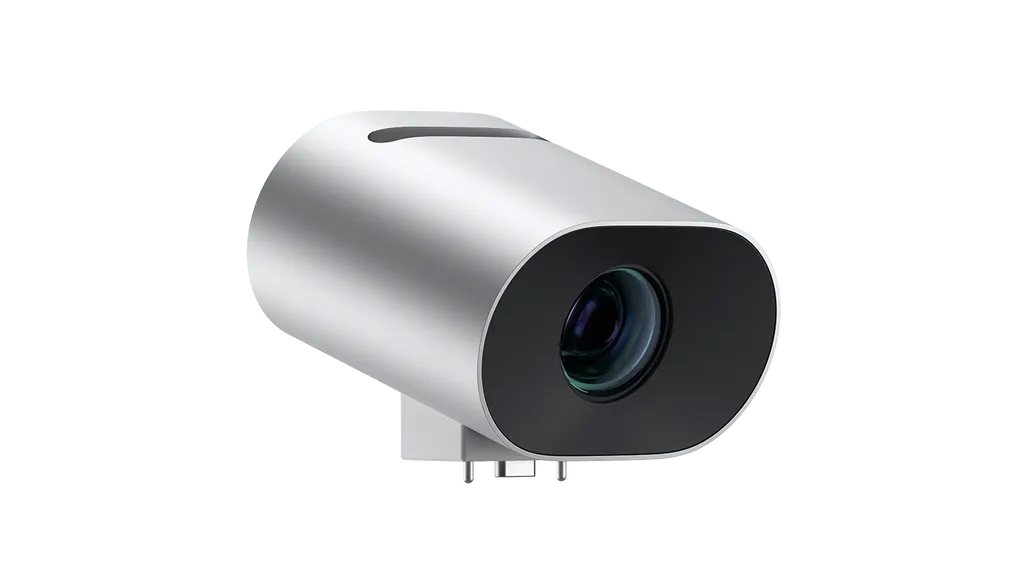
Surface Hub Smart Camera
Microsoft Surface Hub Smart Camera for Surface Hub 2S and Hub 3
- Memory
- 1 GB DRAM
- Warranty
- One-year limited hardware…
The Microsoft Surface Hub Smart Camera is built for Surface Hub 2S and Surface Hub 3 displays. It mounts magnetically on the top bezel and uses automatic framing to keep people in view as they move. With a field of view above 136 degrees, it suits boardrooms and meeting rooms in Doha where remote colleagues need to see everyone at the table. Included with some Surface Hub bundles; also sold separately.
What the Surface Hub Smart Camera does in a meeting
The Microsoft Surface Hub Smart Camera is the camera module designed for Surface Hub 2S and Surface Hub 3 displays. It gives remote participants a life-size picture of the room, including people standing at the screen to write, draw or open files. Instead of holding one fixed shot, the camera re-frames the picture when people enter or leave the room, or when someone interacts with the content on the display, so the far end keeps seeing whoever is speaking.
It comes with a privacy cover, a Quick Start Guide, and safety and warranty documents. The camera is included with some Surface Hub 3 50-inch and 85-inch bundles and the Surface Hub 2S 85-inch, and it is also sold separately, so check your order before you request a quote.
Image quality and framing specifications
The lens is a fixed-focus design with 11 glass elements and a horizontal field of view greater than 136 degrees. Digital pan-tilt-zoom adjusts the picture without moving the camera. The working distance is 1.0 to 7.4 metres, which defines how deep a room the camera can cover from the display. Tilt is limited to 20 degrees above or below horizontal, and de-warp processing corrects the image as the angle changes so faces look natural across the frame.
Image optimisation covers auto exposure, auto white balance and anti-flicker, which matters in rooms that mix daylight with ceiling lighting. Video runs in 16:9 at 360p, 720p, 1080p and 1440p. Inside the casing sits an Intel Myriad X 2085 image signal processor and neural network chip, with 1 GB DRAM and 8 GB eMMC storage that is not user accessible. Firmware is updated through Windows Update, with software updates protected by a signature security process.
Where it fits in Qatar
A boardroom in West Bay or Msheireb with an 85-inch Surface Hub is a typical case. Executives in Doha and colleagues abroad see the full table, and the frame changes as people take their seats or walk to the screen. In a training room at a university in Education City, a lecturer can annotate on the display while remote students follow both the speaker and the content. A ministry team in Doha reviewing files with colleagues in other cities can use the same setup, and industrial training rooms in Mesaieed or Ras Laffan can connect specialists who join from head office.
What to plan before you order
- Host display: confirm you have a Surface Hub 2S or Surface Hub 3, since mounting is listed only for these models.
- Room depth: measure the distance from the display to the furthest seat and check it falls within the 1.0 to 7.4 metre working distance.
- Bundle check: see whether your hub already includes the camera before buying a separate unit.
- Software: IntelliFrame on Microsoft Teams Rooms needs a separately sold licence, and automatic framing needs a supported Windows edition.
- Environment: the source data gives no operating temperature range, so confirm room conditions with the team before installation.
Request a quote
Tell the SmartRooms Qatar team which Surface Hub model is installed or planned, the room size, and how many rooms need cameras. We offer a free site survey, usually send quotations within one working day, deliver to all 8 municipalities of Qatar, and provide professional installation. Organisations can order by LPO, and government tenders, including Monaqasat, are supported. Request a quote today.
Highlights
- Automatic framing follows people as they move or enter the room
- Horizontal field of view greater than 136 degrees
- Working distance of 1.0 to 7.4 metres
- Magnetic break-away USB-C attach to the Surface Hub top bezel
- Privacy cover magnetically attaches to the front of the camera
- One-year limited hardware warranty
Estimated timeline
Quotation within 1 working day · delivery timing depends on stock availability, and we confirm it with your quotation.
Specifications
Tech specs (Microsoft Store UK)12
- Dimensions
- 43mm high (54.6mm high with foot) x 67mm wide x 66mm deep (42mm wide foot)
- Memory
- 1 GB DRAM, 8 GB eMMC (None user accessible)
- Processor
- Intel Myriad X 2085 (Image Signal Processor and NN SOC with 1 TFLOPS of DNN acceleration and 18 cores)
- Security
- Camera software updatable through Windows Update via Hub Software updates protected by signature security process
- Software
- Built-in functionality: ‘Auto framing’ (automatically frames people in field of view) Image optimisation (auto exposure, auto white balance, anti-flicker) Tilt angle adapting de-warp/un-distortion for natural faces across the field of view Upgradability: Internal Camera firmware can be updated with new functionality or bug fixes through Windows Update
- Sensors
- Sensor Resolution: 4K
- What’s in the box
- Surface Hub Smart Camera with privacy cover Quick Start Guide Safety and warranty documents
- Weight
- 180g (0.4 lb) with Camera Cover
- Connections
- Mounting: Top of Surface Hub 2S 85” and 50” only Mechanical & Electrical Interface to Hub: USB-C break-away magnetic attach to top of bezel Interface to Surface Hub 2S 85”and 50”: Customised USB-C Reversible USB-C connection: Not supported Hub Rotation: Not supported
- Cameras, video, and audio
- Fixed focus lens with 11 glass elements HFOV: > 136° Tilt range: +20 deg and -20 deg from horizontal. Surface Hub Smart Camera adapts its de-warp mesh to un-distort the image according to the camera tilt angle, so the image always looks natural. Privacy cover magnetically attaches to front of camera for privacy, and magnetically attaches to back of camera for convenient storage
- Exterior
- Casing: Anodised Aluminium Colour: Platinum Physical buttons: None One white LED indicator for camera status (indicator is only visible when ‘On’)
- Warranty
- One-year limited hardware warranty (All Countries)
Tech specs (Microsoft Store UK, Surface Hub 3 page — Surface Hub Smart Camera)12
- Dimensions
- 43 mm high (54.6 mm high with foot) × 67 mm wide × 66 mm deep (42 mm wide foot)
- Memory
- 1 GB DRAM, 8 GB eMMC (Not user accessible)
- Processor
- Intel Myriad X 2085 (Image Signal Processor and NN SOC with 1 TFLOPS of DNN acceleration and 18 cores)
- Security
- Camera software is updatable through Windows Update via Hub Software updates protected by signature security process
- Software
- Intelligent functionality: IntelliFrame support on Microsoft Teams Rooms* Automatic framing** (automatically frames people in field of view) Image optimization (auto exposure, auto white balance, anti-flicker) Tilt angle adapting de-warp/un-distortion for natural faces across the field of view Upgradability: Internal Camera firmware can be updated with new functionality or bug fixes through Windows Update * Software licence required. Sold separately. ** Available when running Windows 10 Team Edition or Windows 10/11 Pro/Enterprise.
- Sensors
- Sensor Resolution: 12MP
- Connections
- Mounting: Top of Surface Hub 2S and Surface Hub 3 for Business Mechanical & Electrical Interface to Hub: USB-C break-away magnetic attach to top of bezel Interface to Surface Hub 2S, Surface Hub 3 for Business: Customized USB-C Reversible USB-C connection: Not supported.
- Camera and Video Features
- Fixed focus lens with 11 glass elements 1 RGB Camera Module Working Distances: 1.0-7.4m HFOV: >136 degrees Tilt range: +20 deg and -20 deg from horizontal. Surface Hub Smart Camera adapts its de-warp mesh to un-distort the image according to the camera tilt angle, so the image always looks natural. Video Format: 16:9 (NV12 at 360p, 720p, 1080p, 1440p) Privacy cover magnetically attaches to front of camera for privacy, and magnetically attaches to back of camera for convenient storage
- Exterior
- Casing: Anodised Aluminium Colour: Platinum Physical buttons: None One white LED indicator for camera status (indicator is only visible when ‘On’)
- Warranty
- 1-year limited hardware warranty (All Countries)
- What’s in the box
- Microsoft Surface Hub Smart Camera with privacy cover Quick-Start Guide Safety and warranty documents
- Weight
- 180 g with privacy cover
Technical specifications (Microsoft Learn)12
- Dimensions
- 43 mm high (54.6 mm high with foot) x 67 mm wide (42 mm wide foot) x 66 mm deep
- Memory
- 1 GB DRAM, 8 GB eMMC (Not user accessible)
- Processor
- Intel Myriad X 2085 (Image Signal Processor and NN SOC with 1 TFLOPS of DNN acceleration and 18 cores)
- Security
- Camera software is updatable through Windows Update via Hub Software updates protected by signature security process
- Software
- Intelligent functionality: Cloud IntelliFrame support on Microsoft Teams Rooms Automatic framing (automatically frames people in field of view) Image optimization (auto exposure, auto white balance, anti-flicker) Tilt angle adapting de-warp/un-distortion for natural faces across the field of view Upgradability: Internal Camera firmware can be updated with new functionality or bug fixes through Windows Update
- Sensors
- Sensor Resolution: 12MP
- Connections
- Mounting: Top of Surface Hub 2S, Surface Hub 3 50", and Surface Hub 3 85" Mechanical & Electrical Interface to Hub: USB-C break-away magnetic attach to top of bezel Interface to Surface Hub 2S, Surface Hub 3 50", and Surface Hub 3 85": Customized USB-C Reversible USB-C connection: Not supported
- Camera and Video Features
- Fixed focus lens with 11 glass elements 1 RGB Camera Module Working Distances: 1.0 – 7.4 m HFOV: >136 degrees Tilt range: +20° and -20° from horizontal. Surface Hub Smart Camera adapts its de-warp mesh to un-distort the image according to the camera tilt angle, so the image always looks natural Video Format: 16:9 (NV12 at 360p, 720p, 1080p, 1440p) Privacy cover magnetically attaches to front of camera for privacy, and magnetically attaches to back of camera for convenient storage
- Exterior
- Casing: Anodized Aluminum Color: Platinum Physical buttons: None One white LED indicator for camera status (indicator is only visible when ‘On’)
- Warranty
- 1-year limited hardware warranty (All Countries)
- What’s in the box
- Microsoft Surface Hub Smart Camera with privacy cover Quick Start Guide Safety and warranty documents
- Weight
- 180 g with privacy cover




