Thursday, 22 October 2026 · 11 Jumada I 1448 AH Sun – Thu · 9:00 – 18:00
+971 56 914 9477 العربية
WhatsApp
This model is discontinuedThe manufacturer no longer makes it. Request a quote and we will propose the closest current replacement.
Suggested replacements ↓

75-inch Du-Co Room System

NEC 75-inch Du-Co Room System Dual-Screen Collaboration Set (Discontinued)

WhatsApp
Priceon request
QuotationWithin 1 working day
DeliveryConfirmed with your quote, based on stock
PDFDownload datasheet (NEC_Datasheet_75-Du-Co-RoomSystem(english).pdf)
Overview

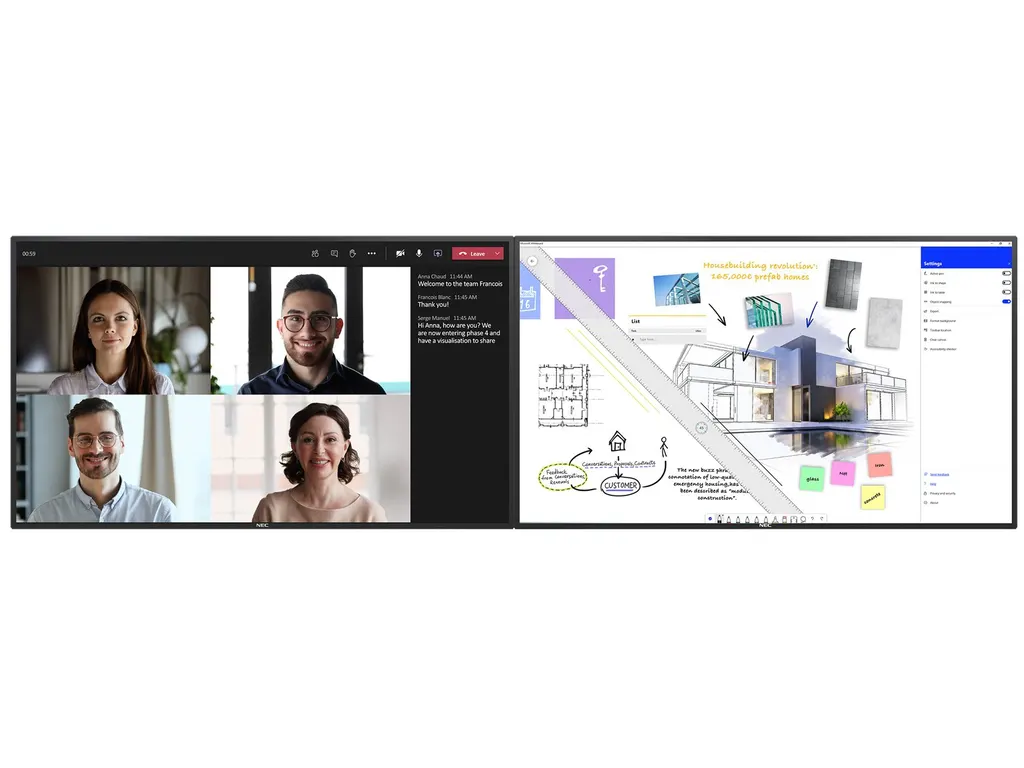
The NEC 75-inch Du-Co Room System pairs a touch-enabled 75-inch 4K display with an identical non-touch panel, giving hybrid meeting rooms a shared dual-screen setup. Its InGlass touch layer supports pen and finger input, and the system carries a 3-year manufacturer warranty. NEC has discontinued this model, so Qatar organisations looking for a current equivalent or a compatible replacement should request a quote.

What the Du-Co pairing is and who it suits

The NEC 75-inch Du-Co Room System is a collaboration set built from two matching 75-inch panels: an interactive NEC MultiSync M751 IGB with an InGlass touch layer, and a non-touch M751 IGB in the same design. It is built for hybrid meetings where some colleagues sit in the room and others join from another site. NEC has discontinued this model, so this page is written for organisations that already run it, buyers comparing it with newer displays, and anyone who needs a replacement. SmartRooms Qatar can quote a current equivalent or a compatible replacement for the same room layout.

Two matched 4K panels for one meeting wall

Each panel has a native 4K resolution of 3840 x 2160 and a 16:9 aspect ratio. Brightness is rated at 500 cd/m2 without the glass, with a typical response time of 8 ms and a 60 Hz refresh rate. The 21.9 mm bezel on every edge keeps the join between the two screens narrow, so content spanning both panels looks consistent. Each panel measures 1,724.6 mm by 1,003.0 mm and is 93.4 mm deep, so the pair needs roughly 3.45 m of wall width. The front is 3.0 mm toughened glass with an anti-glare coating and a hardness rating of 7H.

Touch and writing on the interactive panel

The InGlass layer supports up to 20 simultaneous touches. Input works with a finger, a gloved hand or a stylus of at least 2 mm. Touch response is 15 ms or less and accuracy is below 1 mm. Palm rejection and Windows Ink are included, so a presenter can rest a hand on the glass while writing. Native multi-touch is listed for Windows 7, 8 and 10, Linux and Android. The manufacturer material also mentions a free version of the FlatFrog Board whiteboard software.

Ports, control and room integration

  • Two DisplayPort and two HDMI inputs, both with HDCP support
  • DisplayPort and HDMI loop-through outputs for a second screen or a slot-in PC
  • A 3.5 mm audio output and a 3.5 mm remote control jack
  • 100 Mbit LAN and RS232 for control systems
  • Control support for AMX NetLinx, Crestron, PJLink, SNMP and HTTP browser access
  • Slot-in compute bay for Raspberry Pi Compute Module 4 or Intel Smart Display Modules up to 66 W

Where it fits in Qatar

Three realistic situations:

  • A boardroom in West Bay or Msheireb where the Doha team and colleagues in another city review the same agenda, with one panel for the video call and one for shared documents.
  • A seminar room in Education City where a lecturer writes on the touch panel while remote students join through Microsoft Teams or Zoom.
  • A training room in Lusail or at a government authority, where an operator manages power, inputs and status from a central control system.

Planning the room, power and environment

Plan around three figures from the datasheet. The operating range is 0 to +35 °C with 20 to 80% humidity. Qatar summers can exceed 45 °C, so the room must be air-conditioned and kept within that range. The internal power supply accepts 100-240 V AC at 50/60 Hz and the datasheet lists 205 W power consumption. Each panel weighs about 62 kg and uses a 600 x 400 mm VESA pattern with four M8 holes, so a site survey should check the wall or frame before mounting. A wall mount (L20PNWALL90EU) and a speaker (SP-RM3a) are listed as options, so confirm their availability with your quote.

Because this model is discontinued, the right first step is a quote. Send the SmartRooms Qatar team your room size, the number of panel pairs and whether you need a touch layout. We offer free site surveys, delivery to all eight municipalities of Qatar and quotations usually within one working day. Request a quote for this model or a current equivalent.

Highlights

  • Two 75-inch 4K panels: one touch, one non-touch
  • InGlass touch with up to 20 simultaneous touches
  • Slot-in compute bay: Raspberry Pi CM4 or Intel SDM up to 66 W
  • Operating range 0 to +35 °C, 20 to 80% humidity
  • Power supply 100-240 V AC, 50/60 Hz
  • 3-year manufacturer warranty; NEC has discontinued this model

Classroom fit

At 75″ the farthest student should sit within about 5.6 m (6× the screen height).

Estimated timeline

Quotation within 1 working day · delivery timing depends on stock availability, and we confirm it with your quotation.


Specifications

Source: manufacturer · checked Oct 2026
The full specification and datasheet for this model are available on request; we send them with your quotation.

Downloads

4 files from the manufacturer

Questions about 75-inch Du-Co Room System

What is the NEC 75-inch Du-Co Room System and who is it for?
It is a dual-screen collaboration set combining an interactive NEC MultiSync M751 IGB with an identical non-touch M751 IGB, both 75-inch 4K panels. It suits meeting rooms and boardrooms where people in the room and remote participants share content during hybrid meetings. Teams that want one screen for writing and one for shared material will find the layout practical.
Has NEC discontinued this model, and what should we buy instead?
Yes, NEC has discontinued the 75-inch Du-Co Room System. If your room already uses it, send the room layout to the SmartRooms Qatar team and we will suggest a current equivalent or a compatible replacement that matches your panel count and connection needs. For a new installation, quotations are usually issued within one working day.
How does the touch panel handle writing and annotation?
The interactive panel uses InGlass touch with up to 20 simultaneous touches. Writing works with a finger, a gloved hand or a stylus of at least 2 mm. Touch response is 15 ms or less and accuracy is below 1 mm. Palm rejection and Windows Ink let a presenter write naturally, and a free version of FlatFrog Board whiteboard software is mentioned in the manufacturer material.
Can the system join Microsoft Teams or Zoom calls from a meeting room in Doha?
The system is designed for video conferencing room setups, and the manufacturer material names Microsoft Teams and Zoom as target platforms. Connect the conferencing PC or device to one of the two DisplayPort or two HDMI inputs, then use the other panel for shared content. Your IT team should confirm the exact conferencing setup during the site survey.
Which ports and control interfaces does the system include?
Each panel offers two DisplayPort and two HDMI inputs with HDCP support, loop-through outputs for both, and a 3.5 mm audio output. Control options include 100 Mbit LAN, RS232, a 3.5 mm remote jack and protocols such as AMX NetLinx, Crestron, PJLink and SNMP. USB ports include a 5V/2A input for firmware updates and a powered port rated at 10 W.
Can a computer sit inside the display instead of on a desk?
Yes. The panel has a slot-in compute bay. The manufacturer material lists a Raspberry Pi Compute Module 4 slot, and it accepts Intel Smart Display Modules, large and small, up to 66 W. A slot-in computer keeps cabling tidy and can reduce the need for a separate PC in the room, and the module should be chosen to match your workload with your IT team.
Will the panels run on Qatar's 240 V, 50 Hz mains supply?
Yes. The internal power supply accepts 100-240 V AC at 50/60 Hz, which covers Qatar's 240 V, 50 Hz supply. The datasheet lists 205 W power consumption, and power savings mode draws under 0.5 W. A power cable is included in the shipping contents, and the electrical circuit should be arranged during installation planning.
Can it run in a room without air conditioning during Qatar summers?
No. The operating temperature range is 0 to +35 °C with 20 to 80% humidity. Qatar summer temperatures can exceed 45 °C, so the room must stay air-conditioned within that range. The front IP5x rating gives dust protection, but keeping the panels inside a closed room away from open windows is the safer choice during dust storms. Check ventilation around the panels during the survey.
How much space and wall support do two panels need?
Each panel measures 1,724.6 mm by 1,003.0 mm, is 93.4 mm deep and weighs about 62 kg. Placed side by side, the pair needs roughly 3.45 m of wall width. The VESA pattern is 600 x 400 mm with four M8 holes. Before mounting, our free site survey checks wall or frame capacity, cable routes and sightlines to both panels.
Would this layout suit hybrid teaching in a lecture room in Education City?
It suits a seminar room or a medium-sized lecture room. The lecturer can annotate on the touch panel while the non-touch panel shows the remote class feed or course slides. Two HDMI and two DisplayPort inputs let a lecturer laptop and a classroom PC connect at the same time. Larger halls will need extra audio, because the built-in speakers are rated 10 W + 10 W.
Can facilities staff monitor and control the displays remotely?
Yes. The system supports SNMP remote management, HTTP browser access, automated email alerts, a scheduled timer and NEC NaViSet Administrator 2. It also has an integrated temperature sensor with programmable actions. For a school or government building with several rooms, these tools help facilities staff schedule power, receive alerts and disable hardware buttons or infrared to protect settings.
Can we buy this through an LPO or a government tender?
Yes. SmartRooms Qatar supplies on purchase orders (LPOs) and government tenders, including Monaqasat, and accepts payment by bank transfer, cheque or purchase order. Because this model is discontinued, the quote will cover a current equivalent or compatible replacement, so include the number of rooms and panel pairs in your request. Products are covered by the manufacturer warranty.

Suggested replacements

BenQ CM7505 BenQ Board CM7505 75-inch Interactive Display
75″ UHD 3840 × 2160 pixels Ultra Precision IR
Clevertouch Core by Clevertouch 75" Clevertouch Core by Clevertouch 75" 4K Interactive Display
75″ 3840(H) x 2160(V) Android 16 - EDLA Certified
Clevertouch IMPACT Secure 75" Clevertouch IMPACT Secure 75" Interactive Display
75″ Android 11 2x16W for room-filling sound
Clevertouch LUX for Enterprise 2 75" Clevertouch LUX for Enterprise 2 75" Interactive Display
75″ 4K UHD (3840x2160) @ 60Hz Android 15
Clevertouch Pro Series 3 75" Clevertouch Pro Series 3 75-inch 4K Interactive Display
75″ 4K UHD (3840x2160 @60Hz) Android 16

Similar models

SMART SBID-6286S-V3 SMART Board 6086S-V3 86-inch Interactive Display with iQ
86″ 4K UHD (3840 × 2160) HyPr Touch with InGlass
SMART SBID-6286S-V3-P SMART Board 6086S-V3 Pro 86-inch Interactive Display with iQ
86″ 4K UHD (3840 × 2160) HyPr Touch with InGlass
Clevertouch Clevertouch Edge 65" Clevertouch Edge 65" 4K Interactive Display with Camera and Speakers
65″ 4K UHD (3840x2160 @60Hz) Android 15
Clevertouch Clevertouch Edge 86" Clevertouch Edge 86" 4K Interactive Flat Panel
86″ 4K UHD (3840x2160 @60Hz) Android 15
Clevertouch Core by Clevertouch 86" Clevertouch Core by Clevertouch 86-inch Interactive Display
86″ 3840(H) x 2160(V) Android 16 - EDLA Certified
Email Call