Thursday, 22 October 2026 · 11 Jumada I 1448 AH Sun – Thu · 9:00 – 18:00
+971 56 914 9477 العربية
WhatsApp
This model is discontinuedThe manufacturer no longer makes it. Request a quote and we will propose the closest current replacement.
Suggested replacements ↓

V801 IRT

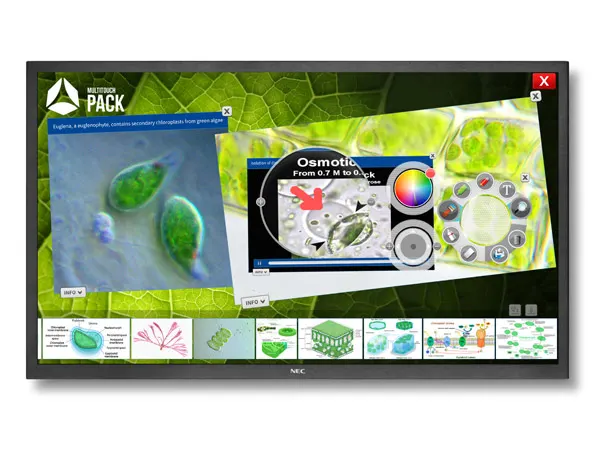
NEC MultiSync V801 IRT 80-inch Multi-Touch Interactive Display

WhatsApp
Priceon request
QuotationWithin 1 working day
DeliveryConfirmed with your quote, based on stock
PDFDownload datasheet (NEC_Datasheet_V801IRT-english.pdf)
Overview

The NEC MultiSync V801 IRT is an 80-inch 16:9 touch display that the manufacturer has discontinued, so this page is for organisations that already run one, buyers comparing it with newer models, and anyone seeking a replacement. Its infrared touch layer recognises up to six simultaneous touches and accepts fingers, gloves and styluses. For meeting rooms and classrooms in Qatar, request a quote for a current equivalent or compatible replacement.

What the 80-inch V801 IRT is and how it is built

The NEC MultiSync V801 IRT is an 80-inch, 16:9 large format display with a 1920 x 1080 native panel running at 60 Hz. It uses a UV²A panel with edge LED backlighting, a typical shipping brightness of 320 cd/m² (460 cd/m² maximum) and a typical contrast ratio of 5000:1. It can be mounted in landscape or portrait orientation, which suits wide whiteboard work as well as tall content layouts.

Infrared touch, glass and group work

Touch is handled by an infrared cell imaging system that supports up to six simultaneous touches, so several people can annotate, drag and compare content at the same time. Input can come from a finger, a gloved hand or a stylus. The system can estimate the size of an object touching the glass and respond accordingly, which helps separate deliberate touches from resting items. The touch active area measures 1,776.6 x 999 mm, with an average sample time of approximately 61 ms.

The front is 5 mm premium toughened glass with a single-sided anti-reflective coating. Light transmission is 92% (±2%), haze is 9% (±2%) and gloss at 60 degrees is 56% (±2%). In practical terms, the glass is designed to let most of the image through while reducing reflections from windows and ceiling lights. The manufacturer states that the touch system does not need re-calibration after alignment or temperature changes.

Connections, expansion and remote management

  • Digital video inputs: DisplayPort, DVI-D and HDMI 1.3, all with HDCP.
  • Analogue video inputs: 15-pin D-sub, plus composite and component via BNC.
  • Audio: 3.5 mm analogue input, HDMI or DisplayPort digital audio, and a 3.5 mm output.
  • Control: LAN at 100 Mbit with SNMP, RS-232C, IR remote and a remote wire input.
  • Option slot: STv2 slot compatible with the Intel/NEC OPS standard, for a slot-in PC or an HD-SDI card.
  • Management: NaViSet Administrator 2, a scheduler, DICOM support, PIN theft protection and a 10 x 10 TileMatrix mode.

Planning a Qatar installation

Without its stand, the panel measures 1,838 x 1,074 x 100.5 mm and weighs 90 kg. The bezel is 30 mm on the sides and 37 mm at the top and bottom. VESA mounting uses four M8 holes at 400 x 400 mm. A wall carrying this weight needs a structural check, so SmartRooms Qatar offers a free site survey before mounting, followed by professional installation. Integrated speakers are rated at 10 W + 10 W, with optional 15 W + 15 W speakers listed.

The operating range is 0 to +40°C with 20 to 80% humidity, and storage ranges from -20 to +60°C. Qatar summers can push outdoor temperatures above 45°C, so keep the display in an air-conditioned room, away from direct sunlight and window glare, and confirm the room will stay within the operating range. Typical power draw in shipping mode is 230 W, rising to a maximum of 420 W with a built-in PC at full workload. An external power supply and power cable are included, and standby draw is below 0.5 W in ECO standby.

Where this model fits in Qatar

A university seminar room in Education City can use the 80-inch format for group annotation, with the anti-reflective glass helping in rooms that have windows. A boardroom in West Bay can connect laptops over HDMI or DisplayPort and use the RS-232C and LAN control options to fit into an existing room system. A training room in the Industrial Area serving an energy or logistics team can use the scheduler and NaViSet Administrator 2 to manage the display centrally.

Because this model is discontinued, the next step is a quote for a current equivalent or a compatible replacement. Share your room size, input sources and touch requirements, and SmartRooms Qatar will usually send a quotation within one working day. Schools and government buyers can issue a purchase order or LPO, and payment by bank transfer, cheque or purchase order is accepted.

Highlights

  • 80-inch 16:9 panel with 1920 x 1080 native resolution
  • Infrared touch with up to six simultaneous touches
  • Works with finger, gloved hand or stylus input
  • OPS-compatible slot for a slot-in PC or HD-SDI card
  • Operating range 0 to +40°C, 20 to 80% humidity
  • Three-year warranty including backlight, per manufacturer data

Classroom fit

At 80″ the farthest student should sit within about 6.0 m (6× the screen height).

Estimated timeline

Quotation within 1 working day · delivery timing depends on stock availability, and we confirm it with your quotation.
Specifications

Source: manufacturer · checked Oct 2026
The full specification and datasheet for this model are available on request; we send them with your quotation.

Downloads

4 files from the manufacturer

Questions about V801 IRT

Has NEC discontinued the MultiSync V801 IRT?
Yes. The manufacturer has discontinued this 80-inch touch display, so this page serves organisations that already own one, buyers comparing it with newer models, and anyone who needs a replacement. If you are looking for a current equivalent or a compatible replacement, request a quote and the SmartRooms Qatar team will recommend options based on your room size, input sources and touch requirements.
Which rooms suit an 80-inch V801 IRT?
The 80-inch 16:9 format suits mid-sized classrooms, training rooms and meeting rooms in Doha, where several people need to stand at the screen and work together. For a boardroom in West Bay or a training room in Msheireb, check that the viewing distance and wall space suit a panel 1,838 mm wide before choosing it, and ask for a site survey.
How many people can use the touch function at once?
Up to six simultaneous touches are supported, using a finger, a gloved hand or a stylus. The infrared system can also estimate the size of an object touching the glass and respond differently, which can help separate deliberate touches from resting items. This suits brainstorming sessions in a Lusail meeting room where more than one person writes at a time.
Which operating systems support native multi-touch?
The datasheet lists native multi-touch for Windows 7, Windows 8, Linux and Android, and default mouse operation on Windows XP, Windows Vista and Mac OS X. It does not list Windows 10 or Windows 11 for touch. Before buying for a current IT environment, ask the SmartRooms Qatar team to confirm compatibility with your exact operating system and software.
What does the OPS slot do?
The STv2 slot follows the Intel/NEC OPS standard and can take a slot-in PC, so the computer sits inside the display without an external box or extra cabling. The datasheet recommends a Core i5 or Core i7 slot-in PC with WS7P. An HD-SDI card for 1.5G and 3G signals is also listed as an option, which helps a classroom keep the front of the room tidy.
What video and audio connections are available?
Digital inputs are DisplayPort, DVI-D and HDMI 1.3, all with HDCP. Analogue inputs are a 15-pin D-sub, plus composite and component via BNC. Audio includes a 3.5 mm analogue input, HDMI or DisplayPort digital audio, and a 3.5 mm output. Control is available through LAN at 100 Mbit, RS-232C and a remote wire input, which helps when connecting laptops in a Doha boardroom to a room control system.
Can it be wall-mounted, and how heavy is it?
Weight is 90 kg without the stand. VESA mounting is 400 x 400 mm with four M8 holes. Because a panel this heavy needs a suitable wall or frame, SmartRooms Qatar offers a free site survey before installation, which is useful for an office in Lusail or a school in Al Khor. Wall mount, trolley and feet accessories are listed for this model, subject to confirmation when you request a quote.
Will it cope with summer temperatures in Qatar?
The operating range is 0 to +40°C with 20 to 80% humidity. Qatar summer temperatures can exceed 45°C outdoors, so keep the room within the operating range by using air conditioning during use, and keep the panel away from direct sun and window glare. For a training room in the Industrial Area, ask the SmartRooms Qatar team to confirm the room conditions before fixing the display.
How much power does it draw?
Typical consumption in shipping mode is 230 W, rising to a maximum of 420 W with a built-in PC at full workload. Standby draw is below 0.5 W in ECO standby. An external power supply and power cable are supplied. For a school with several units on one circuit, plan the total load and ask SmartRooms Qatar to confirm the power arrangement for Qatar before installation.
Is it suitable for a lecture hall in Education City?
An 80-inch panel suits a seminar or tutorial room better than a large lecture hall, where the screen may look small to students at the back. The anti-reflective glass, with 92% light transmission and 9% haze, is designed to reduce reflections in rooms with windows, although strong daylight should still be controlled with blinds. Confirm the room layout with the team before choosing a size.
Can facilities staff manage several units from one place?
Yes. NaViSet Administrator 2 is listed as a free download for managing connected displays from a central location. The unit also offers LAN with SNMP, RS-232C control, a scheduler, screen saver functions and a PIN for theft protection. For a school in Al Sadd with several classrooms, these features help facilities staff keep every screen configured and secured from one place.
What warranty applies to this model?
The manufacturer data lists a three-year warranty including the backlight, and the display is rated for operation 16 hours a day, 7 days a week. Confirm the warranty terms that apply to your unit when you request a quote. Schools and government bodies can issue a purchase order or LPO, and payment by bank transfer, cheque or purchase order is accepted.

Suggested replacements

SMART SBM777-43 SMART Board M777-43 77-inch Interactive Whiteboard
77″ Approximately 32 Advanced IR with Object…
SMART SBM777V-43 SMART Board SBM777V-43 77-inch Interactive Whiteboard
77″ Approximately 32 Advanced IR with Object…
BenQ CM7505 BenQ Board CM7505 75-inch Interactive Display
75″ UHD 3840 × 2160 pixels Ultra Precision IR
Clevertouch Core by Clevertouch 75" Clevertouch Core by Clevertouch 75" 4K Interactive Display
75″ 3840(H) x 2160(V) Android 16 - EDLA Certified
Clevertouch IMPACT Secure 75" Clevertouch IMPACT Secure 75" Interactive Display
75″ Android 11 2x16W for room-filling sound

Similar models

SMART SBID-6286S-V3 SMART Board 6086S-V3 86-inch Interactive Display with iQ
86″ 4K UHD (3840 × 2160) HyPr Touch with InGlass
SMART SBID-6286S-V3-P SMART Board 6086S-V3 Pro 86-inch Interactive Display with iQ
86″ 4K UHD (3840 × 2160) HyPr Touch with InGlass
Clevertouch Clevertouch Edge 65" Clevertouch Edge 65" 4K Interactive Display with Camera and Speakers
65″ 4K UHD (3840x2160 @60Hz) Android 15
Clevertouch Clevertouch Edge 86" Clevertouch Edge 86" 4K Interactive Flat Panel
86″ 4K UHD (3840x2160 @60Hz) Android 15
Clevertouch Core by Clevertouch 86" Clevertouch Core by Clevertouch 86-inch Interactive Display
86″ 3840(H) x 2160(V) Android 16 - EDLA Certified
Email Call