





Thursday, 22 October 2026 · 11 Jumada I 1448 AH Sun – Thu · 9:00 – 18:00
+971 56 914 9477 العربية
WhatsApp

Newline 4K ModCam+

Newline 4K ModCam+ AI Camera and Microphone for Newline Displays

WhatsApp
Priceon request
QuotationWithin 1 working day
DeliveryConfirmed with your quote, based on stock
PDFDownload datasheet (4KModCam+_Newline_Specsheet_11.23_EN.pdf)
Overview

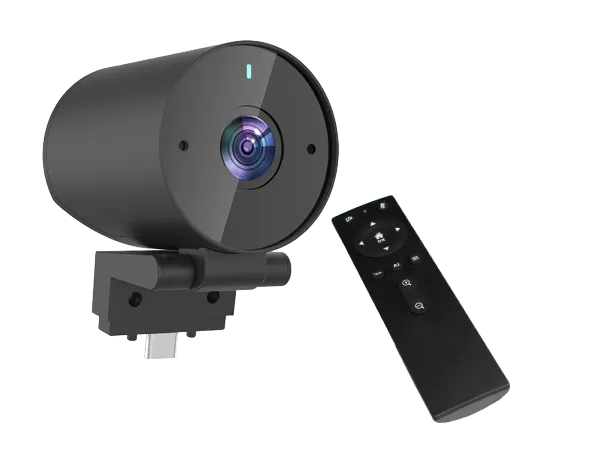
The Newline 4K ModCam+ is a 4K camera with a built-in dual microphone array, made as an add-on for compatible Newline interactive displays. It offers a 120° field of view, AI auto framing that keeps participants in shot, and a tilt range from -10° to +90°. One USB Type-C connection links it to the display. It suits Doha classrooms and boardrooms running hybrid sessions.

A 4K camera and microphone unit for Newline displays

The Newline 4K ModCam+ is a camera and microphone unit for organisations that already run, or are about to buy, compatible Newline interactive displays and want to join video calls from the same screen. Its Sony 4K CMOS sensor records 3840 × 2160 video at 30 fps. The unit is sold as a display accessory, so it is planned as part of a display purchase rather than as a standalone conferencing system. A single USB Type-C connection links it to the display.

Framing, zoom and tilt for the whole room

The 120° field of view covers a wide classroom or boardroom table. AI auto framing uses face tracking to keep people in the picture as they move, and digital zoom reaches 3.75x for closer shots. The body tilts from -10° to +90°, so the lens can be angled to suit the mounting height. Depth of field runs from 0.8 m to infinity, which keeps people seated at normal distances in focus. The unit can be adjusted with an infrared remote control, and a mirror image setting is included.

Microphones rated for rooms up to three metres

Two built-in microphones use noise reduction and automatic gain control to lift voices. The datasheet gives a pick-up distance of 3 m, a signal-to-noise ratio of 74 dB and a sensitivity of -30 ± 2 dB. For a meeting room where participants sit around one table, that covers typical seating distances without extra microphones. Hard walls, air-conditioning noise and speakers seated far from the unit all affect results, so run a test call in the actual room before the first important session.

What to plan before ordering

  • Display compatibility: check your model against the listed Flex, 21Q, 22Q, 22Z, 23QA, 23QAS, 23QCA and 23QCA+ displays.
  • USB route: confirm a free USB Type-C port and a cable path from the display to the camera position.
  • Environment: operating temperature is 0 to 50°C, so keep the unit in an air-conditioned room away from direct sun through windows.
  • Software: the datasheet names Zoom, Microsoft Teams and Google Meet, and states compatibility with Windows UVC and Mac.

Where it fits in Qatar

A school in Al Wakrah running lessons for students learning from home can use the tilt and framing settings to keep the teacher and class in view. In Msheireb, a government office holding meetings that connect Doha with colleagues abroad can use the 120° view to cover a boardroom table. A company in Lusail with a training room shared by several teams can keep one display for in-room work and video calls.

SmartRooms Qatar offers a free site survey before installation, so the team can check sight lines, the camera position and the USB route before anything is fixed. Quotations are usually issued within one working day. Request a quote for the ModCam+ and your compatible Newline display, and the team will confirm compatibility before you order.

Highlights

  • 4K video at 3840 × 2160 resolution, 30 fps
  • 120° field of view with AI auto framing
  • Dual built-in microphones rated to 3 m pick-up
  • Tilt range from -10° to +90° with infrared remote
  • Single USB Type-C connection, USB power 5V 500 mA
  • Listed compatibility with Newline Flex and Q Series displays

Estimated timeline

Quotation within 1 working day · delivery timing depends on stock availability, and we confirm it with your quotation.


Specifications

Source: manufacturer · checked Oct 2026
The full specification and datasheet for this model are available on request; we send them with your quotation.

Downloads

1 file from the manufacturer

Questions about Newline 4K ModCam+

What is the Newline 4K ModCam+ and who is it for?
The Newline 4K ModCam+ is a 4K camera with a built-in dual microphone array, sold as an accessory for compatible Newline interactive displays. It suits schools, universities, government offices and companies in Qatar that want to run video calls from the display already in the room. It records 3840 × 2160 video at 30 fps and includes AI auto framing, so it is most useful where the display is the main teaching or meeting screen.
Which Newline displays is the ModCam+ compatible with?
The manufacturer's datasheet lists compatibility with Newline Flex, 21Q, 22Q, 22Z, 23QA, 23QAS, 23QCA and 23QCA+ interactive displays. Other Newline models are not named in the source data, so SmartRooms Qatar will confirm your exact model before a quotation is issued. Quotations are usually issued within one working day, so send your display model with your enquiry.
Does the ModCam+ work with Zoom, Microsoft Teams and Google Meet?
Yes. The datasheet names Zoom, Microsoft Teams and Google Meet as supported videoconferencing software. The camera is described as UVC-compatible with Windows and Mac, so those systems recognise it as a standard video device. Check that the conferencing app on your display or laptop is up to date, and test a call in the room before a session with partners abroad.
How does AI auto framing work?
AI auto framing uses face tracking to keep participants inside the picture as they move around the room. Combined with the 120° field of view and digital zoom of 3.75x, it reduces the need to adjust the camera by hand during a session. It helps a teacher move between students or a chairperson walk beside a boardroom table without leaving the frame. Position the unit so the expected seating area falls within its view.
Can the ModCam+ be used in a hot room or near a window in Doha?
The operating temperature range is 0 to 50°C, so the camera should be used indoors in an air-conditioned room. Doha summers regularly go above 45°C outdoors, so avoid mounting the unit where direct sunlight or heat from a window can build up. Keep it away from the glass, check that the air conditioning covers the mounting spot, and ask the SmartRooms Qatar team to review the position during the free site survey.
How far can the built-in microphones pick up voices?
The datasheet gives a pick-up distance of 3 m for the dual built-in microphones, with a signal-to-noise ratio of 74 dB and a sensitivity of -30 ± 2 dB. The microphones include noise reduction and automatic gain control. In a meeting room, seat the most distant participants within about three metres of the unit and test the set-up in the room, because hard surfaces and air-conditioning noise change results.
What does the 120° field of view cover in a meeting room?
The 120° field of view can take in a full table of participants from one position, provided the unit is mounted so the table sits within its view. The datasheet does not give seating numbers or room sizes, so the best way to confirm coverage is a site survey. Tilt from -10° to +90° lets the installer angle the lens to suit the room layout and the mounting height.
How is the ModCam+ powered and connected?
The camera is rated for USB power at 5V and 500 mA and connects through a single USB Type-C connection. It weighs 0.3 kg and measures 73 × 61 × 35 mm, so it suits a compact mounting arrangement. Confirm that the display has a USB port close to the mounting point and plan a tidy cable route, which the SmartRooms Qatar team can check during a free site survey.
Can a teacher in Al Khor use it for lessons with students learning from home?
Yes, this is a typical use. The framing and tilt settings help keep the teacher and classroom in view, and the built-in microphones are rated for a pick-up distance of 3 m. Position the unit so the board or teaching area and the front rows are in shot, and confirm that the platform is one of those named in the datasheet: Zoom, Microsoft Teams or Google Meet. Request a quote and SmartRooms Qatar can review your classroom layout.
Is the ModCam+ suitable for a boardroom in West Bay where people sit around one table?
It can be, provided the table sits within the 120° field of view and the participants sit within the 3 m pick-up distance of the microphones. AI auto framing follows faces, so speakers who move around the table stay in shot. Mount the unit centrally, facing the table, where possible, and confirm the layout during a free site survey before installation.
How should a government office in Msheireb plan the installation?
Start with a free site survey to check the room layout, the USB port on the display and the camera position. Confirm that the display model is on the compatible list, then agree on the cable route and mounting method. Government buyers can order by purchase order or through a government tender, including Monaqasat, and payment can be made by bank transfer, cheque or purchase order.
Can I buy the ModCam+ through an LPO or a Monaqasat tender?
Yes. SmartRooms Qatar supplies on purchase orders (LPOs) and government tenders, including Monaqasat, so a school buying one unit per classroom or an office buying one for a meeting room can follow the same process. Send the display model, the number of units and the municipality for delivery with your enquiry. The unit is covered by the manufacturer's warranty, and the quotation will list every item.

Similar models

Clevertouch CleverCam Clevertouch CleverCam 4K ePTZ Camera for Video Conferencing
Main Stream: 3840×2160 @30fps
Clevertouch CleverInk Clevertouch CleverInk Writing Technology for Interactive Displays
Accessories
Clevertouch Intelligent Sensor Module Clevertouch Intelligent Sensor Module for Interactive Flat Panels
Accessories
Clevertouch LUX Mini Clevertouch LUX Mini Android 13 OPS Upgrade Module
8GB 64GB
Email Call


