





Thursday, 22 October 2026 · 11 Jumada I 1448 AH Sun – Thu · 9:00 – 18:00
+971 56 914 9477 العربية
WhatsApp

Track Cam

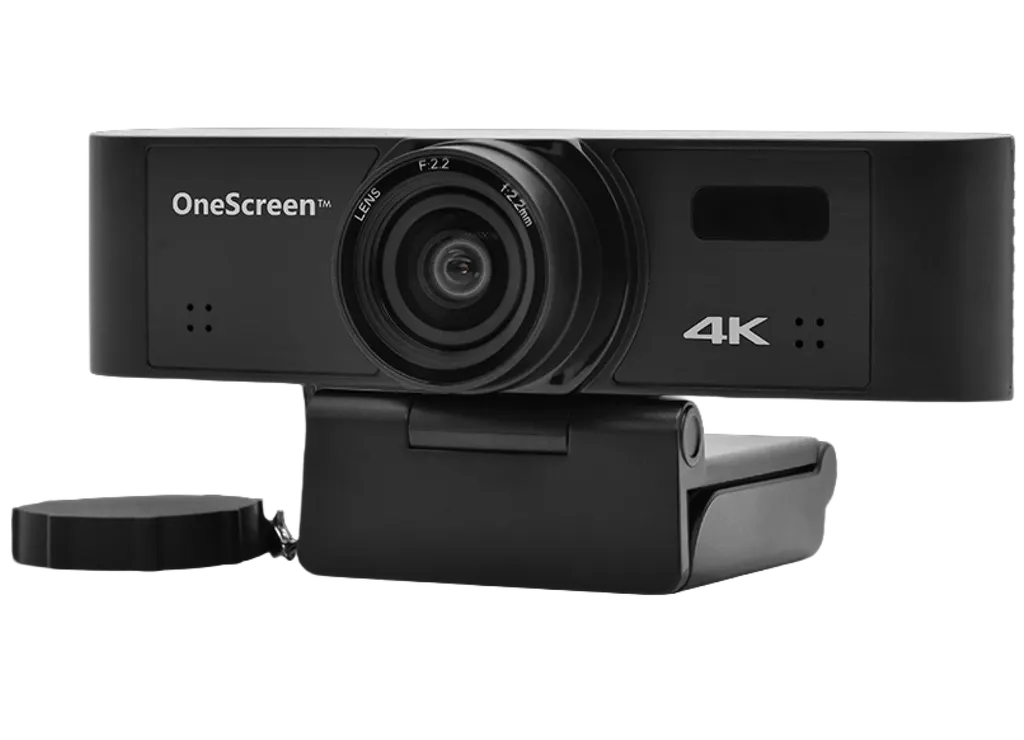
OneScreen Track Cam 4K Auto-Framing Conference Camera

System
Windows 7
Warranty
1 year
WhatsApp
Priceon request
QuotationWithin 1 working day
DeliveryConfirmed with your quote, based on stock
PDFDownload datasheet (OneScreen_TrackCam_Spec-Sheet.pdf)
Overview

The OneScreen Track Cam is a 4K conference camera with auto-framing and electronic pan, tilt and zoom, plus built-in microphones and a remote control. Its 110° horizontal field of view and 8x digital zoom keep seated participants in frame. It suits Qatari offices, schools and universities running hybrid meetings that connect Doha with teams abroad. Request a quote from SmartRooms Qatar to match a camera to your room.

What the Track Cam does in a meeting room

The Track Cam is a 4K camera built for hybrid meetings, where some people sit in the room while others join from elsewhere. It uses electronic pan, tilt and zoom to follow the scene, and auto-framing to adjust the view without an operator touching the camera. A remote control covers the changes that still need a person, so a presenter can adjust the framing from the table.

Image and audio specifications that matter

The camera carries a 1/2.7-inch CMOS sensor with 8.29M effective pixels and progressive scanning. Its fixed M12 lens has a 2.2 mm focal length and a horizontal field of view of 110 degrees, which covers a full conference table without a separate wide-angle lens. Video is listed at 4K with 30fps or 25fps. Minimum illumination is 0.5 lux at F1.8 with AGC on. Backlight compensation, digital noise reduction, automatic white balance and digital zoom up to 8x are included. Built-in microphones are part of the unit, so audio pickup should be planned together with the camera position.

Connectivity, software and power

The Track Cam uses the UVC 1.1 USB video protocol and outputs H.264, MJPEG, YUY2 and NV12 formats. The manufacturer lists Windows 7, 8.1, 10 or higher as the supported operating systems. The input voltage is 5V, with a maximum power consumption of 3.0W and a maximum current consumption of 600mA. Confirm your conferencing platform and operating system with the SmartRooms Qatar team before ordering.

Where it fits in Qatar

  • Ministry boardroom in Msheireb: a camera that frames the whole table during a call with a regional office.
  • Seminar room in Education City: a lecturer presents to the room while students join from Doha or abroad.
  • Company meeting room in West Bay or Lusail: a wide view for a team that holds daily calls with colleagues in Dubai or London.

Planning the installation

Mount the camera above the display or on the far wall, at a height that gives a clear view of seated participants, and check the cable route to your PC or conferencing device before installation. The operating range is 0 to 40 degrees Celsius (32 to 104 degrees Fahrenheit), so keep it in an air-conditioned room. Summer temperatures outside in Qatar can exceed 45 degrees Celsius, so avoid unconditioned spaces and direct sunlight through windows. The storage range is 4.4 to 60 degrees Celsius (40 to 140 degrees Fahrenheit), and the rated shelf life is 30,000 hours. The manufacturer provides a one-year warranty. Request a quote from SmartRooms Qatar, and the team will confirm mounting and cabling during a free site survey.

Highlights

  • 4K video listed at 30fps or 25fps
  • 110° horizontal field of view with 2.2 mm lens
  • Auto-framing with electronic pan, tilt and zoom
  • Remote control and built-in microphones
  • Digital zoom up to 8x and backlight compensation
  • Windows 7, 8.1, 10 or higher; one-year warranty

Estimated timeline

Quotation within 1 working day · delivery timing depends on stock availability, and we confirm it with your quotation.

Specifications

23 specifications · Source: manufacturer · checked Oct 2026
Camera9
Sensor
1/2.7'', CMOS, Effective Pixel: 8.29M
Scanning Mode
Progressive
Lens Mount
M12
Focus and FOV
F=2.2mm, HFOV: 110°
Minimal Illumination
0.5 Lux @ (F1.8, AGC ON)
Shutter Speed
1/30s ~ 1/10000s
White Balance
Auto
Digital Noise Reduction
✔
Digital Zoom
Up to 8x
Privacy Cover7
Backlight Compen- sation
✔
Video Format
4k@30fps/25fps
USB Video Communication Protocol
UVC 1.1
Current Consumption
600mA (Max)
Storage Temperature
40°F ~ 140°F
Dimensions
4.6” x 1.46” x 1.21” (in)
Certifications
FCC, CE
Hardware Specifications2
Operating System
Windows 7, 8.1, 10 or higher
Color System/Compression
H.264 / MJPEG /YUY2 /NV12
Input & Output Interface5
Input Voltage
5V
Operating Temperature
32°F ~ 104°F
Power Consumption
3.0W (Max)
Shelf life
30000 hours
Warranty
1 year

Downloads

1 file from the manufacturer

Questions about Track Cam

Who is the OneScreen Track Cam built for?
It suits organisations that hold hybrid meetings, such as a head office in West Bay whose managers join calls with teams in Dubai or London. The camera sends a 4K picture of the room to the far end, follows the presenter with auto-framing and keeps a 110° view of the table. The remote control lets staff adjust the frame without moving the camera by hand. Request a quote if your meeting room needs this setup.
Does the camera follow the speaker automatically?
Yes. The manufacturer describes the Track Cam as an auto-framing camera, and it uses electronic pan, tilt and zoom to adjust the view without a camera operator. The remote control handles manual changes when a presenter wants a different framing. Auto-framing is useful where people move around the table. Confirm the layout with the SmartRooms Qatar team during the free site survey.
What is the field of view and lens?
The Track Cam uses a fixed M12 lens with a 2.2 mm focal length and a horizontal field of view of 110°. That width covers a full table of seated participants close to the camera, which suits a boardroom in Msheireb or a seminar room in Education City. Because the lens is fixed, the mounting position and distance from the seats determine how the room is framed.
What video resolution and frame rate does it output?
The source data lists 4K video at 30fps and 25fps. The camera uses a 1/2.7-inch CMOS sensor with 8.29M effective pixels and progressive scanning. Before ordering, confirm with the SmartRooms Qatar team which frame rate your conferencing platform expects, so the setup matches the software your staff already use.
Which operating systems are supported?
The manufacturer lists Windows 7, 8.1, 10 or higher as supported operating systems. The source data does not list macOS or Linux, so do not assume support for them. If your school or ministry runs another platform, ask the SmartRooms Qatar team to confirm compatibility in writing before you raise a purchase order.
What video formats and protocol does it use?
The Track Cam uses the UVC 1.1 USB video protocol and outputs H.264, MJPEG, YUY2 and NV12 colour formats. UVC is the standard that lets many conferencing applications detect a USB camera on a standard PC without a custom driver. Check the specific application your team uses before final approval.
Will it work in a classroom with the lights dimmed?
The minimum illumination is 0.5 lux at F1.8 with AGC on, and the camera includes backlight compensation and digital noise reduction. A private school in Al Rayyan dimming lights for projection will benefit from that figure, but a bright window behind the teacher still needs careful placement. Keep the lens out of direct sunlight, and ask the team to review the room during the free site survey.
Can it be installed near a window or outdoors in Doha's summer?
No. Install it indoors in an air-conditioned room. The rated operating range is 0 to 40 degrees Celsius (32 to 104 degrees Fahrenheit), while summer temperatures outside in Doha can exceed 45 degrees Celsius. Avoid positions where direct sun through a window reaches the lens. The storage range is 4.4 to 60 degrees Celsius.
Is it suitable for a government ministry boardroom in Msheireb?
It can be, provided the room is air-conditioned and the conferencing PC runs one of the listed Windows versions. The 110° view covers a full table, 8x digital zoom lets the operator frame a speaker at the far end, and the remote control avoids moving the camera during a meeting. Request a quote and the SmartRooms Qatar team will confirm the setup for your room.
How should I plan the mounting position in a lecture hall at Education City?
Mount the camera at a height and angle that shows the lecturer, the board and the seated students, and check the cable run to the computer before drilling. The 2.2 mm lens gives a wide view, so the distance from the front row affects the framing. The free site survey includes marking the mounting position and cable route before installation.
What power does it need?
The listed input voltage is 5V, with a maximum power consumption of 3.0W and a maximum current consumption of 600mA. The source data does not list a mains adapter, so ask the SmartRooms Qatar team what power connection the package includes for your room. Qatar mains supply is 240V at 50Hz, so confirm the correct power source before installation.
What warranty applies and how do we buy one?
The manufacturer provides a one-year warranty, and the source data lists a shelf life of 30,000 hours. SmartRooms Qatar supplies the camera by quotation, and organisations can pay by bank transfer, cheque or purchase order. Send your room details with your request, and the team will confirm the expected lead time along with the quotation.

Similar models

Clevertouch CleverCam Clevertouch CleverCam 4K ePTZ Camera for Video Conferencing
Main Stream: 3840×2160 @30fps
Clevertouch CleverInk Clevertouch CleverInk Writing Technology for Interactive Displays
Accessories
Clevertouch Intelligent Sensor Module Clevertouch Intelligent Sensor Module for Interactive Flat Panels
Accessories
Clevertouch LUX Mini Clevertouch LUX Mini Android 13 OPS Upgrade Module
8GB 64GB
Email Call




