





Web Camera
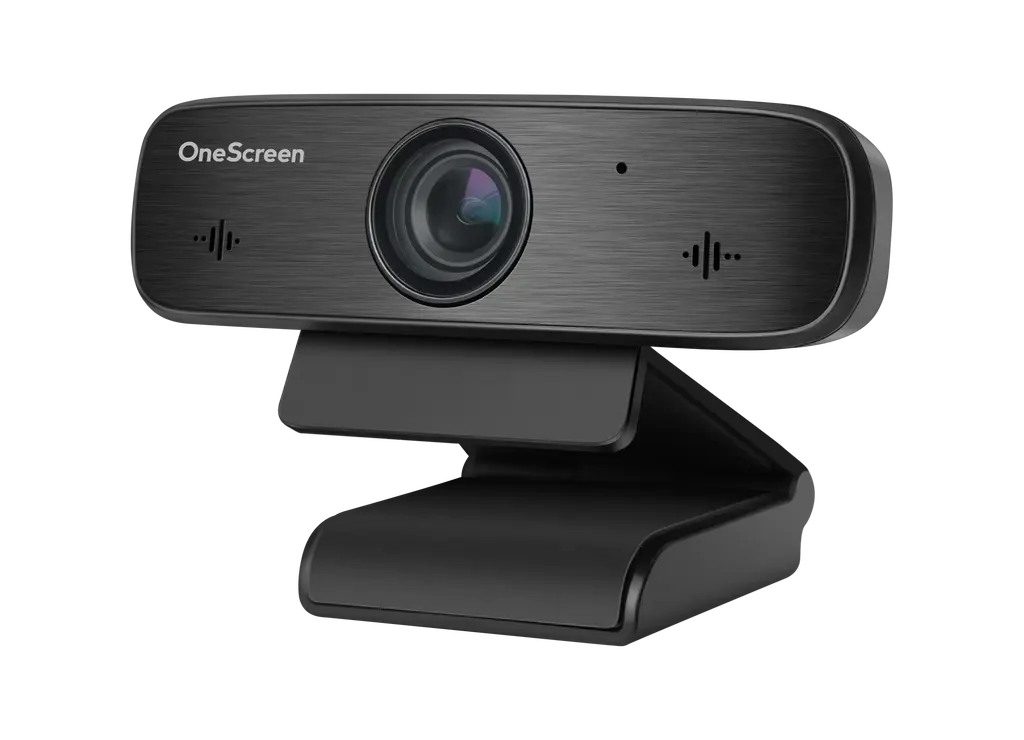
OneScreen Web Camera 1080p USB Video Conferencing Camera
- System
- Windows 7
The OneScreen Web Camera is a USB camera that captures 1080p video at 30 or 25 frames per second, with built-in microphones for video calls. It has a 90° horizontal field of view, 4x digital zoom, backlight compensation and a privacy cover. It suits meeting rooms and huddle spaces in Doha that hold calls with colleagues abroad. Request a quote for one or several units.
What the OneScreen Web Camera does on a video call
The OneScreen Web Camera is a USB camera built for video conferencing. It captures 1080p video at 30 or 25 frames per second and can also output 720p, 960×540 and 640×360 when a lower resolution suits the call or the connection. A 1/2.8-inch CMOS sensor with 2.07 megapixels of effective resolution captures the image, and the built-in microphones handle call audio, so one device covers both picture and sound.
The lens has a 2.8 mm focal length on an M12 mount, with a horizontal field of view of 90°. That angle suits a room where participants sit across one table, while 4x digital zoom lets the host move closer to a speaker or whiteboard without moving the camera.
Image controls for bright windows and dim rooms
A boardroom with a window behind the speaker is a common problem on a video call, because the presenter can turn into a silhouette. The camera offers backlight compensation, and its shutter runs from 1/30 to 1/10000 of a second with progressive scanning. Minimum illumination is 0.5 lux at F1.8 with AGC on, so the picture stays usable in dimmer seminar rooms and evening sessions. White balance can be set to auto, manual or VAR, and 2D and 3D digital noise reduction are included. The data also lists privacy cover support.
Connection, power and operating limits
The camera connects through one USB 2.0 Type A port and takes its power from that connection at 5V, drawing up to 1 W and 200 mA. It supports YUY2, H.264 and MJPEG compression. The data lists Windows 7, 8.1, 10 or later, macOS 10.10 or later, Linux with UVC support, and Android 8 or later as supported operating systems.
The operating range is 0°C to 40°C (32°F to 104°F), and storage temperature runs from -40°C to 60°C (-40°F to 140°F). Summer temperatures in Qatar regularly pass 45°C, so this camera belongs in an air-conditioned room, not on an outdoor kiosk or a window ledge that takes direct sun. It measures 4.06 × 1.06 × 1.18 inches and weighs 153 g.
Where it fits in Qatar
In Msheireb, a government department running a cross-agency review can bring a colleague from another ministry into a meeting room through a single USB port, with the camera set up once and reused for every session. In Education City, a university seminar room streaming a session with a partner campus abroad needs a camera that copes with lecture-hall lighting and a presenter moving near the screen. In Al Wakrah, a private school equipping a staff room for parent and teacher calls can use a camera that draws its power from USB rather than a separate adapter.
What to plan before you order
- Check that the host computer or device runs one of the listed operating systems.
- Choose a USB 2.0 port and plan the cable route from the camera position to that port.
- Confirm the mounting position on the display or wall, and use the rotating bracket to set the angle.
- Keep the camera in a cooled space within its 0°C to 40°C operating range.
SmartRooms Qatar offers free site surveys, which help confirm the mounting position and cable run before anything is installed. Quotations are usually issued within one working day. Schools, ministries and other public bodies can order by LPO or through government tenders, including Monaqasat, and pay by bank transfer, cheque or purchase order. The product is covered by the manufacturer's warranty. To request a quote, send the SmartRooms Qatar team your room size, host device, display and number of units.
Highlights
- 1080p video at 30 or 25 frames per second
- Built-in microphones for video call audio
- 90° horizontal field of view with 4x digital zoom
- Backlight compensation and privacy cover support
- Single USB 2.0 Type A connection, powered at 5V
- Supports Windows, macOS, Linux with UVC and Android 8+
Estimated timeline
Quotation within 1 working day · delivery timing depends on stock availability, and we confirm it with your quotation.
Specifications
General1
- Cable System/ Compression
- YUY2 / H.264 / MJPEG
Camera15
- Sensor
- 1/2.8 inches, CMOS, Effective Pixel: 2.07 Megapixel
- USB Video Communication Protocol
- UVC 1.1
- Type of Lens Mount
- M12
- Video Format
- 1080P @ 30/25 FPS, 720P @ 30/25 FPS, 960x540P @30/25 FPS, 640x360P @ 30/25 FPS
- Lens
- F=2.8mm, Horizontal FOV: 90°
- Minimum Illumination
- 0.5 Lux @ (F1.8, AGC ON)
- UaC
- Supported
- White Balance
- Auto, Manual, VAR
- Digital Noise Reduction
- 2D & 3D Digital Noise Reduction
- Digital Zoom
- 4x
- Scanning Mode
- Progressive
- Shutter
- 1/30s ~ 1/10000s
- Backlight
- Damping rotating bracket
- Backlight Compensation
- Supported
- Privacy Cover
- Supported
Input & Output Interface8
- USB Interface
- 1 x USB 2.0, type A
- Input Voltage
- 5V (USB Power Supply)
- Operating Temperature
- 32°F ~ 104°F
- Power Consumption
- 1 W (Max.)
- Net Weight
- 153 g
- Input Current
- 200 mA (Max.)
- Storage Temperature
- -40°F ~ 140°F
- Dimension
- 4.06" × 1.06" × 1.18" (in)
Hardware1
- Operating System
- Windows 7,8.1,10 or higher, MAC OS 10.10 or higher, Linux (need to support UVC) and Android 8 or higher




