TH-75BQ1
Panasonic TH-75BQ1 75-inch 4K Interactive Touch Display
- Screen size
- 75-inch (74.5" / 1892.7 mm)
- Resolution
- 3840 x 2160
- System
- Windows® (8.1/10)
- Brightness
- 500 cd/m²
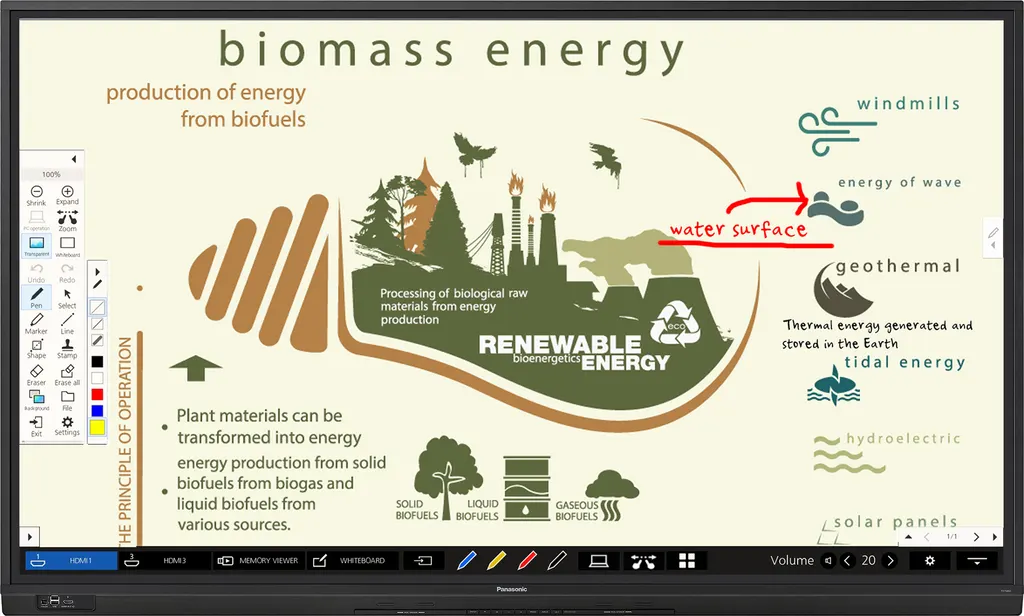
The Panasonic TH-75BQ1 is a 75-inch class touch display with 3840 x 2160 resolution, 500 cd/m² brightness and up to 20-point multi-touch, built for classrooms and meeting rooms. It includes an embedded whiteboard function, a 4K USB media player and an Intel SDM slot for an interface board. Panasonic has discontinued this model, so SmartRooms Qatar can quote a current equivalent or compatible replacement for schools and offices across Qatar.
A 75-inch touch display for teaching and meetings
The Panasonic TH-75BQ1 is a 75-inch class interactive display from the BQ1 Series, with a 1892.7 mm screen and 3840 x 2160 resolution. It is designed to share lesson materials, documents and live computer screens while staff and students write, annotate and move content directly on the glass. Panasonic has discontinued this model, so the information below is written for organisations that already own one and for buyers comparing it with newer options.
The specifications that shape daily use
Panel brightness is rated at 500 cd/m² with a 1200:1 contrast ratio, an 8.0 ms grey-to-grey response time and a 178 degree viewing angle. The IPS panel keeps colours consistent when people sit away from the centre line, which matters in rooms where seats are spread out. Touch uses infrared blocking detection and recognises up to 20 points at once.
- Resolution: 3840 x 2160, compatible with 4K/60p input signals
- Touch: up to 20-point multi-touch on Windows and Mac systems listed in the specifications
- Audio: 20 W built-in speakers, with a speaker output rated at 30 W
Connecting laptops, computers and a second screen
Three HDMI inputs, one DisplayPort input, one DVI-D input and a mini D-Sub 15-pin PC input cover most laptops and classroom computers. A separate HDMI output feeds a second display or projector with the same image, and written comments and zoom changes are reflected on that screen in real time, which helps in large halls. An RJ45 LAN port supports PJLink and wired Screen Transfer, while an RS-232C serial port allows external control. A USB Type B touch connection and front and rear USB Type A ports complete the set.
Where it fits in Qatar
A secondary school in Al Sadd replacing an older whiteboard in a mid-sized classroom would use the touch and whiteboard functions for interactive lessons, and the multi-screen comparison of up to nine images for group work. At a training centre in Education City, the HDMI output can feed a projector for larger cohorts. A government office in Msheireb holding meetings in Arabic and English can show documents at 4K, while the USB media player loops briefings in a reception area when no computer is available.
What to plan before installation
At 56.6 kg with handles fitted and a 1716 x 1032 x 107 mm body, the panel needs a wall that can carry its load and a VESA 600 x 400 mm mounting pattern. SmartRooms Qatar offers a free site survey to check the wall, fixings and cable route before installation. The operating range is 0 to 40 °C up to 1400 m altitude, with 20 to 80 percent non-condensing humidity, so plan for air conditioning that keeps the room within that range through Qatar summers. Power is 110 to 240 V AC at 50 or 60 Hz, with an average on-mode consumption of 278 W and a rated maximum of 363 W. Panasonic rates the unit for 18 hours of operation per day.
Request a quote for this model or a current replacement
Because Panasonic has discontinued the TH-75BQ1, most buyers now compare it with a current equivalent or a compatible replacement. SmartRooms Qatar supplies, delivers to all eight municipalities of Qatar and installs professionally, and handles purchase orders and government tenders, including Monaqasat. Quotations are usually issued within one working day. Send your room size, mounting plan and existing connections, and request a quote.
Highlights
- 75-inch class panel with 3840 x 2160 (4K) resolution
- 500 cd/m² brightness and 1200:1 contrast ratio
- Up to 20-point multi-touch using infrared blocking detection
- Embedded whiteboard and comparison of up to nine images
- Screen Transfer support for up to 64 displays over wired LAN
- Intel SDM specification slot for interface boards sold separately
- Discontinued by Panasonic; request a quote for a replacement
Classroom fit
At 75″ the farthest student should sit within about 5.6 m (6× the screen height).
Estimated timeline
Quotation within 1 working day · delivery timing depends on stock availability, and we confirm it with your quotation.
Specifications
Display7
- Screen Size / Aspect Ratio
- 75-inch (74.5" / 1892.7 mm)
- Effective Display Area (W x H)
- 1649.6 mm x 927.9 mm (64.9" x 36.5")
- Resolution (H x V)
- 3840 x 2160
- Brightness* 1
- 500 cd/m²
- Contrast Ratio
- 1200:1
- Response Time
- 8.0 ms (G to G)
- Viewing Angle
- 178° / 178° (CR > 10)
Touch Panel3
- Detection Method
- Infrared blocking detection method
- Touch Operation
- Up to 20-point multi-touch* 2
- OS
- Windows® (8.1/10), Mac OS X (10.10/10.11), macOS (10.12/10.13/10.14/10.15/11.0)
Connection Terminal12
- HDMI In
- Type A Connector x 3 (HDCP 2.2 supported)
- DIGITAL Out
- HDMI Type A Connector x 1
- DisplayPort In
- DisplayPort x 1 (HDCP 2.2 supported)
- DVI-D In
- DVI-D 24-pin x 1
- PC In
- Mini D-Sub 15-pin x1 (compatible with DDC2B)
- USB* 3
- USB TYPE A Connector (female) x 1 DC5 V/ 0.9 A, (USB3.0 supported.) : Back USB TYPE A Connector (female) x 2 DC5 V/ 0.5 A, (USB2.0 supported.) : Front
- USB (TOUCH)
- USB TYPE B Connector (male) x 1
- Serial In
- D-Sub 9-pin x 1 (for external control, RS-232C compliant)
- Audio In
- Stereo mini-jack (M3) x 2 (Shared with DCI-D IN and PC IN)
- Audio Out
- Stereo mini-jack (M3) x 1
- LAN
- RJ45 x 1, 10BASE-T/ 100BASE-TX/1000BASE-T, compatible with PJLink™
- SLOT
- Intel® SDM specification Corresponding size SDM-S / SDM-L, Supply power 3.3 V / 1.1 A, 12 V / 5.5 A
Audio2
- Built-in speaker
- 20 W (10 W + 10 W) 10% THD
- Speaker Out
- 30 W (15 W + 15 W) 10% THD
Electrical5
- Power Requirements
- 110-240 AC, 50 / 60 Hz
- Power Consumption
- 363 W
- On Mode Average Power Consumption* 4
- 278 W
- Power Off Condition
- Approx. 0.3 W
- Standby Condition
- Approx. 0.5 W
Mechanical5
- Dimensions (W x H x D)
- 1716 x 1032 x 107 mm (67.6" x 40.7" x 4.2") (with handles)
- Bezel Width
- T/R/L 16.3 mm (0.64") B 54.3 mm (2.14") (with speaker)
- Weight
- 56.6 kg (124.8 lbs.)
- Pitch for Wall-hanging
- VESA Compliant 600 x 400 mm (23.6" x 15.8")
- Protective Glass
- Anti Glare Surface / Scattering prevention film
Installation Requirement* 52
- Orientation
- Landscape / Portrait
- Tilting Angle
- Landscape: 0 degrees forward, 0-45 degrees backward, Portrait: 0 degrees forward/backward
Environment3
- Operating Environment
- Temperature: 0 °C to 40 °C (32 °F to 104 °F) [for up to 1400 m (4593') altitude] / 0 °C to 35 °C (32 °F to 95 °F) [for between 1400 m and 2800 m (4593' and 9186') altitude], Humidity: 20 % to 80 % (Non-condensation)
- Operating Time* 6
- 18 h/day
- Regional Spec Sheets
- Global: TH-75BQ1W