





Thursday, 22 October 2026 · 11 Jumada I 1448 AH Sun – Thu · 9:00 – 18:00
+971 56 914 9477 العربية
WhatsApp

ActivPen 2

Promethean ActivPen 2 Active Pen for ActivPanel 10

WhatsApp
Priceon request
QuotationWithin 1 working day
DeliveryConfirmed with your quote, based on stock
PDFDownload datasheet (ActivPen 2 - Quick Install Guide (Multilingual).pdf)
Overview

The Promethean ActivPen 2 is an active pen for the ActivPanel 10 interactive flat panel. It controls ActivSuite apps and content from anywhere in the room, and includes an air mouse and digital pointer. The USB dock and charging cable come in the box, and the dock charges and pairs the pen automatically. Suited to classrooms and meeting rooms across Qatar.

What the ActivPen 2 does on an ActivPanel 10

The ActivPen 2 is an accessory for the ActivPanel 10 interactive flat panel. It works as an active pen, an air mouse and a digital pointer, so the person presenting can open ActivSuite apps and control on-screen content from anywhere in the room. Instead of returning to the panel after every slide or click, the presenter can stay where the audience is, which suits a teacher working through a lesson or a manager leading a meeting.

Setup: the USB dock and automatic pairing

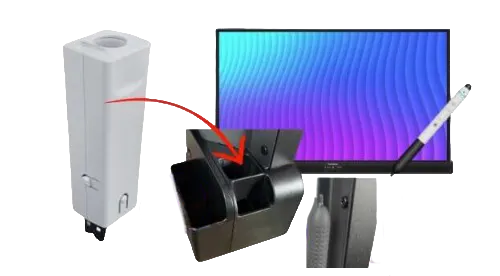
The box includes a USB dock and a charging cable. Plug the dock into the designated USB port on the left side of the ActivPanel 10. If the silicone cover is still fitted over that port, remove it before connecting the dock. Once connected, the dock charges the ActivPen 2 and pairs it with the panel automatically, so staff do not have to pair it by hand before each session.

Where it fits across Qatar

Three situations where this accessory adds practical value:

  • Classrooms in Al Wakrah, Al Rayyan or Lusail: a teacher moves between students while advancing slides and annotating the board through ActivSuite.
  • Boardrooms in West Bay or Msheireb: a presenter controls the agenda and highlights figures with the digital pointer from anywhere at the table or in front of the screen.
  • Briefing rooms in Doha: a speaker moves through a session that switches between Arabic and English without walking back to the panel each time.

What to plan before you order

Check that the designated USB port on the left side of the ActivPanel 10 in each room is free and reachable. The source data does not list battery life, range or operating temperature for the pen. If you plan to store pens in a hot cupboard, a room without air conditioning or a vehicle, confirm the environment with the SmartRooms Qatar team first, because summer temperatures in Qatar regularly exceed 45°C. For several rooms, a free site survey helps us map which panels need a dock and where each port sits.

Ordering with SmartRooms Qatar

Tell us how many ActivPanel 10 displays you are equipping and whether the purchase runs through a purchase order (LPO) or a government tender, then request a quote. Quotations are usually issued within one working day. We deliver to all 8 municipalities of Qatar, and the product is covered by the manufacturer's warranty. Request a quote today and our team will confirm the pen and dock quantities for each room.

Highlights

  • Active pen, air mouse and digital pointer in one accessory
  • Controls ActivSuite apps and content from anywhere in the room
  • USB dock and charging cable included in the box
  • Dock charges and pairs the pen with the ActivPanel 10 automatically
  • Connects to the designated USB port on the panel's left side

Estimated timeline

Quotation within 1 working day · delivery timing depends on stock availability, and we confirm it with your quotation.


Specifications

Source: manufacturer · checked Oct 2026
The full specification and datasheet for this model are available on request; we send them with your quotation.

Downloads

2 files from the manufacturer

Questions about ActivPen 2

What is the Promethean ActivPen 2 used for?
The ActivPen 2 is an accessory for the ActivPanel 10 that lets the presenter control ActivSuite apps and on-screen content from anywhere in the room. It works as an active pen, an air mouse and a digital pointer. It suits teachers and meeting leaders who want to move around the room while staying in control of the display, instead of standing at the panel for every action.
Which panel is the ActivPen 2 designed to work with?
The ActivPen 2 is listed as an accessory in the ActivPanel 10 series. Its USB dock pairs the pen with an ActivPanel 10 automatically once connected. The source data covers only the ActivPanel 10, so if your room uses a different interactive display, ask the SmartRooms Qatar team to confirm compatibility before you request a quote. This avoids buying pens that do not suit your existing panels.
What comes in the box with the ActivPen 2?
The box includes a USB dock and a charging cable. The dock does two jobs: it charges the pen, and it pairs the pen with the ActivPanel 10 once connected to the panel's designated USB port. Confirm the quantities of pens and docks with our team when you request a quote, so every room has the dock it needs for the panel it serves.
Where does the USB dock connect on the ActivPanel 10?
Plug the USB dock into the designated USB port on the left side of the ActivPanel 10. If the silicone cover is still in place over that port, remove it before connecting the dock. Before installation day, check that the left side of each panel is reachable, especially where panels are wall-mounted in a classroom or a boardroom, so the dock can be connected without moving the display.
Does the ActivPen 2 need to be paired manually?
The manufacturer's data says the USB dock pairs the ActivPen 2 with the ActivPanel 10 automatically once it is connected to the panel. This means staff do not have to pair the pen by hand before each lesson or meeting. During installation, a technician can connect the dock and test the pen before the room is handed over, which keeps the first session in a new room simple.
Can a teacher in a Qatar classroom use it while moving around the room?
Yes. The ActivPen 2 is designed to access ActivSuite apps and control content from anywhere in the room. A primary teacher in a school in Al Rayyan or Lusail can move between groups of students while advancing slides, opening apps and annotating on the board without returning to the panel. How well it fits your lessons depends on your ActivSuite setup, which our team can review during a free site survey.
How does the pen help in a West Bay boardroom?
In a West Bay boardroom, the presenter can control the displayed content from the table or from the front of the room, so the speaker does not need to walk to the screen to move through an agenda or open a file. The digital pointer helps highlight figures during a financial review. Before ordering, check the room layout so the panel's left-side USB port can be reached for the dock.
Can the ActivPen 2 be used in a hot room or outdoors?
The source data gives no operating temperature range or environmental rating for the ActivPen 2, so we cannot confirm it for hot or outdoor conditions. Summer temperatures in Qatar regularly exceed 45°C, which matters for any room without air conditioning, for storage in a car, or for outdoor event areas. Please confirm the environment with the SmartRooms Qatar team before ordering.
What should I plan for when installing the pen with a new panel?
The pen itself needs no mounting, so planning focuses on the panel and the dock. Confirm where the ActivPanel 10 will be installed, check that the designated USB port on its left side is accessible, and remove the silicone cover before connecting the dock. SmartRooms Qatar offers professional installation and a free site survey, which is useful when several rooms in a school or office campus need the same setup.
Can we buy ActivPen 2 units for several rooms under one LPO?
Yes. Schools, ministries and companies equipping several rooms can request one quotation covering multiple ActivPen 2 units and submit it against a purchase order (LPO). Quotations are usually issued within one working day. Payment by bank transfer, cheque or purchase order is accepted, and we deliver to all 8 municipalities of Qatar.
Is the ActivPen 2 covered by a warranty?
The ActivPen 2 is covered by the manufacturer's warranty. The source data does not state the warranty period or its terms, so please ask our team to confirm the details that apply when you request a quote. Asking for the terms in writing before ordering helps procurement teams file the purchase correctly.
How is the pen charged, and what information is missing?
The USB dock charges the ActivPen 2 once it is connected to the ActivPanel 10, and a charging cable is included in the box. The source data does not give battery life, charging time or battery capacity. If your schedule depends on a specific number of hours of use, ask the SmartRooms Qatar team for this information before you request a quote, rather than assuming it.

Similar models

Clevertouch CleverCam Clevertouch CleverCam 4K ePTZ Camera for Video Conferencing
Main Stream: 3840×2160 @30fps
Clevertouch CleverInk Clevertouch CleverInk Writing Technology for Interactive Displays
Accessories
Clevertouch Intelligent Sensor Module Clevertouch Intelligent Sensor Module for Interactive Flat Panels
Accessories
Clevertouch LUX Mini Clevertouch LUX Mini Android 13 OPS Upgrade Module
8GB 64GB
Email Call


