





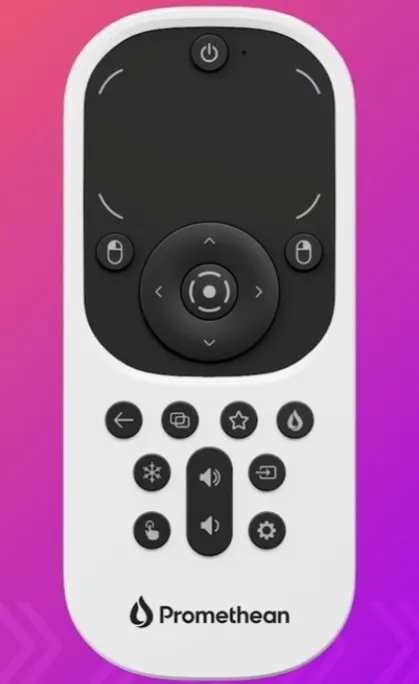
All-in-One Remote
Promethean All-in-One Remote for ActivPanel 10 Interactive Displays
The Promethean All-in-One Remote is an untethered controller for the ActivPanel 10 series. A track pad, a full keyboard on the reverse and dedicated panel controls let presenters navigate, type and switch windows from anywhere in the room. A dual-function power button either blacks out the display or shuts the panel down fully. It suits boardrooms, classrooms and training rooms across Qatar that want control away from the screen.
What an untethered remote changes in the room
The Promethean All-in-One Remote is a handheld accessory for the ActivPanel 10 series, built for presenters who want to run the panel without standing beside it. Because it works untethered, the presenter can move around the room while opening files, editing content and moving through slides on the screen.
The controls that matter during a live session
The remote detects whether you are using its front or the full keyboard on its back, so its controls respond to how you hold it. The rear keyboard suits search terms, file names and web addresses. The remote includes the following controls:
- Track pad for quick navigation across the screen.
- Full keyboard on the back for typing without a separate device.
- Arrow keys and a central button to move through on-screen options and confirm a selection.
- Left and right mouse keys for standard click actions.
- Back button to return to the previous page.
- Multi-window button to switch between windows open on the panel.
- Flame button for quick access to the ActivSuite menu.
- Dual-function power button to black out the display for a pause, or shut the ActivPanel down completely.
Where it fits in Qatar
In a boardroom in Msheireb or West Bay, the chair can manage the agenda from their seat, switch between documents and keep the discussion moving with a team that joins from Doha and abroad, without walking to the panel for each change. In a classroom in Education City or Al Rayyan, a teacher can move among students, keep the lesson going and return to an earlier page with one press of the back button.
A training room in Lusail, where a trainer delivers a session that moves between presentations, web resources and practice files, benefits from controls that stay in the trainer's hand for the whole session rather than at a lectern.
What to plan for before ordering
Confirm which ActivPanel 10 model is installed in each room so the remote is matched to the right panel. Plan where the presenter will normally stand and check the sightline to the panel, because the remote is most useful when the presenter can move freely. Schools and government bodies can place the order on a purchase order (LPO); listing the remotes with the panels on one quotation keeps the approval to a single step.
Send the SmartRooms Qatar team the ActivPanel 10 model and the number of rooms that need a remote, then request a quote. Quotations are usually issued within one working day.
Highlights
- Untethered controller for the ActivPanel 10 series
- Track pad and full keyboard on the rear
- Detects whether you use the front or the back
- Dual-function power button: display blackout or full shutdown
- Dedicated back, multi-window and ActivSuite menu buttons
- Left and right mouse keys plus arrow keys with central confirm
Estimated timeline
Quotation within 1 working day · delivery timing depends on stock availability, and we confirm it with your quotation.




