





WA65FX-P
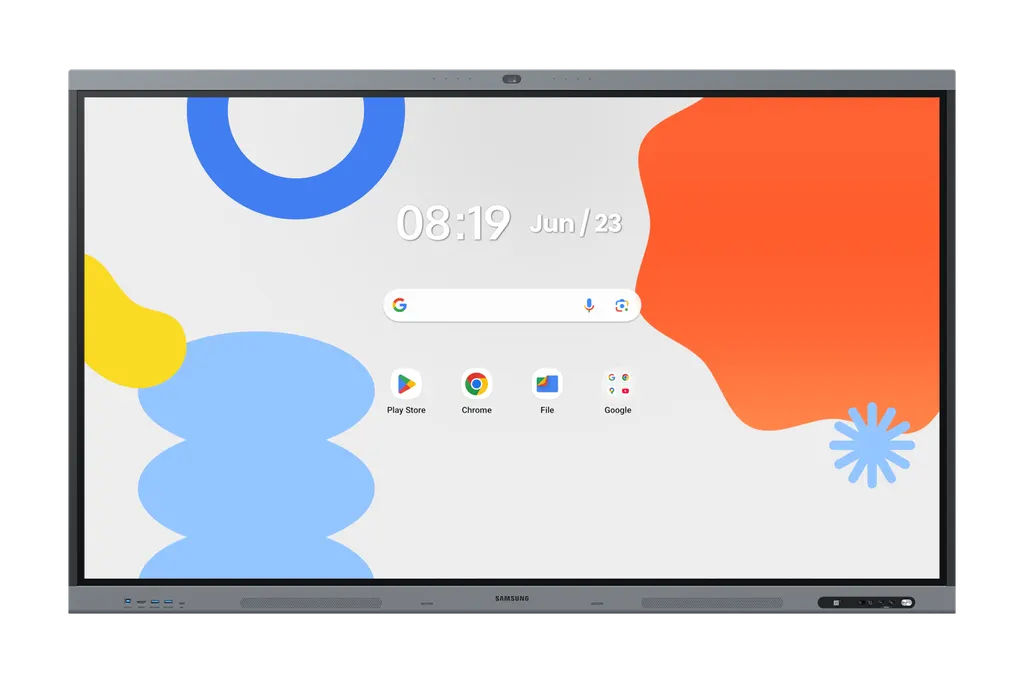
Samsung WA65FX-P 65-inch Interactive E-Board with Built-in Camera
- Screen size
- 65"
- Resolution
- 3,840 x 2,160
- Touch
- Yes
- Memory
- 128GB
Built around a 4K IPS panel, the Samsung WA65FX-P is a 65-inch interactive display with infrared touch, Android 15 and a built-in 48MP camera. A lesson or video call can start from the screen itself, without a separate PC. It suits classrooms, training rooms and meeting rooms in Qatar that need shared annotation, wireless sharing from up to nine devices and an OPS slot for desktop software. Request a quote for supply, delivery and installation.
A 65-inch room device that replaces a stack of equipment
The Samsung WA65FX-P brings a 65-inch display, Android 15 and a 48MP camera into one unit. A teacher or presenter can start a lesson or a hybrid meeting without a separate PC, webcam, speakerphone or cable set, which keeps the room tidy and reduces the number of parts a support team must maintain. The panel is an IPS unit at 3,840 x 2,160 resolution, so documents and spreadsheets stay sharp when projected to people at the back of the room.
Display, touch and connectivity figures to check
Typical brightness is 450 nit, with a 1,200:1 contrast ratio, a 178/178 viewing angle and an 8ms response time. Touch is infrared (IR), and the manufacturer lists multi-touch for up to 50 users, which matters when a whole class writes at the board. Inputs include two HDMI 2.1 ports, one DisplayPort 1.2 input and four USB ports. The 3-in-1 USB-C port handles touch control, screen connection and charging up to 65W, so a teacher can connect a laptop with one cable. Networking covers RJ45 input and output, Wi-Fi 6 (802.11ax) and Bluetooth, and an RS232 input allows external control systems to operate the display.
Tools built for lessons and meetings
- Auto Framing on the 48MP camera keeps the speaker in view during a video call.
- Split screen offers up to four independent note areas on one page, so several students can write at once.
- Wireless sharing accepts content from up to nine devices, whatever their operating system.
- Live Caption adds on-screen captions to audio and video content.
- OPS slot lets the display operate like a Windows PC for familiar software.
- Device management provides central remote control of devices and app settings, and advanced messaging sends emergency alerts to every display on a campus.
Where it fits in Qatar
A private school in Al Wakrah fitting out a new classroom can use the 65-inch size in a room of moderate depth, where the screen is visible from every seat without a larger panel. A meeting room in West Bay that links Doha with teams abroad benefits from the built-in camera, the microphone with a 10-meter pickup range and the dual 20W speakers, so one device handles the call. A training room in Lusail running short courses can take content from several laptops and keep trainee notes on the split screen.
What to plan before the order is placed
The set measures 1483.9 x 911.9 x 86.9 mm and weighs 36.3 kg, so the wall or stand must be rated for that load and fitted to the 600 x 400 mm VESA pattern. Operating conditions are 0 to 40°C at 10 to 80% humidity, non-condensing. Qatar summers can exceed 45°C, so install it in an air-conditioned room away from unshaded windows and loading doors. Power input is rated AC100-240V 50/60Hz, with 392W typical consumption in on mode and 0.5 W in sleep mode. SmartRooms Qatar offers a free site survey before wall mounting, and quotations are usually returned within one working day. Request a quote and include the room size, mounting type and number of units, and we will confirm the right package with you.
Highlights
- 65-inch IPS panel with 3,840 x 2,160 resolution
- Infrared touch with multi-touch support for up to 50 users
- Android 15 with octa-core CPU and 128GB flash memory
- Built-in 48MP camera with Auto Framing
- Dual 20W speakers with built-in woofer
- Wi-Fi 6, Bluetooth, HDMI 2.1 and DisplayPort 1.2 inputs
Estimated timeline
Quotation within 1 working day · delivery timing depends on stock availability, and we confirm it with your quotation.
Specifications
Display14
- Diagonal Size
- 65"
- Panel Type
- IPS
- Resolution
- 3,840 x 2,160
- Pixel Pitch (HxV, mm)
- 0.372 x 0.372 mm
- Brightness (Typ)
- 450 nit
- Contrast Ratio
- 1,200:1
- Viewing Angle (H/V)
- 178/178
- Response Time
- 8ms
- Color Gamut
- 72%
- Glass Haze
- 25%
- H-Scanning Frequency
- 135 kHz
- Maximum Pixel Frequency
- 78 MHz
- V-Scanning Frequency
- 60 Hz
- Operation Time Support
- 12/7
Connectivity15
- HDMI In
- 2
- DP In
- 1
- Version of HDMI
- 2.1
- Version of DP
- 1.2
- Version of HDCP
- 2.2
- USB
- 4
- IR In
- No
- Audio In
- Stereo Mini Jack
- Audio Out
- Stereo Mini Jack
- Video Out
- Yes
- RS232 In
- Yes
- RJ45 In
- Yes
- RJ45 Out
- Yes
- WiFi
- Wi-Fi 6: 802.11ax
- Bluetooth
- Yes
Power3
- Power Supply
- AC100-240V 50/60Hz
- Power Consumption (On Mode, W)
- 392W
- Power Consumption (Sleep Mode, W)
- 0.5 W
Dimension2
- Set Dimension (WxHxD, mm)
- 1483.9 x 911.9 x 86.9 mm
- Package Dimension (WxHxD, mm)
- 1640 x 1010 x 185 mm
Weight2
- Set Weight (kg)
- 36.3 kg
- Package Weight
- 43.8 kg
Operation Conditions2
- Temperature
- 0 - 40 ℃
- Humidity
- 10 - 80% (Non-Condensing)
Mechanical Specification4
- VESA Mount (mm)
- 600 x 400 mm
- Bezel Width (mm)
- 14.9mm
- Bezel Color
- Top/bottom : Dark blue-gray, Side : Black
- Frame Material
- Aluminium
Optional Feature1
- Touch
- Yes
SoC2
- OS Version
- Android-15
- Flash Memory Size
- 128GB
Touch1
- Touch Technology
- IR
Certification and Compliance2
- EMC
- FCC CFR Title 47, Part 15, Subpart B/EN55032:2015+A11:2020
- Safety
- IEC62368-1/UL62368-1/IEC60950-1 / IS13252




