





WA75FX-P
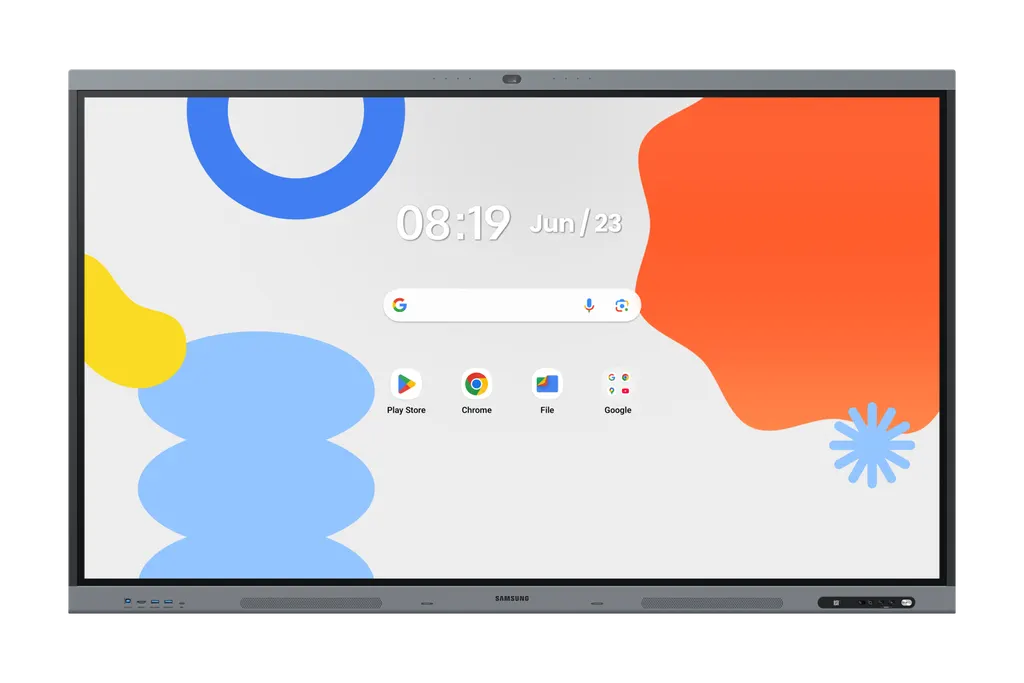
Samsung WA75FX-P 75-inch Interactive E-Board Display with Built-in Camera
- Screen size
- 75"
- Resolution
- 3,840 x 2,160
- Touch
- Yes
- Memory
- 128GB
The Samsung WA75FX-P is a 75-inch interactive display with a 4K IPS panel, Android 15 and a built-in 48MP camera with Auto Framing, so video calls can start without extra hardware. Its IR touch supports multi-touch for up to 50 users, and an OPS slot lets it run Windows software. It suits classrooms, boardrooms and training rooms across Qatar that need one display for teaching and meetings. Request a quote for supply and installation.
A 75-inch 4K touch display that runs its own apps
The Samsung WA75FX-P is a 75-inch interactive display from the WAFX-P series. Its IPS panel delivers 3,840 x 2,160 resolution with 450 nit typical brightness, a 1,200:1 contrast ratio and 178/178 degree viewing angles, so people seated across a classroom or boardroom table see the same clear image. An 8 ms response time keeps moving content smooth. The panel runs Android 15 on an octa-core processor with 128GB of flash storage, so lessons and meetings can run directly on the screen without a separate computer.
Touch is handled by an IR layer with multi-touch support for up to 50 users. The bezel is 14.9 mm wide, which keeps the screen edge narrow when the panel is placed in a row or a video wall style layout in a corridor or lobby.
Video calls and audio without extra equipment
A built-in 48MP camera with Auto Framing keeps the speaker in view, while the microphone picks up voices within a 10-metre range. Two 20W speakers and a built-in woofer carry the audio across the room. This matters for an office in West Bay or Lusail that needs to connect a meeting room with colleagues abroad, because the call can start from the panel itself with no separate camera, codec or speaker kit to install. Built-in Live Caption also adds on-screen captions to audio and video content, which helps learners and staff who need them.
Connections and expansion for a working room
- Inputs: two HDMI inputs (HDMI 2.1), one DisplayPort 1.2 input and four USB ports
- USB-C: a 3-in-1 port for touch control, screen connection and charging devices up to 65W
- Sharing: an HDMI output and wireless sharing from up to 9 devices at once
- Network: Wi-Fi 6 (802.11ax), Bluetooth and RJ45 input and output ports
- Control and expansion: an RS232 input and an OPS slot for a Windows PC module
Device management lets IT staff control settings and apps across several panels from one central system, which is useful for a school group or a company with multiple rooms.
Planning the site before the panel arrives
At 50.3 kg without packaging and measuring 1705.0 x 1036.3 x 87.1 mm, this is a heavy panel. Check the wall or stand against the 800 x 400 mm VESA mount before delivery, and use two people to handle it during fitting. A site survey is worth booking before any wall-mounted installation, and SmartRooms Qatar offers free site surveys.
The operating range is 0 to 40 degrees Celsius with 10 to 80 percent non-condensing humidity. Qatar summers can push outdoor and unconditioned indoor temperatures above 45 degrees Celsius, so the panel should sit in an air-conditioned room, away from direct sun through windows. Its AC 100-240V 50/60Hz input covers Qatar's 240 V mains supply, with 440W power draw in on mode and 0.5W in sleep mode.
Where it fits in Qatar
- A private school in Al Wakrah refitting a primary or science classroom, where teachers want one panel for lessons, shared student work and Google Play apps.
- A ministry meeting room in Msheireb hosting Arabic and English speaking teams, using multi-window mode to show several documents at once.
- A hotel conference room on The Pearl, where presenters connect laptops and phones wirelessly without running cables across the room.
Send SmartRooms Qatar your room size, wall details and number of units, and request a quote. Purchase orders (LPOs) and government tender paperwork are accepted, and quotations are usually issued within one working day.
Highlights
- 75-inch 4K UHD IPS panel at 3,840 x 2,160 resolution
- Android 15 with octa-core processor and 128GB flash storage
- Built-in 48MP camera with Auto Framing and 10-metre mic pickup
- IR touch with multi-touch support for up to 50 users
- Two HDMI inputs, DisplayPort, 3-in-1 USB-C and an OPS slot
- EDLA certified with an 800 x 400 mm VESA mount
Estimated timeline
Quotation within 1 working day · delivery timing depends on stock availability, and we confirm it with your quotation.
Specifications
Display14
- Diagonal Size
- 75"
- Panel Type
- IPS
- Resolution
- 3,840 x 2,160
- Pixel Pitch (HxV, mm)
- 0.429 x 0.429 mm
- Brightness (Typ)
- 450 nit
- Contrast Ratio
- 1,200:1
- Viewing Angle (H/V)
- 178/178
- Response Time
- 8ms
- Color Gamut
- 72%
- Glass Haze
- 25%
- H-Scanning Frequency
- 135 kHz
- Maximum Pixel Frequency
- 78 MHz
- V-Scanning Frequency
- 60 Hz
- Operation Time Support
- 12/7
Connectivity14
- HDMI In
- 2
- DP In
- 1
- Version of HDMI
- 2.1
- Version of DP
- 1.2
- Version of HDCP
- 2.2
- USB
- 4
- Audio In
- Stereo Mini Jack
- Audio Out
- Stereo Mini Jack
- Video Out
- Yes
- RS232 In
- Yes
- RJ45 In
- Yes
- RJ45 Out
- Yes
- WiFi
- Wi-Fi 6: 802.11ax
- Bluetooth
- Yes
Power3
- Power Supply
- AC100-240V 50/60Hz
- Power Consumption (On Mode, W)
- 440W
- Power Consumption (Sleep Mode, W)
- 0.5 W
Dimension2
- Set Dimension (WxHxD, mm)
- 1705.0 x 1036.3 x 87.1 mm
- Package Dimension (WxHxD, mm)
- 1860 x 1125 x 185 mm
Weight2
- Set Weight (kg)
- 50.3 kg
- Package Weight
- 59.1 kg
Operation Conditions2
- Temperature
- 0 - 40 ℃
- Humidity
- 10 - 80% (Non-Condensing)
Mechanical Specification4
- VESA Mount (mm)
- 800 x 400 mm
- Bezel Width (mm)
- 14.9mm
- Bezel Color
- Top/bottom : Dark blue-gray, Side:Black
- Frame Material
- Aluminium
Optional Feature1
- Touch
- Yes
SoC2
- OS Version
- Android-15
- Flash Memory Size
- 128GB
Touch1
- Touch Technology
- IR
Certification and Compliance2
- EMC
- FCC CFR Title 47, Part 15, Subpart B/EN55032:2015+A11:2020
- Safety
- IEC62368-1/UL62368-1/IEC60950-1 / IS13252




