





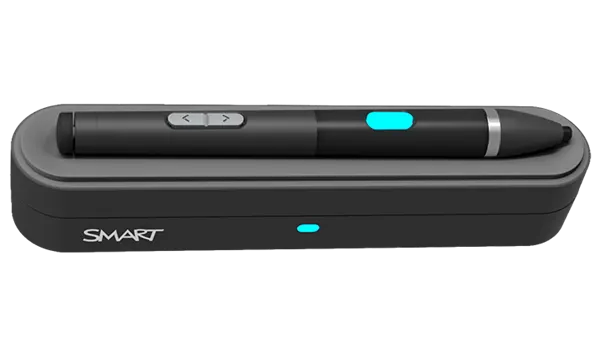
SMART MultiStylus
SMART MultiStylus SMS-TE-IQ4 Battery-Free Pen for iQ 4 SMART Boards
- System
- Windows 11; macOS 26
The SMART MultiStylus SMS-TE-IQ4 is a battery-free pen, remote and air mouse in one device. One minute on the docking station gives up to 60 minutes of use, and 4096 pressure levels support precise inking. It works with SMART Board MX V5, MX V5 Plus, QX V2 Pro and RX displays. It suits Qatari teachers who want to move around the room and stay in control.
What the SMS-TE-IQ4 brings to a classroom
The SMART MultiStylus SMS-TE-IQ4 is a handheld tool for SMART Boards. It combines writing on the screen, remote control of lessons and air mouse pointing in one device. This order number includes a docking station with Tool Explorer (V2) technology and is intended for displays with embedded iQ 4.
The pen has no replaceable battery. It runs on an ultra-capacitor that is recharged wirelessly on the docking station, so teachers do not need to change cells or wait for a dead device before a lesson.
Charging, battery and power figures
- Quick charge: one minute on the dock gives up to 60 minutes of usage.
- Full charge: six minutes.
- Usage time: up to 10 hours, depending on the mode in use.
- Standby: up to 168 hours in sleep mode, which starts after 10 minutes without activity.
- Docking station: 5V DC supply with power consumption below 4.5 W.
Short top-ups between periods suit back-to-back lessons, and the pen wakes when it is picked up.
Writing, navigation and inking features
The tip supports 4096 levels of pressure, so line thickness follows the teacher's hand. The eraser is pressure-activated, and the pen has programmable buttons, an LED indicator and top and bottom arrow keys. In pen mode, teachers can change colour, use a highlighter, open the whiteboard or browser, and capture or freeze the screen. In air mouse mode the same device provides a cursor, a laser pointer, left and right clicks and an ESC key.
Where it fits in Qatar
A private school in Al Wakrah fitting out new classrooms with SMART Boards can give each room one pen, so teachers can move among pupils during group work while still advancing slides. A university teaching centre in Education City can use air mouse mode for presentations in larger rooms where the presenter needs to stand away from the board. Corporate training rooms in West Bay with an RX or MX display gain the same freedom of movement.
What to plan before ordering
The docking station mounts magnetically on the display frame, and the stylus mounts magnetically on the dock. Confirm your display model and an iQ 4.7.2 or later installation before ordering, and check that the room PCs run Windows 11 or macOS 26. Operating temperature is 5 to 35°C with humidity from 5 to 80 percent, non-condensing, so keep the pen and dock inside air-conditioned rooms, because Qatar summers can exceed 45°C. Wireless range is more than 30 m in open areas. Tool Explorer cubes and stamps are sold separately as TE-4CUBE-V2 and TE-4STAMP-V2. Each package includes a 3 m USB 2.0 Type-C to Type-A cable and a small hardware set.
Ordering SMS-TE-IQ4 for your rooms
Send us your number of rooms, display models and site location, and the SmartRooms Qatar team will reply with a quotation, usually within one working day. Schools and government bodies can order on a purchase order, and payment is possible by bank transfer, cheque or purchase order. Request a quote for the SMS-TE-IQ4 today.
Highlights
- Battery-free ultra-capacitor design, wirelessly recharged on the dock
- One minute on the dock gives up to 60 minutes of use
- 4096 levels of pressure for precise inking and fine erasing
- Pen, remote and air mouse functions in one device
- Magnetic docking station with USB 2.0 Type-C input
- Works with SMART Board MX V5, MX V5 Plus, QX V2 Pro and RX
Estimated timeline
Quotation within 1 working day · delivery timing depends on stock availability, and we confirm it with your quotation.
Specifications
Features4
- Supported functionality
- Pen mode; Air mouse mode
- Buttons
- Programmable LED, ProgrammableTop/Bottom arrows, Eraser
- Stylus tip
- 4096 levels of pressure
- Eraser
- Pressure-activated
Interactive experience3
- Pen mode functions
- Color selection, Highlighter, Pressure-sensitive inking, Pressure erase, Arrow up, Arrow down, Whiteboard, Browser, Digital assistant, Screen shade, Screen capture, Freeze screen
- Air mouse mode functions
- Cursor, Highlighter, Laser pointer, Mouse left click, Mouse right click, Whiteboard, Browser, Digital assistant, Screen shade, Screen capture, Freeze screen, ESC key
- Tool Explorer function
- Optional cubes and stamps (V2)
Connectors and mounting3
- Docking station connector
- USB 2.0 Type-C input
- Docking station mount
- Magnetic, mounted on the display’s frame
- Stylus mount
- Magnetic, mounted on the docking station
Power – MultiStylus6
- Power source
- Ultra-capacitor
- Auto-on
- Motion-activated
- Usage time
- 10 hours (mode dependent)
- Standby time
- 168 hours (in sleep mode; activates after 10 minutes of inactivity)
- Charge time
- Quick charge: 1 minute for up to 60 minutes of usage time; Full charge: 6 minutes
- Charge method
- Wireless charging using the docking station
Power – Docking station1
- Power source
- 5V DC
Storage and operating requirements3
- Operating temperature
- 41–95°F ( 5–35°C )
- Storage temperature
- -40–76°F ( -40–60°C )
- Humidity
- 5–80% relative humidity, non-condensing
Included components5
- SMART MultiStylus
- 1
- SMART Docking Station with Tool Explorer (V2) technology
- 1
- USB 2.0 Type C to Type A, 3 m
- 1
- Hardware set (1 screwdriver, 2 screws)
- 1
- Illustrated installation instructions
- 1
Connectivity2
- Wired
- USB-C to USB-A
- Wireless operating range
- > 98' ( 30 m ) (in an open area)
Tool integration4
- Software
- iQ 4.7.2 or later; SMART Product Drivers and Ink; SMART Notebook 25 or later
- Operating systems
- Windows 11; macOS 26
- Compatible displays
- SMART Board MX (V5); SMART Board MX (V5) Plus; SMART Board QX (V2) Pro; SMART Board RX
- Accessories
- Tool Explorer (V2) stamps and cubes
Certification and compliance4
- Regulatory models
- SMART MultiStylus: PQR-3, SMART Docking station: CBQR-3
- US / Canada
- FCC, ISED
- EU / EEA / EFTA / UK
- CE, UKCA
- Australia / New Zealand
- RCM
Purchasing information – Order numbers1
- SMS-TE-IQ4
- SMART MultiStylus with Tool Explorer (V2) technology, Accessory Kit, for displays with embedded iQ 4
Purchasing information – Optional accessories2
- TE-4CUBE-V2
- Tool Explorer (V2) cubes
- TE-4STAMP-V2
- Tool Explorer (V2) stamps
SMART Warranty1
- _text
- Terms and conditions and warranty upgrade options vary by region. Visit smarttech.com/warranty or contact your reseller for information.
Installation, dimensions, and weights1
- Notes
- All dimensions ± 0.3 cm. All weights ± 5 g.
Installation, dimensions, and weights – SMART MultiStylus3
- Weight
- 1.1 oz ( 31 g )
- Shipping dimensions
- 8 ¼" × 3 ⅝" × 1" ( 21 cm × 9.2 cm × 2.5 cm )
- Shipping weight
- 3.2 oz ( 90 g )
Installation, dimensions, and weights – SMART Docking Station3
- Weight
- 6.2 oz ( 175 g )
- Shipping dimensions
- 9 ⅞" × 5 ½" × 3 ¼" ( 25 cm × 14 cm × 8.3 cm )
- Shipping weight
- 11.5 oz ( 325 g )




