





Thursday, 22 October 2026 · 11 Jumada I 1448 AH Sun – Thu · 9:00 – 18:00
+971 56 914 9477 العربية
WhatsApp

MB-Remote

Yealink MB-Remote Presentation Remote Controller for MeetingBoard

WhatsApp
Priceon request
QuotationWithin 1 working day
DeliveryConfirmed with your quote, based on stock
PDFDownload datasheet (Yealink MB-Remote Datasheet.pdf)
Overview

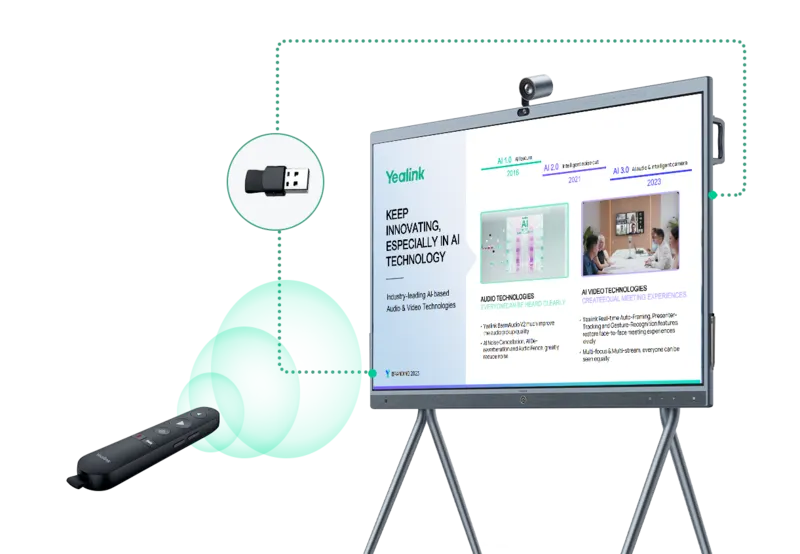
The Yealink MB-Remote is a 2.4 GHz presentation remote for Yealink MeetingBoard and MeetingBoard Pro conference terminals. Its USB receiver comes already fitted inside the controller, so no software installation is needed. Page up and down keys, a presentation key, a simulated mouse, microphone mute, volume and camera control keys let a presenter run the session from anywhere in the room. It suits meeting rooms, lecture spaces and training rooms in Doha and Lusail. Request a quote from SmartRooms Qatar.

What the MB-Remote does in a MeetingBoard session

The Yealink MB-Remote is a handheld presentation controller built for Yealink MeetingBoard and MeetingBoard Pro conference terminals. Instead of returning to the touch panel or the room PC to change a slide, the presenter can page through documents, presentation files and web pages from wherever they stand. An air mouse function supports simple pointer operations, and the controls also cover everyday meeting tasks such as muting the microphone and adjusting volume.

Keys, range and connection

The remote links to a USB receiver over a 2.4 GHz wireless connection with a stated range of 10 m. The source data describes operation through 360 degrees around the receiver. The receiver is already seated in the controller, so the user only plugs it into a compatible host. No software installation is needed.

  • Page up and page down keys for documents, presentation files and web pages.
  • Presentation key and simulated mouse for simple presentation control.
  • Microphone mute, volume plus and volume minus for quick control during calls.
  • Camera control key for switching the camera on or off.

The button layout follows the natural grip, so keys can be located by touch while the presenter keeps attention on the audience. A single indicator signals low battery and pairing status.

Check compatibility before you order

Compatibility depends on both the host and its firmware. For MeetingBoard Pro, the manufacturer data lists firmware 331.320.0.55 and later. On that firmware, H.323 and SIP calls are fully supported, and so are Microsoft Teams and Zoom. In BYOD or general mode the camera control key is not supported. When used with a PC running Windows 10 and later or macOS 12 and later, the microphone mute key and the camera control keys are not supported. Because the compatibility details name MeetingBoard Pro specifically, confirm support for your standard MeetingBoard unit with the SmartRooms Qatar team before ordering.

Where it fits in Qatar

  • A government authority briefing room in Doha, where a presenter advances slides and mutes the microphone during a call with an overseas office.
  • A private school in Al Wakrah fitting out staff and training rooms, where teachers present from the middle of the room rather than from the lectern.
  • A corporate office in West Bay running Teams or Zoom calls, where the camera key and mute key sit within reach of the presenter.

What to plan for

  • Host and software: confirm the MeetingBoard firmware and the PC operating system before quoting.
  • Battery: two AAA batteries are included. The manufacturer states two hours of use daily for about three months, which varies with use.
  • Environment: the stated operating range is 0 to 40 degrees Celsius and 10 to 95 percent humidity. Keep the remote in air-conditioned rooms and out of parked vehicles and sunlit window ledges.
  • Quantity: organisations equipping several rooms can request one quotation for all units and settle it by LPO, bank transfer or cheque.

Tell the SmartRooms Qatar team which MeetingBoard model and host you use, and request a quote. Quotations usually follow within one working day, and we deliver to all eight municipalities of Qatar. The MB-Remote is covered by the manufacturer warranty.

Highlights

  • 2.4 GHz wireless link with a stated range of 10 m
  • USB receiver pre-installed, with no software installation needed
  • Page up and down keys, presentation key and simulated mouse
  • Microphone mute, volume and camera control keys on the remote
  • Teams and Zoom fully supported on MeetingBoard Pro firmware 331.320.0.55 and later
  • Powered by two AAA batteries, rated for about three months

Estimated timeline

Quotation within 1 working day · delivery timing depends on stock availability, and we confirm it with your quotation.

Specifications

15 specifications · Source: manufacturer · checked Oct 2026
Physical Specifications6
- With receiver
144 mm x 30 mm x 16 mm
- Without receiver
134 mm x 30 mm x 16 mm
Weight (including battery, excluding receiver)
51.5 g
Receiver Size
(L x W x H): 34 mm x 15 mm x 7.5 mm
Receiver Weight
2.5 g
Details
Size (L x W x H):
Basic Specifications3
Power Consumption (Standby)
0.033 mW
Indicator
One (used to indicate low power and pairing)
Details
Button: - Microphone Mute Button - Volume+ - Volume- - Camera Control Key - Page Up Key - Page Down Key - Presentation Key
Battery2
Battery Type
2 AAA batteries
Details
Battery Life: Satisfy 2 hours of use every day for three months(*varies depending on usage)
Connection2
Connection Type
2.4 GHz wireless connection
Connection Range
10 m
Operating Temperature1
Details
0-40°C
Operating Humidity1
Details
10-95%

Downloads

4 files from the manufacturer

Questions about MB-Remote

What is the Yealink MB-Remote used for?
The Yealink MB-Remote is a presentation remote for Yealink MeetingBoard and MeetingBoard Pro conference terminals. It lets a presenter turn pages in documents, presentation files and web pages, use a simulated mouse, mute the microphone, adjust volume and switch the camera on or off from anywhere in the room. It suits meeting rooms, lecture spaces and training rooms where the presenter should not have to stay at the touch panel.
Does the MB-Remote need software or drivers installed?
No. The USB receiver is already fitted inside the controller and the pairing is set at the factory, so the user only plugs the receiver into a compatible host and starts presenting. For IT managers equipping several rooms in Doha or Lusail, this removes driver installation from each setup, although the host should still be checked against the compatibility details.
What is the wireless range and how does the connection work?
The remote connects over a 2.4 GHz wireless link with a stated range of 10 m, and the manufacturer describes operation through 360 degrees around the receiver. In a large lecture hall at Education City, position the host and receiver so the presenter's usual standing areas fall within 10 m. Walls and metal structures can reduce practical range, so test positions during a free site survey.
Which MeetingBoard models does it support?
The MB-Remote is designed for MeetingBoard and MeetingBoard Pro conference terminals. The compatibility details in the manufacturer data name MeetingBoard Pro running firmware 331.320.0.55 or later. Before ordering for a standard MeetingBoard unit, confirm its firmware and support with the SmartRooms Qatar team, who will check your setup as part of the quotation.
Does it work with Microsoft Teams and Zoom?
Yes, on MeetingBoard Pro with firmware 331.320.0.55 and later, Teams and Zoom are listed as fully supported, alongside H.323 and SIP calls. A corporate office in West Bay running calls with teams abroad can advance slides and use the microphone mute and camera control keys during the call. Confirm the firmware version on each endpoint before the quotation is finalised.
Which features do not work in BYOD mode or on a PC?
In BYOD or general mode, the camera control key is not supported. When used with a PC running Windows 10 and later or macOS 12 and later, the microphone mute key and the camera control keys are not supported. The page up and down keys and the presentation key are not listed as exclusions. Plan for these limits before buying for rooms where visitors bring their own laptops.
Can a presenter use it with a laptop in a training room?
Yes, the remote works with Windows 10 and later and macOS 12 and later through its USB receiver, subject to the listed exclusions. A training centre in Msheireb running workshops from staff laptops can use the page up and down keys and the presentation key for slides, documents and web pages. Confirm the laptop operating system before quoting, since older versions fall outside the stated support.
How long do the batteries last?
The remote runs on two AAA batteries. The manufacturer states two hours of use every day for three months, although this varies with usage. An indicator light signals low power and pairing. A ministry meeting room in Doha used daily should keep spare AAA batteries on hand so that a presentation never starts with a dead remote.
Is the MB-Remote suitable for Qatar's summer heat?
The stated operating temperature is 0 to 40 degrees Celsius, with humidity between 10 and 95 percent. Summer conditions in Qatar can push temperatures beyond that range outdoors and in poorly cooled spaces, so keep the remote in air-conditioned meeting rooms and out of parked vehicles, sunlit window ledges and outdoor events. A hotel conference room in The Pearl with reliable cooling fits this range. If a space runs hotter, check with the SmartRooms Qatar team.
How many units can a school order at once?
A private school in Al Wakrah fitting out several classrooms and staff rooms can send one request covering every room, with the quantity and room list included. SmartRooms Qatar issues one quotation, which can be settled by purchase order (LPO), bank transfer or cheque. Delivery covers all eight municipalities of Qatar, so the whole order can go to one site.
What is in the box and how big is the remote?
The package contains the remote with its USB receiver already installed, a velvet protective pouch, a quick start guide and two AAA batteries. With the receiver fitted, the remote measures 144 x 30 x 16 mm, or 134 x 30 x 16 mm without it. It weighs 51.5 g including batteries, excluding the receiver, which measures 34 x 15 x 7.5 mm and weighs 2.5 g. Its slim body suits a presenter's hand at a lectern or in the middle of a room.

Similar models

Clevertouch CleverCam Clevertouch CleverCam 4K ePTZ Camera for Video Conferencing
Main Stream: 3840×2160 @30fps
Clevertouch CleverInk Clevertouch CleverInk Writing Technology for Interactive Displays
Accessories
Clevertouch Intelligent Sensor Module Clevertouch Intelligent Sensor Module for Interactive Flat Panels
Accessories
Clevertouch LUX Mini Clevertouch LUX Mini Android 13 OPS Upgrade Module
8GB 64GB
Email Call




